
mybatis高级(1)(入门回顾)
首先入门案例(并且拿到新增记录当前id)
1.创建mybatis-config.xml文件
<?xml version="1.0" encoding="UTF-8" ?>

<!DOCTYPE configuration

PUBLIC "-//mybatis.org//DTD Config 3.0//EN"

"http://mybatis.org/dtd/mybatis-3-config.dtd">

<configuration>

    <!-- 使用别名 -->

    <typeAliases>

        <!-- 为包下所有类使用别名,默认是简单类名 -->

        <package name="cn.cnsdhzzl.entity" />

        <!-- 对单个类,按类型名使用别名 -->

        <!-- <typeAlias type="cn.cnsdhzzl.entity.Student" alias="student" /> -->

    </typeAliases>

    <!-- 开发模式 -->

    <environments default="development">

        <environment id="development">

            <!-- 使用jdbc的事务 -->

            <transactionManager type="JDBC" />

            <!-- 使用自带的连接池 -->

            <dataSource type="POOLED">

                <property name="driver" value="oracle.jdbc.driver.OracleDriver" />

                <property name="url" value="jdbc:oracle:thin:@localhost:1521:orcl" />

                <property name="username" value="**" />

                <property name="password" value="**" />

            </dataSource>

        </environment>

    </environments>

    <!-- 映射小配置 -->

    <mappers>

        <mapper resource="cn/cnsdhzzl/dao/StudentDAO.xml" />

    </mappers>

</configuration>
2.创建分层搭建架构
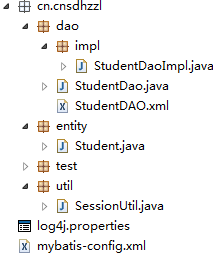
3.创建StudentDAO.xml
<?xml version="1.0" encoding="UTF-8" ?>

<!DOCTYPE mapper

PUBLIC "-//mybatis.org//DTD Mapper 3.0//EN"

"http://mybatis.org/dtd/mybatis-3-mapper.dtd">

<mapper namespace="cn.cnsdhzzl.dao">

    <!-- 添加操作 -->

    <insert id="insertStudent">

        insert into student(id,name,address,sex)

        values(seq_ssm.nextval,#{name},#{address},#{sex})

        <selectKey keyProperty="id" resultType="int">

            select

            seq_ssm.currval from dual

        </selectKey>

    </insert>

    <!-- 删除的id名称随便写 -->

    <delete id="deleteStudentById">

        delete student where id=#{id}

    </delete>

    <!-- 修改操作 -->

    <update id="updateStudent">

        update student set

        name=#{name},address=#{address},sex=#{sex} where id=#{id}

    </update>

    <!-- 返回集合要加resultType -->

    <select id="findAll" resultType="student">

        select * from student

    </select>

    <!-- 方法一 -->

    <select id="likeSelectByStr" resultType="student">

        select * from student

        where name like '%${value}%'

    </select>

    <!-- 方法二 -->

    <!-- <select id="likeSelectByStr" resultType="student"> select * from student

        where name like concat('%',#{stuname},'%') </select> -->

    <!-- 方法一 -->

    <select id="likeSelectByEntity" resultType="student">

        select * from student

        where name like '%${name}%'

    </select>

    <!-- 方法二 -->

    <!-- <select id="likeSelectByEntity" resultType="student"> select * from

        student where name like concat('%',#{stuname},'%') </select> -->

</mapper>
4.实现接口方法
@Override

    public Integer addStudent(Student stu) {

        SqlSession sqlSession = SessionUtil.getSqlSession();

        int result = sqlSession.insert("insertStudent", stu);

        sqlSession.commit();

        sqlSession.close();

        System.out.println("保存结果" + result);

        return result;

    }
5.测试
@Test

    public void frist() {

        Student stu = new Student("BBB", "北京", "男");

        StudentDaoImpl dao = new StudentDaoImpl();

        dao.addStudent(stu);

        System.out.println("成功");

    }
结果图

注意事项:
语句后面不能加';'(分号),会报sql异常
mybatis高级(1)(入门回顾)的更多相关文章
- MyBatis高级篇之整合ehcache缓存框架
MyBatis高级篇之整合ehcache缓存框架 2017-09-01 0 Comments 1,671 Views 0 Times 一.前言 MyBatis为我们提供了Cache接口,也提供 ...
- 【Mybatis高级映射】一对一映射、一对多映射、多对多映射
前言 当我们学习heribnate的时候,也就是SSH框架的网上商城的时候,我们就学习过它对应的高级映射,一对一映射,一对多映射,多对多映射.对于SSM的Mybatis来说,肯定也是差不多的.既然开了 ...
- 8、web入门回顾/ Http
1 web入门回顾 web入门 1)web服务软件作用: 把本地资源共享给外部访问 2)tomcat服务器基本操作 : 启动: %tomcat%/bin/startup.bat 关闭: % ...
- mybatis高级映射(一对一,一对多)
mybatis高级映射 一对一关联映射 需求:查询订单信息,关联查询用户信息(一个订单对应一个用户) (1)通过resultType实现 sql语句: select orders.* , USER.u ...
- MyBatis(1)——快速入门
MyBatis 简介 MyBatis 本是apache的一个开源项目iBatis, 2010年这个项目由apache software foundation 迁移到了google code,并且改名为 ...
- (转) MyBatis(1)——快速入门
MyBatis 简介 MyBatis 本是apache的一个开源项目iBatis, 2010年这个项目由apache software foundation 迁移到了google code,并且改名为 ...
- MyBatis高级查询
-------------------------siwuxie095 MyBatis 高级查询 1.MyBatis 作为一个 ORM 框架,也对 SQL 的高级查询做了支持, MyBatis 高级查 ...
- Spring MVC+Spring+Mybatis+MySQL(IDEA)入门框架搭建
目录 Spring MVC+Spring+Mybatis+MySQL(IDEA)入门框架搭建 0.项目准备 1.数据持久层Mybatis+MySQL 1.1 MySQL数据准备 1.2 Mybatis ...
- (转)MyBatis框架的学习(二)——MyBatis架构与入门
http://blog.csdn.net/yerenyuan_pku/article/details/71699515 MyBatis框架的架构 MyBatis框架的架构如下图: 下面作简要概述: S ...
随机推荐
- linux sed
sed 命令 sed -i 's/3306/3308/g' my.cnf mysql # 同时替换两个文件
- JavaScript中const、var和let区别浅析
在JavaScript中有三种声明变量的方式:var.let.const.下文给大家介绍js中三种定义变量的方式const, var, let的区别. 1.const定义的变量不可以修改,而且必须初始 ...
- ECMA中的switch语句
switch借鉴自其他语言,但也有自己的特色. 1.可以在switch语句中使用任何数据类型(数值.字符串.对象等),很多其他语言中只能使用数值. 2.每个case的值不一定是常量,可以是变量或者表达 ...
- echarts在IE8下遮挡其他组件的问题
echarts的图在IE8下会浮在上层遮挡住其他组件,解决方式是页面中引入 <meta http-equiv="X-UA-Compatible" content=" ...
- 模块(configparser+shutil+logging)
一.configparser模块 1.模块介绍 configparser用于处理特定格式的文件,其本质上是利用open来操作文件. *注:(这里解释一下特定格式的文件) a.有section和opti ...
- [Linux] Nginx networking 403 Forbidden 静态文件不允许查看
nginx 的 403 Forbidden errors 表示你在请求一个资源文件但是nginx不允许你查看. 403 Forbidden 只是一个HTTP状态码,像404,200一样不是技术上的错误 ...
- javascript各种宽高
参考: http://www.w3cschool.cc/jsref/dom-obj-all.html http://www.cnblogs.com/wen12128/archive/2012/05/2 ...
- TTradmin v1.1 - 免端口映射穿透任何内网、基于radmin核心的即时远程协助
TTradmin 是一款免端口映射可直接穿透任何内网,基于radmin核心的即时远程协助软件.在使用的时候只需要保证“协助端”和“被协助端”使用同一个验证码即可实现安全便捷的远程控制,不需要进 ...
- SLES 10安装Oracle10gR2笔记
SLES 10安装Oracle10gR2笔记 一. 数据库安装 . 安装C/C++ Compiler gcc --version验证是否安装 . 验证Service Pack版本 SPident –v ...
- Cheatsheet: 2016 04.01 ~ 04.30
.NET String format Setting up Ubuntu for .NET Development ASP.NET Core and Angular2 - Part 1 - Upda ...