
通过声明Attribute属性改变不同类的输出效果
ConsoleApplication--控制台应用程序
首先创建基类:
using System;

using System.Collections.Generic;

using System.Linq;

using System.Text;

using System.Threading.Tasks;

namespace Attribute_Exercise

{

    /// <summary>

    /// 此处的注释不影响编译和运行,只是给开发者提供帮助

    /// </summary>

    //[some Attribute]  e.g.

    [Obsolete] //[Obsolete]、[Obsolete("")]、[Obsolete("",true/false)]  Obsolete的构造函数 F12查看

    [Serializable]

    public class BasicClass

    {

        //基类属性、字段

        public int ID { set; get; }

        public string Name { set; get; }

    }

    public class AClass:BasicClass

    {

    }

    public class BClass : BasicClass

    {

    }

    public class CClass : BasicClass

    {

    }

}
其次自定义一个Attribute:
using System;

using System.Collections.Generic;

using System.Linq;

using System.Text;

using System.Threading.Tasks;

namespace Attribute_Exercise

{

    /// <summary>

    /// 自定义一个Attribute:somename+Attribute

    /// 使用时:[somename]

    /// </summary>

    public class CustomizedAttribute:Attribute

    {

        //以下是构造函数

        public CustomizedAttribute()

        {

           //空

        }

        public CustomizedAttribute(string msg)

        {

        }

        public CustomizedAttribute(string msg, bool err)

        {

        }

        //字段

        public string Msg;

        public bool Err;

    }

    public class esleCusomizedAttribute : Attribute

    {

    }

}
在主入口中:
using System;

using System.Collections.Generic;

using System.Linq;

using System.Text;

using System.Threading.Tasks;

namespace Attribute_Exercise

{

    class Program

    {

        static void Main(string[] args)

        {

            //主要运用了继承的机制

            BasicClass bc = new BasicClass() { ID=,Name="基类1"};

            Console.WriteLine("基类ID:{0}  ;基类类名:{1}",bc.ID,bc.Name);

            Console.ReadLine();

        }

    }

}
先看看基类的效果:
下面进入主题--如何在不改变基类及其继承类的对象的情况下,仅仅通过声明Attribute,使得这些继承类具有不同的行为或者效果?
1.声明Attribute:在BasicClass.cs Line 23处增加 [Customized] ;
2.增加相应Attribute的方法:
using System;

using System.Collections.Generic;

using System.Linq;

using System.Reflection;//反射

using System.Text;

using System.Threading.Tasks;

namespace Attribute_Exercise

{

    public class AttributeActivities

    {

        public static void OutPut<T>(T t) where T : BasicClass

        {

            Type type=t.GetType();

            Attribute attribute = type.GetCustomAttribute(typeof(CustomizedAttribute));//注意  using System.Reflection;

            if (attribute != null && attribute is CustomizedAttribute)

            {

                CustomizedAttribute customizedAttr = attribute as CustomizedAttribute;

                Console.WriteLine("当前类额外的Attribute:{0}",

                    customizedAttr.ToString().Substring(customizedAttr.ToString().IndexOf(".")+));

                Console.WriteLine("+++++++++++++++++++++++++++++++++++++++++++++++++");

            }

        }

    }

}
3.在程序主入口调用方法:
using System;

using System.Collections.Generic;

using System.Linq;

using System.Text;

using System.Threading.Tasks;

namespace Attribute_Exercise

{

    class Program

    {

        static void Main(string[] args)

        {

            //主要运用了继承的机制

            BasicClass bc = new BasicClass() { ID=,Name="基类1"};

            Console.WriteLine("基类ID:{0}  ;基类类名:{1}",bc.ID,bc.Name);

            Console.WriteLine("*************************************************");

            AttributeActivities.OutPut<AClass>(new AClass()

            {

                ID=,

                Name="AClass"

            });

            Console.WriteLine("*************************************************");

            AttributeActivities.OutPut<BClass>(new BClass()

            {

                ID = ,

                Name = "BClass"

            });

            Console.WriteLine("*************************************************");

            AttributeActivities.OutPut<CClass>(new CClass()

            {

                ID = ,

                Name = "CClass"

            });

            Console.ReadLine();

        }

    }

}
结果截图:
是不是感觉很神奇呢? 并没有对这个继承类做任何修改,只是多了个声明,然后附加相应的方法就实现了拥有不同Attribute的类具有不同的效果。
读者也可以自己扩展其它的方法试试哦。。。
补充:
Attribute里增加:
using System;

using System.Collections.Generic;

using System.Linq;

using System.Text;

using System.Threading.Tasks;

namespace Attribute_Exercise

{

    /// <summary>

    /// 自定义一个Attribute:somename+Attribute

    /// 使用时:[somename]

    /// </summary>

    public class CustomizedAttribute:Attribute

    {

        //以下是构造函数

        public CustomizedAttribute()

        {

           //空

        }

        public CustomizedAttribute(string msg)

        {

        }

        public CustomizedAttribute(string msg, bool err)

        {

        }

        //字段

        public string Msg;

        public bool Err;

        //增加部分

        //扩展方法

        public int Number;

        public void DoSomeThing(string msg)

        {

            if (Err)

            {

                Console.WriteLine("{0}--{1}",msg,DateTime.Now);

            }

        }

        public CustomizedAttribute(string msg, int number, bool err)

        {

            this.Msg = msg;

            this.Number = number;

            this.Err = err;

        }

    }

    public class esleCusomizedAttribute : Attribute

    {

    }

}
方法调用:
using System;

using System.Collections.Generic;

using System.Linq;

using System.Reflection;//反射

using System.Text;

using System.Threading.Tasks;

namespace Attribute_Exercise

{

    public class AttributeActivities

    {

        public static void OutPut<T>(T t) where T : BasicClass

        {

            Type type=t.GetType();

            Attribute attribute = type.GetCustomAttribute(typeof(CustomizedAttribute));//注意  using System.Reflection;

            if (attribute != null && attribute is CustomizedAttribute)

            {

                CustomizedAttribute customizedAttr = attribute as CustomizedAttribute;

                Console.WriteLine("当前类额外的Attribute:{0}",

                    customizedAttr.ToString().Substring(customizedAttr.ToString().IndexOf(".")+));

                Console.WriteLine("+++++++++++++++++++++++++++++++++++++++++++++++++");

                //调用扩展方法

                customizedAttr.DoSomeThing(t.Name);

            }

        }

    }

}
在继承类前声明Attribute:
using System;

using System.Collections.Generic;

using System.Linq;

using System.Text;

using System.Threading.Tasks;

namespace Attribute_Exercise

{

    /// <summary>

    /// 此处的注释不影响编译和运行,只是给开发者提供帮助

    /// </summary>

    //[some Attribute]  e.g.

    [Obsolete] //[Obsolete]、[Obsolete("")]、[Obsolete("",true/false)]  Obsolete的构造函数 F12查看

    [Serializable]

    public class BasicClass

    {

        //基类属性、字段

        public int ID { set; get; }

        public string Name { set; get; }

    }

     //声明Attribute

    [Customized]

    public class AClass:BasicClass

    {

    }

    //声明扩展Attribute的构造函数

    [Customized("",,true)]

    public class BClass : BasicClass

    {

    }

    public class CClass : BasicClass

    {

    }

}
结果: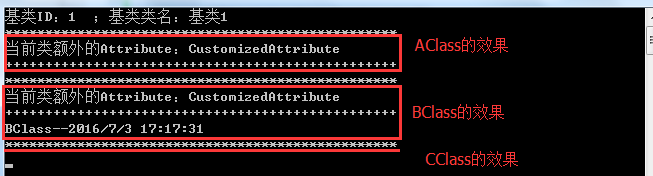
注:未经作者同意,禁止转载!转载请说明出处!请尊重知识产权。
通过声明Attribute属性改变不同类的输出效果的更多相关文章
- 【ASP.NET】DataContract序列化,反序列化对象中包含用接口声明的属性时的处理方法
为此对象添加KnownType属性(Attribute).类型为用接口声明的属性(Property)的所有可能类型. 示例如下: public interface IKey { [DataMembe ...
- iOS 使用COPY声明NSSTRING属性
使用COPY声明NSSTRING属性 2014/05/29 JACE 发表回复 声明一个NSString属性使用copy要优于使用strong.这同样适用于遵守NSCoding协议的不可变类(immu ...
- WPF——数据绑定及属性改变事件
一.首先需要封装一下文本框的属性,并且在实体类中添加一个实体类的属性改变函数 public class User : INotifyPropertyChanged //INotifyPropertyC ...
- python类内init外声明的属性与init内声明的对象属性的访问和操作区别
python类内init外声明的属性与init内声明的对象属性的访问和操作区别(面试题) 1.在ipython中输入以下代码,其输出会是什么? In [1]: class ClassOut: ...: ...
- PHP使用static关键字声明静态属性和静态方法
PHP使用static关键字声明静态属性和静态方法 在PHP中,通过static关键字修饰的成员属性和成员方法被称为静态属性和静态方法. 静态属性和静态方法不需要在被类实例化的情况下就可以直接使用. ...
- 借助JavaScript中的Dom属性改变Html中Table边框的颜色
借助JavaScript中的Dom属性改变Html中Table边框的颜色 -------------------- <html> <head> <title>我是页 ...
- C#里Attribute属性
系统内置属性 系统内置的Attribute属性Obsolete,被个这属性标记的方法在别的地方被调用的时候会有警告提示; 这个属性还可以指定第二个布尔参数,设置编译时是否报错; 例: [Obsolet ...
- OC中在.h和.m中声明的属性和成员变量有何区别?
相比Swift而言,OC规矩太多. 差不多,.h中声明的属性和成员变量均可以在子类中访问到.而.m则不可.而属性其实也就是成员变量的一种简写,其内部自动包含了getter和setter方法. 如图:V ...
- silverlight属性改变事件通知
工作中遇到silverlight本身没有提供的某些属性改变事件,但又需要在属性改变时得到通知,Google搬运stack overflow,原地址 /// Listen for change of t ...
随机推荐
- CSS3的基础用法
CSS3的现状:1.浏览器支持程度差,需要添加私有前缀 2.移动端支持优于PC端 3.不断改进中 4.应用相对广泛 在CSS3中增加新增了许多灵活查找元素的方法,极大的提高了查找元素的效率和精准度.C ...
- 结合个人经历总结的前端入门方法 (转自https://github.com/qiu-deqing/FE-learning)
结合个人经历总结的前端入门方法 (https://github.com/qiu-deqing/FE-learning),里面有很详细的介绍. 之前一直想学习前端的,都不知道怎么下手都一年了啥也没学到, ...
- SPSS中两种重复测量资料分析过程的比较
在SPSS中,有两个过程可以对重复测量资料进行分析:一种是一般线性模型的重复度量:一种是混合线性模型,对于同样的数据资料,使用两种过程分析出的内容不大一样,注意是内容而不是结果,只要操作正确,结果应该 ...
- 3个sprint的团队贡献分
第一次冲刺贡献分 成员名字 贡献分 101丘娟 23 108周诗琦 26 107杨晓霞 24 124陈程 27 第二次冲刺贡献分 成员名字 贡献分 101丘娟 23 108周诗琦 27 ...
- Selenium ide录制回放错误Timed out after 30000ms
[error] Timed out after 30000ms 该问题可能是速度控制条播放速度过快导致,调整播放速度至slow
- WPF依赖属性DependencyProperty
写在之前: 依赖属性算是WPF醉醉基础的一个组成了.平时写代码的时候,简单的绑定很轻松,但是遇到复杂的层次比较多的绑定,真的是要命.所以,我觉得深刻认识依赖属性是很有必要的.本篇只是个人学习的记录,学 ...
- php 面试题收集-基础题
1.表单中 get与post提交方法的区别?答:get是发送请求HTTP协议通过url参数传递进行接收,而post是实体数据,可以通过表单提交大量信息. 2.session与cookie的区别?答:s ...
- Discuz中解决jquery 冲突的方法 绝对简单
将jquery.js在common.js之前载入,不然jquery的$()函数会覆盖common.js的$()函数: 然后用到jQuery的$()函数的地方都用jQuery()代替. 例如 $(doc ...
- 简化通过classname查找 方法
function getClass(oParent,sclass){ var aEle=oParent.getElementsByTagName('*'); var result=[]; for(va ...
- 测试键盘的控制字符对应的ASCII码值
#include <stdio.h>#include <termio.h> //终端操作头文件 char getch(void){ struct termio ...