
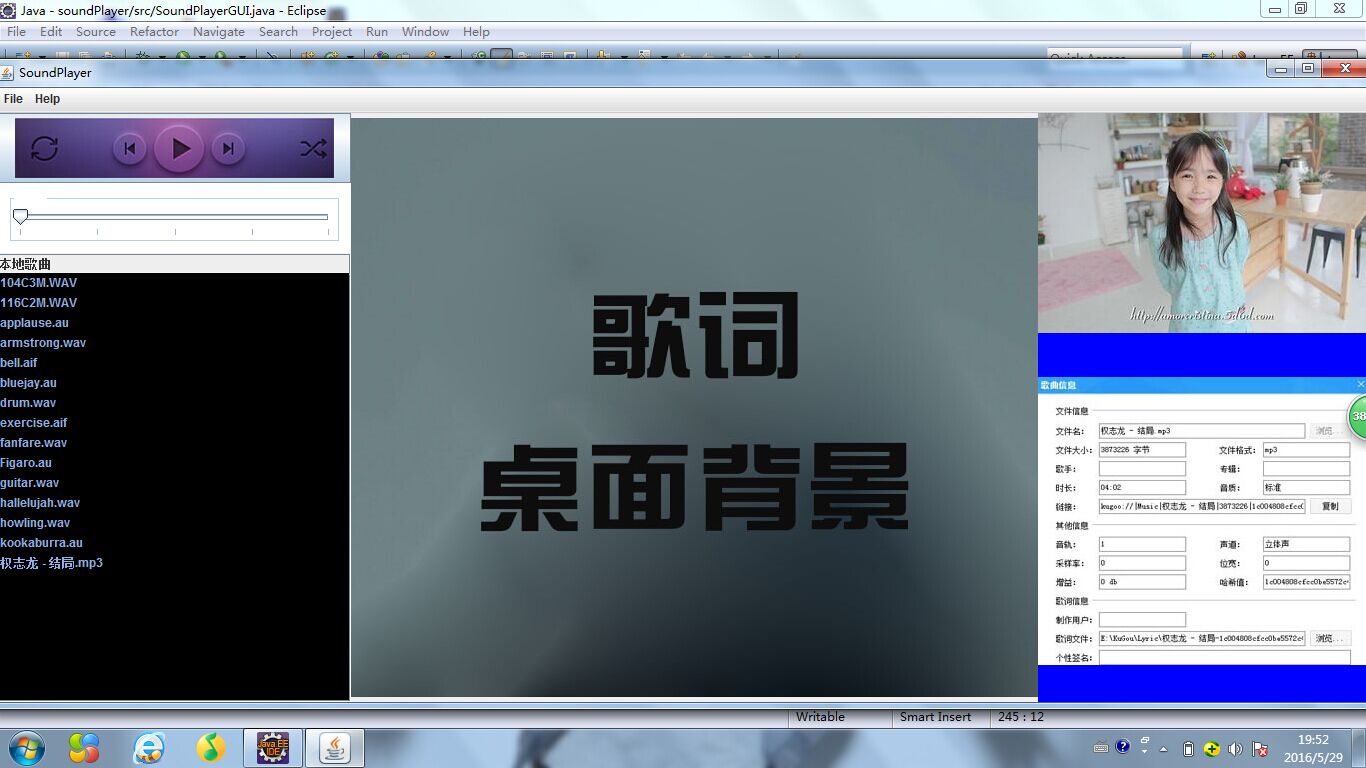
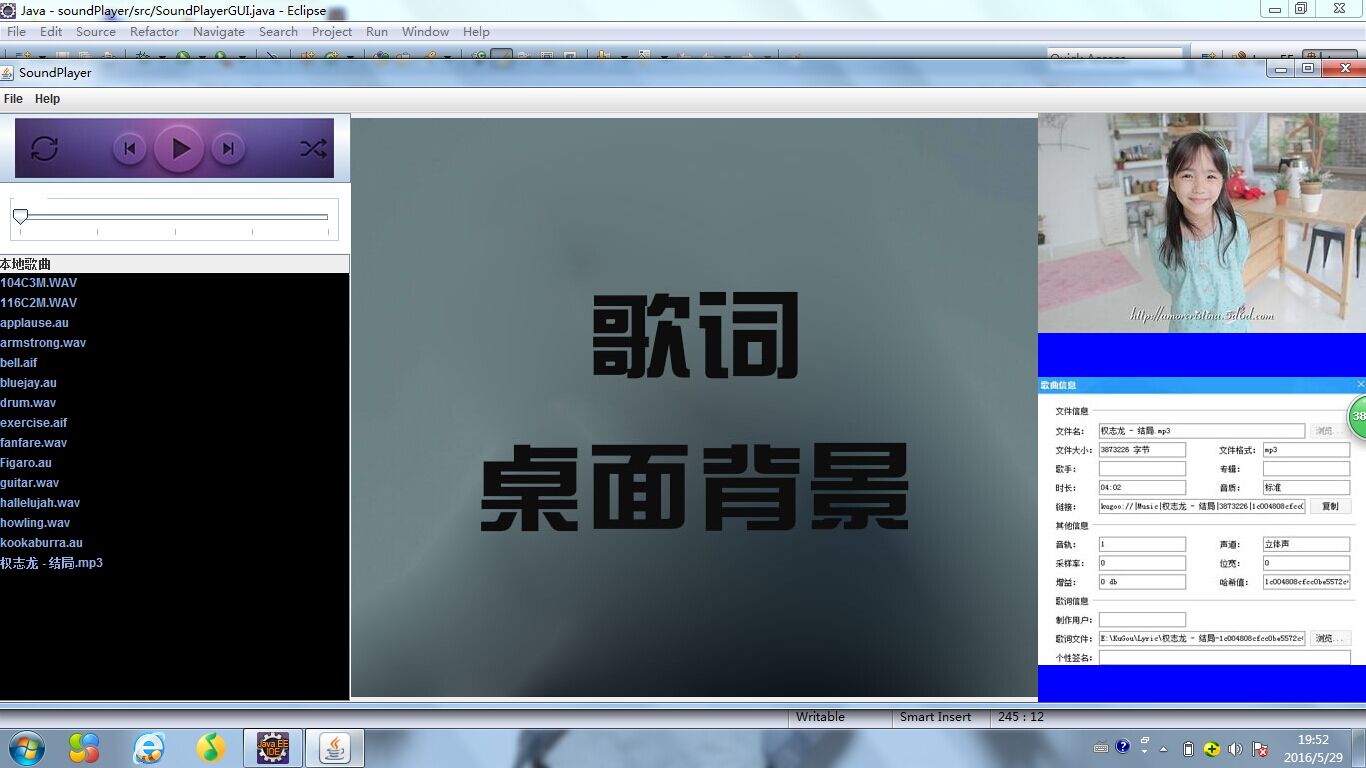
music player界面
public class SoundPlayerGUI extends JFrame
implements ChangeListener, ActionListener
{
private static final String VERSION = "Version 1.0";
private static final String AUDIO_DIR = "audio";
private JList fileList;

private JSlider slider;

private JLabel infoLabel;

public static void main(String[] args)

{

    SoundPlayerGUI gui = new SoundPlayerGUI();

}

public SoundPlayerGUI()

{

    super("SoundPlayer");

    String[] audioFileNames = findFiles(AUDIO_DIR, null);

    makeFrame(audioFileNames);

}

private void play()

{

    String filename = (String)fileList.getSelectedValue();

    if(filename == null) {  // nothing selected

        return;

    }

    slider.setValue(0);

    boolean successful = player.play(new File(AUDIO_DIR, filename));

}

private void showInfo(String message)

{

    infoLabel.setText(message);

}

private void showAbout()

{

    JOptionPane.showMessageDialog(this,

                "SoundPlayer\n" + VERSION,

                "About SoundPlayer",

                JOptionPane.INFORMATION_MESSAGE);

}

private String[] findFiles(String dirName, String suffix)

{

    File dir = new File(dirName);

    if(dir.isDirectory()) {

        String[] allFiles = dir.list();

        if(suffix == null) {

            return allFiles;

        }

        else {

            List<String> selected = new ArrayList<String>();

            for(String filename : allFiles) {

                if(filename.endsWith(suffix)) {

                    selected.add(filename);

                }

            }

            return selected.toArray(new String[selected.size()]);

        }

    }

    else {

        System.out.println("");

        return null;

    }

}

public void stateChanged(ChangeEvent evt)

{

    player.seek(slider.getValue());

}

public void actionPerformed(ActionEvent evt)

{

    JComboBox cb = (JComboBox)evt.getSource();

    String format = (String)cb.getSelectedItem();

    if(format.equals("all formats")) {

        format = null;

    }

    fileList.setListData(findFiles(AUDIO_DIR, format));

}

private void makeFrame(String[] audioFiles)

{

    JPanel contentPane = (JPanel)getContentPane();

    contentPane.setBorder(new EmptyBorder(0, 0, 0, 0));

    makeMenuBar();

    contentPane.setLayout(new BorderLayout(0, 0));
contentPane.setBackground(new Color(0,0,0));
JPanel leftPane = new JPanel();
{
leftPane.setLayout(new BorderLayout(188, 1));
String[] formats = { "all formats", ".wav", ".au", ".aif",".mp3" };
// Create the combo box.
JComboBox formatList = new JComboBox(formats);
formatList.addActionListener(this);
leftPane.add(formatList, BorderLayout.NORTH);
// Create the scrolled list for file names
fileList = new JList(audioFiles);
fileList.setForeground(new Color(140,171,226));
fileList.setBackground(new Color(0,0,0));
fileList.setSelectionBackground(new Color(87,49,134));
fileList.setSelectionForeground(new Color(140,171,226));
JScrollPane scrollPane = new JScrollPane(fileList);
scrollPane.setColumnHeaderView(new JLabel("本地歌曲"));
leftPane.add(scrollPane, BorderLayout.CENTER);
JButton button = new JButton(new ImageIcon("play.jpg"));
button.setPressedIcon(new ImageIcon ("play1.jpg"));
button.addActionListener(new ActionListener() {
public void actionPerformed(ActionEvent e) { play(); }
});
slider = new JSlider(0, 100, 0);
TitledBorder border = new TitledBorder("Seek");
border.setTitleColor(Color.white);
slider.setBorder(new CompoundBorder(new EmptyBorder(6, 10, 10, 10), border));
slider.addChangeListener(this);
slider.setBackground(Color.white);
slider.setMajorTickSpacing(25);
slider.setPaintTicks(true);
JPanel toolbar = new JPanel();
toolbar.setLayout(new GridLayout(2, 1));
toolbar.add(button);
toolbar.add(slider);
leftPane.add(toolbar,BorderLayout.NORTH);
}
contentPane.add(leftPane, BorderLayout.WEST);
JPanel picPane=new JPanel();
{
JLabel pic=new JLabel(new ImageIcon("zhuomian.jpg"));
picPane.add(pic, BorderLayout.CENTER);
contentPane.add(picPane,BorderLayout.CENTER);
}
JPanel centerPane = new JPanel();
{
centerPane.setLayout(new BorderLayout(188, 8));
JLabel image = new JLabel(new ImageIcon("u=2786397887,625919022&fm=21&gp=0.jpg"));
centerPane.add(image, BorderLayout.NORTH);
centerPane.setBackground(Color.BLUE);
infoLabel = new JLabel(new ImageIcon("zhi.jpg"));
centerPane.add(infoLabel, BorderLayout.CENTER);
}
contentPane.add(centerPane, BorderLayout.EAST);
// Create the toolbar with the buttons
pack();
// place this frame at the center of the screen and show
Dimension d = Toolkit.getDefaultToolkit().getScreenSize();
setLocation(d.width/2 - getWidth()/2, d.height/2 - getHeight()/2);
setVisible(true);}
private void makeMenuBar()
{
final int SHORTCUT_MASK =
Toolkit.getDefaultToolkit().getMenuShortcutKeyMask();
JMenuBar menubar = new JMenuBar();
setJMenuBar(menubar);
JMenu menu;
JMenuItem item;
menu = new JMenu("File");
menubar.add(menu);
item = new JMenuItem("Quit");
item.setAccelerator(KeyStroke.getKeyStroke(KeyEvent.VK_Q, SHORTCUT_MASK));
item.addActionListener(new ActionListener() {
public void actionPerformed(ActionEvent e) { quit(); }
});
menu.add(item);
menu = new JMenu("Help");
menubar.add(menu);
item = new JMenuItem("About SoundPlayer...");
item.addActionListener(new ActionListener() {
public void actionPerformed(ActionEvent e) { showAbout(); }
});
menu.add(item);
}
}
music player界面的更多相关文章
- 更改电脑名称后, Cnario无法播放画面和声音, 开机后停留在桌面, Cnario Player软件界面的停止按钮为蓝色可选状态
症状描述 Cnario Player正常工作期间, 更改了电脑的Windows系统计算机名称(不是登录Windows的用户名), 重启后, 新计算机名生效. 此时Cnario自动启动, 但没有进入播放 ...
- 禁止Cnario Player启动后自动开始播放
Cnario Player安装激活后, 默认开机后自动启动, 启动加载内容完成后进入10秒倒计时, 10秒后即开始播放关机前播放的内容. 如果不想让其自动开始播放, 可按照如下办法设置其不自动播放. ...
- 如何简单快速的修改Bootstrap
Bootstrap并不是单单意味着HTML/CSS界面框架,更确切的说,它改变了整个游戏规则.这个囊括了应有尽有的代码框架使得许多应用和网站的设计开发变得简便许多,而且它将大量的HTML框架普及成了产 ...
- 最近玩Bootstrap , 一些小工具 记录在案。
最近玩Bootstrap , 一些小工具 记录在案. 1 定制Bootstrap ,所见即所得的修改Bootstrap的各种变量,即时查看样式的变化. http://bootswatchr.com/ ...
- Unity iOS混合开发界面切换思路
Unity iOS混合开发界面切换思路 最近有很多博友QQ 私信 或则 留言联系我,请教iOS和Unity界面之前相互切换的问题,源代码就不私下发你们了,界面跳转功能的代码我直接贴到下面好了,顺带说i ...
- Composer Player 属性设置
/// <summary> /// 设置选中名称 /// </summary> /// <param name="name"></para ...
- 【Cocos2d-x for WP8 学习整理】(3)CCScrollView 实现捕鱼达人一样的场景选择界面
UI 界面一般是游戏里比较独立的地方,因为游戏引擎一般都比较注意基础的功能封装,很少会关注UI,但是 UI 确是玩家第一眼看到的效果,因此能否实现一个美观的UI对于提升游戏的整体美观有着很大的帮助. ...
- VMware Player安装Debian系统
尝试用虚拟机来安装Debian系统,感觉这样一来安装与卸载方便,二来也可以在Linux系统安装出现问题的情况下方便在host主机上查找解决方法,同时也避免了要重新设置分区来安装Linux系统(双系统的 ...
- 20套高品质的 Mobile & Web 界面 PSD 素材免费下载
在这里,我们向大家呈现20个新鲜出炉的矢量的免费 PSD 素材.这些素材来自著名的设计社区——Dribbble,这个网站的用户不断发布各种精美的用户界面,图标和网站布局,以帮助激励他人.这些免费素材不 ...
随机推荐
- AngularJS - Passing data between pages
You need to create a service to be able to share data between controllers. app.factory('myService', ...
- Calculator(1.0)
Calculator(1.0) Github链接 解题过程中遇到的困难 对于c++中类和对象的使用不够明确,看了c++的视频教程学会了用类和对象来写程序. 不会使用<queue>,在网上查 ...
- MicroERP软件更新记录1.0
版本号:1.0.256 本次: 1\修复了选择货位时的BUG; 2\增加了物品资料由EXCEL表批量导入的功能; 3\物品资料增加了三个自定义属性; 4\优化了科目汇总账(余额表)算法; 5\应大家建 ...
- HTML元素隐藏和显示
在web前端开发过程中,经常会用到隐藏和显示元素的方法 总结:1.通过JS或Jquery控制 2.通过CSS样式控制 一.Js或jquery (jquery为例) 1.隐藏元素 使用 ...
- Android Studio打开时提示ADB错误的问题
如图所示,ADB连接错误,解决办法很简单:打开cmd,定位到sdk文件夹下的platform-tools,然后执行adb kill-server回车:再执行adb start-server即可
- 数论学习笔记之解线性方程 a*x + b*y = gcd(a,b)
~>>_<<~ 咳咳!!!今天写此笔记,以防他日老年痴呆后不会解方程了!!! Begin ! ~1~, 首先呢,就看到了一个 gcd(a,b),这是什么鬼玩意呢?什么鬼玩意并不 ...
- 5-26课堂作业——组员投票Alpha版存在的问题
我们在课上讨论了Alpha版目前发现的问题,并通过投票的方式,选出其中三个认为是当前须紧要解决的问题. 问题: 1.缺少数据库: 2.用户体验不良好,游戏难度分区不明显: 3.团队成员共同工作时间少.
- 关于zero_interconnect_delay_mode和nonzero_interconnect_delay_mode的区别
在执行report_qor命令时,需要注意这样一个问题,对于Reg_2_Reg路径,在worst scene情况下,nonzero模型要比zero模型报出的结果差,但在best scene情况下,却要 ...
- [GodLove]Wine93 Tarining Round #9
比赛链接: http://vjudge.net/contest/view.action?cid=48069#overview 题目来源: lrj训练指南---二维几何计算 ID Title Pro ...
- IOS-当遇到tableView整体上移时的解决方案
方案一在使用了navigationController后,当界面进行跳转往返后,时而会出现tableView或collectionView上移的情况,通常会自动上移64个像素,那么这种情况,我们可以关 ...