
Emacs配置erlang开发环境(.emacs 文件)
以前都是用sublime写erlang代码,好处不多说,主要是觉得一点不好用,不能实现函数跳转,及其不方便,尤其是代码一多,头疼。后来折腾过IntelliJ,下了个收费$0.00的版本,风格还是挺稀饭的,函数什么的都解决了,留下一个bug,粘贴`复制神马的老是不搭调。。。没办法,还是回归开天神器emacs的怀抱!
各种度娘 谷哥后,一路颠簸,终于勉强可以用了,不过还是不太稀饭。后来找师兄拷了个配置,折腾了下,上图:
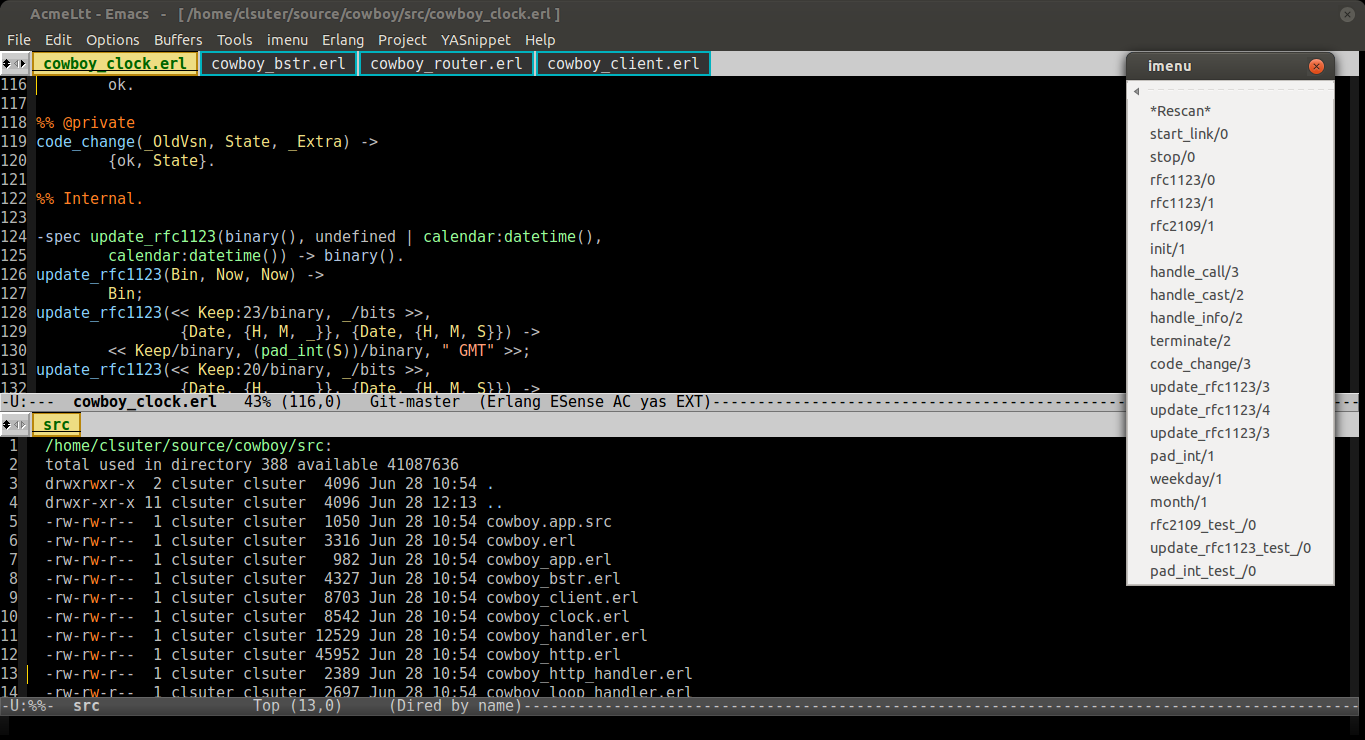
下面是配置文件:
(setq default-directory "~/erlang")

(global-set-key (kbd "C-SPC") 'nil)

;; share clipboard with outside programs

(setq x-select-enable-clipboard t)

(tool-bar-mode nil)

;;(menu-bar-mode nil)

(scroll-bar-mode nil)

(setq make-backup-files nil)

;; 设置另外一些颜色:语法高亮显示的背景和主题,区域选择的背景和主题,二次选择的背景和选择

(set-face-foreground 'highlight "white")

(set-face-background 'highlight "blue")

(set-face-foreground 'region "cyan")

(set-face-background 'region "blue")

(set-face-foreground 'secondary-selection "skyblue")

(set-face-background 'secondary-selection "darkblue")

(set-foreground-color "grey")

(set-background-color "black")

(set-cursor-color "gold1")

(set-mouse-color "gold1")

;;(set-scroll-bar-mode nil)

;设定光标为短线

(setq-default cursor-type 'bar)

;设置标题

(setq frame-title-format

        '("  AcmeLtt - Emacs   -   [ " (buffer-file-name "%f \]"

                (dired-directory dired-directory "%b \]"))))

;设置启动大小

(set-frame-height (selected-frame) 65)

(set-frame-width (selected-frame) 170)

(setq inhibit-startup-message t);关闭起动时LOGO

(setq visible-bell t);关闭出错时的提示声

(setq default-major-mode 'erlang-mode);一打开就起用 text 模式

(global-font-lock-mode t);语法高亮

(auto-image-file-mode t);打开图片显示功能

(fset 'yes-or-no-p 'y-or-n-p);以 y/n代表 yes/no

(column-number-mode t);显示列号

(show-paren-mode t);显示括号匹配

(setq mouse-yank-at-point t);支持中键粘贴

(transient-mark-mode t);允许临时设置标记

(setq x-select-enable-clipboard t);支持emacs和外部程序的粘贴

(setq auto-save-default nil);关闭备份文件#xxx#

;;-----kill ring 长度

(setq kill-ring-max 200)

(require 'linum)

(global-linum-mode 1)

;;--------------------------快捷键定义------------------------

(global-set-key [(f12)] 'loop-alpha)  ;;玻璃

;;F1列模式

(global-set-key [f1] 'cua-mode)

;;恢复,常用键

(global-set-key [f2] 'undo)

;;F4,kill键,习惯设置,关闭当前buffer

(global-set-key [f4] 'kill-this-buffer)

;;定义查找快捷键

(global-set-key [f5] 'replace-regexp) ;;支持正则表达式

(global-set-key [f6] 'replace-string)

(global-set-key [f8] 'erlang-mode)

(global-set-key [f7] 'ecb-activate) ;;定义F7键为激活ecb

(global-set-key [C-f7] 'ecb-deactivate)

(global-set-key [f11] 'delete-other-windows) ;;设置F11为删除其它窗口

 (global-set-key (kbd "C-c z") (quote shell))

;;-------------------------------全选---------------------

(defun select-all ()

  "Select the whole buffer."

  (interactive)

  (goto-char (point-min))

  ;; Mark current position and push it into the mark ring.

  (push-mark-command nil nil)

  (goto-char (point-max))

  (message "ok."))

(provide 'select-all)

(autoload 'select-all "select-all"

  "Select the whole buffer." t nil)

;; user defined keys

(global-set-key "\C-x\C-a" 'select-all)

;;-------------------glass style------------------

(setq alpha-list '((85 55) (100 100)))

(defun loop-alpha ()

  (interactive)

  (let ((h (car alpha-list)))

    ((lambda (a ab)

       (set-frame-parameter (selected-frame) 'alpha (list a ab))

       (add-to-list 'default-frame-alist (cons 'alpha (list a ab)))

       ) (car h) (car (cdr h)))

    (setq alpha-list (cdr (append alpha-list (list h))))

    ))

;;--------------------------erlang----------------------------------------------------

(setq load-path (cons "/usr/lib/erlang/lib/tools-2.6.6.5/emacs" load-path))

(setq erlang-root-dir "/usr/lib/erlang")

(setq exec-path (cons "/usr/lib/erlang/bin" exec-path))

(require 'erlang-start)

(add-to-list 'auto-mode-alist '("\\.erl?$" . erlang-mode))

(add-to-list 'auto-mode-alist '("\\.hrl?$" . erlang-mode))

(add-to-list 'load-path "~/.emacs.d/erlware-mode")

;;----------------------distel-------------------

(let ((distel-dir "~/.emacs.d/distel/elisp"))

    (unless (member distel-dir load-path)

        ;; Add distel-dir to the end of load-path

        (setq load-path (append load-path (list distel-dir)))))

(require 'distel)

(distel-setup)

;; Some Erlang customizations

(add-hook 'erlang-mode-hook

  (lambda ()

  ;; when starting an Erlang shell in Emacs, default in the node name

    (setq inferior-erlang-machine-options '("-sname" "emacs"))

    ;; add Erlang functions to an imenu menu

    (imenu-add-to-menubar "imenu")))

;; prevent annoying hang-on-compile

(defvar inferior-erlang-prompt-timeout t)

;; tell distel to default to that node

(setq erl-nodename-cache

      (make-symbol

       (concat

        "emacs@"

        ;; Mac OS X uses "name.local" instead of "name", this should work

        ;; pretty much anywhere without having to muck with NetInfo

        ;; ... but I only tested it on Mac OS X.

        (car (split-string (shell-command-to-string "hostname"))))))

;; A number of the erlang-extended-mode key bindings are useful in the shell too

(defconst distel-shell-keys

  '(("\C-\M-i"   erl-complete)

    ("\M-?"      erl-complete)

    ("\M-."      erl-find-source-under-point)

    ("\M-,"      erl-find-source-unwind)

    ("\M-*"      erl-find-source-unwind)

    )

  "Additional keys to bind when in Erlang shell.")

(add-hook 'erlang-shell-mode-hook

  (lambda ()

;; add some Distel bindings to the Erlang shell

        (dolist (spec distel-shell-keys)

        (define-key erlang-shell-mode-map (car spec) (cadr spec)))))

;;------------------------esense--------------------

(setq load-path (cons "~/.emacs.d/esense-1.12" load-path))

(require 'esense-start)

(setq esense-indexer-program "~/.emacs.d/esense-1.12/esense.sh")

;;----------------ecb--------------

;; cedet

(load-file "~/.emacs.d/cedet-1.0/common/cedet.el")

(global-ede-mode 1)                      ; Enable the Project management system

(semantic-load-enable-code-helpers)      ; Enable prototype help and smart completion

(global-srecode-minor-mode 1)            ; Enable template insertion menu

(add-to-list 'load-path "~/.emacs.d/ecb-2.40")

(require 'ecb)

;;(require 'ecb-autoloads)

;;(setq ecb-auto-activate t)

(setq ecb-tip-of-the-day nil)

;; tabbar

(add-to-list 'load-path "~/.emacs.d/tabbar")

(require 'tabbar)

(tabbar-mode t)

(global-set-key [(meta j)] 'tabbar-backward)

(global-set-key [(meta k)] 'tabbar-forward)

;;--------------------- tabbar----------

(set-face-attribute 'tabbar-default-face nil

                    :family "DejaVu Sans Mono"

                    :background "gray80"

                    :foreground "gray30"

                    :height 1.0

                    )

(set-face-attribute 'tabbar-selected-face nil

                    :inherit 'tabbar-default

                    :foreground "DarkGreen"

                    :background "LightGoldenrod"

                    :box '(:line-width 2 :color "Darkgoldenrod")

                    :overline "black"

                    :underline "black"

                    :weight 'bold

                    )

(set-face-attribute 'tabbar-unselected-face nil

                    :inherit 'tabbar-default

                    :box '(:line-width 2 :color "#00B2BF")

                    )

(custom-set-variables

  ;; custom-set-variables was added by Custom.

  ;; If you edit it by hand, you could mess it up, so be careful.

  ;; Your init file should contain only one such instance.

  ;; If there is more than one, they won't work right.

 '(ecb-options-version "2.40")

 '(ecb-primary-secondary-mouse-buttons (quote mouse-1--C-mouse-1)))

(custom-set-faces

  ;; custom-set-faces was added by Custom.

  ;; If you edit it by hand, you could mess it up, so be careful.

  ;; Your init file should contain only one such instance.

  ;; If there is more than one, they won't work right.

 )

;;wrangler

;; --------- wrangler -----------------------

(add-to-list 'load-path "/usr/local/lib/erlang/lib/wrangler-1.0/elisp")

(require 'wrangler)

;;---------------------YASnippet--------------------

(add-to-list 'load-path

             "~/.emacs.d")

(require 'yasnippet-bundle)

;;----------------------auto-complete-------------

;;(add-to-list 'ac-dictionary-directories "~/.emacs.d/ac-dict")

;;(require 'auto-complete-config)

;;(ac-config-default)

(add-to-list 'load-path "~/.emacs.d/")

(require 'auto-complete-config)

(add-to-list 'ac-dictionary-directories "~/.emacs.d//ac-dict")

(ac-config-default)
红色部分根据情况自己修改,wrlangler需要自己编译,路径是编译后的。
除了wrangler需要自己编译外,其余的都在.emacs.d下。当然,得自己M-x load-library。嫌麻烦的可以email哦。

最后,希望路过的牛牛能分享下自己的,诚心求教。
Emacs配置erlang开发环境(.emacs 文件)的更多相关文章
- 使用IntelliJ IDEA配置Erlang开发环境
这篇文章比较详细,感谢作者,拷贝过来做个记录 ————————————————————————————————————————————————————————————————————————————— ...
- MacOS配置Erlang开发环境
Mac下安装Erlang brew 的安装: $ curl -LsSf http://github.com/mxcl/homebrew/tarball/master | sudo tar xvz -C ...
- emacs 搭建racket开发环境
emacs 搭建racket开发环境 emacs下搭建开发racket的环境,笔者之前用过下面两种模式:geiser和racket-mode.相对而言,后一种方式要显得简单.本文主要介绍后一种方式环境 ...
- Visual Studio 开发(二):VS 2017配置FFmpeg开发环境
在上篇文章Visual Studio 开发(一):安装配置Visual Studio Code 中,我们讲了一下如何配置VS CODE,来编写和调试C的代码.如果你已经使用VS Code回顾和复习好C ...
- eclipse配置c开发环境
// */ // ]]> eclipse配置c开发环境 1. eclipse配置c开发环境 1.1. 缘起 1.2. cygwin 1.3. eclipse 1.4. 配置 1 eclipse配 ...
- Notepad++ 使用nppexec插件配置简易开发环境
notepad++ 采用nppexec插件来配置简易开发环境,而不需要笨重的IDE以及麻烦.重复的命令行.控制台输入: 以下为本人最近用到的脚本配置: //编程语言脚本中$(NAME_PART).x ...
- VC 6中配置OpenGL开发环境
2010,2012中配置类似 http://hi.baidu.com/yanzi52351/item/f9a600dffa4caa4ddcf9be1d VC 6中配置OpenGL开发环境 这里,我习惯 ...
- Macbook Pro配置PHP开发环境
Macbook Pro配置PHP开发环境 安装环境如下: Mac OS 10.10.1 Apache 2.4.9 PHP 5.5.14 MySQL 5.6.22 Apache配置 在Mac OS 10 ...
- [转]Aptana Studio 3配置Python开发环境图文教程
转载URL:http://www.cr173.com/html/49260_1.html 一.安装Aptana Studio 3 安装完运行时建议将相关默认工作目录设定在英文的某个目录下.避免可能出现 ...
随机推荐
- PHP多种序列化/反序列化的方法 (转载)
1. serialize和unserialize函数 这两个是序列化和反序列化PHP中数据的常用函数. <?php $a = array('a' => 'Apple' ,'b' => ...
- windows中path环境变量即时生效
修改PATH后,打来CMD命令行,输入 “set PATH=C” (不会真的改变PATH变量值,但会重新读取一次PATH值),关掉CMD窗口再打开.OK 不放心可以 echo %PATH% 检视一下.
- flask-sqlalchemy 关系表简单操作
from flask import Flaskfrom flask.ext.sqlalchemy import SQLAlchemyfrom flask.ext.migrate import Migr ...
- PHPExcel导出
第一,先查出数据库里面要生成Excel的数据,如: $data= M('User')->findAll(); //查出数据 $name='Excelfile'; //生成的Excel文 ...
- X光机的原理及构造
一.X射线的发现 1895年德国物理学家伦琴(W.C.RÖntgen)在研究阴极射线管中气体放电现象时,用年伦琴荣获物理学第一个诺贝尔奖金.科学总是在不断发展的,经伦琴及各国科学家的反复实践和研究,逐 ...
- Office OpenXML-Excel(一)
原文 http://www.cnblogs.com/changminglong/articles/2840004.html 适用于 2007 Microsoft Office 套件,Microsoft ...
- ISSkin 使用技巧,WinXP 下的窗口阴影
原文 http://restools.hanzify.org/article.asp?id=109 是否觉得在使用 ISSkin 的时候感觉窗口太过平板,尤其对于那些窗口边缘和窗口内部颜色一致的皮肤尤 ...
- poj 1573 Robot Motion_模拟
又是被自己的方向搞混了 题意:走出去和遇到之前走过的就输出. #include <cstdlib> #include <iostream> #include<cstdio ...
- 关于select
select 1与select * 的区别:“selelct 常量 from 表名” 对应所有行,返回的永远只有一个值,即常量 ,所以一般只用来判断是否有表记录:而“select * from 表名” ...
- 图片延迟加载并等比缩放,一个简单的JQuery插件
使用方法: $(".viewArea img").zoom({height:74,width:103}); (function($){ $.fn.zoom = function(s ...