
qt 自动完成LineEdit
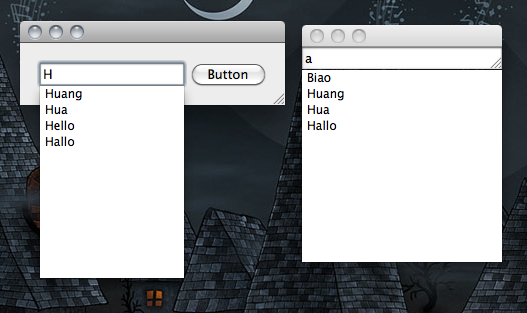
-------------------------------------CompleteLineEdit.h-------------------------------------

#ifndef COMPLETELINEEDIT_H

#define COMPLETELINEEDIT_H

#include <QtGui/QLineEdit>

#include <QStringList>

class QListView;

class QStringListModel;

class QModelIndex;

class CompleteLineEdit : public QLineEdit {

    Q_OBJECT

public:

    CompleteLineEdit(QStringList words, QWidget *parent = );

public slots:

    void setCompleter(const QString &text); // 动态的显示完成列表

    void completeText(const QModelIndex &index); // 点击完成列表中的项,使用此项自动完成输入的单词

protected:

    virtual void keyPressEvent(QKeyEvent *e);

    virtual void focusOutEvent(QFocusEvent *e);

private:

    QStringList words; // 整个完成列表的单词

    QListView *listView; // 完成列表

    QStringListModel *model; // 完成列表的model

};

#endif // COMPLETELINEEDIT_H

-------------------------------------CompleteLineEdit.cpp-------------------------------------

#include "CompleteLineEdit.h"

#include <QKeyEvent>

#include <QtGui/QListView>

#include <QtGui/QStringListModel>

#include <QDebug>

CompleteLineEdit::CompleteLineEdit(QStringList words, QWidget *parent)

    : QLineEdit(parent), words(words) {

    listView = new QListView(this);

    model = new QStringListModel(this);

    listView->setWindowFlags(Qt::ToolTip);

    connect(this, SIGNAL(textChanged(const QString &)), this, SLOT(setCompleter(const QString &)));

    connect(listView, SIGNAL(clicked(const QModelIndex &)), this, SLOT(completeText(const QModelIndex &)));

}

void CompleteLineEdit::focusOutEvent(QFocusEvent *e) {

    //listView->hide();

}

void CompleteLineEdit::keyPressEvent(QKeyEvent *e) {

    if (!listView->isHidden()) {

        int key = e->key();

        int count = listView->model()->rowCount();

        QModelIndex currentIndex = listView->currentIndex();

        if (Qt::Key_Down == key) {

            // 按向下方向键时,移动光标选中下一个完成列表中的项

            int row = currentIndex.row() + ;

            if (row >= count) {

                row = ;

            }

            QModelIndex index = listView->model()->index(row, );

            listView->setCurrentIndex(index);

        } else if (Qt::Key_Up == key) {

            // 按向下方向键时,移动光标选中上一个完成列表中的项

            int row = currentIndex.row() - ;

            if (row < ) {

                row = count - ;

            }

            QModelIndex index = listView->model()->index(row, );

            listView->setCurrentIndex(index);

        } else if (Qt::Key_Escape == key) {

            // 按下Esc键时,隐藏完成列表

            listView->hide();

        } else if (Qt::Key_Enter == key || Qt::Key_Return == key) {

            // 按下回车键时,使用完成列表中选中的项,并隐藏完成列表

            if (currentIndex.isValid()) {

                QString text = listView->currentIndex().data().toString();

                setText(text);

            }

            listView->hide();

        } else {

            // 其他情况,隐藏完成列表,并使用QLineEdit的键盘按下事件

            listView->hide();

            QLineEdit::keyPressEvent(e);

        }

    } else {

        QLineEdit::keyPressEvent(e);

    }

}

void CompleteLineEdit::setCompleter(const QString &text) {

    if (text.isEmpty()) {

        listView->hide();

        return;

    }

    if ((text.length() > ) && (!listView->isHidden())) {

        return;

    }

    // 如果完整的完成列表中的某个单词包含输入的文本,则加入要显示的完成列表串中

    QStringList sl;

    foreach(QString word, words) {

        if (word.contains(text)) {

            sl << word;

        }

    }

    model->setStringList(sl);

    listView->setModel(model);

    if (model->rowCount() == ) {

        return;

    }

    // Position the text edit

    listView->setMinimumWidth(width());

    listView->setMaximumWidth(width());

    QPoint p(, height());

    int x = mapToGlobal(p).x();

    int y = mapToGlobal(p).y() + ;

    listView->move(x, y);

    listView->show();

}

void CompleteLineEdit::completeText(const QModelIndex &index) {

    QString text = index.data().toString();

    setText(text);

    listView->hide();

}

-------------------------------------main.cpp----------------------------------

#include <QtGui/QApplication>

#include "CompleteLineEdit.h"

#include <QtGui>

#include <QCompleter>

#include <QStringList>

int main(int argc, char *argv[]) {

    QApplication a(argc, argv);

    QStringList sl = QStringList() << "Biao" << "Bin" << "Huang" << "Hua" << "Hello" << "BinBin" << "Hallo";

    QWidget widgetw;

    CompleteLineEdit * edit= new CompleteLineEdit(sl);

    QPushButton *button = new QPushButton("Button");

    QHBoxLayout *layout = new QHBoxLayout();

    layout->addWidget(edit);

    layout->addWidget(button);

    widgetw.setLayout(layout);

    widgetw.show();

    CompleteLineEdit e(sl);

    e.show();

    return a.exec();

}
http://www.cnblogs.com/foxhengxing/archive/2010/09/08/1821796.html
qt 自动完成LineEdit的更多相关文章
- C++解析头文件-Qt自动生成信号声明
目录 一.瞎白话 二.背景 三.思路分析 四.代码讲解 1.类图 2.内存结构声明 3.QtHeaderDescription 4.私有函数讲解 五.分析结果 六.下载 一.瞎白话 时间过的ZTMK, ...
- C++解析头文件-Qt自动生成信号定义
目录 一.概述 二.实现思路 三.代码讲解 1.类图 2.QtCppDescription 3.测试 四.源代码 一.概述 上一篇文章C++解析头文件-Qt自动生成信号声明我们主要讲解了怎么去解析C+ ...
- qt 自动重启(两种方法)
所谓自动重启就是程序自动关闭后在重新打开: 一般一个qt程序main函数如下: int main(int argc, char* argv[]) { QApplication app(argc, ar ...
- 使用Qt自动注册Lav
Qt播放视频使用QMediaPlayer要注册Lav解码器,如果手动去注册,每次去使用管理员运行命令或者生成.bat文件都比较麻烦. 解决方法步骤如下: 一:编写注册Lav解码器脚本,并取消控制台的显 ...
- Qt自动生成.rc文件并配置对应属性 程序图标 版本 描述等
Qt项目配置文件pro里需要如下配置,进行qmake,build后会自动生成.rc文件,并将对应的信息写入文件中 VERSION = 1.0.0.1 RC_ICONS = "http.ico ...
- Qt 自动搜索串口号列表
@功能: SerialPortList 类实现当前可用的串口进行实时扫描,当发现有新的串口 或是现有串口消失时,SerialPortList类将发出一个QStringList类型的 信号onNewSe ...
- 如何用Qt自动拷贝exe依赖的dll
QT生成的.exe文件不能运行的解决办法 之前的数独项目的GUI,当我的Qt项目生成exe时,由于缺少了相关的依赖dll文件,打开会一直报缺少依赖文件的错: 然后一开始我到安装的Qt文件夹里把这些有Q ...
- Qt自动填写表单并点击按钮,包括调用js方法
本篇博客参阅了很多其他大牛的文章,具体找不到了,还望包涵>_< 因为其他博客大都是只有主要代码,对于像我这种菜鸟,根本摸不着头脑,以此想总结一下,帮助新手尽快实现功能... 主要是调用了C ...
- qt中的lineEdit文本输入框的输入类型限制(三种验证类)
qt的三种验证类: 1.输入int类型 QValidator *validator=new QIntValidator(100,999,this): QLineEdit *edit=new QLine ...
随机推荐
- mysql不能链接远程,报(Host '***.***.***.***' is not allowed to connect to this MySQL server)
Host '***.***.***.***' is not allowed to connect to this MySQL server 其中***...是本机公网ip; 解决办法: 首先看报错窗口 ...
- Ring3下Hook NtQueryDirectoryFile隐藏文件
NTSTATUS WINAPI Hook_NtQueryDirectoryFile(IN HANDLE FileHandle,IN HANDLE Event OPTIONAL,IN PIO_APC_R ...
- Linux下(主要针对Ubuntu)下桌面分辨率的添加
系统版本: Linux (Ubuntu) 其他桌面发行版应该也行. 相关命令: lspci, cvt, xrandr 在桌面分辨率不正常显示桌面或者没有最佳的分辨率时,需要修改添加适合的桌面分辨率模式 ...
- ZOJ 2048(Prim 或者 Kruskal)
Highways Time Limit: 5 Seconds Memory Limit: 32768 KB Special Judge The island nation of F ...
- devStack
1,devstack shell 脚本开源官网 http://devstack.org/ 脚本功能快速搭建 OpenStack 的运行和开发环境 [Note tips by Ruiy devstack ...
- 高效CSS書寫規範及CSS兼容性
一.選擇器針對性說明 某一元素的多个规则集中,选择器的针对性越高,该规则集的权重也就越高.针对性相同的,后出现的规则集的权重更高. * {} /* a=0 b=0 c=0 d=0 -> spec ...
- ThinkPHP中的__initialize()和类的构造函数__construct()
ThinkPHP中的__initialize()和类的构造函数__construct()网上有很多关于__initialize()的说法和用法,总感觉不对头,所以自己测试了一下.将结果和大家分享.不对 ...
- 在Linux系统上限制远程登录的IP
在Linux系统上限制远程登录的IP,使用系统自带的配置文件. /etc/hosts.allow /etc/hosts.deny 匹配原则 先allow 后deny.
- SQL Server 2008 忘记sa密码的解决办法
由于某些原因,sa和windows验证都不能登录 sql server,可以用独占模式,修改sa密码先在服务管理器停止Sql Server服务,然后打开命令行,进入 SQL Server安装目录,进入 ...
- angular controller之间通信方式
对于日常开发中,难免会有controller之间通信需求.对于controller之间通信有两种方式可以做到. 用 Angular 进行开发,基本上都会遇到 Controller 之间通信的问题,本文 ...