
Android 底部弹出Dialog(横向满屏)
项目中经常需要底部弹出框,这里我整理一下其中我用的比较顺手的一个方式(底部弹出一个横向满屏的dialog)。
效果图如下所示(只显示关键部分):
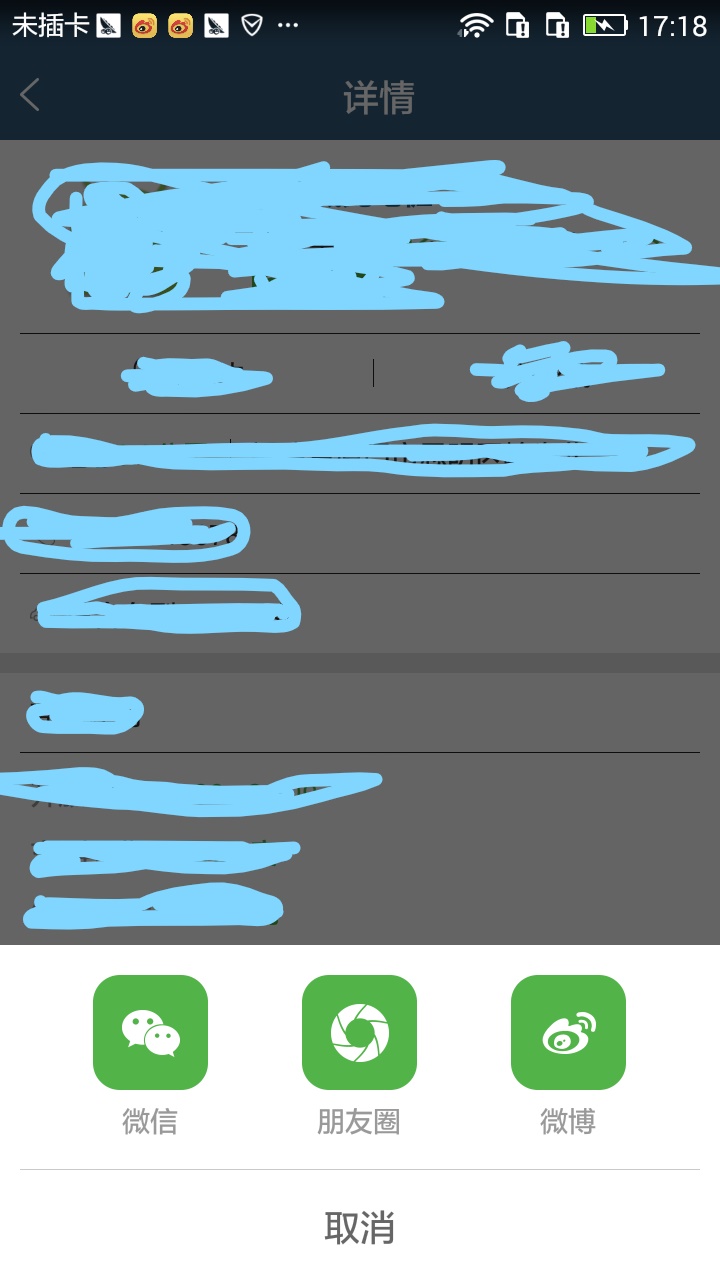
步骤如下所示:
1.定义一个dialog的布局(lay_share.xml)
 <?xml version="1.0" encoding="utf-8"?>

 <LinearLayout xmlns:android="http://schemas.android.com/apk/res/android"

     android:layout_width="match_parent"

     android:layout_height="match_parent"

     android:background="@color/white"

     android:orientation="vertical">

     <LinearLayout

         android:layout_width="match_parent"

         android:layout_height="wrap_content"

         android:gravity="center_vertical"

         android:orientation="horizontal"

         android:paddingBottom="@dimen/padding_15"

         android:paddingTop="@dimen/padding_15">

         <View

             android:layout_width="0dp"

             android:layout_height="0dp"

             android:layout_weight="1" />

         <TextView

             android:layout_width="wrap_content"

             android:layout_height="wrap_content"

             android:drawablePadding="@dimen/padding_5"

             android:drawableTop="@mipmap/ic_weixin_share"

             android:gravity="center"

             android:text="微信"

             android:textColor="@color/color_999999"

             android:textSize="@dimen/text_14" />

         <View

             android:layout_width="0dp"

             android:layout_height="0dp"

             android:layout_weight="1" />

         <TextView

             android:layout_width="wrap_content"

             android:layout_height="wrap_content"

             android:drawablePadding="@dimen/padding_5"

             android:drawableTop="@mipmap/ic_circle_share"

             android:gravity="center"

             android:text="朋友圈"

             android:textColor="@color/color_999999"

             android:textSize="@dimen/text_14" />

         <View

             android:layout_width="0dp"

             android:layout_height="0dp"

             android:layout_weight="1" />

         <TextView

             android:layout_width="wrap_content"

             android:layout_height="wrap_content"

             android:drawablePadding="@dimen/padding_5"

             android:drawableTop="@mipmap/ic_weibo_share"

             android:gravity="center"

             android:text="微博"

             android:textColor="@color/color_999999"

             android:textSize="@dimen/text_14" />

         <View

             android:layout_width="0dp"

             android:layout_height="0dp"

             android:layout_weight="1" />

     </LinearLayout>

     <View

         android:layout_width="match_parent"

         android:layout_height="0.5dp"

         android:layout_marginLeft="@dimen/padding_10"

         android:layout_marginRight="@dimen/padding_10"

         android:background="@color/color_c9c9c9" />

     <TextView

         android:id="@+id/tv_cancel"

         android:layout_width="match_parent"

         android:layout_height="wrap_content"

         android:gravity="center"

         android:padding="@dimen/padding_15"

         android:text="取消"

         android:textColor="@color/color_666666"

         android:textSize="@dimen/text_18" />

 </LinearLayout>
2.定义弹出框弹出动画(dialog_enter.xml)
 <?xml version="1.0" encoding="utf-8"?>

 <set xmlns:android="http://schemas.android.com/apk/res/android">

     <translate

         android:duration="300"

         android:fromYDelta="100%p"

         android:toYDelta="0" />

 </set>
dialog_enter.xml
3.定义弹出框隐藏动画(dialog_exit.xml)
 <?xml version="1.0" encoding="utf-8"?>

 <set xmlns:android="http://schemas.android.com/apk/res/android">

     <translate

         android:duration="300"

         android:fromYDelta="0"

         android:toYDelta="100%p" />

 </set>
dialog_exit.xml
4.定义动画style
 <!--弹出框动画-->

     <style name="share_animation" parent="android:Animation">

         <item name="android:windowEnterAnimation">@anim/dialog_enter</item>

         <item name="android:windowExitAnimation">@anim/dialog_exit</item>

     </style>
5.定义对话框样式
 <!-- 对话框样式 -->

     <style name="dialog_bottom_full" parent="android:style/Theme.Dialog">

         <item name="android:windowBackground">@android:color/transparent</item>

         <item name="android:windowNoTitle">true</item>

         <item name="android:windowIsFloating">true</item>

         <item name="android:windowContentOverlay">@null</item>

         <item name="android:scrollHorizontally">true</item>

     </style>
6.最后,在需要从底部弹出dialog的地方,直接调用showDialog()方法
 /**

      * 显示分享弹出框

      */

     private void showDialog() {

         if (mShareDialog == null) {

             initShareDialog();

         }

         mShareDialog.show();

     }

     /**

      * 初始化分享弹出框

      */

     private void initShareDialog() {

         mShareDialog = new Dialog(this, R.style.dialog_bottom_full);

         mShareDialog.setCanceledOnTouchOutside(true);

         mShareDialog.setCancelable(true);

         Window window = mShareDialog.getWindow();

         window.setGravity(Gravity.BOTTOM);

         window.setWindowAnimations(R.style.share_animation);

         View view = View.inflate(this, R.layout.lay_share, null);

         view.findViewById(R.id.tv_cancel).setOnClickListener(new View.OnClickListener() {

             @Override

             public void onClick(View view) {

                 if (mShareDialog != null && mShareDialog.isShowing()) {

                     mShareDialog.dismiss();

                 }

             }

         });

         window.setContentView(view);

         window.setLayout(WindowManager.LayoutParams.MATCH_PARENT, WindowManager.LayoutParams.WRAP_CONTENT);//设置横向全屏

     }
大功告成!
收工!
Android 底部弹出Dialog(横向满屏)的更多相关文章
- (转)android底部弹出iOS7风格对话选项框(QQ对话框)--第三方开源--IOS_Dialog_Library
本文转载于:http://blog.csdn.net/zhangphil/article/details/44940339 完成这个效果的是使用了 IOS_Dialog_Library 下载地址:ht ...
- android 闹钟提醒并且在锁屏下弹出Dialog对话框并播放铃声和震动
android 闹钟提醒并且在锁屏下弹出Dialog对话框并播放铃声和震动 1.先简单设置一个闹钟提醒事件: //设置闹钟 mSetting.setOnClickListener ...
- Android Demo---实现从底部弹出窗口
在前面的博文中,小编简单的介绍了如何制作圆角的按钮以及圆角的图片,伴着键盘和手指之间的舞步,迎来新的问题,不知道小伙伴有没有这样的经历,以App为例,点击头像的时候,会从底部弹出一个窗口,有从相册中选 ...
- 转 android 从底部弹出一个popuwindow,渐入渐出效果。我这里是用在购物车需要选择购买选项的操作。
最近要改客户端,需要实现一个从底部弹出的popuwindow,像我这种渣渣android技术,能整出popuwindow但是整不出动画,百度之,记录一下. 从下面这个地址转的 http://blog. ...
- android不依赖具体activity弹出Dialog对话框,即全局性对话框
最近在DialogUtil类中声明了一个静态的弹出Dialog方法,弹出的Dialog也是静态的,并且只在第一次进行创建,由于Dialog弹出依附于Activity,所以就出现了问题. 即:第一次调用 ...
- Android BottomSheet:底部弹出Fragment面板(4)
Android BottomSheet:底部弹出Fragment面板(4) BottomSheet不仅可以弹出轻量级的定制好的面板(见附录文章5,6,7),还可以弹出"重"的 ...
- Android屏幕底部弹出DialogFragment(3)
Android屏幕底部弹出DialogFragment(3) 附录文章1,2的DialogFragment是常规的DialogFragment,但是现在的一些Android开发中,往往需要从底部 ...
- 关于一条定制长按Power键弹出Dialog的需求
如题,需要定制长按Power键弹出的Dialog,UI上的大致效果是:全屏,中间下拉按钮“Swipe Down To Power Off”下拉关机,底部左右两侧“Reboot”,“Cancel”按钮, ...
- 拍照选择图片(Activity底部弹出)
效果图如下: 第一步 : 显示出的布局文件:alert_dialog.xml <?xml version="1.0" encoding="utf-8"?& ...
随机推荐
- 在Linux(Luna)下向Launch启动器中添加图标
记录下在Luna下向Launch中添加图标的步骤,以供以后参考,这里我以加入eclipse图标为例: 首先,我们来创建一个desktop文件(Luna中到启动器Launch可以看作是Ubuntu中到桌 ...
- MapReduce剖析笔记之三:Job的Map/Reduce Task初始化
上一节分析了Job由JobClient提交到JobTracker的流程,利用RPC机制,JobTracker接收到Job ID和Job所在HDFS的目录,够早了JobInProgress对象,丢入队列 ...
- Assertor用于判断参数和抛出异常
代码 /// <summary> 断言器,用于判断和抛出异常 /// </summary> static class Assertor { /// <summary> ...
- 【MSP是什么】MSP认证之项目群管理学习总结
首先要说的是,我这篇体会是针对一定的背景的,不能算是一种通用的管理方式,只能是我自己的经验总结,能给大家平常的管理提供一点思路,我就很满足了.先说说背景,我所在公司做的是大型桌面应用软件,简单点说就是 ...
- Python标准模块--itertools
1 模块简介 Python提供了itertools模块,可以创建属于自己的迭代器.itertools提供的工具快速并且节约内存.开发者可以使用这些工具创建属于自己特定的迭代器,这些特定的迭代器可以用于 ...
- CRL快速开发框架系列教程四(删除数据)
本系列目录 CRL快速开发框架系列教程一(Code First数据表不需再关心) CRL快速开发框架系列教程二(基于Lambda表达式查询) CRL快速开发框架系列教程三(更新数据) CRL快速开发框 ...
- 表单reset无法重置hidden的解决方案
方法一:用text代替hidden,设置text隐藏 <input id="id" name="id" style="display: none ...
- CSS3与页面布局学习总结(五)——Web Font与Sprite
一.web font web font是应用在web中的一种字体技术,在CSS中使用font-face定义新的字体.先了解操作系统中的字体: a).安装好操作系统后,会默认安装一些字体,这些字体文件描 ...
- isEmpty和isBlank的区别
isEmpty 判断某字符串是否为空,为空的标准是 str==null或 str.length()==0 StringUtils.isEmpty(null) = true StringUtils.i ...
- 使用ViewPager实现自动轮播
很多APP中都实现了类似引导页的自动轮播,不由得想到昨天的引导页上修改一下代码实现轮播. 其实大体上只需要添加一个线程循环执行就可以了. 项目已同步至:https://github.com/nanch ...