
(原)ubuntu上安装Torch7及nn及dpnn
转载请注明出处:
http://www.cnblogs.com/darkknightzh/p/5653864.html
参考网址:
http://torch.ch/docs/getting-started.html
http://deepdish.io/2015/02/20/local-torch-installation/
160714说明:如果需要使用torch及GraphicsMagick并读取jpg图像的话,最好先安装libjpeg的库,然后在安装GraphicsMagick,最后再安装torch。
因为刚才GraphicsMagick调用jpeg没有错误,但是torch里面的某个模块又提示找不到libjpeg.so的库了,之后只能先强制卸载image包:luarocks remove image --force,再重新luarocks install image。之后正常了。。。
1. 先安装luarocks
sudo apt-get install luarocks
2. 安装torch
(http://torch.ch/docs/getting-started.html)
1) 终端中输入:
git clone https://github.com/torch/distro.git ~/torch --recursive

cd ~/torch; bash install-deps;

./install.sh
说明: ~/torch应该就是终端当前所在的文件夹(默认时为/home/XXX/,加了~/torch后就变成了/home/XXX/torch)
2) 将torch添加到PATH中
source ~/.bashrc
160713说明:今天在另一台电脑上安装了torch7和ZeroBrane,启动ZeroBrane后,程序第一句require 'image'就错误,提示找不到image包。后来网上搜了一下,也有人遇到了这个问题。主要就是环境变量。
http://deepdish.io/2015/02/20/local-torch-installation/说了,可以将以下语句加入到~/.bashrc中:
export TORCH_DIR=$HOME/torch

export LUA_PATH="$TORCH_DIR/install/share/lua/5.1/?.lua;$TORCH_DIR/install/share/lua/5.1/?/init.lua;$TORCH_DIR/install/share/luajit-2.1.0-alpha/?.lua"

export LUA_CPATH="$TORCH_DIR/install/lib/lua/5.1/?.so"
自己发现,执行完source ~/.bashrc后,~/.bashrc中多了一条语句:
. /home/XXX/program/torch/install/bin/torch-activate
这条语句中torch-activate就是包含torch安装的库目录的文件。然后重启电脑,再使用ZeroBrane的话,就不会提示找不到image包了。。。
由于没有重启电脑,害的我卸了torch又重新装了几次。。。哎。。。
现在感觉,如果再碰到这个问题,实在不行的话,就自己手动把torch-activate文件的路径加到.bashrc中,然后重启电脑试试。不行的话,额,不行再想办法吧。。。
3) 如果需要的话,卸载torch
rm -rf ~/torch
说明:上面安装的是torch和LuaJIT,如果希望安装torch和Lua5.2,而不是LuaJIT,则:
git clone https://github.com/torch/distro.git ~/torch --recursive

cd ~/torch

# clean old torch installation

./clean.sh

# optional clean command (for older torch versions)

# curl -s https://raw.githubusercontent.com/torch/ezinstall/master/clean-old.sh | bash

# https://github.com/torch/distro : set env to use lua

TORCH_LUA_VERSION=LUA52 ./install.sh
5) 安装完torch后输入th:
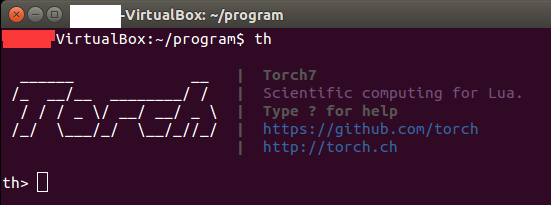
3. 安装torch的包(packages),如nn和dpnn
说明:安装先安装nn,再安装dpnn
1) 下载nn和dpnn:
https://github.com/nicholas-leonard/dpnn
2) 解压这两个文件夹。
3) 终端中cd到这两个文件夹上一级目录。
4) 使用luarocks install命令进行安装
luarocks install nn-master/rocks/nn-scm-.rockspec

luarocks install dpnn-master/rocks/dpnn-scm-.rockspec
说明:① 官网中说直接使用命令luarocks install dpnn进行安装,但是会提示:
No results matching query were found
② nn和dpnn都有依赖的包,需要先安装好。具体都有啥,忘了。。。不过dpnn依赖的比nn多。
③ 官网说可以使用Luarocks在终端中安装packages,比如:
luarocks install image
但是如果安装失败的话,就按照3中①-④的步骤,先下载下来,然后再安装。。。
④ 查看都安装了哪些包:
luarocks list
(原)ubuntu上安装Torch7及nn及dpnn的更多相关文章
- 在Ubuntu上安装Odoo时遇到的问题
这两天开始看<Odoo快速入门与实践 Python开发ERP指南>(刘金亮 2019年5月第1版 机械工业出版社).试着在Ubuntu上安装Odoo,遇到很多问题,通过在网上查找,都已解 ...
- [异常解决] ubuntu上安装JLink驱动遇到的坑及给后来者的建议
一.前言 最近将整个电脑格式化,改成了linux操作系统 希望这样能让自己在一个新的世界探索技术.提升自己吧- win上的工具用多了,就不想变化了- 继上一篇<ubuntu上安装虚拟机遇到的问题 ...
- Ubuntu上安装Robomongo及添加到启动器
到目前为止,Robomongo仍是MongoDB最好的客户端管理工具,如需在Ubuntu上安装Robomongo,可直接从官网下载.tar.gz压缩包进行解压,然后直接运行bin目录下的robomon ...
- 在 Ubuntu 上安装 Android Studio
在 Ubuntu 上安装 Android Studio http://www.linuxidc.com/Linux/2013-05/84812.htm 打开terminal,输入以下命令 sudo a ...
- Ubuntu上安装Karma失败对策
在Ubuntu上安装Karma遇到超时 timeout 错误.Google了一下,国外的码农给了一个快捷的解决方案,实测可行,贴在这里: sudo apt-get install npm nodejs ...
- 在Ubuntu上安装LAMP服务器
1.安装Ubuntu上安装LAMP apt-get install lamp-server^ 2.安装过程中设置MySql密码 3.测试 创建index.php var/www/html/index. ...
- [译]How to Setup Sync Gateway on Ubuntu如何在ubuntu上安装sync-gateway
参考文章https://hidekiitakura.com/2015/03/21/how-to-setup-sync-gateway-on-ubuntudigitalocean/ 在此对作者表示感谢 ...
- 在Ubuntu上安装JDK、Ant、Jmeter和Jenkins
一.前期准备 1. 在win7下载VMware.Ubuntu(用迅雷下比较快) 2. 安装完VMware后新建虚拟机,选择iso: 3. 具体配置参考如下,至此Ubantu安装完成 二.在Ubuntu ...
- Ubuntu上安装MongoDB(译)
add by zhj:直接从第四步开始就可以了,而且安装好MongoDB后会自动启动的,不必自己去执行启动命令 原文:https://docs.mongodb.com/manual/tutorial/ ...
随机推荐
- C++中引用和指针详解
先来分析指针这个东东: 从概念上讲,指针本质上就是存放变量地址的一个变量,在逻辑上是独立的,它可以被改变,包括其所指向的地址的改变和其指向的地址中所存放的数据的改变. 上面的图表示了程序运行时变量的值 ...
- linux tar使用
Linux tar指令简单使用 -c:创建包,-x:解压或解包(-c和-x可理解为互逆运算),-t:查看包 -f:后加处理文件,必须放在参数组合的最后一位(tar -cf a.tar 1.tx ...
- linux中查找命令find、locate、whereis、which、type区别
linux中查找命令find.locate.whereis.which.type区别 1. find Java代码 find是最常见和最强大的查找命令,你可以用它找到任何你想找的文件.与查询数据库(/ ...
- CoFun 1616 数字游戏
Description 一个数x可以按以下规则生成数字: 1.将任意两位交换,若交换的数字为a和b,生成的代价为((a and b)+(a xor b))*2 . 例如134可以生成431,因为431 ...
- AQS详解
一.概述 谈到并发,不得不谈ReentrantLock:而谈到ReentrantLock,不得不谈AbstractQueuedSynchronized(AQS)! 类如其名,抽象的队列式的同步器,AQ ...
- 2013第49周三IE9文档模式
今天完善了原有模块的代码和注释,然后继续之前新模块的开发,并写了两边的service接口,除了因为邮件中有部分问题让我分心外,专心下来写代码的感觉真好,今天基本上没遇到多少让我新感悟的技术问题,就总结 ...
- 关于vs的lib文件和dll文件
一.LIB文件概念 一个lib文件是obj文件的集合.当然,其中还夹杂着其他一些辅助信息,目的是为了让编译器能够准确找到对应的obj文件 二.与DLL的区别 (1)lib是编译时需要的,dll是运行时 ...
- Number of Parallelograms(求平行四边形个数)
Number of Parallelograms time limit per test 4 seconds memory limit per test 256 megabytes input sta ...
- [Immutable.js] Exploring Sequences and Range() in Immutable.js
Understanding Immutable.js's Map() and List() structures will likely take you as far as you want to ...
- iOS绘图教程
本文是<Programming iOS5>中Drawing一章的翻译,考虑到主题完整性,翻译版本中加入了一些书中未涉及到的内容.希望本文能够对你有所帮助.(本文由海水的味道翻译整理,转载请 ...