
【转】基于jquery的无刷新表格分页
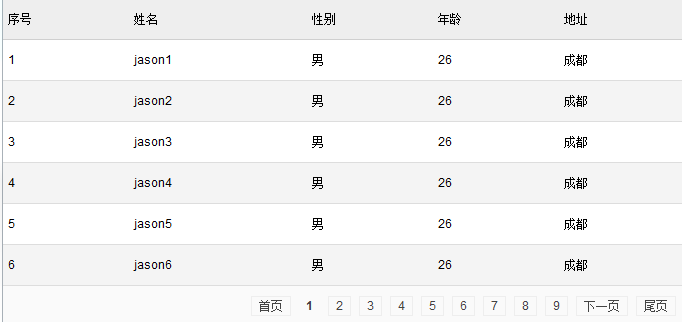
效果图
css样式
<style>

    html,body{margin: 0;padding:0}

        a:focus {outline: none;}

            /* 通用表格显示 */

        table, th, td {font: 12px Arial,Helvetica,sans-serif,'宋体';margin: 0;padding: 0}

        table{border-spacing: 0;border-collapse: collapse;}

        .datatable {width: 100%;border-style: none;background-color: #fff;margin-bottom: 20px;text-align: left;}

        .datatable th, .datatable td { padding: 5px;line-height: 30px}

        .datatable thead th {background-color: #eee;margin: 0;text-align: left;border-top: 1px solid #cfcfcf;border-bottom: 1px solid #cfcfcf;font-weight: 500}

        .datatable tbody td {background-color: #fff;border-bottom: 1px solid #ddd;table-layout:fixed;word-break:break-all;font-weight: 400}

        .datatable tbody tr.evenrow td {background-color: #f4f4f4;}

        .datatable tfoot td {background-color: #fafafa;text-align: right;border-bottom: 1px solid #cfcfcf;}

            /*表格分页列表*/

        .datatable td.paging a {border: 1px solid #eee; color: #444; margin: 4px; padding: 2px 7px; text-decoration: none; text-align:center;}

            /*表格分页当前页*/

        .datatable td.paging a.current {background: #eee; border: 1px solid #CFCFCF; color: #444; font-weight: bold;}

        .datatable td.paging a.current{border: 0;cursor: auto;background:none}

</style>
html结构
<table id="cs_table" class="datatable"></table>
javascript封装代码
<script src="http://libs.baidu.com/jquery/1.9.0/jquery.js"></script>

<script>

    /**

     * 抽象化表格

     */

    function abstractTable(){

        // ---------内容属性

        this.id = null;         // 每个表格都有唯一的一个id

        this.tableobj = null;  //表格对象

        this.rowNum = 0;       //行数

        this.colNum = 0;      //列数

        this.header = [];     //表头数据

        this.content = [];   //body数据

        // ----------提供外部使用获得表格内部数据

        this.currentClickRowID = 0;   //当前点击的行数据

        // --- 通过表头来获得这张表的列数

        this.getColNum = function(){

            this.colNum = this.header.length;

            return   this.colNum;

        }

        // -----------  表格自我构建行为

        this.clearTable = function(){};

        this.showHeader = function(){};

        this.showContent = function(begin,end){};

        this.showFoot = function(){};

        // --------- 分页功能属性

        this.allDataNum = 0;  // 总数据条数

        this.displayNum = 10; // 每页显示条数

        this.maxPageNum = 0;  // 最大页码值

        this.currentPageNum =1;// 当前页码值

        //tfoot分页组

        this.groupDataNum = 10;  //每组显示10页

        this.groupNum = 1;       //当前组

        // -------- 分页功能行为

        this.paginationFromBeginToEnd = function(begin,end){}

        this.first =  function(){}//首页

        this.last = function(){}//最后一页

        this.prev = function(){}//上一页

        this.next = function(){}//下一页

        this.goto = function(){} //跳到某页

        // ----------- 表格初始化

        this.init = function(begin,end){}

    }

    /*

     表格对象模板

     */

    function tableTemplet(table_id){

        abstractTable.call(this);

        this.id = table_id;

    }

    /**

     * 表格对象

     * @param options

     */

    function table(options){

        if(!options){return;}

        if(!$.isPlainObject(options)){return;}

        tableTemplet.call(this,options.tableId);

        //得到表格对象

        this.tableobj = $("#"+this.id);

        //清空表格内容

        this.clearTable = function(){

            this.tableobj.html(" ");

        }

        // 实现分页行为

        this.paginationFromBeginToEnd= function(x,y){

            this.maxPageNum = Math.ceil(this.allDataNum/this.displayNum);

            var arrPage = [];

            for(var i= x;i<y;i++){

                arrPage.push(this.content[i]);

            }

            return arrPage;

        }

        this.showHeader = function(){

            if(this.header != null){

               var  $thead = $("<thead>"),

                    $tr = $("<tr>"),

                    $th;

                for(var i=0;i<this.colNum;i++){

                    $th = $("<th>").html(this.header[i]);

                    $th.appendTo($tr);

                }

                $tr.appendTo($thead);

                $thead.appendTo(this.tableobj)

            }

        }

        //初始化tbody

        this.showContent = function(begin,end){

            if(this.content != null){

                var $tbody = $("<tbody>"),

                    $tr,

                    $td;

                var tempDaTa = this.paginationFromBeginToEnd(begin,end),

                    len = tempDaTa.length;

                // 循环创建行

                for(var i=0;i<len;i++){

                    $tr = $("<tr>").appendTo($tbody);

                    if(i%2==1){

                        $tr.addClass("evenrow");

                    }

                    // 循环创建列  取得对象中的键

                    for(var key in tempDaTa[i]){

                        $td = $("<td>").html(tempDaTa[i][key]).appendTo($tr);

                    }

                }

                this.tableobj.append($tbody);

            }

        }

        //初始化tfoot

        this.showFoot = function(){

           var $tfoot = $("<tfoot>"),

               $tr = $("<tr>"),

               $td = $("<td>").attr("colspan",this.colNum).addClass("paging");

               $tr.append($td);

               $tfoot.append($tr);

               this.tableobj.append($tfoot);

               this.pagination($td);

        }

        //表格分页

        this.pagination = function(tdCell){

            var $td= typeof(tdCell) == "object" ? tdCell : $("#" + tdCell);

            //首页

            var oA = $("<a/>");

            oA.attr("href","#1");

            oA.html("首页");

            $td.append(oA);

            //上一页

            if(this.currentPageNum>=2){

                var oA = $("<a/>");

                oA.attr("href","#"+(this.currentPageNum - 1));

                oA.html("上一页");

                $td.append(oA);

            }

            //普通显示格式

            if(this.maxPageNum <= this.groupDataNum){  // 10页以内 为一组

                for(var i = 1;i <= this.maxPageNum ;i++){

                    var oA = $("<a/>");

                    oA.attr("href","#"+i);

                    if(this.currentPageNum == i){

                        oA.attr("class","current");

                    }

                    oA.html(i);

                    $td.append(oA);

                }

            }else{//超过10页以后(也就是第一组后)

                 if(this.groupNum<=1){//第一组显示

                     for(var j = 1;j <= this.groupDataNum ;j++){

                         var oA = $("<a/>");

                         oA.attr("href","#"+j);

                         if(this.currentPageNum == j){

                             oA.attr("class","current");

                         }

                         oA.html(j);

                         $td.append(oA);

                     }

                 }else{//第二组后面的显示

                     var begin = (this.groupDataNum*(this.groupNum-1))+ 1,

                          end ,

                         maxGroupNum = Math.ceil(this.maxPageNum/this.groupDataNum);

                     if(this.maxPageNum%this.groupDataNum!=0&&this.groupNum==maxGroupNum){

                         end = this.groupDataNum*(this.groupNum-1)+this.maxPageNum%this.groupDataNum

                     }else{

                         end = this.groupDataNum*(this.groupNum);

                     }

                     for(var j = begin;j <= end ;j++){

                         var oA = $("<a/>");

                         oA.attr("href","#"+j);

                         if(this.currentPageNum == j){

                             oA.attr("class","current");

                         }

                         oA.html(j);

                         $td.append(oA);

                     }

                 }

            }

            //下一页

            if( (this.maxPageNum - this.currentPageNum) >= 1 ){

                var oA = $("<a/>");

                oA.attr("href","#" + (this.currentPageNum + 1));

                oA.html("下一页");

                $td.append(oA);

            }

            //尾页

            var oA = $("<a/>");

            oA.attr("href","#" + this.maxPageNum);

            oA.html("尾页");

            $td.append(oA);

            var page_a = $td.find('a');

            var tempThis = this;

            page_a.unbind("click").bind("click",function(){

                var nowNum =  parseInt($(this).attr('href').substring(1));

                if(nowNum>tempThis.currentPageNum){//下一组

                    if(tempThis.currentPageNum%tempThis.groupDataNum==0){

                        tempThis.groupNum += 1;

                        var maxGroupNum = Math.ceil(tempThis.maxPageNum/tempThis.groupDataNum);

                        if(tempThis.groupNum>=maxGroupNum){

                            tempThis.groupNum = maxGroupNum;

                        }

                    }

                }

                if(nowNum<tempThis.currentPageNum){//上一组

                    if((tempThis.currentPageNum-1)%tempThis.groupDataNum==0){

                        tempThis.groupNum -= 1;

                        if(tempThis.groupNum<=1){

                            tempThis.groupNum = 1;

                        }

                    }

                }

                if(nowNum==tempThis.maxPageNum){//直接点击尾页

                    var maxGroupNum = Math.ceil(tempThis.maxPageNum/tempThis.groupDataNum);

                    tempThis.groupNum = maxGroupNum;

                }

                if(nowNum==1){

                    var maxGroupNum = Math.ceil(tempThis.maxPageNum/tempThis.groupDataNum);

                    tempThis.groupNum = 1;

                }

                tempThis.currentPageNum = nowNum;

                tempThis.init((tempThis.currentPageNum-1)*tempThis.displayNum,

                    tempThis.currentPageNum*tempThis.displayNum);

                return false;

            });

        }

        //初始化

        this.init = function(begin,end){

            this.header = options.headers;

            this.colNum = this.header.length;

            this.content = options.data;

            this.allDataNum = this.content.length;

            if(options.displayNum){

                this.displayNum = options.displayNum;

            }

            if(options.groupDataNum){

                this.groupDataNum = options.groupDataNum;

            }

            this.clearTable();

            this.showHeader();

            this.showContent(begin,end);

            this.showFoot();

        }

        this.init(0,options.displayNum);

    }

</script>
调用方式
<script type="text/javascript">

    var data = [];

    for(var i=0;i<334;i++){

        data[i] = {id:i+1,name:"jason"+(i+1),gender:"男",age:26,address:"成都"};

    }

    var cs = new table({

        "tableId":"cs_table",    //必须

        "headers":["序号","姓名","性别","年龄","地址"],   //必须

        "data":data,        //必须

        "displayNum": 6,    //必须   默认 10

       "groupDataNum":9  //可选    默认 10

});

</script>
【转】基于jquery的无刷新表格分页的更多相关文章
- jQuery.pager无刷新分页
刚刚学习前端的时候,需要一个无刷新的分页功能,找了一个不错的,大家也有很大分享,在这里写一个自己的部分代码,前后端都有,需要的小伙伴可以参考一下,代码不是完整的. 直接上伪代码<样式代码省略,部 ...
- 基于Jquery+Ajax+Json+存储过程 高效分页
在做后台开发中,都会有大量的列表展示,下面给大家给大家分享一套基于Jquery+Ajax+Json+存储过程高效分页列表,只需要传递几个参数即可.当然代码也有改进的地方,如果大家有更好的方法,愿留下宝 ...
- angular -- 无刷新做分页
无刷新做分页参考地址: http://www.jq22.com/demo/angular201707111100/ 示例代码: <!DOCTYPE html> <html lang= ...
- 基于JQuery可拖动列表格插件DataTables的踩坑记
前言 最近项目中在使用能够拖动列调整列位置顺序的表格插件---DataTables,这也是目前我找到的唯一一种存在有这种功能的插件. 在查找使用方法的过程中发现可用案例并不多,且大多言语不详.本文将全 ...
- JQUERY AJAX无刷新异步上传文件
AJAX无刷新上传文件并显示 http://blog.csdn.net/gao3705512/article/details/9330637?utm_source=tuicool jQuery For ...
- JQuery实现无刷新下拉加载图片
最近做的一个项目需要做页面无刷新下拉加载图片,调研了一番,大多都采用检测滚动条达到底部,然后利用ajax加载下一页数据对页面数据进行添加,根据这一逻辑,自己写了一个,具体代码如下: JQu ...
- jQuery Ajax无刷新操作
下面是“无刷新登录”的例子,采用Ashx+jQuery Ajax实现. //后台实例代码 ashx文件(可替换为从数据库中读取) public void ProcessRequest(HttpCont ...
- jQuery实现无刷新切换主题皮肤功能
主题皮肤切换功能在很多网站和系统中应用,用户可以根据此功能设置自己喜欢的主题颜色风格,增强了用户体验.本文将围绕如何使用jQuery实现点击无刷新切换主题皮肤功能. 查看演示DEMO:https:// ...
- jquery.axios无刷新机制删除
思路:无刷新机制就是不用的刷新动作 ,用前端html语法删除和后端的数据库删,同时删除达到效果 除操作,来实现无刷洗的方法
随机推荐
- Android URI简介
就Android平台而言,URI主要分三个部分:scheme, authority and path.其中authority又分为host和port.格式如下:scheme://host:port/p ...
- LINUX下中文语言包的安装(转)
在安装盘上已经有各种语言包了,我们只需要找到他们,并安装就可以了.中文的是fonts-chinese-3.02-9.6.el5.noarch.rpmfonts-ISO8859-2-75dpi-1.0- ...
- -_-#【Canvas】转成黑白
function drawInBlackAndWhite() { var imagedata = context.getImageData(0, 0, canvas.width, canvas.hei ...
- Sum Root to Leaf Numbers——LeetCode
Given a binary tree containing digits from 0-9 only, each root-to-leaf path could represent a number ...
- J - Borg Maze - poj 3026(BFS+prim)
在一个迷宫里面需要把一些字母.也就是 ‘A’ 和 ‘B’连接起来,求出来最短的连接方式需要多长,也就是最小生成树,地图需要预处理一下,用BFS先求出来两点间的最短距离, *************** ...
- python_安装工具easy_install和pip
前言 用python就必须知道easy_install和pip这两个东西啦 easy_insall提供了在线一键安装模块或包的方便方式,而pip是easy_install的改进版,提供更好的提示信息, ...
- 1st day
学习配置环境,听的一脸懵逼,不过还好装好了,哈哈哈... <?php /*写一个函数,该函数可以将给定的任意个数的参数以指定的字符串串接起来成为一个长的字符串.该函数带2个或2个以上参数,其中第 ...
- 写自己的WPF样式 - 窗体
初试WPF样式,感觉还不错.上篇写完了按钮的样式下面写窗体,废话不多说直接上代码: (1)定义一个窗体样式"MyWpfWindow" <Style x:Key="M ...
- android获得屏幕高度和宽度
获取屏幕的宽度与高度有以下几种方法: .WindowManager wm = (WindowManager) getContext() .getSystemSe ...
- 【iOS】Resumable Doanloads(断点下载)
这里我们只讨论iOS平台下的通用app,我们可以自己写代码来实现resume downloads,解释如下. resume一个HTTP下载不难,但必须要理解一些关键的HTTP概念: entity ta ...