
【转】基于jquery的无刷新表格分页
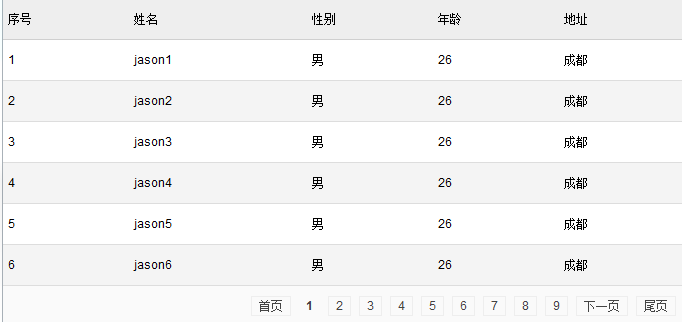
效果图
css样式
<style>

    html,body{margin: 0;padding:0}

        a:focus {outline: none;}

            /* 通用表格显示 */

        table, th, td {font: 12px Arial,Helvetica,sans-serif,'宋体';margin: 0;padding: 0}

        table{border-spacing: 0;border-collapse: collapse;}

        .datatable {width: 100%;border-style: none;background-color: #fff;margin-bottom: 20px;text-align: left;}

        .datatable th, .datatable td { padding: 5px;line-height: 30px}

        .datatable thead th {background-color: #eee;margin: 0;text-align: left;border-top: 1px solid #cfcfcf;border-bottom: 1px solid #cfcfcf;font-weight: 500}

        .datatable tbody td {background-color: #fff;border-bottom: 1px solid #ddd;table-layout:fixed;word-break:break-all;font-weight: 400}

        .datatable tbody tr.evenrow td {background-color: #f4f4f4;}

        .datatable tfoot td {background-color: #fafafa;text-align: right;border-bottom: 1px solid #cfcfcf;}

            /*表格分页列表*/

        .datatable td.paging a {border: 1px solid #eee; color: #444; margin: 4px; padding: 2px 7px; text-decoration: none; text-align:center;}

            /*表格分页当前页*/

        .datatable td.paging a.current {background: #eee; border: 1px solid #CFCFCF; color: #444; font-weight: bold;}

        .datatable td.paging a.current{border: 0;cursor: auto;background:none}

</style>
html结构
<table id="cs_table" class="datatable"></table>
javascript封装代码
<script src="http://libs.baidu.com/jquery/1.9.0/jquery.js"></script>

<script>

    /**

     * 抽象化表格

     */

    function abstractTable(){

        // ---------内容属性

        this.id = null;         // 每个表格都有唯一的一个id

        this.tableobj = null;  //表格对象

        this.rowNum = 0;       //行数

        this.colNum = 0;      //列数

        this.header = [];     //表头数据

        this.content = [];   //body数据

        // ----------提供外部使用获得表格内部数据

        this.currentClickRowID = 0;   //当前点击的行数据

        // --- 通过表头来获得这张表的列数

        this.getColNum = function(){

            this.colNum = this.header.length;

            return   this.colNum;

        }

        // -----------  表格自我构建行为

        this.clearTable = function(){};

        this.showHeader = function(){};

        this.showContent = function(begin,end){};

        this.showFoot = function(){};

        // --------- 分页功能属性

        this.allDataNum = 0;  // 总数据条数

        this.displayNum = 10; // 每页显示条数

        this.maxPageNum = 0;  // 最大页码值

        this.currentPageNum =1;// 当前页码值

        //tfoot分页组

        this.groupDataNum = 10;  //每组显示10页

        this.groupNum = 1;       //当前组

        // -------- 分页功能行为

        this.paginationFromBeginToEnd = function(begin,end){}

        this.first =  function(){}//首页

        this.last = function(){}//最后一页

        this.prev = function(){}//上一页

        this.next = function(){}//下一页

        this.goto = function(){} //跳到某页

        // ----------- 表格初始化

        this.init = function(begin,end){}

    }

    /*

     表格对象模板

     */

    function tableTemplet(table_id){

        abstractTable.call(this);

        this.id = table_id;

    }

    /**

     * 表格对象

     * @param options

     */

    function table(options){

        if(!options){return;}

        if(!$.isPlainObject(options)){return;}

        tableTemplet.call(this,options.tableId);

        //得到表格对象

        this.tableobj = $("#"+this.id);

        //清空表格内容

        this.clearTable = function(){

            this.tableobj.html(" ");

        }

        // 实现分页行为

        this.paginationFromBeginToEnd= function(x,y){

            this.maxPageNum = Math.ceil(this.allDataNum/this.displayNum);

            var arrPage = [];

            for(var i= x;i<y;i++){

                arrPage.push(this.content[i]);

            }

            return arrPage;

        }

        this.showHeader = function(){

            if(this.header != null){

               var  $thead = $("<thead>"),

                    $tr = $("<tr>"),

                    $th;

                for(var i=0;i<this.colNum;i++){

                    $th = $("<th>").html(this.header[i]);

                    $th.appendTo($tr);

                }

                $tr.appendTo($thead);

                $thead.appendTo(this.tableobj)

            }

        }

        //初始化tbody

        this.showContent = function(begin,end){

            if(this.content != null){

                var $tbody = $("<tbody>"),

                    $tr,

                    $td;

                var tempDaTa = this.paginationFromBeginToEnd(begin,end),

                    len = tempDaTa.length;

                // 循环创建行

                for(var i=0;i<len;i++){

                    $tr = $("<tr>").appendTo($tbody);

                    if(i%2==1){

                        $tr.addClass("evenrow");

                    }

                    // 循环创建列  取得对象中的键

                    for(var key in tempDaTa[i]){

                        $td = $("<td>").html(tempDaTa[i][key]).appendTo($tr);

                    }

                }

                this.tableobj.append($tbody);

            }

        }

        //初始化tfoot

        this.showFoot = function(){

           var $tfoot = $("<tfoot>"),

               $tr = $("<tr>"),

               $td = $("<td>").attr("colspan",this.colNum).addClass("paging");

               $tr.append($td);

               $tfoot.append($tr);

               this.tableobj.append($tfoot);

               this.pagination($td);

        }

        //表格分页

        this.pagination = function(tdCell){

            var $td= typeof(tdCell) == "object" ? tdCell : $("#" + tdCell);

            //首页

            var oA = $("<a/>");

            oA.attr("href","#1");

            oA.html("首页");

            $td.append(oA);

            //上一页

            if(this.currentPageNum>=2){

                var oA = $("<a/>");

                oA.attr("href","#"+(this.currentPageNum - 1));

                oA.html("上一页");

                $td.append(oA);

            }

            //普通显示格式

            if(this.maxPageNum <= this.groupDataNum){  // 10页以内 为一组

                for(var i = 1;i <= this.maxPageNum ;i++){

                    var oA = $("<a/>");

                    oA.attr("href","#"+i);

                    if(this.currentPageNum == i){

                        oA.attr("class","current");

                    }

                    oA.html(i);

                    $td.append(oA);

                }

            }else{//超过10页以后(也就是第一组后)

                 if(this.groupNum<=1){//第一组显示

                     for(var j = 1;j <= this.groupDataNum ;j++){

                         var oA = $("<a/>");

                         oA.attr("href","#"+j);

                         if(this.currentPageNum == j){

                             oA.attr("class","current");

                         }

                         oA.html(j);

                         $td.append(oA);

                     }

                 }else{//第二组后面的显示

                     var begin = (this.groupDataNum*(this.groupNum-1))+ 1,

                          end ,

                         maxGroupNum = Math.ceil(this.maxPageNum/this.groupDataNum);

                     if(this.maxPageNum%this.groupDataNum!=0&&this.groupNum==maxGroupNum){

                         end = this.groupDataNum*(this.groupNum-1)+this.maxPageNum%this.groupDataNum

                     }else{

                         end = this.groupDataNum*(this.groupNum);

                     }

                     for(var j = begin;j <= end ;j++){

                         var oA = $("<a/>");

                         oA.attr("href","#"+j);

                         if(this.currentPageNum == j){

                             oA.attr("class","current");

                         }

                         oA.html(j);

                         $td.append(oA);

                     }

                 }

            }

            //下一页

            if( (this.maxPageNum - this.currentPageNum) >= 1 ){

                var oA = $("<a/>");

                oA.attr("href","#" + (this.currentPageNum + 1));

                oA.html("下一页");

                $td.append(oA);

            }

            //尾页

            var oA = $("<a/>");

            oA.attr("href","#" + this.maxPageNum);

            oA.html("尾页");

            $td.append(oA);

            var page_a = $td.find('a');

            var tempThis = this;

            page_a.unbind("click").bind("click",function(){

                var nowNum =  parseInt($(this).attr('href').substring(1));

                if(nowNum>tempThis.currentPageNum){//下一组

                    if(tempThis.currentPageNum%tempThis.groupDataNum==0){

                        tempThis.groupNum += 1;

                        var maxGroupNum = Math.ceil(tempThis.maxPageNum/tempThis.groupDataNum);

                        if(tempThis.groupNum>=maxGroupNum){

                            tempThis.groupNum = maxGroupNum;

                        }

                    }

                }

                if(nowNum<tempThis.currentPageNum){//上一组

                    if((tempThis.currentPageNum-1)%tempThis.groupDataNum==0){

                        tempThis.groupNum -= 1;

                        if(tempThis.groupNum<=1){

                            tempThis.groupNum = 1;

                        }

                    }

                }

                if(nowNum==tempThis.maxPageNum){//直接点击尾页

                    var maxGroupNum = Math.ceil(tempThis.maxPageNum/tempThis.groupDataNum);

                    tempThis.groupNum = maxGroupNum;

                }

                if(nowNum==1){

                    var maxGroupNum = Math.ceil(tempThis.maxPageNum/tempThis.groupDataNum);

                    tempThis.groupNum = 1;

                }

                tempThis.currentPageNum = nowNum;

                tempThis.init((tempThis.currentPageNum-1)*tempThis.displayNum,

                    tempThis.currentPageNum*tempThis.displayNum);

                return false;

            });

        }

        //初始化

        this.init = function(begin,end){

            this.header = options.headers;

            this.colNum = this.header.length;

            this.content = options.data;

            this.allDataNum = this.content.length;

            if(options.displayNum){

                this.displayNum = options.displayNum;

            }

            if(options.groupDataNum){

                this.groupDataNum = options.groupDataNum;

            }

            this.clearTable();

            this.showHeader();

            this.showContent(begin,end);

            this.showFoot();

        }

        this.init(0,options.displayNum);

    }

</script>
调用方式
<script type="text/javascript">

    var data = [];

    for(var i=0;i<334;i++){

        data[i] = {id:i+1,name:"jason"+(i+1),gender:"男",age:26,address:"成都"};

    }

    var cs = new table({

        "tableId":"cs_table",    //必须

        "headers":["序号","姓名","性别","年龄","地址"],   //必须

        "data":data,        //必须

        "displayNum": 6,    //必须   默认 10

       "groupDataNum":9  //可选    默认 10

});

</script>
【转】基于jquery的无刷新表格分页的更多相关文章
- jQuery.pager无刷新分页
刚刚学习前端的时候,需要一个无刷新的分页功能,找了一个不错的,大家也有很大分享,在这里写一个自己的部分代码,前后端都有,需要的小伙伴可以参考一下,代码不是完整的. 直接上伪代码<样式代码省略,部 ...
- 基于Jquery+Ajax+Json+存储过程 高效分页
在做后台开发中,都会有大量的列表展示,下面给大家给大家分享一套基于Jquery+Ajax+Json+存储过程高效分页列表,只需要传递几个参数即可.当然代码也有改进的地方,如果大家有更好的方法,愿留下宝 ...
- angular -- 无刷新做分页
无刷新做分页参考地址: http://www.jq22.com/demo/angular201707111100/ 示例代码: <!DOCTYPE html> <html lang= ...
- 基于JQuery可拖动列表格插件DataTables的踩坑记
前言 最近项目中在使用能够拖动列调整列位置顺序的表格插件---DataTables,这也是目前我找到的唯一一种存在有这种功能的插件. 在查找使用方法的过程中发现可用案例并不多,且大多言语不详.本文将全 ...
- JQUERY AJAX无刷新异步上传文件
AJAX无刷新上传文件并显示 http://blog.csdn.net/gao3705512/article/details/9330637?utm_source=tuicool jQuery For ...
- JQuery实现无刷新下拉加载图片
最近做的一个项目需要做页面无刷新下拉加载图片,调研了一番,大多都采用检测滚动条达到底部,然后利用ajax加载下一页数据对页面数据进行添加,根据这一逻辑,自己写了一个,具体代码如下: JQu ...
- jQuery Ajax无刷新操作
下面是“无刷新登录”的例子,采用Ashx+jQuery Ajax实现. //后台实例代码 ashx文件(可替换为从数据库中读取) public void ProcessRequest(HttpCont ...
- jQuery实现无刷新切换主题皮肤功能
主题皮肤切换功能在很多网站和系统中应用,用户可以根据此功能设置自己喜欢的主题颜色风格,增强了用户体验.本文将围绕如何使用jQuery实现点击无刷新切换主题皮肤功能. 查看演示DEMO:https:// ...
- jquery.axios无刷新机制删除
思路:无刷新机制就是不用的刷新动作 ,用前端html语法删除和后端的数据库删,同时删除达到效果 除操作,来实现无刷洗的方法
随机推荐
- BAT带队烧钱圈地华为们猛追云计算
在和一位创业者交流时,他说现在创业者想从市场脱颖而出太难了,且不论创业本身的不易,更多时候是想做的事情都被BAT广撒网覆盖了. 现实也正是如此,包括影业.在线音乐.车联网等领域,BAT都已涉足.如今, ...
- Win7 下用 VS2015 编译最新 openssl(1.0.2j)包含32、64位debug和release版本的dll、lib(8个版本)
Win7 64位系统下通过VS2015编译好的最新的OpenSSL(1.0.2j)所有八个版本的链接库, 包含以下八个版本: 1.32位.debug版LIB: 2.32位.release版LIB: 3 ...
- BZOJ 1021 [SHOI2008]Debt 循环的债务
1021: [SHOI2008]Debt 循环的债务 Time Limit: 1 Sec Memory Limit: 162 MBSubmit: 694 Solved: 356[Submit][S ...
- 腾讯CDC谈扁平化设计
扁平化设计无疑是当前讨论最多,最火的设计形式,自ios7面世以来更是将扁平化设计的讨论推向风口浪尖. 在这里我不想分析拟物设计和扁平化设计的优劣,更不想说谁更好!在形式服从内容的今天,我只能说哪种设计 ...
- [Design Pattern] Proxy Pattern 简单案例
Proxy Pattern, 即代理模式,用一个类代表另一个类的功能,用于隐藏.解耦真正提供功能的类,属于结构类的设计模式. 下面是 代理模式的一个简单案例. Image 定义接口,RealImage ...
- mybatis3-generator-plugin插件地址
http://repo1.maven.org/maven2/com/github/oceanc/mybatis3-generator-plugin/0.4.0/
- python:numpy(文件存取)
NumPy提供了多种存取数组内容的文件操作函数.保存数组数据的文件可以是二进制格式或者文本格式.二进制格式的文件又分为NumPy专用的格式化二进制类型和无格式类型. 一,tofile()和from ...
- linux系统目录介绍
目录/文件 用途 来源 / /处于Linux文件系统树形结构的最顶端,它是Linux文件系统的入口,所有的目录.文件.设备都在/之下. - /bin 该目录存放着系统最常用的最重要的命令,相当于DOS ...
- cmd 命令设置UTF8
使用cmd 执行java -jar executable.jar 测试包时,cmd显示中文正常,但是日志文件中中文显示不正常,也导致执行时不能正常做些检测和验证 这是由于cmd命令窗口的编码格式问题 ...
- C# 读取 Access 数据库表的例子
using System;using System.Data;using System.Data.OleDb;using System.Collections.Generic;using System ...