
搭建HWI(HiveWebInterface)步骤总结
众所周知,Hive有三种使用方式:CLI、HWI浏览器、Thrift客户端。安装配置完Hive后无需进行额外操作即可使用CLI。但是HWI则需要单独搭建。本文主要记录我自己搭建HWI的过程。
说明:本文主要介绍HWI的安装,后续会完成下面两篇博文:
- HWI的介绍
- HWI的使用
本博主主要是记录自己的学习内容,有哪些理解不到位的地方还请各位读者提出宝贵意见。
简单查看hwi使用
在命令行输入:
hive --service hwi --help
输出内容如下,给出了HWI的使用方法。
Usage ANT_LIB=XXXX hive --service hwi
在命令行输入
hive --service hwi
报错,报错信息如下:
cannot access /home/linux/application/hive2.1.0/lib/hive-hwi-*.war: No such file or directory
报错原因:lib下面没有war包,查找各种资料都提示需要从官网下载hive源代码src文件然后打包web文件夹的war文件。
搭建HWI
打包war文件
- 下载src文件地址:http://apache.fayea.com/hive/hive-2.1.0/ PS:选择自己的版本
- 解压src文件:tar -xzf apache-hive-2.1.0-src.tar.gz
- 进入web文件夹:cd apache-hive-2.1.0-src/hwi/web
- 打包war文件:jar -xcf hive-hwi-2.1.0.war *
- 把war复制到${HIVE_HOME}/bin目录:cp hive-hwi-2.1.0.war ${HIVE_HOME}/bin/
- 根据官网配置hive hwi,步骤如下:
- cd ${HIVE_HOME}/conf
- vim hive-site.xml
- 添加的配置信息如下:
<property>

<name>hive.hwi.listen.host</name>

  <value>0.0.0.0</value>

  <description>This is the host address the Hive Web Interface will listen on</description>

</property>

<property>

  <name>hive.hwi.listen.port</name>

  <value>9999</value>

  <description>This is the port the Hive Web Interface will listen on</description>

</property>

<property>

  <name>hive.hwi.war.file</name>

  <value>${HIVE_HOME}/lib/hive-hwi-<version>.war</value>

  <description>This is the WAR file with the jsp content forHive Web Interface</description>

</property>
安装ANT
HWI需要用Apache的ANT来编译,因此需要安装ANT。
Apache Ant is a Java library and command-line tool that help building software.
ANT的安装及配置步骤
- 下载ANT下载地址:https://www.apache.org/dist/ant/binaries/
- 解压:unzip apache-ant-1.9.7-bin.zip
- 重命名:mv apache-ant-1.9.7 ant1.9.7 PS:该步骤可以省略,重命名只是为了使用简短方便
- 建立软连接:ln -s ant1.9.7 ant PS:该步是为了方便在不同版本之间切换测试方便
- 配置环境变量:vim /etc/profile
export ANT_HOME=/opt/ant
export PATH=$PATH:$ANT_HOME/bin - 使profile生效:source /etc/profile
验证ant是否安装成功:ant -version
尝试启动HWI
在命令行输入下面的命令,目的是为了启动相关服务。
hive --service hwi
在浏览器中输入 localhost:9999/hwi。一直刷不出网页,我又把配置文件中hive.hwi.war.file的Value值改为:lib/hive-hwi-2.1.0.war (使用相对路径),然后刷新页面又报错如下:
Unable to find a javac compiler;

com.sun.tools.javac.Main is not on the classpath.

Perhaps JAVA_HOME does not point to the JDK
出错原因:${HIVE_HOME}/lib下没有tools.jar所致。把JAVA安装目录下的tools.jar包复制到${HIVE_HOME}/lib,命令如下:
cp ${JAVA_HOME}/lib/tools.jar ${HIVE_HOME}/lib
再次刷新localhost:9999/hwi又如下错误:
The following error occurred while executing this line:

jar:file:/home/linux/application/hive2.1.0/lib/ant-1.9.1.jar!/org/apache/tools/ant/antlib.xml:37: Could not create task or type of type: componentdef.

Ant could not find the task or a class this task relies upon.

This is common and has a number of causes; the usual

solutions are to read the manual pages then download and

install needed JAR files, or fix the build file:

- You have misspelt 'componentdef'.

Fix: check your spelling.

- The task needs an external JAR file to execute

and this is not found at the right place in the classpath.

Fix: check the documentation for dependencies.

Fix: declare the task.

- The task is an Ant optional task and the JAR file and/or libraries

implementing the functionality were not found at the time you

yourself built your installation of Ant from the Ant sources.

Fix: Look in the ANT_HOME/lib for the 'ant-' JAR corresponding to the

task and make sure it contains more than merely a META-INF/MANIFEST.MF.

If all it contains is the manifest, then rebuild Ant with the needed

libraries present in ${ant.home}/lib/optional/ , or alternatively,

download a pre-built release version from apache.org

- The build file was written for a later version of Ant

Fix: upgrade to at least the latest release version of Ant

- The task is not an Ant core or optional task

and needs to be declared using <taskdef>.

- You are attempting to use a task defined using

<presetdef> or <macrodef> but have spelt wrong or not

defined it at the point of use

Remember that for JAR files to be visible to Ant tasks implemented

in ANT_HOME/lib, the files must be in the same directory or on the

classpath

Please neither file bug reports on this problem, nor email the

Ant mailing lists, until all of these causes have been explored,

as this is not an Ant bug.
根据错误信息,${HIVE_HOME}/lib下的ant.jar版本为1.9.1,但是我装的ant版本为1.9.7,因此该错误是因为版本不一致导致的。因此,需要把${ANT_HOME}/lib下的ant.jar包copy到${HIVE_HOME}/lib下,并修改权限为777。使用的命令如下:
cp ${ANT_HOME}/lib/ant.jar  ${HIVE_HOME}/lib/ant-1.9.7.jar

cd ${HIVE_HOME}/lib

chmod 777 ant-1.9.7.jar
再次启动HWI
此时可以把原服务关掉,重新启动服务,命令为:hive --service hwi,并在浏览器中输入:localhost:9999/hwi,多刷新几次即可。说明:localhost可能是你的主机名或IP。
HWI的界面如下:
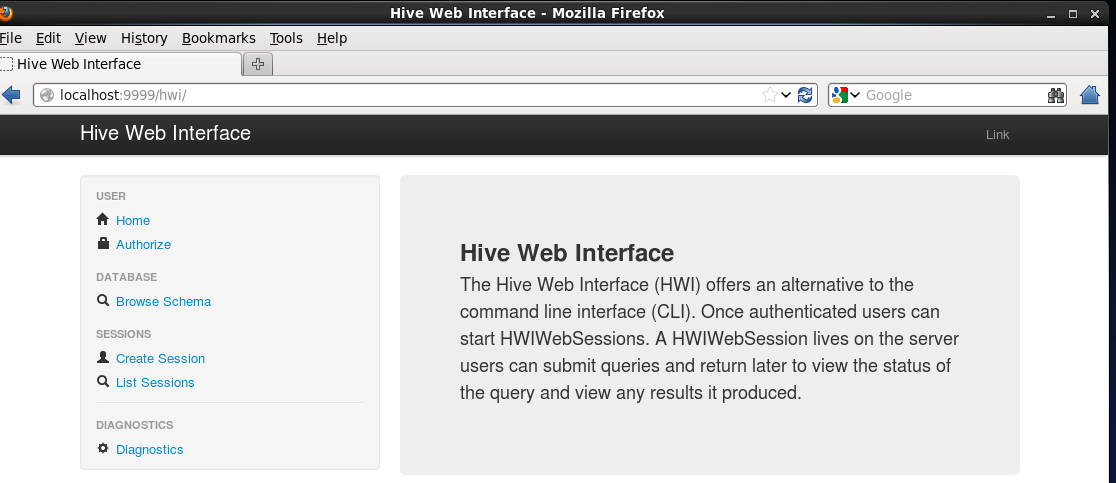
参考官网:https://cwiki.apache.org/confluence/display/Hive/HiveWebInterface
搭建HWI(HiveWebInterface)步骤总结的更多相关文章
- ssh框架搭建的基本步骤(以及各部分作用)
ssh框架搭建的基本步骤(以及各部分作用) 一.首先,明确spring,struts,hibernate在环境中各自的作用. struts: 用来响应用户的action,对应到相应的类进行 ...
- 搭建ssm的步骤
搭建SSM的步骤 ----------------------------- 1.创建web工程 2.把SSM做需要的所有jar导入工程中 3.web.xml 1.Springmvc的前端控制器,如果 ...
- 测试那些事儿—Linux搭建环境基础步骤
Linux搭建环境基础步骤 准备工具:SecureCRT工具(Linux工具,连接服务器)FTP传输工具(上传文件到服务器)MySQL连接工具 安装包(以下文件均为压缩包rpm格式和tar.gz):J ...
- [炼丹术]使用Pytorch搭建模型的步骤及教程
使用Pytorch搭建模型的步骤及教程 我们知道,模型有一个特定的生命周期,了解这个为数据集建模和理解 PyTorch API 提供了指导方向.我们可以根据生命周期的每一个步骤进行设计和优化,同时更加 ...
- 搭建SSH详细步骤及相关说明
因为手里已有相关jar,为方便我搭建的是:Struts2.0+Hibernate3.3+Spring3.0,数据库:MySQL 如果想搭建最新的,在官网上下载最新jar即可. 这里会对比MyEclip ...
- CentOS服务器上搭建Gitlab安装步骤、中文汉化详细步骤、日常管理以及异常故障排查
一, 服务器快速搭建gitlab方法 可以参考gitlab中文社区 的教程centos7安装gitlab:https://www.gitlab.cc/downloads/#centos7centos6 ...
- mybatis环境搭建和开发步骤
环境搭建 第一步:导入jar包 第二步:导入核心配置文件(mybatis-config.xml) <?xml version="1.0" encoding="UTF ...
- vue框架搭建的详细步骤(一)
在这里我们先快速的搭建一个vue的脚手架: (1).在安装vue的环境之前,安装NodeJS环境是必须的.可以使用node -v指令检查,需要保证安装了4.0版本以上的nodeJS环境. 没有安装的话 ...
- 基于微软hyper-v虚拟化服务器搭建方法和步骤整理
基于Microsoft基础设施私有云计算搭建 摘要:私有云是指组织机构建设的专供自己使用的云平台,它所提供的服务不是供他人使用,而是供自己的内部人员或分支机构使用,不同于公有云,私有云部署在企业内部网 ...
随机推荐
- zookeeper集群一次性启动
编写shell脚本 新建文本,命名为start-zookeeper.sh #!/bin/sh echo "start zkServer…" for i in master work ...
- jquery validate 配合ligerui使用
这样当单击登录按钮时右边会弹出一个小框框,同时显示jquery扩展的下面那段代码错误内容,当添加内容正确后小框框消失,lable换成error也行 $("#form1").vali ...
- HTML5 QQ登录背景动态图片
预览效果如图所示: 代码如下: <!DOCTYPE html> <head> <meta http-equiv="Content-Type" cont ...
- IOS自定义alertview
在家闲来无事,于是就看起来ios绘图的那块,写点什么好呢? 鼓捣了一会,总算写出了一个小东西 这个是写完以后的效果 这里我实现了三种款式的alertview 分别是成功,错误和警告,剩下的呢有空继续添 ...
- Android模拟器genymotion安装与eclipse 插件安装
推荐一款Android模拟器"Genymotion",有点速度快,占用资源少,可整合eclipse.闲话少谈,看安装步骤. 1.下载地址:https://www.genymotio ...
- JVM笔记-逃逸分析
参考: http://www.iteye.com/topic/473355http://blog.sina.com.cn/s/blog_4b6047bc01000avq.html 什么是逃逸分析(Es ...
- SVN管理工具Cornerstone之:创建分支、提交合并
创建工程的分支: 步骤: 1.选择左下角仓库repositories中的工程名->选择trunk->点击Branch->在提示框里填写分支名称create, 2.在做上角work ...
- 转:cookie和session(二)——php应用
文章来自于:http://blog.csdn.net/half1/article/details/21650211 本文将介绍cookie在session在php中的基本用法. 1.cookie ...
- java.lang.NoClassDefFoundError: javax/servlet/ServletContext
方法1:把SpringBoot中main方法所在的class不再继承org.springframework.boot.context.web.SpringBootServletInitializer即 ...
- java Future 模式
考慮這樣一個情況,使用者可能快速翻頁瀏覽文件中,而圖片檔案很大,如此在瀏覽到有圖片的頁數時,就會導致圖片的載入,因而造成使用者瀏覽文件時會有停頓 的現象,所以我們希望在文件開啟之後,仍有一個背景作業持 ...