
搭建HWI(HiveWebInterface)步骤总结
众所周知,Hive有三种使用方式:CLI、HWI浏览器、Thrift客户端。安装配置完Hive后无需进行额外操作即可使用CLI。但是HWI则需要单独搭建。本文主要记录我自己搭建HWI的过程。
说明:本文主要介绍HWI的安装,后续会完成下面两篇博文:
- HWI的介绍
- HWI的使用
本博主主要是记录自己的学习内容,有哪些理解不到位的地方还请各位读者提出宝贵意见。
简单查看hwi使用
在命令行输入:
hive --service hwi --help
输出内容如下,给出了HWI的使用方法。
Usage ANT_LIB=XXXX hive --service hwi
在命令行输入
hive --service hwi
报错,报错信息如下:
cannot access /home/linux/application/hive2.1.0/lib/hive-hwi-*.war: No such file or directory
报错原因:lib下面没有war包,查找各种资料都提示需要从官网下载hive源代码src文件然后打包web文件夹的war文件。
搭建HWI
打包war文件
- 下载src文件地址:http://apache.fayea.com/hive/hive-2.1.0/ PS:选择自己的版本
- 解压src文件:tar -xzf apache-hive-2.1.0-src.tar.gz
- 进入web文件夹:cd apache-hive-2.1.0-src/hwi/web
- 打包war文件:jar -xcf hive-hwi-2.1.0.war *
- 把war复制到${HIVE_HOME}/bin目录:cp hive-hwi-2.1.0.war ${HIVE_HOME}/bin/
- 根据官网配置hive hwi,步骤如下:
- cd ${HIVE_HOME}/conf
- vim hive-site.xml
- 添加的配置信息如下:
<property>

<name>hive.hwi.listen.host</name>

  <value>0.0.0.0</value>

  <description>This is the host address the Hive Web Interface will listen on</description>

</property>

<property>

  <name>hive.hwi.listen.port</name>

  <value>9999</value>

  <description>This is the port the Hive Web Interface will listen on</description>

</property>

<property>

  <name>hive.hwi.war.file</name>

  <value>${HIVE_HOME}/lib/hive-hwi-<version>.war</value>

  <description>This is the WAR file with the jsp content forHive Web Interface</description>

</property>
安装ANT
HWI需要用Apache的ANT来编译,因此需要安装ANT。
Apache Ant is a Java library and command-line tool that help building software.
ANT的安装及配置步骤
- 下载ANT下载地址:https://www.apache.org/dist/ant/binaries/
- 解压:unzip apache-ant-1.9.7-bin.zip
- 重命名:mv apache-ant-1.9.7 ant1.9.7 PS:该步骤可以省略,重命名只是为了使用简短方便
- 建立软连接:ln -s ant1.9.7 ant PS:该步是为了方便在不同版本之间切换测试方便
- 配置环境变量:vim /etc/profile
export ANT_HOME=/opt/ant
export PATH=$PATH:$ANT_HOME/bin - 使profile生效:source /etc/profile
验证ant是否安装成功:ant -version
尝试启动HWI
在命令行输入下面的命令,目的是为了启动相关服务。
hive --service hwi
在浏览器中输入 localhost:9999/hwi。一直刷不出网页,我又把配置文件中hive.hwi.war.file的Value值改为:lib/hive-hwi-2.1.0.war (使用相对路径),然后刷新页面又报错如下:
Unable to find a javac compiler;

com.sun.tools.javac.Main is not on the classpath.

Perhaps JAVA_HOME does not point to the JDK
出错原因:${HIVE_HOME}/lib下没有tools.jar所致。把JAVA安装目录下的tools.jar包复制到${HIVE_HOME}/lib,命令如下:
cp ${JAVA_HOME}/lib/tools.jar ${HIVE_HOME}/lib
再次刷新localhost:9999/hwi又如下错误:
The following error occurred while executing this line:

jar:file:/home/linux/application/hive2.1.0/lib/ant-1.9.1.jar!/org/apache/tools/ant/antlib.xml:37: Could not create task or type of type: componentdef.

Ant could not find the task or a class this task relies upon.

This is common and has a number of causes; the usual

solutions are to read the manual pages then download and

install needed JAR files, or fix the build file:

- You have misspelt 'componentdef'.

Fix: check your spelling.

- The task needs an external JAR file to execute

and this is not found at the right place in the classpath.

Fix: check the documentation for dependencies.

Fix: declare the task.

- The task is an Ant optional task and the JAR file and/or libraries

implementing the functionality were not found at the time you

yourself built your installation of Ant from the Ant sources.

Fix: Look in the ANT_HOME/lib for the 'ant-' JAR corresponding to the

task and make sure it contains more than merely a META-INF/MANIFEST.MF.

If all it contains is the manifest, then rebuild Ant with the needed

libraries present in ${ant.home}/lib/optional/ , or alternatively,

download a pre-built release version from apache.org

- The build file was written for a later version of Ant

Fix: upgrade to at least the latest release version of Ant

- The task is not an Ant core or optional task

and needs to be declared using <taskdef>.

- You are attempting to use a task defined using

<presetdef> or <macrodef> but have spelt wrong or not

defined it at the point of use

Remember that for JAR files to be visible to Ant tasks implemented

in ANT_HOME/lib, the files must be in the same directory or on the

classpath

Please neither file bug reports on this problem, nor email the

Ant mailing lists, until all of these causes have been explored,

as this is not an Ant bug.
根据错误信息,${HIVE_HOME}/lib下的ant.jar版本为1.9.1,但是我装的ant版本为1.9.7,因此该错误是因为版本不一致导致的。因此,需要把${ANT_HOME}/lib下的ant.jar包copy到${HIVE_HOME}/lib下,并修改权限为777。使用的命令如下:
cp ${ANT_HOME}/lib/ant.jar  ${HIVE_HOME}/lib/ant-1.9.7.jar

cd ${HIVE_HOME}/lib

chmod 777 ant-1.9.7.jar
再次启动HWI
此时可以把原服务关掉,重新启动服务,命令为:hive --service hwi,并在浏览器中输入:localhost:9999/hwi,多刷新几次即可。说明:localhost可能是你的主机名或IP。
HWI的界面如下:
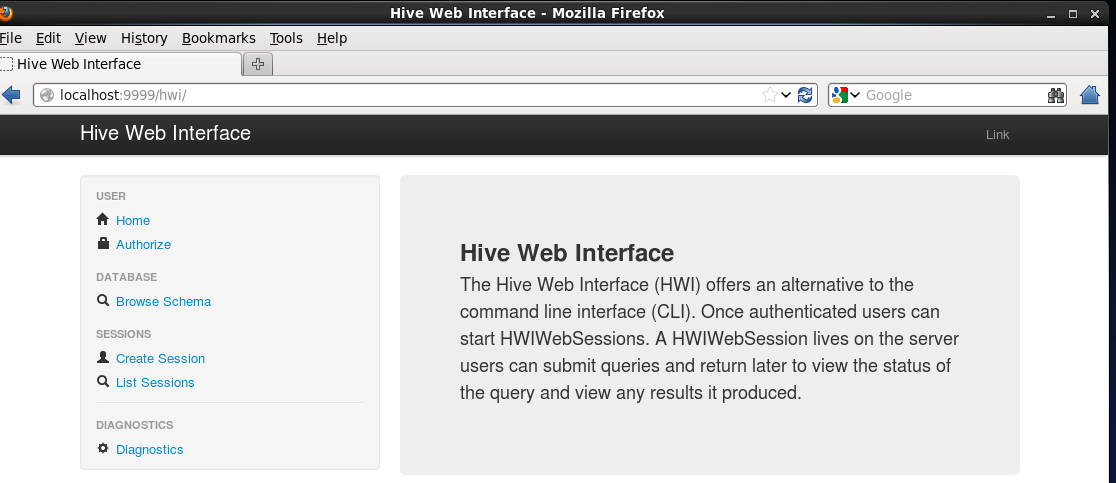
参考官网:https://cwiki.apache.org/confluence/display/Hive/HiveWebInterface
搭建HWI(HiveWebInterface)步骤总结的更多相关文章
- ssh框架搭建的基本步骤(以及各部分作用)
ssh框架搭建的基本步骤(以及各部分作用) 一.首先,明确spring,struts,hibernate在环境中各自的作用. struts: 用来响应用户的action,对应到相应的类进行 ...
- 搭建ssm的步骤
搭建SSM的步骤 ----------------------------- 1.创建web工程 2.把SSM做需要的所有jar导入工程中 3.web.xml 1.Springmvc的前端控制器,如果 ...
- 测试那些事儿—Linux搭建环境基础步骤
Linux搭建环境基础步骤 准备工具:SecureCRT工具(Linux工具,连接服务器)FTP传输工具(上传文件到服务器)MySQL连接工具 安装包(以下文件均为压缩包rpm格式和tar.gz):J ...
- [炼丹术]使用Pytorch搭建模型的步骤及教程
使用Pytorch搭建模型的步骤及教程 我们知道,模型有一个特定的生命周期,了解这个为数据集建模和理解 PyTorch API 提供了指导方向.我们可以根据生命周期的每一个步骤进行设计和优化,同时更加 ...
- 搭建SSH详细步骤及相关说明
因为手里已有相关jar,为方便我搭建的是:Struts2.0+Hibernate3.3+Spring3.0,数据库:MySQL 如果想搭建最新的,在官网上下载最新jar即可. 这里会对比MyEclip ...
- CentOS服务器上搭建Gitlab安装步骤、中文汉化详细步骤、日常管理以及异常故障排查
一, 服务器快速搭建gitlab方法 可以参考gitlab中文社区 的教程centos7安装gitlab:https://www.gitlab.cc/downloads/#centos7centos6 ...
- mybatis环境搭建和开发步骤
环境搭建 第一步:导入jar包 第二步:导入核心配置文件(mybatis-config.xml) <?xml version="1.0" encoding="UTF ...
- vue框架搭建的详细步骤(一)
在这里我们先快速的搭建一个vue的脚手架: (1).在安装vue的环境之前,安装NodeJS环境是必须的.可以使用node -v指令检查,需要保证安装了4.0版本以上的nodeJS环境. 没有安装的话 ...
- 基于微软hyper-v虚拟化服务器搭建方法和步骤整理
基于Microsoft基础设施私有云计算搭建 摘要:私有云是指组织机构建设的专供自己使用的云平台,它所提供的服务不是供他人使用,而是供自己的内部人员或分支机构使用,不同于公有云,私有云部署在企业内部网 ...
随机推荐
- 了解HTML的代码注释
什么是代码注释?代码注释的作用是帮助程序员标注代码的用途,过一段时间后再看你所编写的代码,就能很快想起这段代码的用途. 代码注释不仅方便程序员自己回忆起以前代码的用途,还可以帮助其他程序员很快的读懂你 ...
- Ubuntu下管理员界面的切换
不同于redhat的Linux系统可以通过命令su root 简单地切换到管理员状态,ubuntn 默认是没有超级用户的,因此如需使用管理员权限可以使用以下2种方法: 1.sudo -i 此命令不需要 ...
- 由于权限不足而无法读取配置文件出现的HTTP 500.19解决办法
无法访问请求的页面,因为该页的相关配置数据无效. 如下图: 解决方法, 到站点目录的属性,安全标签,添加用户(Everyone),并给修改权限:
- cocos2d-x把json数据解析到数组或字典中(libjson库)
以前在cocos2d-x项目中用到json解析,集成了libjson库后发现网上提供的解析方法大多是在解析过程中取得值,并没有将解析结果有效的保存起来,于是摸索一番,把解析结果根据数据格式存到数组或字 ...
- Ant快速入门(三)-----定义生成文件
适应Ant的关键就是编写生成文件,生成文件定义了该项目的各个生成任务(以target来表示,每个target表示一个生成任务),并定义生成任务之间的依赖关系. Ant生成文件的默认名为build.xm ...
- 「30天自制操作系统」 Stop & 「OS67 」 Start
废话 整个十月都没有再写一点什么, 其实没什么好写的, 把书里的东西码出来贴在博客里实在没什么意思, 况且书里已经写得够详细了. 这本书给我最深刻的感觉是, 作者通过简化一些细节, 一步一步地模拟整个 ...
- C++访问权限【原创】
可以访问private的有:1.本类的函数:2.友元函数. 可以访问protected的有:1.本类的函数:2.子类函数:3.友元函数. 可以访问public的有:1.本类的函数和对象:2.子 ...
- go官网教程A Tour of Go
http://tour.golang.org/#1 中文版:http://go-tour-cn.appsp0t.com/#4 package main import ( "fmt" ...
- Hadoop CombineFileInputFormat实现原理及源码分析
Hadoop适用于少量的大文件场景,而不是大量的小文件场景(这里的小文件通常指文件大小显著小于HDFS Block Size的文件),其主要原因是因为FileInputFormat在为这些小文件生成切 ...
- HBase Endpoint
引言 假设HBase某张表有1000个Region,里面存储着100万行数据,现在需要统计满足某些条件的行数,普通的做法是使用Filter(过滤条件),通过HBase API将满足过滤条件的行数据 ...