
iOS 使用贝塞尔曲线绘制路径
使用贝塞尔曲线绘制路径
大多数时候,我们在开发中使用的控件的边框是矩形,或者做一点圆角,是使得矩形的角看起来更加的圆滑。 但是如果我们想要一个不规则的图形怎么办?有人说,叫UI妹子做,不仅省事,还可以趁机接近她们(_:D)。这又时候确实可以。但是如果是一个时刻变动的不规则图形,这样如果做成动图或者剪出很多张图,再叫UI妹子做的话,似乎也能解决, 但是实际效果吧,呵呵。好吧,iOS中我们其实不需要担心这个问题。使用UIBezierPath可以很容易的会址出一些复杂的图形。
UIBezierPath 属于UIkit,可以用于绘制路径。 说到绘制,大家很快想到了大名鼎鼎的Core Graphics,同学们直接使用 Core Graphics绘制图形也完全没有问题,Core Graphics具有更多的绘制途径,它是一套强大的API,但是其函数之多异常绝对会让不熟悉的你头晕脑胀,iOS 很人性化的对 Core Graphics进行封装。也即是UIBezierPath。这篇文章主要讲解下如何使用UIBezierPath结合CAShapeLayer在一个UIView上绘制简单的路径。
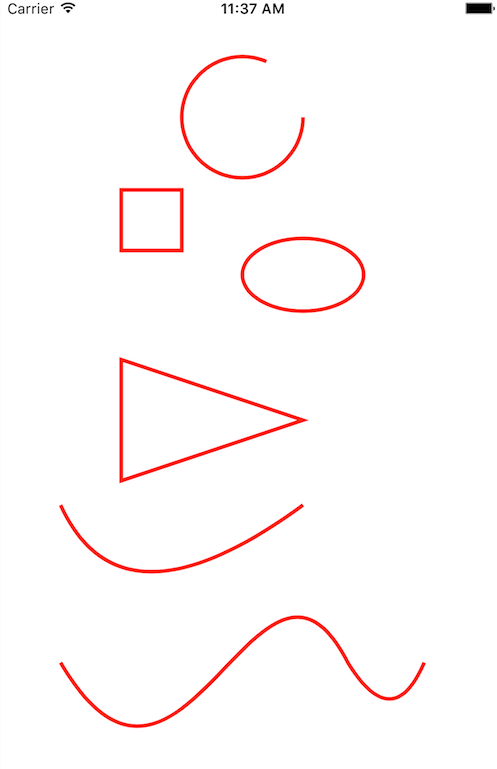
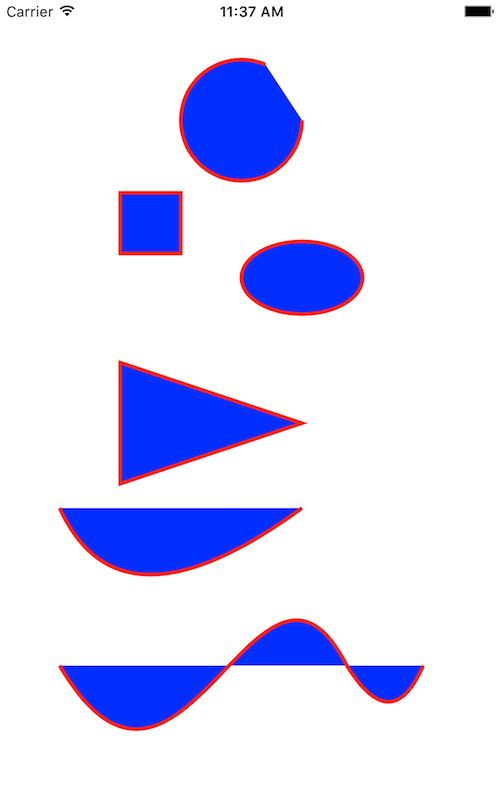
对于路径的绘制两种方式,一种是填充(fill ),一种是描绘(stroke)。直接上代码吧,毕竟也不是什么高深的知识。
import UIKit

class ViewController: UIViewController {

    override func viewDidLoad() {

        super.viewDidLoad()

        self.userBezier()

    }

    override func didReceiveMemoryWarning() {

        super.didReceiveMemoryWarning()

    }

    func userBezier(){

        // 绘制一段圆弧   如果是合起来的就是圆了

        let criclePath: UIBezierPath = UIBezierPath.init(arcCenter: CGPoint.init(x: , y: ), radius: , startAngle: , endAngle: 5.12, clockwise: true)

        criclePath.stroke()

        // 绘制一个矩形

        let rectPath: UIBezierPath = UIBezierPath.init(rect: CGRect.init(x: , y: , width: , height: ))

        criclePath.append(rectPath)

        // 绘制一个椭圆  原理是内接矩形,如果矩形的长宽相等那么绘制的就是圆

        let ovalPath:UIBezierPath = UIBezierPath.init(ovalIn: CGRect.init(x: , y: , width: , height: ))

        criclePath.append(ovalPath)

        //绘制直线多边形  可以让多条直线拼接 组合成复杂的形状  比如绘制一个三角形

        let trianglePath :UIBezierPath = UIBezierPath.init()

        trianglePath.move(to: CGPoint.init(x: , y: ))  //绘制起始点

        trianglePath.addLine(to: CGPoint.init(x: , y: ))  //从起点绘制一条直线到指定点

        trianglePath.addLine(to: CGPoint.init(x: , y: ))  //

        trianglePath.close()   //闭合路径

        trianglePath.lineWidth = 3.0

        criclePath.append(trianglePath)

        //添加一个二阶的曲线  二阶曲线一共是三个点, 起点/终点/折点(控制点)

        let cruvePath :UIBezierPath = UIBezierPath.init()

        cruvePath.move(to: CGPoint.init(x: , y: ))

        cruvePath.addQuadCurve(to: CGPoint.init(x: , y: ), controlPoint: CGPoint.init(x: , y: ))

        criclePath.append(cruvePath)

        //添加一个三阶的曲线  起点 终点  两个控制点 后面可以无限添加 二阶曲线  形成一个很长的三阶曲线

        let path :UIBezierPath = UIBezierPath.init()

        path.move(to: CGPoint.init(x: , y: ))

        path.addCurve(to: CGPoint.init(x: , y: ), controlPoint1: CGPoint.init(x: , y: ), controlPoint2: CGPoint.init(x: , y: ))

        path.addQuadCurve(to: CGPoint.init(x: , y: ), controlPoint: CGPoint.init(x: , y: ))

        criclePath.append(path)

        //创建一个CAShapelayer  用于显示这些路径

        let shPl: CAShapeLayer = CAShapeLayer.init()

        shPl.path = criclePath.cgPath

        shPl.lineWidth = 3.0

        shPl.fillColor = UIColor.clear.cgColor  //填充路径

        shPl.strokeColor = UIColor.red.cgColor   //描绘路径 根据线宽来描绘

        self.view.layer.addSublayer(shPl)

        self.view.layer.backgroundColor = UIColor.white.cgColor

    }

}
根据绘制的方式不同,运行下面两张图片:
iOS 使用贝塞尔曲线绘制路径的更多相关文章
- iOS:使用贝塞尔曲线绘制图表(折线图、柱状图、饼状图)
1.介绍: UIBezierPath :画贝塞尔曲线的path类 UIBezierPath定义 : 贝赛尔曲线的每一个顶点都有两个控制点,用于控制在该顶点两侧的曲线的弧度. 曲线的定义有四个点:起始点 ...
- iOS开发 贝塞尔曲线
iOS开发 贝塞尔曲线UIBezierPath - 陌云 时间 2014-03-14 11:04:00 博客园-所有随笔区 原文 http://www.cnblogs.com/moyunmo/p/ ...
- n阶贝塞尔曲线绘制(C/C#)
原文:n阶贝塞尔曲线绘制(C/C#) 贝塞尔是很经典的东西,轮子应该有很多的.求n阶贝塞尔曲线用到了 德卡斯特里奥算法(De Casteljau's Algorithm) 需要拷贝代码请直接使用本文最 ...
- OpenGL 实践之贝塞尔曲线绘制
说到贝塞尔曲线,大家肯定都不陌生,网上有很多关于介绍和理解贝塞尔曲线的优秀文章和动态图. 以下两个是比较经典的动图了. 二阶贝塞尔曲线: 三阶贝塞尔曲线: 由于在工作中经常要和贝塞尔曲线打交道,所以简 ...
- 基于canvas二次贝塞尔曲线绘制鲜花
canvas中二次贝塞尔曲线参数说明: cp1x:控制点1横坐标 cp1y:控制点1纵坐标 x: 结束点1横坐标 y:结束点1纵坐标 cp2x:控制点2横坐标 cp2y:控制点2纵坐标 z:结束点2横 ...
- iOS开发 贝塞尔曲线UIBezierPath
最近项目中需要用到用贝塞尔曲线去绘制路径 ,然后往路径里面填充图片,找到这篇文章挺好,记录下来 自己学习! 转至 http://blog.csdn.net/guo_hongjun1611/articl ...
- iOS开发 贝塞尔曲线UIBezierPath(2)
使用CAShapeLayer与UIBezierPath可以实现不在view的drawRect方法中就画出一些想要的图形 . 1:UIBezierPath: UIBezierPath是在 UIKit 中 ...
- iOS开发 贝塞尔曲线UIBezierPath(后记)
使用CAShapeLayer与UIBezierPath可以实现不在view的drawRect方法中就画出一些想要的图形 . 1:UIBezierPath: UIBezierPath是在 UIKit 中 ...
- JavaScript+canvas 利用贝塞尔曲线绘制曲线
效果图: <body> <canvas id="test" width="800" height="300">< ...
随机推荐
- C#中防止程序多次运行
C#中如何防止程序多次运行?只要在程序入口点函数Main()中的开始部分添加如注释部分的代码,就能快捷实现. 示例代码如下: using System; using System.Collecti ...
- Day1:第一个python小程序
Day1:第一个python小程序与开发工具Pycharm 一.Hello World C:\Users\wenxh>python Python 3.6.2 (v3.6.2:5fd33b5, J ...
- iOS_03_为什么选择ios开发
为什么选择ios开发 为什么要选择移动开发 * 手机将是人类最离不开的设备之一,硬件软件参数也越来越强,应用需求量剧增. * 移动互联(就是将移动通信和互联网二者结合起来)发展迅速,各大公司都对移动互 ...
- spark算子介绍
1.spark的算子分为转换算子和Action算子,Action算子将形成一个job,转换算子RDD转换成另一个RDD,或者将文件系统的数据转换成一个RDD 2.Spark的算子介绍地址:http:/ ...
- java学习笔记之基础语法(一)
1.java语言基础由关键字.标识符.注释.常量和变量.运算符.语句.函数和数组等组成. 2.1关键字 定义:被java语言赋予了特殊含义的单词 特点:关键字中所有的字母都是小写. 2.2用于定义数据 ...
- 【u124】环状最大两段子段和
Time Limit: 1 second Memory Limit: 128 MB [问题描述] 给出一段环状序列,即认为A[1]和A[N]是相邻的,选出其中连续不重叠且非空的两段使得这两段和最大. ...
- [D3] Create Labels from Non-numeric Data with Ordinal Scales in D3 v4
When your data contains discrete, non-numeric property values that you need to format or convert bef ...
- ios开发多线程四:NSOperation多图下载综合案例
#import "ViewController.h" #import "XMGAPP.h" @interface ViewController () /** t ...
- 修改Linux中的用户名 分类: B3_LINUX 2014-07-24 11:40 440人阅读 评论(0) 收藏
需要修改2个文件: /etc/hosts /etc/sysconfig/network 然后重启 1.修改/etc/sysconfig/network NETWORKING=yes HOSTNAME= ...
- [Django] ModelViewSet from rest_framework and Router
To build rest api easily, we can use ModelViewSet from rest_framework. It provides GET, POST, DELETE ...