
Android Studio ERROR: x86 emulation currently requires hardware acceleration!报错解决傻瓜教程~
很早之前就碰到过Android Studio模拟器无法启动的问题,今天终于尝试去解决了下,下面将我解决的方法记录下。
模拟器报错信息为:
emulator: ERROR: x86 emulation currently requires hardware acceleration!

Please ensure Intel HAXM is properly installed and usable.

CPU acceleration status: HAX kernel module is not installed!
提示为Intel HAXM没开,百度了下,应该是英特尔硬件加速的东东,
实际上Android SDK 已经集成了这个软件,目录为
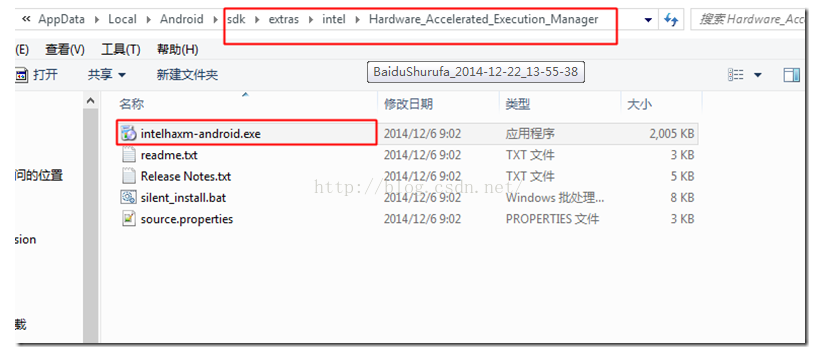
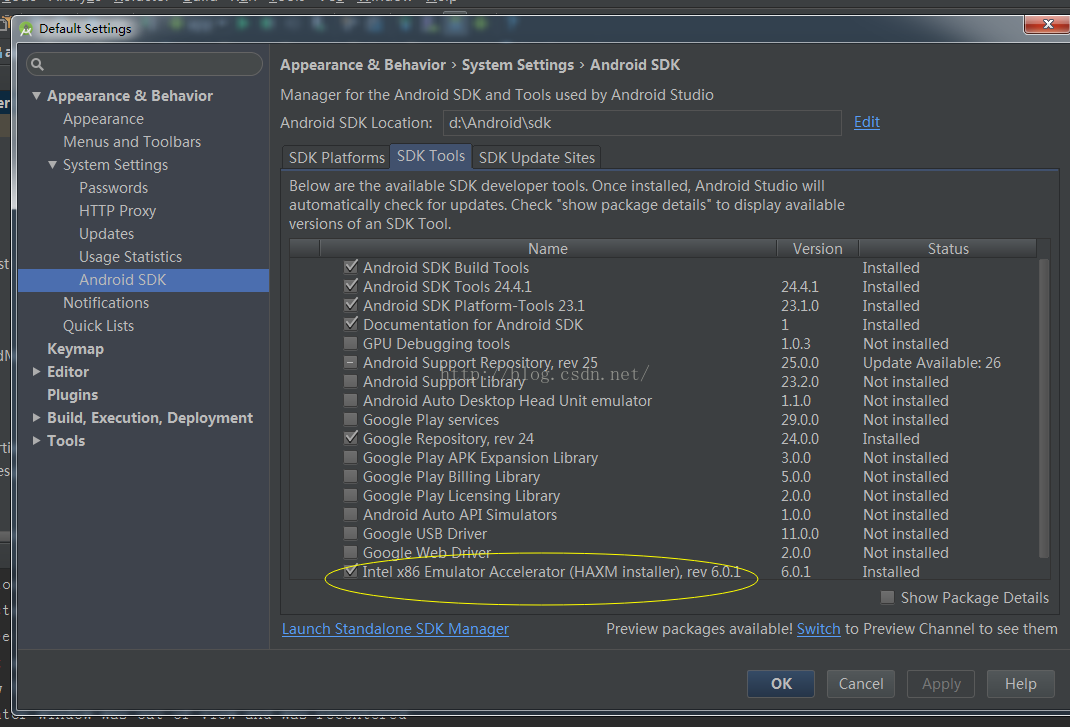
如果sdk目录下找不到,那一定是你的sdk里没下载,可以去这里下载:
下载完成后直接去点击安装,结果又挂了:
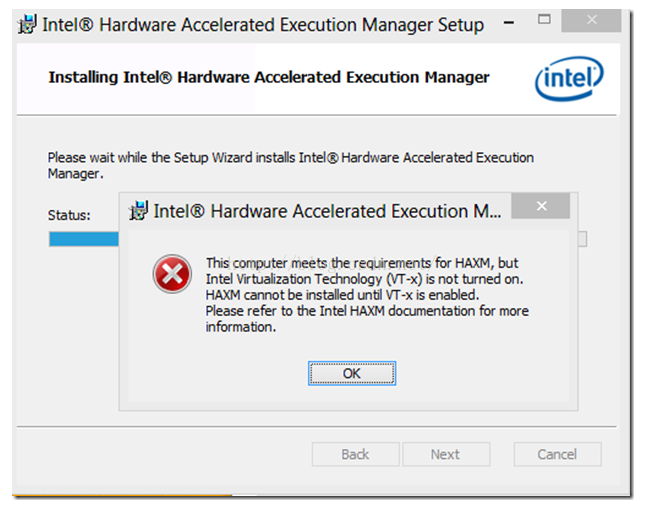
这时候还有两步要做:
1、BIOS-Virtualization-Inter(R) Virtualization Technology 设成Enabled
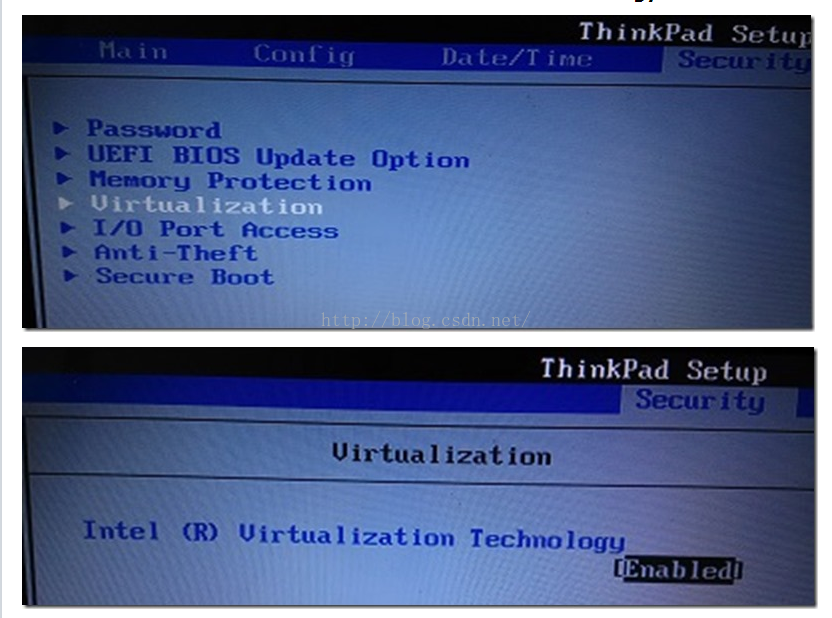
2、BIOS - No Execute (NX) Memory Protection 设成Enabled
做完这些,再回来安装intelhaxm-android.exe就能成功了,
dangdangdang!!!
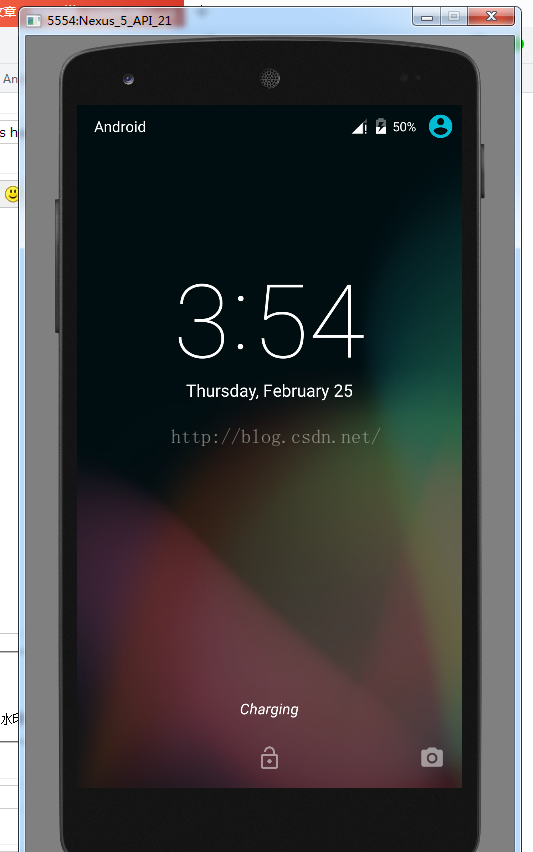
模拟器起来了!!!
虚拟化软件来源
前提: CPU 支持 VT (Virtualization Technology), 而且仅限于 Intel CPU
首先要打开SDK Manager 下载intel haxm,下载位置:android-sdk\extras\intel\Hardware_Accelerated_Execution_Manager\IntelHaxm.exe
下载完毕后运行IntelHaxm.exe安装,完毕后命令行执行 sc query intelhaxm ,如果 STATE RUNNING 表示安装成功 。(如果BIOS里面没有开启Virtualization Technology,安装的时候会有相关错误提示,进BIOS开启就好)
打开 SDK Manager 下载 intel x86镜像创建AVD,CPU选择 intel atom x86
Android Studio ERROR: x86 emulation currently requires hardware acceleration!报错解决傻瓜教程~的更多相关文章
- android ------ Emulator: error: x86 emulation currently requires hardware acceleration
我创建 Android 模拟器,运行项目时出现了一个这样的错误: 如下: emulator ERROR:x86 emulation currently requires hardware accele ...
- 运行android模拟器,emulator: ERROR: x86 emulation currently requires hardware acceleration!
运行android模拟器,emulator: ERROR: x86 emulation currently requires hardware acceleration! 问题: 运行android模 ...
- emulator: ERROR: x86 emulation currently requires hardware acceleration!
emulator: ERROR: x86 emulation currently requires hardware acceleration!Please ensure Intel is prop ...
- emulator: ERROR: x86 emulation currently requires hardware acceleration!Please ensure Intel HAXM is properly installed and usable.CPU acceleration status: HAX kernel module is not installed!
Android Studio 1.0 已经放出来了,以后的Android平台开发激昂逐步从Eclipse向Android Studio迁移,为了能不落伍我也特意从Google下载了Android St ...
- Android Studio3.1.2运行模拟器出错Emulator:emulator:ERROR:x86 emulation currently requires hardware acceleration!
出错截图如下所示: 解决方法: 由于我是已经解决了这个问题,安装了Intel x86 Emulator Accelerator,所以显示后面显示的是 Installed,如果报错和我贴的图一样,就可以 ...
- andriod studio报错 Emulator: emulator: ERROR: x86 emulation currently requires hardware acceleration! Emulator: Process finished with exit code 1
安装即可,再次运行svd,成功
- 启动安卓模拟器报错 emulator: ERROR: x86_64 emulation currently requires hardware acceleration! CPU acceleration status:HAXM must be updated(version 1.1.1<6.0.1) 解决办法
启动安卓模拟器报错 emulator: ERROR: x86_64 emulation currently requires hardware acceleration! CPU accelerat ...
- Android studio 中,遇到报错:ERROR: x86_64 emulation currently requires hardware acceleration! CPU acceleration status:HAXM must be updated(version 1.1.1<6.0.1)的解决方法
在 Android SDK 的安装目录下找到intelhaxm-android.exe安装即可.忘记目录位置直接在“计算机”中搜索,如果没有,返回Android studio 的“设置”,找到 这个图 ...
- Android AVD启动报错:emulator: ERROR: x86_64 emulation currently requires hardware acceleration! Please ensure Intel HAXM is properly installed and usable.
打开Android SDK manager查看安装发现HAXM在windows上无法安装 可以去 http://www.androiddevtools.cn/index.html 下载 Android ...
随机推荐
- <九度 OJ>题目1012:畅通project
题目描写叙述: 某省调查城镇交通状况,得到现有城镇道路统计表.表中列出了每条道路直接连通的城镇.省政府"畅通project"的目标是使全省不论什么两个城镇间都能够实现交通(但不一定 ...
- Qt的一些开发技巧
Lambda匿名函数 有时候槽函数代码辑逻辑非常简单,可以直接用下面的Lambda匿名函数处理信号,简捷明了.需c++11支持,不支持自身递归调用. 1 2 3 4 5 6 7 QComboBox * ...
- 发布一个stl标准库容器类(vector/list)的安全删除方法
话不多说,看代码. #include <functional> #ifndef ASSERT #include <cassert> #define ASSERT assert ...
- linux安装anaconda
打开网址:https://repo.continuum.io/archive/ 下载对应版本: 然后把下载的文件放到linux系统上 在终端执行: bash Anaconda3-5.1.0-Linux ...
- UVA 10917 Walk Through the Forest SPFA
uva.onlinejudge.org/index.php?option=com_onlinejudge&Itemid=8&page=show_problem&problem= ...
- 4、qq物联SDK介绍及实例讲解
1.到QQ物联官网http://iot.open.qq.com中下载软件SDK S3C2440_20161122_1.6.205_r4288.tar.gz注意:在后续大家实际开发过程中,可能你会下载到 ...
- [HTML] Change an HTML5 input's placeholder color with CSS
We will look at what CSS selectors to use to change an HTML5 inputs placeholder color. This can diff ...
- stm32的timer
- Spring Boot+Mybatis+Pagehelper分页
Spring Boot 集成MyBatis和Pagehelper分页插件 mybatis-spring-boot-starter依赖树如下: pom配置 <project xmlns=" ...
- iOS开发之Quarz2D:九:图形上下文矩阵操作
#import "VCView.h" @implementation VCView - (void)drawRect:(CGRect)rect { // Drawing code ...