
Android Studio ERROR: x86 emulation currently requires hardware acceleration!报错解决傻瓜教程~
很早之前就碰到过Android Studio模拟器无法启动的问题,今天终于尝试去解决了下,下面将我解决的方法记录下。
模拟器报错信息为:
emulator: ERROR: x86 emulation currently requires hardware acceleration!

Please ensure Intel HAXM is properly installed and usable.

CPU acceleration status: HAX kernel module is not installed!
提示为Intel HAXM没开,百度了下,应该是英特尔硬件加速的东东,
实际上Android SDK 已经集成了这个软件,目录为
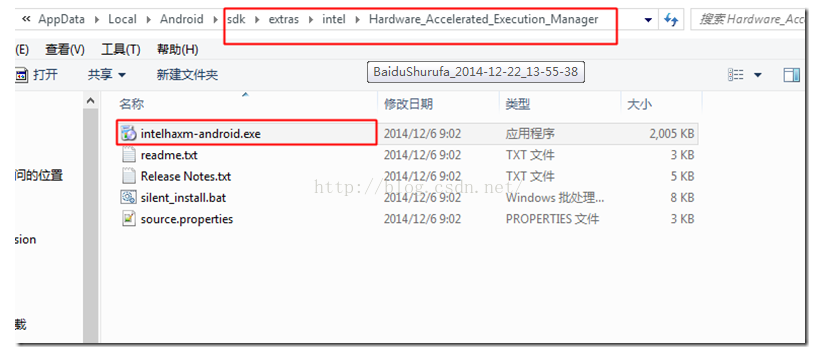
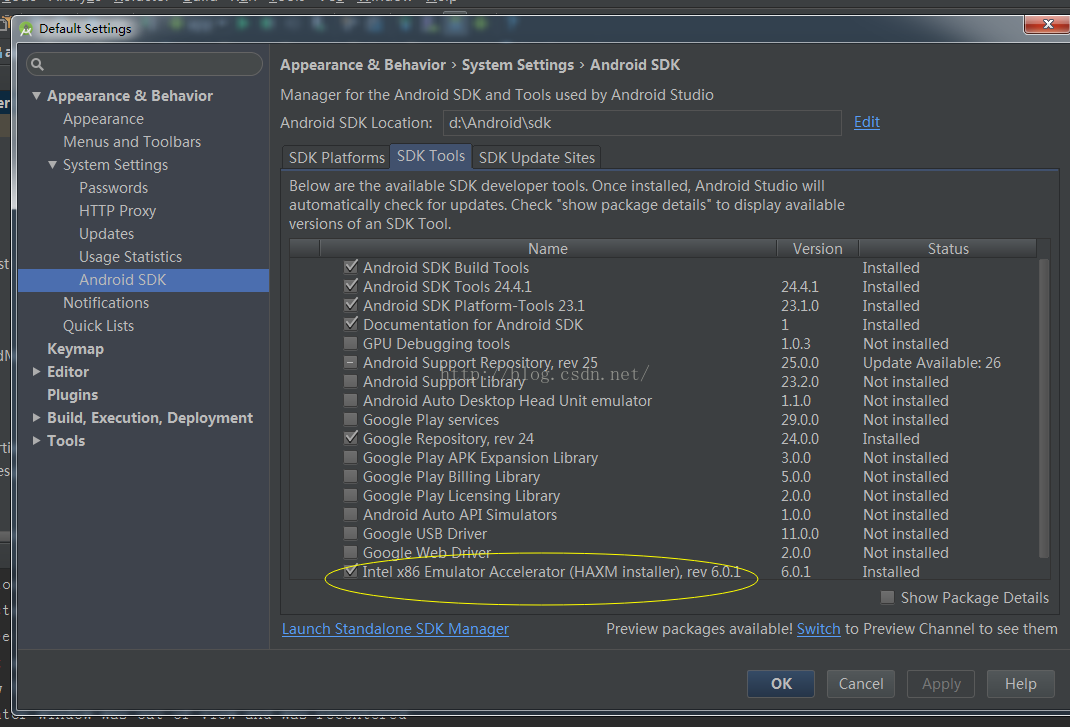
如果sdk目录下找不到,那一定是你的sdk里没下载,可以去这里下载:
下载完成后直接去点击安装,结果又挂了:
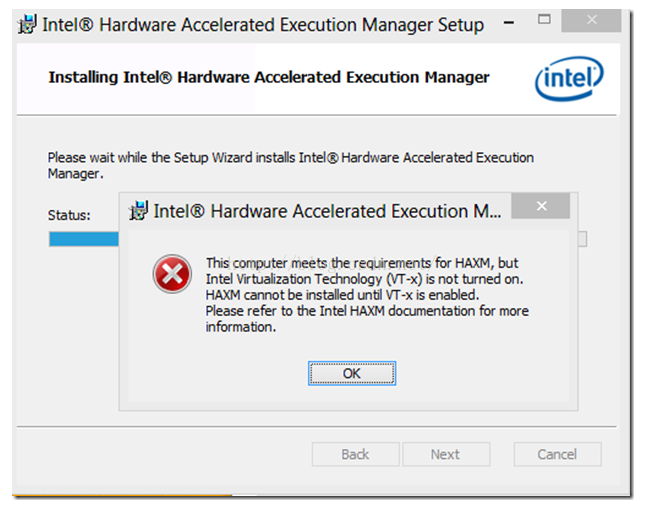
这时候还有两步要做:
1、BIOS-Virtualization-Inter(R) Virtualization Technology 设成Enabled
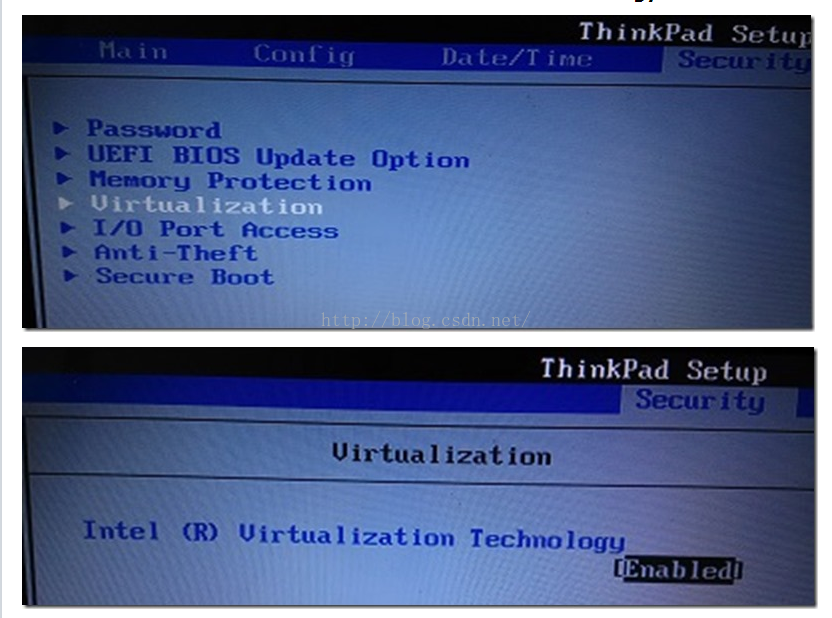
2、BIOS - No Execute (NX) Memory Protection 设成Enabled
做完这些,再回来安装intelhaxm-android.exe就能成功了,
dangdangdang!!!
模拟器起来了!!!

虚拟化软件来源
前提: CPU 支持 VT (Virtualization Technology), 而且仅限于 Intel CPU
首先要打开SDK Manager 下载intel haxm,下载位置:android-sdk\extras\intel\Hardware_Accelerated_Execution_Manager\IntelHaxm.exe
下载完毕后运行IntelHaxm.exe安装,完毕后命令行执行 sc query intelhaxm ,如果 STATE RUNNING 表示安装成功 。(如果BIOS里面没有开启Virtualization Technology,安装的时候会有相关错误提示,进BIOS开启就好)
打开 SDK Manager 下载 intel x86镜像创建AVD,CPU选择 intel atom x86
Android Studio ERROR: x86 emulation currently requires hardware acceleration!报错解决傻瓜教程~的更多相关文章
- android ------ Emulator: error: x86 emulation currently requires hardware acceleration
我创建 Android 模拟器,运行项目时出现了一个这样的错误: 如下: emulator ERROR:x86 emulation currently requires hardware accele ...
- 运行android模拟器,emulator: ERROR: x86 emulation currently requires hardware acceleration!
运行android模拟器,emulator: ERROR: x86 emulation currently requires hardware acceleration! 问题: 运行android模 ...
- emulator: ERROR: x86 emulation currently requires hardware acceleration!
emulator: ERROR: x86 emulation currently requires hardware acceleration!Please ensure Intel is prop ...
- emulator: ERROR: x86 emulation currently requires hardware acceleration!Please ensure Intel HAXM is properly installed and usable.CPU acceleration status: HAX kernel module is not installed!
Android Studio 1.0 已经放出来了,以后的Android平台开发激昂逐步从Eclipse向Android Studio迁移,为了能不落伍我也特意从Google下载了Android St ...
- Android Studio3.1.2运行模拟器出错Emulator:emulator:ERROR:x86 emulation currently requires hardware acceleration!
出错截图如下所示: 解决方法: 由于我是已经解决了这个问题,安装了Intel x86 Emulator Accelerator,所以显示后面显示的是 Installed,如果报错和我贴的图一样,就可以 ...
- andriod studio报错 Emulator: emulator: ERROR: x86 emulation currently requires hardware acceleration! Emulator: Process finished with exit code 1
安装即可,再次运行svd,成功
- 启动安卓模拟器报错 emulator: ERROR: x86_64 emulation currently requires hardware acceleration! CPU acceleration status:HAXM must be updated(version 1.1.1<6.0.1) 解决办法
启动安卓模拟器报错 emulator: ERROR: x86_64 emulation currently requires hardware acceleration! CPU accelerat ...
- Android studio 中,遇到报错:ERROR: x86_64 emulation currently requires hardware acceleration! CPU acceleration status:HAXM must be updated(version 1.1.1<6.0.1)的解决方法
在 Android SDK 的安装目录下找到intelhaxm-android.exe安装即可.忘记目录位置直接在“计算机”中搜索,如果没有,返回Android studio 的“设置”,找到 这个图 ...
- Android AVD启动报错:emulator: ERROR: x86_64 emulation currently requires hardware acceleration! Please ensure Intel HAXM is properly installed and usable.
打开Android SDK manager查看安装发现HAXM在windows上无法安装 可以去 http://www.androiddevtools.cn/index.html 下载 Android ...
随机推荐
- Varnish 实战
Varnish 实战项目 目录 实现基于Keepalived+Haproxy+Varnish+LNMP企业级架构 一.环境准备 1.1 相关配置 1.2 安装服务 1.3 关闭防火墙及selinu ...
- android studio 一次编译错误:Error:Minimum supported Gradle version is 2.14.1.
因为需要,今天从git上重新下载工程到另一个目录下,结果运行的时候报了这个错:Error:Minimum supported Gradle version is 2.14.1. Current ve ...
- Docker---(2)docker pull 下来的镜像存储在哪里
原文:Docker---(2)docker pull 下来的镜像存储在哪里 版权声明:欢迎转载,请标明出处,如有问题,欢迎指正!谢谢!微信:w1186355422 https://blog.csdn. ...
- 老李的菜园 mysql 自定义函数
新建: Create function function_name(参数列表)returns返回值类型 函数体 函数名,应该合法的标识符,并且不应该与已有的关键字冲突. 一个函数应该属于某个数据库,可 ...
- hdu 3416 Marriage Match IV (最短路+最大流)
hdu 3416 Marriage Match IV Description Do not sincere non-interference. Like that show, now starvae ...
- App.js和App.css(用于移动应用的js和css)
App.js和App.css(用于移动应用的js和css) 一.App.js和App.css(用于移动应用的js和css) App.js 是一个轻量级的 JavaScript UI 库,用来创建移动的 ...
- [Node] Run Any Version of a Node Tool with npx
As node projects evolve, new features are added all the time. This results in different errors or re ...
- python3 序列
python中有很多内置序列 列表 元组 字符串 python中容器的概念 列表 元组 字符串 字典 集合 是可以改变的,元组不可改变 几乎可以在所有情况下用列表代替元组,只有一种情况下,是不可以的, ...
- Java RMI使用
1. Java RMI介绍 RMI:远程方法调用(Remote Method Invocation).能够让在某个java虚拟机上的对象像调用本地对象方法一样调用另一个java 虚拟机中的对象上的方法 ...
- Chrome 临时目录
mklink /J "C:\Users\%USERNAME%\AppData\Local\Google\Chrome\User Data\Default\Cache" " ...