
easyui---panel(面板)
panel笔记:
EASYUI
panel:
class:easyui-panel,带有title
打开:onclick="javascript:$('#c').panel('open')"
关闭:onclick="javascript:$('#c').panel('close')"
展开:onclick="javascript:$('#panel').panel('expand',true)"
折叠:onclick="javascript:$('#panel').panel('collapse',true)"
页脚:data-options="footer:'#footer'"//将id为footer的容器作为页脚
关闭(右上角小工具):data-options="closable:true"
折叠展开(右上角小工具):collapsible:true
类似局部刷新(右上角小工具):data-options="
tools:[{
iconCls:'icon-reload',
handler:function(){
$('#p').panel('refresh', '_content.html');//#p为被刷新的容器,_content.html代表的是将那个页面内容加进来
}
}]
布局(放置在panel内部):
<div class="easyui-layout" data-options="fit:true">
<div data-options="region:'west',split:true" style="width:100px;padding:10px">
Left Content
</div>
<div data-options="region:'east'" style="width:100px;padding:10px">
Right Content
</div>
<div data-options="region:'center'" style="padding:10px">
Center Content
</div>
</div>
1.连接好easyui
2.开始
<div class="easyui-panel" style="width: 100%;height:650px;">
<a href="#" class="easyui-linkbutton" onclick="javascript:$('#panel').panel('open')">打开事件</a>
<a href="#" class="easyui-linkbutton" onclick="javascript:$('#panel').panel('close')">关闭事件</a>
<a href="javascript:void(0)" class="easyui-linkbutton" onclick="javascript:$('#panel').panel('expand',true)">展开</a>
<a href="javascript:void(0)" class="easyui-linkbutton" onclick="javascript:$('#panel').panel('collapse',true)">折叠</a>
<div id="panel" style="width:700px;height:200px;padding:10px;" class="easyui-panel"
data-options="closable:true,collapsible:true,minimizable:true,maximizable:true,footer:'#footer',
tools:[{
iconCls:'icon-reload',
handler:function(){
$('#panel').panel('refresh', '_content.html');
}
}]" title="这是一个panel">
<div class="easyui-layout" data-options="fit:true">
<div data-options="region:'west',split:true" style="width:100px;padding:10px">
Left Content
</div>
<div data-options="region:'east'" style="width:100px;padding:10px">
Right Content
</div>
<div data-options="region:'center'" style="padding:10px">
Center Content
</div>
</div>
<div id="footer" style="padding:5px;">主意这是一个页脚</div>
</div>
</div>
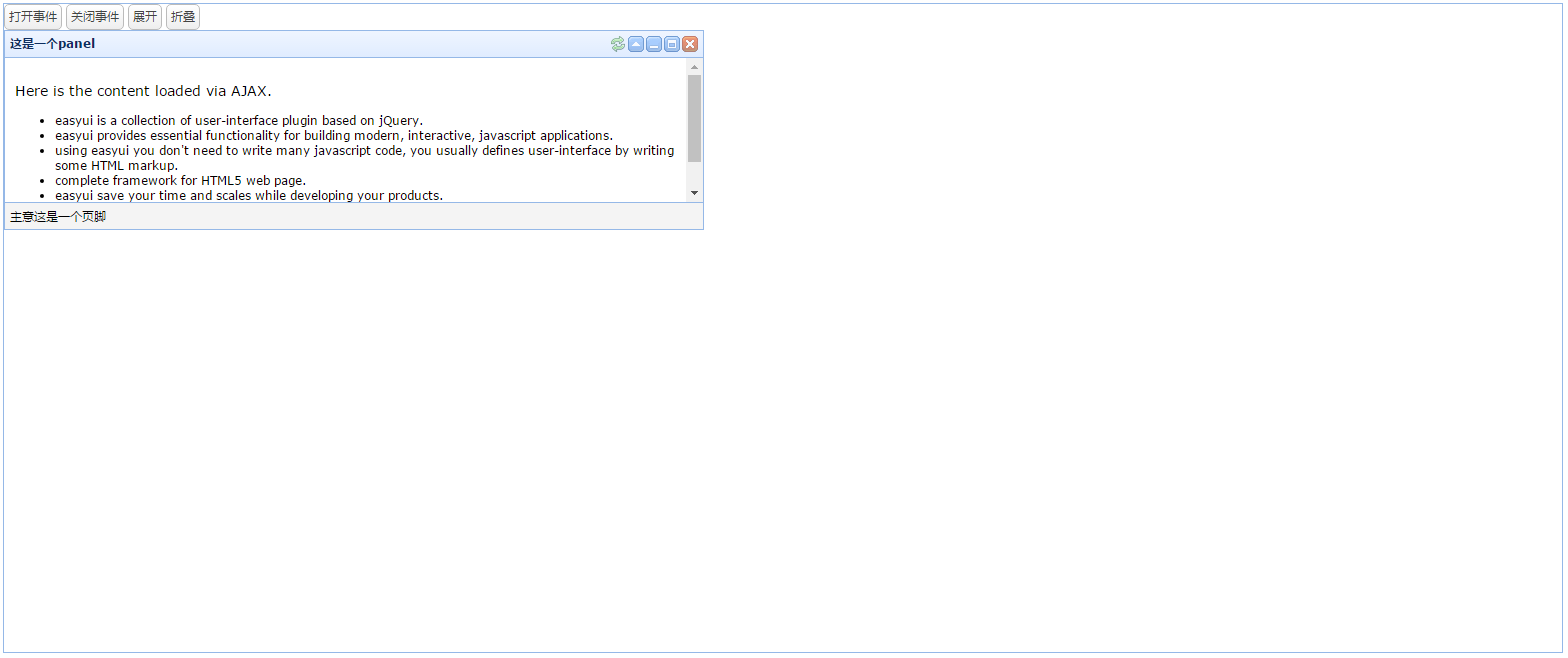
3.效果图
easyui---panel(面板)的更多相关文章
- 布局-EasyUI Panel 面板、EasyUI Tabs 标签页/选项卡、EasyUI Accordion 折叠面板、EasyUI Layout 布局
EasyUI Panel 面板 通过 $.fn.panel.defaults 重写默认的 defaults. 面板(panel)当做其他内容的容器使用.它是创建其他组件(比如:Layout 布局.Ta ...
- EasyUI - Panel 面板控件
效果: html代码: <div id="p" style="padding: 10px;"> <p>panel content.< ...
- EasyUI Accordion下的Panel面板初始化时全部折叠
EasyUI Accordion下的Panel面板有一个属性:selected,默认值为:false.初始化时,若设置'selected:true',则面板默认打开,效果如下: <div tit ...
- 第一百九十九节,jQuery EasyUI,Panel(面板)组件
jQuery EasyUI,Panel(面板)组件 学习要点: 1.加载方式 2.属性列表 3.事件列表 4.方法列表 本节课重点了解EasyUI中Panel(面板)组件的使用方法,这个组件不依赖于其 ...
- EasyUI系列学习(九)-Panel(面板)
一.加载方式 1.class加载 <div class="easyui-panel" title="面板一" style="width:500p ...
- easyUI panel组件
easyUI panel组件: 属性的使用: <!DOCTYPE html> <html lang="en"> <head> <meta ...
- jQuery Easy UI Panel(面板)组件
panel(面板)组件,跟前面的组件使用方法差点儿都差点儿相同,也是从设置一些面板属性.操作面板触发的事件.我们可针对面板对象的操作方法这三个点去学习. 后面有一些组件要依赖于这个组件. 另一点跟前面 ...
- Html - Bootstrap Panel面板
http://v3.bootcss.com/components/#panels Bootstrap Panel面板 <div class="panel panel-default&q ...
- 修改easyui panel 默认样式
有这么个需求需要修改easyui panel头部中的背景色.于是根据panel中的最终被浏览器解析出来的类名,直接修改这个css样式,设置backgroud-color这个属性,发现不管用. 于是,就 ...
- fedora23然后创建workspace?或者说是panel面板?
好像在fedora23中 无法再添加工作空间workspace. 系统会自动的在非空工作空间后面再生成一个空的工作空间. 而且 工作空间 好像不只 4个, 可以有很多个. panel面板好像也不能添加 ...
随机推荐
- 算法(Algorithms)第4版 练习 1.3.13
(a) 0 1 2 3 4 5 6 7 8 9 (b) 4 6 8 7 5 3 2 9 0 1 (c) 2 5 6 7 4 8 9 3 1 0 (d) 4 3 2 1 0 5 6 7 8 9 答案:b ...
- Zookeeper用来干什么?
在Zookeeper的官网上有这么一句话:ZooKeeper is a centralized service for maintaining configuration information, n ...
- aop 例子(annotation方式实现)
面向切面编程(也叫面向方面),可以通过预编译方式和运行期动态代理实现在不修改源代码的情况下给程序动态统一添加功能的一种技术.AOP实际是GoF设计模式的延续,设计模式孜孜不倦追求的是调用者和被调用者之 ...
- POJ2253(djkstra求最长最短边)
Frogger Time Limit: 1000MS Memory Limit: 65536K Total Submissions: 32257 Accepted: 10396 Descrip ...
- JavaScript:Map使用
定义Map /** * Map * */ function Map() { /** 存放键的数组(遍历用到) */ this.keys = new Array(); /** 存放数据 */ this. ...
- 15 Vue项目部署
前言: VUE 是一个javascript的前端框架,注定了它是运行在浏览器里的,对服务器本地没有任何要求,只要一个静态文件服务器能通过http访问到其资源文件就足矣!无论你是用apache ,ngn ...
- ubuntu在recovery模式下更改用户密码
http://www.jb51.net/os/Ubuntu/164636.html 1, restart 2, Hold down shift key / press and hold 3, sele ...
- openStack高可用性和灾备方案
1. 基础知识 1.1 高可用 (High Availability,简称 HA) 高可用性是指提供在本地系统单个组件故障情况下,能继续访问应用的能力,无论这个故障是业务流程.物理设施.IT软/硬件的 ...
- jquery 插件 国外
http://www.jqueryrain.com/demo/jquery-portfolio-gallery-plugin/
- [nyoj737]石子归并(区间dp入门题)
题意:有N堆石子排成一排,每堆石子有一定的数量.现要将N堆石子并成为一堆.合并的过程只能每次将相邻的两堆石子堆成一堆,每次合并花费的代价为这两堆石子的和,经过N-1次合并后成为一堆.求出总的代价最小值 ...