
Mybatis-Generator_学习_02_使用Mapper专用的MyBatis Generator插件
源码见:https://github.com/shirayner/tk-mybatis-generator
一、要点
二、具体实现
1.项目结构
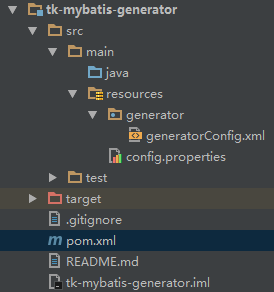
2.配置 pm.xml
<?xml version="1.0" encoding="UTF-8"?>

<project xmlns="http://maven.apache.org/POM/4.0.0"

         xmlns:xsi="http://www.w3.org/2001/XMLSchema-instance"

         xsi:schemaLocation="http://maven.apache.org/POM/4.0.0 http://maven.apache.org/xsd/maven-4.0.0.xsd">

    <parent>

        <artifactId>study-parent</artifactId>

        <groupId>com.ray.study</groupId>

        <version>1.0-SNAPSHOT</version>

    </parent>

    <modelVersion>4.0.0</modelVersion>

    <packaging>jar</packaging>

    <artifactId>tk-mybatis-generator</artifactId>

    <properties>

        <!--  MyBatis Generator  -->

        <!--  Java接口和实体类  -->

        <targetJavaProject>${basedir}/src/main/java</targetJavaProject>

        <targetMapperPackage>tk.mybatis.mapper.mapper</targetMapperPackage>

        <targetModelPackage>tk.mybatis.mapper.model</targetModelPackage>

        <!--  XML生成路径  -->

        <targetResourcesProject>${basedir}/src/main/resources</targetResourcesProject>

        <targetXMLPackage>mapper</targetXMLPackage>

        <!--  依赖版本  -->

        <mapper.version>3.4.6</mapper.version>

        <mysql.version>5.1.6</mysql.version>

    </properties>

    <build>

        <finalName>mmall</finalName>

        <plugins>

            <!--1.mybatis-generator 使用通用mapper实现的-->

            <plugin>

                <groupId>org.mybatis.generator</groupId>

                <artifactId>mybatis-generator-maven-plugin</artifactId>

                <version>1.3.2</version>

                <configuration>

                    <configurationFile>${basedir}/src/main/resources/generator/generatorConfig.xml</configurationFile>

                    <overwrite>true</overwrite>

                    <verbose>true</verbose>

                </configuration>

                <dependencies>

                    <dependency>

                        <groupId>mysql</groupId>

                        <artifactId>mysql-connector-java</artifactId>

                        <version>${mysql.version}</version>

                    </dependency>

                    <dependency>

                        <groupId>tk.mybatis</groupId>

                        <artifactId>mapper</artifactId>

                        <version>${mapper.version}</version>

                    </dependency>

                </dependencies>

            </plugin>

        </plugins>

    </build>

</project>
3.配置 generatorConfig.xml
<?xml version="1.0" encoding="UTF-8"?>

<!DOCTYPE generatorConfiguration

        PUBLIC "-//mybatis.org//DTD MyBatis Generator Configuration 1.0//EN"

        "http://mybatis.org/dtd/mybatis-generator-config_1_0.dtd">

<generatorConfiguration>

    <properties resource="config.properties"/>

    <context id="Mysql" targetRuntime="MyBatis3Simple" defaultModelType="flat">

        <property name="beginningDelimiter" value="`"/>

        <property name="endingDelimiter" value="`"/>

        <plugin type="${mapper.plugin}">

            <property name="mappers" value="${mapper.Mapper}"/>

        </plugin>

        <jdbcConnection driverClass="${jdbc.driverClass}"

                        connectionURL="${jdbc.url}"

                        userId="${jdbc.user}"

                        password="${jdbc.password}">

        </jdbcConnection>

        <javaModelGenerator targetPackage="${targetModelPackage}" targetProject="${targetJavaProject}"/>

        <sqlMapGenerator targetPackage="${targetXMLPackage}"  targetProject="${targetResourcesProject}"/>

        <javaClientGenerator targetPackage="${targetMapperPackage}" targetProject="${targetJavaProject}" type="XMLMAPPER" />

        <table tableName="%" >

            <generatedKey column="id" sqlStatement="Mysql" identity="true"/>

        </table>

    </context>

</generatorConfiguration>
4. 配置 config.properties
# 数据库配置

jdbc.driverClass = com.mysql.jdbc.Driver

jdbc.url = jdbc:mysql://localhost:3306/mmall

jdbc.user = root

jdbc.password =123

#c3p0

jdbc.maxPoolSize=50

jdbc.minPoolSize=10

jdbc.maxStatements=100

jdbc.testConnection=true

# 通用Mapper配置

mapper.plugin = tk.mybatis.mapper.generator.MapperPlugin

mapper.Mapper = tk.mybatis.mapper.common.Mapper
三、参考资料
1. abel533
(1) MyBatis 通用 Mapper 3. MyBatis Generator 插件
(2) 使用Mapper专用的MyBatis Generator插件
Mybatis-Generator_学习_02_使用Mapper专用的MyBatis Generator插件的更多相关文章
- 使用Mapper专用的MyBatis Generator插件
使用Maven执行MBG 这里有一个完整的例子,Mybatis-Spring,下面讲解的内容出自这个例子. 使用Maven插件的一个好处是可以将Maven中的属性使用${property}形式在gen ...
- Spring+SpringMVC+MyBatis深入学习及搭建(三)——MyBatis全局配置文件解析
转载请注明出处:http://www.cnblogs.com/Joanna-Yan/p/6874672.html 前面有写到Spring+SpringMVC+MyBatis深入学习及搭建(二)——My ...
- Spring+SpringMVC+MyBatis深入学习及搭建(二)——MyBatis原始Dao开发和mapper代理开发
转载请注明出处:http://www.cnblogs.com/Joanna-Yan/p/6869133.html 前面有写到Spring+SpringMVC+MyBatis深入学习及搭建(一)——My ...
- Java数据持久层框架 MyBatis之API学习六(Mapper XML 文件详解)
对于MyBatis的学习而言,最好去MyBatis的官方文档:http://www.mybatis.org/mybatis-3/zh/index.html 对于语言的学习而言,马上上手去编程,多多练习 ...
- Java数据持久层框架 MyBatis之API学习五(Mapper XML 文件)
对于MyBatis的学习而言,最好去MyBatis的官方文档:http://www.mybatis.org/mybatis-3/zh/index.html 对于语言的学习而言,马上上手去编程,多多练习 ...
- Mybatis学习第二天——mapper的动态代理
传统的Dao层开发通过接口与实现类的方式,Mybatis中通过mapper动态代理是需要定义接口. 1.传统Dao层封装 那么可以将公共资源提取出来,剩余的封装成方法来实现.下面是UserDaoImp ...
- Mybatis架构学习
Mybatis架构学习 MyBatis 是支持定制化 SQL.存储过程以及高级映射的持久层框架.MyBatis 封装了几乎所有的 JDBC 代码和手动设置参数以及获取结果集.可以对配置和原生Map使用 ...
- 深入浅出Mybatis系列(八)---mapper映射文件配置之select、resultMap
上篇<深入浅出Mybatis系列(七)---mapper映射文件配置之insert.update.delete>介绍了insert.update.delete的用法,本篇将介绍select ...
- MyBatis入门学习教程-使用MyBatis对表执行CRUD操作
上一篇MyBatis学习总结(一)--MyBatis快速入门中我们讲了如何使用Mybatis查询users表中的数据,算是对MyBatis有一个初步的入门了,今天讲解一下如何使用MyBatis对use ...
随机推荐
- TCP/IP详解 卷一(第四、五章 ARP、RARP)
数据链路如 以太网都有自己的寻址机制(MAC)地址,而IP层使用的是IP地址. 当一台主机把以太网数据发送定位于同一局域网上的另一台主机时,是根据MAC地址来确定目的接口的.设备驱动程序从不检查IP数 ...
- java程序如何优化--技巧总结
http://www.douban.com/group/topic/17850695/
- Javascript模式(二) 发布者/订阅者模式
var publisher = { // 订阅者数组 subscribers : { "any" : [] }, // 增加订阅者 on : function(type, fn, ...
- 一种调用dll的巧妙方法
直接上代码,后面说应用场景 新建一个项目,引入需要调用的dll,如下 class Program { [DllImport( "soft.dll" )] static extern ...
- 转:几款主流pcb软件比较
原理图设计软件:会ORCAD就可以了,支持的Netlist超多,基本是业界标准. PCB Layout 软件 1.Protel,现在推AltiumDesigner.国内低端设计的主流,国外基本没人 ...
- mysql中的类型转换和精确位数
select round(123.5); 四舍五入 select floor(123.5);取整数部分 select ceil(123.5);四舍五入
- Windows 10 1703创意者更新官方ISO镜像大全
2017年04月07日 20:00 19867 次阅读 稿源:快科技 12 条评论 Windows 10 Creators Update创意者更新正式版已经发布,目前只能通过易生.MCT工具或者ISO ...
- grep命令:查看配置文件未注释行(转)
FROM: https://linux.cn/article-6958-1.html 可以使用 UNIX/BSD/OS X/Linux 这些操作系统自身提供的 grep,sed,awk,perl或者其 ...
- Swift———a Glance(极客学院)笔记
http://www.swiftv.cn/course/hw4sysi7 本课程很短,加起来一个小时,适合作为一个快速了解. 两本书: apple官方<The Swift Programmi ...
- hdu4612 无向图中随意加入一条边后使桥的数量最少 / 无向图缩点+求树的直径
题意如上,含有重边(重边的话,俩个点就能够构成了边双连通). 先缩点成树,在求数的直径,最远的连起来,剩下边(桥)的自然最少.这里学习了树的直径求法:第一次选随意起点U,进行bfs,到达最远的一个点v ...