
微信小程序干货
1.获取text文本框输入的信息
wxml代码
<view class="weui-cells">

  <view class="weui-cell weui-cell_input">

    <view class="weui-cell__bd">

      <input class="weui-input" bindinput="changepapertitle" maxlength="100" placeholder="请输入问卷标题(最多100个字)" value='{{papertitle}}' />

    </view>

  </view>

</view>
后端js
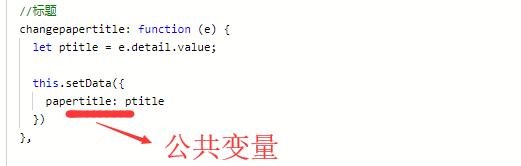
划重点:通过bindinput事件,在后端能够获取到输入值
2.获取同一个控件的多个属性
wxml代码
<input type='text' style='width:200px' bindinput="ratiotxtchange" data-qid='{{item.qid}}' id="{{dqdata.dqid}}" placeholder='其他'></input>
js代码
//单选其他选项输入

  ratiotxtchange:function(e){

    debugger;

    var id = e.currentTarget.id; //选项ID

    var qid = e.currentTarget.dataset.qid;//问题ID

    var value = e.detail.value; //单选框的值

    this.data.radtxts[qid] =id+"|"+ value;

    this.data.tschecks["A"+qid] = id + "|" + value;//存入特殊选项的ID

  }
划重点:前端通过设置data-xx的信息,后端用
e.currentTarget.dataset.xx 获取其中的值,
此方法可以获取同一个控件的多个属性,对处理某些复杂点的逻辑,比较有用

3.微信小程序AJAX请求
    wx.request({

      url: posturl + "/Form/AddAnswerPaper",

      method: 'POST',

      header: {

        'content-type': 'application/x-www-form-urlencoded'

      },

      data: {

        "paperid": paperid, //问卷ID

        "openid": getApp().globalData.openid, //当前登录人

        "rich": JSON.stringify(rich),

        "txts": JSON.stringify(txts),

        "redio": JSON.stringify(rads),

        "checks": JSON.stringify(checks),

        "img": JSON.stringify(imgs),

        "addresses": JSON.stringify(addresses),

      },

      success: function (rdata) {

        if (rdata.data.result == true) {

          that.setData({

            modalHidden: !that.data.modalHidden

          })

        } else {

          wx.showToast({

            title: "保存失败",

            icon: 'loading',

            duration: 3000

          })

        }

      }

    })
4.后端获取微信小程序openid
        /// <summary>

        /// 获取微信用户OPENID

        /// </summary>

        /// <returns></returns>

        public string QueryOpenId()

        {

            seesionmodel m = new seesionmodel();

            try

            {

                string code = Request["code"];

                string Appid = ConfigurationSettings.AppSettings["Appid"];

                string AppSecret = ConfigurationSettings.AppSettings["AppSecret"];

                string html = string.Empty;

                string url = "https://api.weixin.qq.com/sns/jscode2session?appid=" + Appid + "&secret=" + AppSecret + "&js_code=" + code + "&grant_type=authorization_code";

                HttpWebRequest request = (HttpWebRequest)HttpWebRequest.Create(url);

                request.Method = "GET";

                HttpWebResponse response = request.GetResponse() as HttpWebResponse;

                Stream ioStream = response.GetResponseStream();

                StreamReader sr = new StreamReader(ioStream, Encoding.UTF8);

                html = sr.ReadToEnd();

                sr.Close();

                ioStream.Close();

                response.Close();

                m = JsonConvert.DeserializeObject<seesionmodel>(html);

                return m.openid;

            }

            catch (Exception ex)

            {

                logger.Debug(ex.Message);

                m.openid = "获取OpenID失败";

            }

            return JsonConvert.SerializeObject(m);

        }
    public class seesionmodel

    {

        public string session_key { get; set; }

        public string expires_in { get; set; }

        public string openid { get; set; }

    }
通过后端获取微信用户唯一的ID,一是提高安全性,二是可以避免授权弹框。
5.微信小程序弹出可输入的对话框
实例:点击红线,弹出可输入对话框,然后保存。
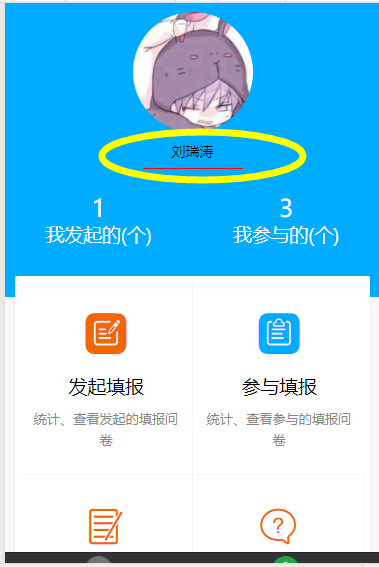
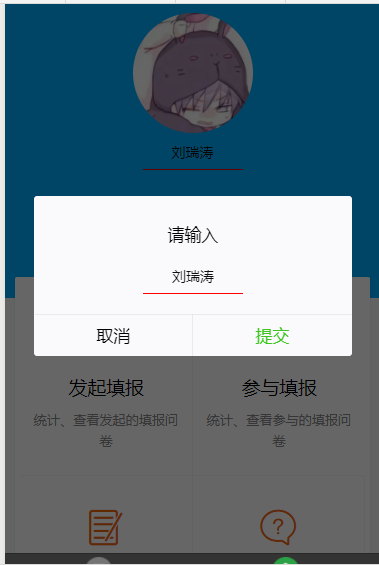
 文本框部分代码:

<view class="p">

      <view bindtap='namechange' style='width:120px;margin:0 auto'>

        <input type='text' class='txtname' value='{{RealName2}}' disabled='disabled' placeholder='请输入您的姓名' />

      </view>

 </view>

弹出框部分代码:

<modal hidden="{{hiddenmodalput}}" title="请输入" confirm-text="提交" bindcancel="cancel" bindconfirm="confirm">

    <input type='text' bindinput='nameinput' value='{{RealName}}'  class='txtname' placeholder="请输入您的名字" auto-focus/>

</modal>
var posturl = getApp().globalData.posturl;

Page({

  data: {

    IcreateNum: 0,

    IJoinNum: 0,

    nickName:"",

    hiddenmodalput:true,

    RealName:"",

    RealName2: ""

  },

  onLoad: function(options) {

    var realname= wx.getStorageSync('RealName');

    if(realname!=""){

      this.setData({

        RealName2: realname

      })

      console.log("从缓存读取姓名");

    }else{

      var openid = getApp().globalData.openid;

      var that=this;

      console.log("从数据库读取姓名");

      wx.request({

        url: posturl + "/Form/QueryRealNameByOpenId", //自己的服务接口地址

        method: 'POST',

        header: {

          'content-type': 'application/x-www-form-urlencoded'

        },

        data: {

          "OpenID": openid

        },

        success: function (data) {

          that.setData({

            RealName2: data.data,

          });

          wx.setStorageSync('RealName', data.data);

        }

      });

    }

  },

  //单击名字

  namechange:function(e){

    console.log("444");

    var RealName2 = this.data.RealName2;

    this.setData({

      hiddenmodalput: false,

      RealName: RealName2

    })

  },

  cancel:function(e){

    this.setData({

      hiddenmodalput: true

    })

  },

  //获取姓名

  nameinput:function(e){

    let name = e.detail.value;

    console.log(name);

    this.setData({

      RealName: name

    })

  },

  //提交姓名

  confirm:function(e){

    var Name = this.data.RealName;

    var openid = getApp().globalData.openid; //唯一标识

    var RealName = this.data.RealName;

    var that=this;

    wx.request({

      url: posturl + "/Form/UpdateRealNameByOpenId", //自己的服务接口地址

      method: 'POST',

      header: {

        'content-type': 'application/x-www-form-urlencoded'

      },

      data: {

        "RealName": RealName,

        "OpenID": openid

      },

      success: function (data) {

        if (data.data.result == true) {

          that.setData({

            hiddenmodalput:true,

            RealName2:RealName

          });

          wx.setStorageSync('RealName', RealName);

        } else {

          wx.showModal({

            title: '错误提示',

            content: '修改姓名失败',

            showCancel: false,

            success: function (res) { }

          })

        }

      }

    });

  },

  onReady: function() {

  },

  onShow: function() {

    // 页面显示

    // 页面初始化 options为页面跳转所带来的参数

    this.queryNumIcreate();

    this.queryNumIJoin();

  },

  onHide: function() {

    // 页面隐藏

  },

  onUnload: function() {

    // 页面关闭

  },

  userNickNameclick:function(){

    console.log("3333");

  }

})
6.微信小程序上传图片
wxml
<view class="uploader-text" bindtap="chooseImage2">添加图片</view>
js
chooseImage2: function (e) {

    var that = this;

    wx.chooseImage({

      sizeType: ['original', 'compressed'], // 可以指定是原图还是压缩图,默认二者都有

      sourceType: ['album', 'camera'], // 可以指定来源是相册还是相机,默认二者都有

      count: 1, // 最多可以选择的图片张数

      success: function (res) {

        // 返回选定照片的本地文件路径列表,tempFilePath可以作为img标签的src属性显示图片

        var tempFilePaths = res.tempFilePaths;

        //启动上传等待中...

        wx.showToast({

          title: '正在上传...',

          icon: 'loading',

          mask: true,

          duration: 10000

        })

        wx.uploadFile({

          url: posturl + '/Form/uploadfilenew',

          filePath: tempFilePaths[0],

          name: 'uploadfile_ant',

          formData: {

            'imgIndex': 0

          },

          header: {

            "Content-Type": "multipart/form-data"

          },

          success: function (res) {

            tempFilePaths = [];

            var saveurl = posturl + JSON.parse(res.data).Url.replace("..", "");

            tempFilePaths.push(saveurl);

            that.setData({

              files2: [],

            });

            // 返回选定照片的本地文件路径列表,tempFilePath可以作为img标签的src属性显示图片

            that.setData({

              files2: that.data.files2.concat(tempFilePaths)

            });

            wx.hideToast();

          },

          fail: function (res) {

            wx.hideToast();

            wx.showModal({

              title: '错误提示',

              content: '上传图片失败',

              showCancel: false,

              success: function (res) { }

            })

          }

        });

      }

    })

  },
c#
  /// <summary>

        /// 上传文件、图片

        /// </summary>

        /// <returns></returns>

        public ContentResult UploadFileNew()

        {

            UploadFileDTO model = new UploadFileDTO();

            try

            {

                HttpPostedFileBase file = Request.Files["uploadfile_ant"];

                if (file != null)

                {

                    //公司编号+上传日期文件主目录

                    model.Catalog = DateTime.Now.ToString("yyyyMMdd");

                    model.ImgIndex = Convert.ToInt32(Request.Form["imgIndex"]);

                    //获取文件后缀

                    string extensionName = System.IO.Path.GetExtension(file.FileName);

                    //文件名

                    model.FileName = System.Guid.NewGuid().ToString("N") + extensionName;

                    //保存文件路径

                    string filePathName = Server.MapPath("~/images/") + model.Catalog;

                    if (!System.IO.Directory.Exists(filePathName))

                    {

                        System.IO.Directory.CreateDirectory(filePathName);

                    }

                    //相对路径

                    string relativeUrl = "../images";

                    file.SaveAs(System.IO.Path.Combine(filePathName, model.FileName));

                    //获取临时文件相对完整路径

                    model.Url = System.IO.Path.Combine(relativeUrl, model.Catalog, model.FileName).Replace("\\", "/");

                }

            }

            catch (Exception ex)

            {

                logger.Error(ex.Message);

            }

            return Content(Newtonsoft.Json.JsonConvert.SerializeObject(model));

        }
6.微信小程序点击图片预览
wxml
<image wx:if='{{DescribeImg!=""&&DescribeImg!=null}}' style='width:400rpx;height:400rpx' src='{{DescribeImg}}' bindtap='previewImg'></image>
js
//图片放大

  previewImg: function (e) {

    var img = this.data.DescribeImg;//图片网址

    var ary = new Array();

    ary.push(img);

    wx.previewImage({

      current: ary[0],     //当前图片地址

      urls: ary,//路径集合,必须是数组

      success: function (res) { },

      fail: function (res) { },

      complete: function (res) { },

    })

  }
微信小程序干货的更多相关文章
- 微信小程序源码推荐
wx-gesture-lock 微信小程序的手势密码 WXCustomSwitch 微信小程序自定义 Switch 组件模板 WeixinAppBdNovel 微信小程序demo:百度小说搜索 sh ...
- 微信小程序案例大全
微信小程序demo:足球,赛事分析 小程序简易导航 小程序demo:办公审批 小程序Demo:电魔方 小程序demo:借阅伴侣 微信小程序demo:投票 微信小程序demo:健康生活 小程序demo: ...
- 微信小程序踩坑集合
1:官方工具:https://mp.weixin.qq.com/debug/w ... tml?t=1476434678461 2:简易教程:https://mp.weixin.qq.com/debu ...
- 微信小程序源码案例大全
微信小程序demo:足球,赛事分析 小程序简易导航 小程序demo:办公审批 小程序Demo:电魔方 小程序demo:借阅伴侣 微信小程序demo:投票 微信小程序demo:健康生活 小程序demo: ...
- 微信小程序实例源码大全2
wx-gesture-lock 微信小程序的手势密码 WXCustomSwitch 微信小程序自定义 Switch 组件模板 WeixinAppBdNovel 微信小程序demo:百度小说搜索 sh ...
- 微信小程序项目实例
目前为止最全的微信小程序项目实例 2018年03月20日 11:38:28 Happy王子乐 阅读数:4188 wx-gesture-lock 微信小程序的手势密码 WXCustomSwitch ...
- 转:目前为止最全的微信小程序项目实例
wx-gesture-lock 微信小程序的手势密码 WXCustomSwitch 微信小程序自定义 Switch 组件模板 WeixinAppBdNovel 微信小程序demo:百度小说搜索 sh ...
- 这是一篇满载真诚的微信小程序开发干货
1月9日零点刚过,张小龙与团队正式发布微信小程序.它究竟能在微信8.5亿用户中牵动多少人,现在还很难说.但对于创业者来讲,小程序无疑带来了新契机,以及服务“上帝”们的新方式. 从今天起,只要开发者登录 ...
- 【腾讯Bugly干货分享】打造“微信小程序”组件化开发框架
本文来自于腾讯Bugly公众号(weixinBugly),未经作者同意,请勿转载,原文地址:http://mp.weixin.qq.com/s/2nQzsuqq7Avgs8wsRizUhw 作者:Gc ...
随机推荐
- 洛谷P1525关押罪犯——并查集
题目:https://www.luogu.org/problemnew/show/P1525 并查集+贪心,从大到小排序,将二人分在不同房间,找到第一个不满足的即为答案. 代码如下: #include ...
- poco时间操作
Poco::DateTime Poco::Timespan Poco::Timestamp 时间操作 Poco::DateTime dt; //c++ 20才有 Calendar dt = dt + ...
- JS---猜数字(0-100)
<!DOCTYPE html> <html> <head lang="en"> <meta charset="UTF-8&quo ...
- Java集合框架(1)
Collection接口:它是Java集合框架的一个根接口,也是List.Set和Queue接口的父接口.同时它定义了可用于操作List.Set和Queue的方法—增删改查. Map接口:它提供了一种 ...
- Brute-Force-Attack on Triple-DES with Reduced Key Space
题目地址:https://www.mysterytwisterc3.org/en/challenges/level-ii/brute-force-attack-on-triple-des-with-r ...
- synchronized用法详解
1.介绍 Java语言的关键字,可用来给对象和方法或者代码块加锁,当它锁定一个方法或者一个代码块的时候,同一时刻最多只有一个线程执行这段代码.当两个并发线程访问同一个对象object中的这个加锁同步代 ...
- Coding-Job:从研发到生产的容器化融合实践
大家好,我是来自 CODING 的全栈开发工程师,我有幸在 CODING 参与了 Coding-Job 这个容器化的编排平台的研发.大家对 CODING 可能比较了解, Coding.net 是一个一 ...
- RobotFramework+selenium环境安装
1.安装python 2.7.12 https://www.python.org/downloads/release/python-2712/ 安装完成之后配置好path,将下面的类似安装路径加入pa ...
- 黑科技抢先尝(续) - Windows terminal中WSL Linux 终端的极简美化指南
目录 修改默认源,为apt-get安装提速 安装python 和 python pip 安装 zsh 安装powerline-font中的特定字体 安装powerline-shell 修改~目录下的配 ...
- U3D Shader基础
http://blog.sina.com.cn/s/blog_471132920101dcnr.html 转载自风宇冲Unity3D教程学院 一个SubShader(渲染方案)是由一个个Pass块来执 ...