
yarn_action
https://maprdocs.mapr.com/home/AdministratorGuide/ResourceAllocation-YARNContainer.html
yarn.scheduler.minimum-allocation-mb
yarn.scheduler.maximum-allocation-mb
A YARN application can be a MapReduce v2 application or a non-MapReduce application. The Warden on each node calculates the resources that can be allocated to process YARN applications. Each application has an Application Master that negotiates YARN container resources. For MapReduce applications, YARN processes each map or reduce task in a container. The Application Master requests resources from the Resource Manager based on memory, CPU, and disk requirements for the YARN containers. For YARN containers that process MapReduce v2 tasks, there are additional considerations. See YARN Container Resource Allocation for MapReduce v2 Applications for details.
https://maprdocs.mapr.com/home/AdministratorGuide/ResourceAllocation-MRv2Apps.html#ResourceAllocationforJobs_26983357-d3e431
YARN Container Resources for MapReduce v2 Applications
In addition to the YARN container resource allocation parameters, the MapReduce ApplicationMaster also considers the following container requirements when it sends requests to the ResourceManager for containers to run MapReduce jobs:
| Parameter | Default | Description |
|---|---|---|
|
|
1024 | Defines the container size for map tasks in MB. |
mapreduce.reduce.memory.mb |
3072 |
Defines the container size for reduce tasks in MB. |
mapreduce.reduce.java.opts |
-Xmx2560m | Java options for reduce tasks. |
mapreduce.map.java.opts |
-Xmx900m | Java options for map tasks. |
|
|
0.5 |
Defines the number of disks a map task requires. For example, a node with 4 disks can run 8 map tasks at a time. Note: If I/O intensive tasks do not run on the node, you may want to change this value. |
|
|
1.33 |
Defines the number of disks that a reduce task requires. For example, a node with 4 disks can run 3 reduce tasks at a time. Note: If I/O intensive tasks do not run on the node, you might want to change this value. |
You can use one of the following methods to change the default configuration:
- Provide updated values in the
mapred-site.xmlfile on the node that runs the job. You can use central configuration to change this value on each node that runs the NodeManager in the cluster. Then, restart NodeManager on each node in the cluster. Themapred-site.xmlfile for MapReduce ve applications is located in the following directory:opt/mapr/hadoop/hadoop-2.x.x/etc/hadoop
- Override the default values from the command line for each application that requires a non-default value.
https://hadoop.apache.org/docs/current/hadoop-yarn/hadoop-yarn-site/FairScheduler.html
【默认仅分配内存】
Fair scheduling is a method of assigning resources to applications such that all apps get, on average, an equal share of resources over time. Hadoop NextGen is capable of scheduling multiple resource types. By default, the Fair Scheduler bases scheduling fairness decisions only on memory. It can be configured to schedule with both memory and CPU, using the notion of Dominant Resource Fairness developed by Ghodsi et al. When there is a single app running, that app uses the entire cluster. When other apps are submitted, resources that free up are assigned to the new apps, so that each app eventually on gets roughly the same amount of resources. Unlike the default Hadoop scheduler, which forms a queue of apps, this lets short apps finish in reasonable time while not starving long-lived apps. It is also a reasonable way to share a cluster between a number of users. Finally, fair sharing can also work with app priorities - the priorities are used as weights to determine the fraction of total resources that each app should get.
【单一队列】
The scheduler organizes apps further into “queues”, and shares resources fairly between these queues. By default, all users share a single queue, named “default”. If an app specifically lists a queue in a container resource request, the request is submitted to that queue. It is also possible to assign queues based on the user name included with the request through configuration. Within each queue, a scheduling policy is used to share resources between the running apps. The default is memory-based fair sharing, but FIFO and multi-resource with Dominant Resource Fairness can also be configured. Queues can be arranged in a hierarchy to divide resources and configured with weights to share the cluster in specific proportions.
In addition to providing fair sharing, the Fair Scheduler allows assigning guaranteed minimum shares to queues, which is useful for ensuring that certain users, groups or production applications always get sufficient resources. When a queue contains apps, it gets at least its minimum share, but when the queue does not need its full guaranteed share, the excess is split between other running apps. This lets the scheduler guarantee capacity for queues while utilizing resources efficiently when these queues don’t contain applications.
【限制单用户单队列的应用数】
The Fair Scheduler lets all apps run by default, but it is also possible to limit the number of running apps per user and per queue through the config file. This can be useful when a user must submit hundreds of apps at once, or in general to improve performance if running too many apps at once would cause too much intermediate data to be created or too much context-switching. Limiting the apps does not cause any subsequently submitted apps to fail, only to wait in the scheduler’s queue until some of the user’s earlier apps finish.
https://hadoop.apache.org/docs/current/hadoop-yarn/hadoop-yarn-site/YARN.html
The ResourceManager has two main components: Scheduler and ApplicationsManager.
【仅调度,不监控和追踪应用状态,不处理应用故障和硬件故障】
The Scheduler is responsible for allocating resources to the various running applications subject to familiar constraints of capacities, queues etc. The Scheduler is pure scheduler in the sense that it performs no monitoring or tracking of status for the application. Also, it offers no guarantees about restarting failed tasks either due to application failure or hardware failures. The Scheduler performs its scheduling function based on the resource requirements of the applications; it does so based on the abstract notion of a resource Container which incorporates elements such as memory, cpu, disk, network etc.
The Scheduler has a pluggable policy which is responsible for partitioning the cluster resources among the various queues, applications etc. The current schedulers such as the CapacityScheduler and the FairScheduler would be some examples of plug-ins.
【应用管理者重启容器】
The ApplicationsManager is responsible for accepting job-submissions, negotiating the first container for executing the application specific ApplicationMaster and provides the service for restarting the ApplicationMaster container on failure. The per-application ApplicationMaster has the responsibility of negotiating appropriate resource containers from the Scheduler, tracking their status and monitoring for progress.
【支持资源预留】
MapReduce in hadoop-2.x maintains API compatibility with previous stable release (hadoop-1.x). This means that all MapReduce jobs should still run unchanged on top of YARN with just a recompile.
YARN supports the notion of resource reservation via the ReservationSystem, a component that allows users to specify a profile of resources over-time and temporal constraints (e.g., deadlines), and reserve resources to ensure the predictable execution of important jobs.The ReservationSystem tracks resources over-time, performs admission control for reservations, and dynamically instruct the underlying scheduler to ensure that the reservation is fullfilled.
In order to scale YARN beyond few thousands nodes, YARN supports the notion of Federation via the YARN Federation feature. Federation allows to transparently wire together multiple yarn (sub-)clusters, and make them appear as a single massive cluster. This can be used to achieve larger scale, and/or to allow multiple independent clusters to be used together for very large jobs, or for tenants who have capacity across all of them.
https://hadoop.apache.org/docs/current/hadoop-yarn/hadoop-yarn-site/YARN.html
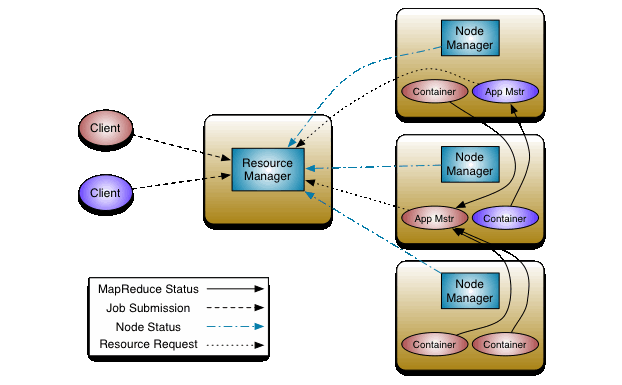
The fundamental idea of YARN is to split up the functionalities of resource management and job scheduling/monitoring into separate daemons. The idea is to have a global ResourceManager (RM) and per-application ApplicationMaster (AM). An application is either a single job or a DAG of jobs.
The ResourceManager and the NodeManager form the data-computation framework. The ResourceManager is the ultimate authority that arbitrates resources among all the applications in the system. The NodeManager is the per-machine framework agent who is responsible for containers, monitoring their resource usage (cpu, memory, disk, network) and reporting the same to the ResourceManager/Scheduler.
The per-application ApplicationMaster is, in effect, a framework specific library and is tasked with negotiating resources from the ResourceManager and working with the NodeManager(s) to execute and monitor the tasks.
yarn_action的更多相关文章
随机推荐
- spring 基础
作者:Spring太难链接:https://zhuanlan.zhihu.com/p/38131490来源:知乎著作权归作者所有.商业转载请联系作者获得授权,非商业转载请注明出处. 目录 Spring ...
- 让cpu占用率曲线听你指挥(多核处理器)
编程之美 1.1 让cpu占用率曲线听你指挥(多核处理器) [版权声明]转载请注明出处 http://www.cnblogs.com/TenosDoIt/p/3242910.html [目录] 不考 ...
- Jenkins连接TFS出现错误:“jenkins com.microsoft.tfs.core.exceptions.TECoreException”的问题收集
没成功解决过,下面提供一些收集的链接地址,因为这个问题真的很少. https://social.msdn.microsoft.com/Forums/vstudio/en-US/1a75a0b2-459 ...
- ArcObject开发,程序编译通过,但无法启动的解决
在ArcGIS 二次开发时,我们很容易就会忽略了,授权方面的问题,尤其是初学者.这方面的问题的解决,主要有: (1)在ArcGIS object控件出现的Form窗体,上添加License Contr ...
- Linux shell 提取文件名和目录名的一些方法(转)
很多时候在使用Linux的shell时,我们都需要对文件名或目录名进行处理,通常的操作是由路径中提取出文件名,从路径中提取出目录名,提取文件后缀名等等.例如,从路径/dir1/dir2/file.tx ...
- 清理Xcode的技巧和方法
移除对旧设备的支持 影响:可重新生成:再连接旧设备调试时,会重新自动生成.我移除了4.3.2, 5.0, 5.1等版本的设备支持. 路径:~/Library/Developer/Xcode/iOS D ...
- PHP 5.4 中经 htmlspecialchars 转义后的中文字符串为空的问题
PHP 5.4.3 环境中测试了一个在 PHP 5.2 环境下运行正常的程序,却发现本应正常提交一个中文字符串到数据库的代码却提交了一个空字符串,经过排查,该字符串在经 htmlspecialchar ...
- Web攻防之XSS,CSRF,SQL注入(转)
摘要:对Web服务器的攻击也可以说是形形色色.种类繁多,常见的有挂马.SQL注入.缓冲区溢出.嗅探.利用IIS等针对Webserver漏洞进行攻击.本文结合WEB TOP10漏洞中常见的SQL注入,跨 ...
- Git历险记(四)——索引与提交的幕后故事
我想如果看过<Git历险记>的前面三篇文章的朋友可能已经知道怎么用git add,git commit这两个命令了:知道它们一个是把文件暂存到索引中为下一次提交做准备,一个创建新的提交(c ...
- Mark一下, dp状态转移方程写对,可是写代码都错,poj 1651 poj 1179
dp题: 1.写状态转移方程; 2.考虑初始化边界,有意义的赋定值.还没计算的赋边界值: 3.怎么写代码自底向上计算最优值 今天做了几个基础dp,所有是dp方程写对可是初始化以及计算写错 先是poj ...