
ElasticSearch(十五) _search api 分页搜索及deep paging性能问题
1、分页搜索
语法:
size,from

GET /_search?size=10

GET /_search?size=10&from=0

GET /_search?size=10&from=20
GET /index/type/_search

{

  "query": { "match_all": {} },

  "from": 1,

  "size": 1

}
实际操作:
查看共有5条数据:
GET /test_index/test_type/_search
"hits" : {

    "total" : 7,

    "max_score" : 1.0,
我们假设将这7条数据分成3页,每一页是3条数据,来实验一下这个分页搜索的效果
第一页:
GET /test_index/test_type/_search?from=0&size=3

{

  "took" : 1,

  "timed_out" : false,

  "_shards" : {

    "total" : 5,

    "successful" : 5,

    "skipped" : 0,

    "failed" : 0

  },

  "hits" : {

    "total" : 7,

    "max_score" : 1.0,

    "hits" : [

      {

        "_index" : "test_index",

        "_type" : "test_type",

        "_id" : "10",

        "_score" : 1.0,

        "_source" : {

          "test_field1" : "test1",

          "test_field2" : "test2"

        }

      },

      {

        "_index" : "test_index",

        "_type" : "test_type",

        "_id" : "12",

        "_score" : 1.0,

        "_source" : {

          "num" : 1,

          "tags" : [ ]

        }

      },

      {

        "_index" : "test_index",

        "_type" : "test_type",

        "_id" : "6",

        "_score" : 1.0,

        "_source" : {

          "test_field" : "test test"

        }

      }

    ]

  }

}
第二页:
GET /test_index/test_type/_search?from=3&size=3

{

  "took" : 7,

  "timed_out" : false,

  "_shards" : {

    "total" : 5,

    "successful" : 5,

    "skipped" : 0,

    "failed" : 0

  },

  "hits" : {

    "total" : 7,

    "max_score" : 1.0,

    "hits" : [

      {

        "_index" : "test_index",

        "_type" : "test_type",

        "_id" : "2",

        "_score" : 1.0,

        "_source" : {

          "test_field" : "replaced test2"

        }

      },

      {

        "_index" : "test_index",

        "_type" : "test_type",

        "_id" : "Baq9WWgBjIP9BXE3vrJ2",

        "_score" : 1.0,

        "_source" : {

          "test_field" : "auto-generate id test"

        }

      },

      {

        "_index" : "test_index",

        "_type" : "test_type",

        "_id" : "1",

        "_score" : 1.0,

        "_source" : {

          "test_field1" : "test1",

          "test_field2" : "bulk test1"

        }

      }

    ]

  }

}
第三页:
GET /test_index/test_type/_search?from=6&size=3

{

  "took" : 1,

  "timed_out" : false,

  "_shards" : {

    "total" : 5,

    "successful" : 5,

    "skipped" : 0,

    "failed" : 0

  },

  "hits" : {

    "total" : 7,

    "max_score" : 1.0,

    "hits" : [

      {

        "_index" : "test_index",

        "_type" : "test_type",

        "_id" : "11",

        "_score" : 1.0,

        "_source" : {

          "num" : 0,

          "tags" : [ ]

        }

      }

    ]

  }

}
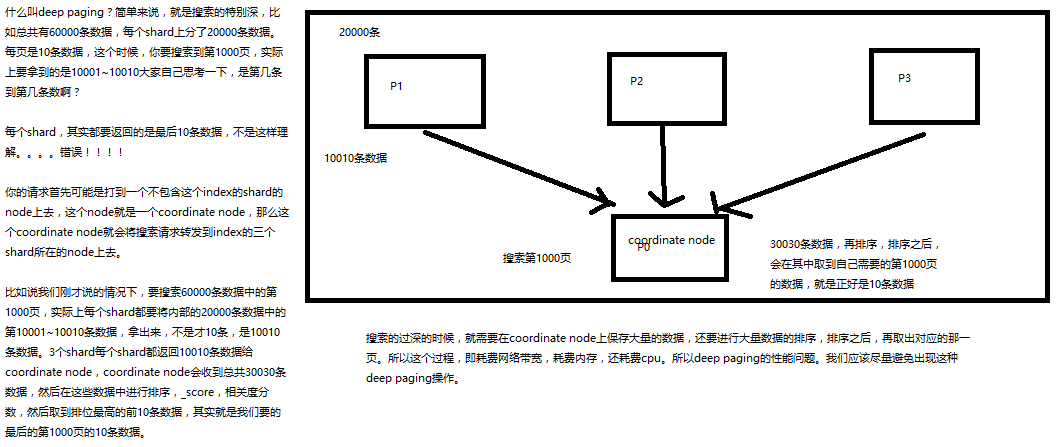
2、深度搜索deep paging的性能问题
ElasticSearch(十五) _search api 分页搜索及deep paging性能问题的更多相关文章
- ElasticSearch(十四) _search api search timeout 机制
语法:timeout=10ms,timeout=1s,timeout=1m GET /_search?timeout=10m timeout:默认无timeout,latency平衡completen ...
- Python 学习 第十五篇:模块搜索路径和包导入
在导入自定义的模块时,除了指定模块名之外,也需要指定目录,由于Python把目录称作包,因此,这类导入被称为包导入.包导入把计算机上的目录变成Python的命名空间,而目录中所包含的子目录和模块文件则 ...
- 十五、API请求接口-远程服务器返回错误: (400) 错误的请求错误
一.远程服务器返回错误: (400) 错误的请求错误 捕获异常查看具体错误 using Newtonsoft.Json; using System; using System.Collections. ...
- 【.NET Core项目实战-统一认证平台】第十五章 网关篇-使用二级缓存提升性能
[.NET Core项目实战-统一认证平台]开篇及目录索引 一.背景 首先说声抱歉,可能是因为假期综合症(其实就是因为懒哈)的原因,已经很长时间没更新博客了,现在也调整的差不多了,准备还是以每周1-2 ...
- 论文阅读笔记二十五:Spatial Pyramid Pooling in Deep Convolutional Networks for Visual Recognition(SPPNet CVPR2014)
论文源址:https://arxiv.org/abs/1406.4729 tensorflow相关代码:https://github.com/peace195/sppnet 摘要 深度卷积网络需要输入 ...
- Elasticsearch由浅入深(七)搜索引擎:_search含义、_multi-index搜索模式、分页搜索以及深分页性能问题、query string search语法以及_all metadata原理
_search含义 _search查询返回结果数据含义分析 GET _search { , "timed_out": false, "_shards": { , ...
- Elasticsearch系列---搜索分页和deep paging问题
概要 本篇从介绍搜索分页为起点,简单阐述分页式数据搜索与原有集中式数据搜索思维方式的差异,就分页问题对deep paging问题的现象进行分析,最后介绍分页式系统top N的案例. 搜索分页语法 El ...
- ES 25 - Elasticsearch的分页查询及其深分页问题 (deep paging)
目录 1 分页查询方法 2 分页查询的deep paging问题 1 分页查询方法 在GET请求中拼接from和size参数 // 查询10条数据, 默认从第0条数据开始 GET book_shop/ ...
- 36.分页及deep paging
主要知识点 1.es分页 2.deep paging 一.es分页语法 size,from 这两个关键字 GET /_search?size=10 指定每页10条数据 GET /_search ...
随机推荐
- linux shmget shmctl
shmgetint shmget(key_t key, size_t size, int flag);key: 标识符的规则size:共享存储段的字节数flag:读写的权限返回值:成功返回共享存储的i ...
- LeetCode OJ--Binary Tree Level Order Traversal II
http://oj.leetcode.com/problems/binary-tree-level-order-traversal-ii/ 树的层序遍历,和上一道题相比,对结果做一个顺序调整 reve ...
- Python Challenge 第一关
偶然在网上看到这个,PYTHON CHALLENGE,利用Python语言闯关,觉得挺有意思,就记录一下. 第0关应该算个入口吧,试了好几次才试出来,没什么代码就不写了.计算一个结果出来就行. 第一关 ...
- html5(拖拽1)
<!DOCTYPE html> <html xmlns="http://www.w3.org/1999/xhtml"> <head> <m ...
- Codeforces 919 C. Seat Arrangements
C. Seat Arrangements time limit per test 1 second memory limit per test 256 megabytes input standa ...
- java poi excel 生成表格的工具封装
效果如下: 代码如下: import java.io.File; import java.io.FileOutputStream; import java.io.IOException; import ...
- JVM 常用命令
对于有图形化界面的用户来,jconsole就可以搞定,界面使用很简单 还可以查看很多信息,例如检测死锁. 下面是没有图形化界面的系统 可以用命令 : jps 查看jvm 进程 jstack -l 6 ...
- Android图片缓存之Bitmap详解(一)
前言: 最近准备研究一下图片缓存框架,基于这个想法觉得还是先了解有关图片缓存的基础知识,今天重点学习一下Bitmap.BitmapFactory这两个类. Bitmap: Bitmap是Android ...
- 【GitHub】删除GitHub上的文件
想要删除已经提交上GitHub上的文件, 删除之后,如果这个文件夹下没有文件了,这个文件夹也会被删除! 并且在它的上层文件夹后面 有提示删除了这个文件的信息!!
- Cookie学习笔记二:Cookie实例
今天说说刚刚学到的两个Cookie的最经典应用:自己主动登录和购物车设置 一:自己主动登录 须要两个页面:login.jsp与index.jsp,login.jsp用来输出登录信息,index.jsp ...