
Spring Boot(六)自定义事件及监听
事件及监听并不是SpringBoot的新功能,Spring框架早已提供了完善的事件监听机制,在Spring框架中实现事件监听的流程如下:
自定义事件,继承org.springframework.context.ApplicationEvent抽象类
定义事件监听器,实现org.springframework.context.ApplicationListener接口
在Spring容器中发布事件
实现自定义事件及监听
- 定义事件
 //自定义事件

 public class ApplicationEventTest extends ApplicationEvent {

     public ApplicationEventTest(Object source) {

         super(source);

     }

     /**

      * 事件处理事项

      * @param msg

      */

     public void printMsg(String msg)

     {

         System.out.println("监听到事件:"+ApplicationEventTest.class);

     }

 }
- 定义监听器
 //自定义事件监听器

 //@Component

 public class ApplicationListenerTest implements ApplicationListener<ApplicationEventTest> {

     @Override

     public void onApplicationEvent(ApplicationEventTest event) {

         event.printMsg(null);

     }

 }
- 在Spring容器中发布事件
 public static void main(String[] args) {

    SpringApplication application = new SpringApplication(SpringbootdemoApplication.class);

    //需要把监听器加入到spring容器中

    application.addListeners(new ApplicationListenerTest());

    Set<ApplicationListener<?>> listeners = application.getListeners();

    ConfigurableApplicationContext context =  application.run(args);

    //发布事件

    context.publishEvent(new ApplicationEventTest(new Object()));

    context.close();

 }
上面的示例是在SpringBoot应用中简单的测试一下。
实际开发中实现监听还有其他的方式,在Spring框架中提供了两种事件监听的方式:
编程式:通过实现ApplicationListener接口来监听指定类型的事件
注解式:通过在方法上加@EventListener注解的方式监听指定参数类型的事件,写该类需要托管到Spring容器中
在SpringBoot应用中还可以通过配置的方式实现监听:
3. 通过application.properties中配置context.listener.classes属性指定监听器
下面分别分析一下这三种监听方式
编程式实现监听
实现ApplicationListenser接口:
 @Component

 public class ApplicationListenerTest implements ApplicationListener<ApplicationEventTest> {

     @Override

     public void onApplicationEvent(ApplicationEventTest event) {

         event.printMsg(null);

     }

 }
控制台输出测试:
 public static void main(String[] args) {

    SpringApplication application = new SpringApplication(SpringbootdemoApplication.class);

    //需要把监听器加入到spring容器中

    //application.addListeners(new ApplicationListenerTest());

    //Set<ApplicationListener<?>> listeners = application.getListeners();

    ConfigurableApplicationContext context =  application.run(args);

    //发布事件

    context.publishEvent(new ApplicationEventTest(new Object()));

 }
那么我们跟踪一下源码,看一下事件是如何发布出去的,又是如何被监听到的呢?
AbstractApplicationContext.java中截取部分代码
 protected void publishEvent(Object event, @Nullable ResolvableType eventType) {

    Assert.notNull(event, "Event must not be null");

    if (logger.isTraceEnabled()) {

       logger.trace("Publishing event in " + getDisplayName() + ": " + event);

    }

    // Decorate event as an ApplicationEvent if necessary

   /将object转成ApplicationEvent

    ApplicationEvent applicationEvent;

    if (event instanceof ApplicationEvent) {

       applicationEvent = (ApplicationEvent) event;

    }

    else {

       applicationEvent = new PayloadApplicationEvent<>(this, event);

       if (eventType == null) {

          eventType = ((PayloadApplicationEvent) applicationEvent).getResolvableType();

       }

    }

    // Multicast right now if possible - or lazily once the multicaster is initialized

    if (this.earlyApplicationEvents != null) {

       this.earlyApplicationEvents.add(applicationEvent);

    }

    else {

     // SimpleApplicationEventMulticaster 获取事件发布器,发布事件

       getApplicationEventMulticaster().multicastEvent(applicationEvent, eventType);

    }

    // Publish event via parent context as well...

    if (this.parent != null) {

       if (this.parent instanceof AbstractApplicationContext) {

          ((AbstractApplicationContext) this.parent).publishEvent(event, eventType);

       }

       else {

          this.parent.publishEvent(event);

       }

    }

 }
查看一下ApplicationContext类结构图可以发现:应用上下文AbstractApplicationContext实际还是通过继承ApplicationEventPublisher接口,实现了其中的事件发布的方法,使得Spring应用上下文有了发布事件的功能,在AbstractApplicationContext内部通过SimpleApplicationEventMulticaster事件发布类,将具体事件ApplicationEvent发布出去。
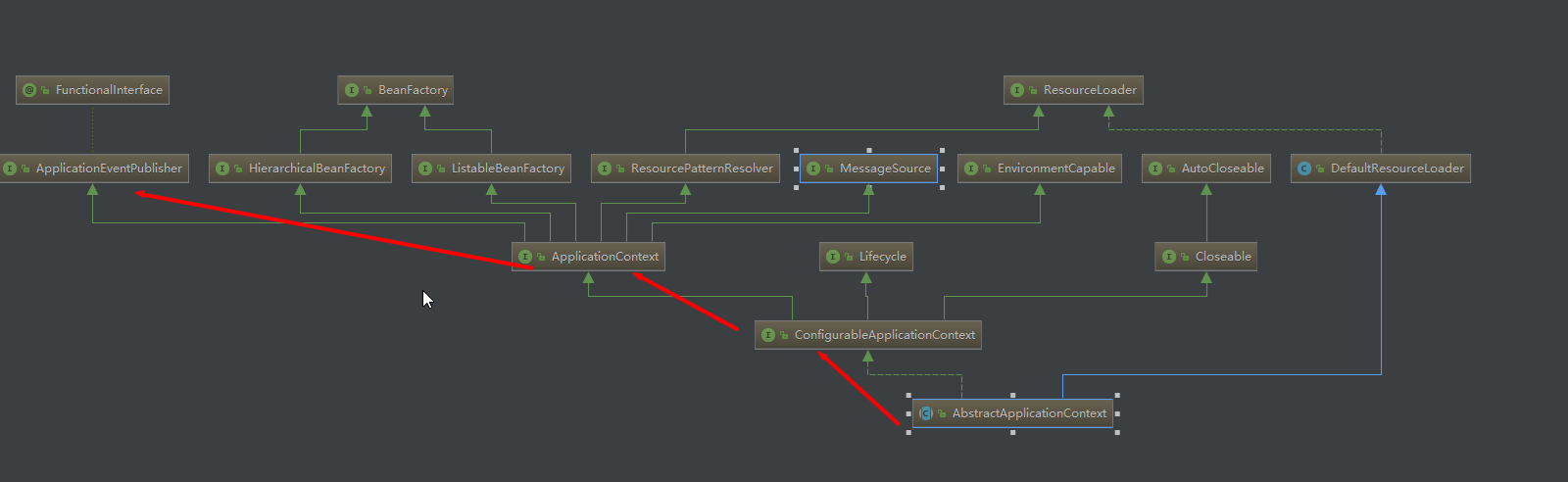
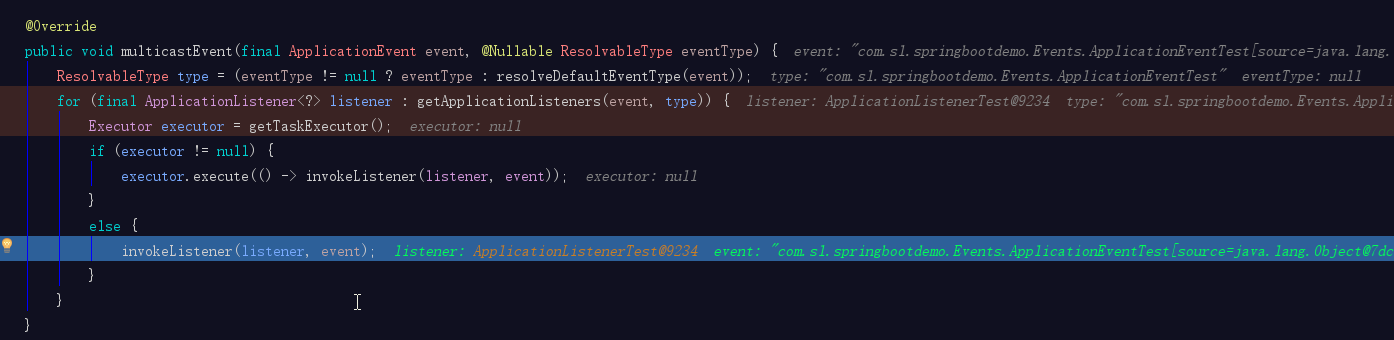
那么事件发布出去后又是如何被监听到的呢?下面看一下具Spring中负责处理事件发布类SimpleApplicationEventMulticaster 中multicastEvent方法具体实现过程
SimpleApplicationEventMulticaster.java部分代码,实际尝试将当前事件逐个广播到指定类型的监听器中(listeners已经根据当前事件类型过滤了)
 @Override

 public void multicastEvent(final ApplicationEvent event, @Nullable ResolvableType eventType) {

    ResolvableType type = (eventType != null ? eventType : resolveDefaultEventType(event));

     // getApplicationListeners(event, type) 筛选监听器,在context.publish(ApplicationEvent event)中已经将事件传入,getApplicationListeners中将可以根据这个event类型从Spring容器中检索出符合条件的监听器

    for (final ApplicationListener<?> listener : getApplicationListeners(event, type)) {

       Executor executor = getTaskExecutor();

       if (executor != null) {

          executor.execute(() -> invokeListener(listener, event));

       }

       else {

     //尝试逐个向监听器广播

          invokeListener(listener, event);

       }

    }

 }
@EventListener注解方式实现
定义注解方法
@Component

public class MyEventHandleTest {

    /**

     * 参数为Object类型时,所有事件都会监听到

     * 参数为指定类型事件时,该参数类型事件或者其子事件(子类)都可以接收到

     */

    @EventListener

    public void event(ApplicationEventTest event){

        event.printMsg(null);

    }

}
实现过程分析:
@EventListener注解主要通过EventListenerMethodProcessor扫描出所有带有@EventListener注解的方法,然后动态构造事件监听器,并将监听器托管到Spring应用上文中。
 protected void processBean(

       final List<EventListenerFactory> factories, final String beanName, final Class<?> targetType) {

    if (!this.nonAnnotatedClasses.contains(targetType)) {

       Map<Method, EventListener> annotatedMethods = null;

       try {

         //查找含有@EventListener注解的所有方法

          annotatedMethods = MethodIntrospector.selectMethods(targetType,

                (MethodIntrospector.MetadataLookup<EventListener>) method ->

                      AnnotatedElementUtils.findMergedAnnotation(method, EventListener.class));

       }

       catch (Throwable ex) {

          // An unresolvable type in a method signature, probably from a lazy bean - let's ignore it.

          if (logger.isDebugEnabled()) {

             logger.debug("Could not resolve methods for bean with name '" + beanName + "'", ex);

          }

       }

       if (CollectionUtils.isEmpty(annotatedMethods)) {

          this.nonAnnotatedClasses.add(targetType);

          if (logger.isTraceEnabled()) {

             logger.trace("No @EventListener annotations found on bean class: " + targetType.getName());

          }

       }

       else {

          // Non-empty set of methods

          ConfigurableApplicationContext context = getApplicationContext();

     //遍历含有@EventListener注解的方法

          for (Method method : annotatedMethods.keySet()) {

             for (EventListenerFactory factory : factories) {

                if (factory.supportsMethod(method)) {

                   Method methodToUse = AopUtils.selectInvocableMethod(method, context.getType(beanName));

           //动态构造相对应的事件监听器

                   ApplicationListener<?> applicationListener =

                         factory.createApplicationListener(beanName, targetType, methodToUse);

                   if (applicationListener instanceof ApplicationListenerMethodAdapter) {

                      ((ApplicationListenerMethodAdapter) applicationListener).init(context, this.evaluator);

                   }

           //将监听器添加的Spring应用上下文中托管

                   context.addApplicationListener(applicationListener);

                   break;

                }

             }

          }

          if (logger.isDebugEnabled()) {

             logger.debug(annotatedMethods.size() + " @EventListener methods processed on bean '" +

                   beanName + "': " + annotatedMethods);

          }

       }

    }

 }
在application.properties中配置context.listener.classes
添加如下配置:
context.listener.classes=com.sl.springbootdemo.Listeners.ApplicationListenerTest
查看一下DelegatingApplicationListener类中实现逻辑:
 public class DelegatingApplicationListener

       implements ApplicationListener<ApplicationEvent>, Ordered {

    private static final String PROPERTY_NAME = "context.listener.classes";

    private int order = 0;

    //Spring framework提供的负责处理发布事件的类,前面说的Spring应用上下文中也是通过这个类发布事件的

    private SimpleApplicationEventMulticaster multicaster;

    @Override

    public void onApplicationEvent(ApplicationEvent event) {

       if (event instanceof ApplicationEnvironmentPreparedEvent) {

         // getListeners内部实现读取context.listener.classes配置的监听器

          List<ApplicationListener<ApplicationEvent>> delegates = getListeners(

                ((ApplicationEnvironmentPreparedEvent) event).getEnvironment());

          if (delegates.isEmpty()) {

             return;

          }

          this.multicaster = new SimpleApplicationEventMulticaster();

          for (ApplicationListener<ApplicationEvent> listener : delegates) {

             this.multicaster.addApplicationListener(listener);

          }

       }

     //发布事件

       if (this.multicaster != null) {

          this.multicaster.multicastEvent(event);

       }

    }
Spring-boot-{version}.jar包中提供一个类DelegatingApplicationListener,该类的作用是从application.properties中读取配置context.listener.classes,并将事件广播给这些配置的监听器。通过前面一章对SpringBoot启动流程分析,我们已经了解到SpringBoot启动时会从META-INF/spring.factories中读取key为org.springframework.context.ApplicationListener的所有监听器。DelegatingApplicationListener的功能可以让我们不需要创建META-INF/spring.factories,直接在application.properties中配置即可。
Spring Boot(六)自定义事件及监听的更多相关文章
- 深入理解Spring的容器内事件发布监听机制
目录 1. 什么是事件监听机制 2. JDK中对事件监听机制的支持 2.1 基于JDK实现对任务执行结果的监听 3.Spring容器对事件监听机制的支持 3.1 基于Spring实现对任务执行结果的监 ...
- uniapp仿h5+fire自定义事件触发监听
仿h5+fire自定义事件触发监听 uni-app调用 event.js 源码记录(点击查看) 1.js下载地址 [event.js](https://ext.dcloud.net.cn/plugin ...
- 前端Datatables自定义事件(监听Datatables插件一些常见的事件动作)
今天开发项目的时候,用Datatables插件做前端分页列表,想在列表发生翻页.排序.搜索.改变单页显示数据条数这些行为的时候做一些其他的操作,看了半天Datatables官网终于找到可以监测到这些事 ...
- Spring Boot 事件和监听
Application Events and Listeners 1.自定义事件和监听 1.1.定义事件 package com.cjs.boot.event; import lombok.Data; ...
- Spring笔记(7) - Spring的事件和监听机制
一.背景 事件机制作为一种编程机制,在很多开发语言中都提供了支持,同时许多开源框架的设计中都使用了事件机制,比如SpringFramework. 在 Java 语言中,Java 的事件机制参与者有3种 ...
- 009-Spring Boot 事件监听、监听器配置与方式、spring、Spring boot内置事件
一.概念 1.事件监听的流程 步骤一.自定义事件,一般是继承ApplicationEvent抽象类 步骤二.定义事件监听器,一般是实现ApplicationListener接口 步骤三.启动时,需要将 ...
- 【spring源码学习】spring的事件发布监听机制源码解析
[一]相关源代码类 (1)spring的事件发布监听机制的核心管理类:org.springframework.context.event.SimpleApplicationEventMulticast ...
- 【laravel】Eloquent 模型事件和监听方式
所有支持的模型事件 在 Eloquent 模型类上进行查询.插入.更新.删除操作时,会触发相应的模型事件,不管你有没有监听它们.这些事件包括: retrieved 获取到模型实例后触发 creatin ...
- Spring Boot(三):Spring Boot中的事件的使用 与Spring Boot启动流程(Event 事件 和 Listeners监听器)
前言:在讲述内容之前 希望大家对设计模式有所了解 即使你学会了本片的内容 也不知道什么时候去使用 或者为什么要这样去用 观察者模式: 观察者模式是一种对象行为模式.它定义对象间的一种一对多的依赖关系, ...
随机推荐
- 微信小程序快速转成百度小程序的方法
1.安装Node.js(>8.5.0)https://nodejs.org/ npm升级到最新版本的方法:npm install -g npm自动更新到最新版本 2.配置cnpm:在命令行中输入 ...
- day 13 内置函数
内置函数思维导图:https://www.processon.com/view/link/5c13ad2de4b0ed122da75668 内置函数 作用域相关: locals() 返回当前作用域 ...
- 第七篇:gcc和arm-linux-gcc常用选项
目录 一.gcc和arm-linux-gcc的常用选项 二.从.c文件到可执行文件过程 一.gcc和arm-linux-gcc的常用选项 常用选型 -v 查看gcc编译器的版本,显示gcc执行时的详细 ...
- elk6.3.2在线安装中文分词工具IK
1.进入ES目录并执行安装(注意版本号改成你需要的版本) cd /usr/share/elasticsearch ./bin/elasticsearch-plugin install https:// ...
- P1803 凌乱的yyy
P1803 凌乱的yyy 题目背景 快noip了,yyy很紧张! 题目描述 现在各大oj上有n个比赛,每个比赛的开始.结束的时间点是知道的. yyy认为,参加越多的比赛,noip就能考的越好(假的) ...
- productFlavors 差异打包问题
差异化打包: 1.dependencies compile 是不可以放到差异化的productFlavors里面的. 会报错: Error:(69, 0) Could not find method ...
- What is the "internal" interface and port for on Openvswitch?
转:https://ask.openstack.org/en/question/4276/what-is-the-internal-interface-and-port-for-on-openvswi ...
- Ubuntu Server 下将HTML页面转换为PNG图片
零.前言 最近做一个网站,需要将网页转换为图片.由于服务器是Ubuntu Server,没有图形界面,所以实现的过程中遇到了很多问题.记录下来备用. 一.安装CutyCapt CutyCapt是一个可 ...
- JMeter性能测试的基础知识和个人理解
JMeter性能测试的基础知识和个人理解 1. JMeter的简介 JMeter是Apache组织开发的开源项目,设计之初是用于做性能测试的,同时它在实现对各种接口的调用方面做的比较成熟,因此,常 ...
- Object里面的方法
object里面有12个方法,没写完,写一些部分代表 toString():输出对象的地址字符串(hashcode码) equals():用的是==,比较的是引用,在有些类里面是重写了这个方法的,重写 ...