
redis 配置初体验
下载redis
1、新增start.bat
编辑redis-server redis.windows.conf
2、。改动redis.windows.conf配置文件改动password:找到例如以下行:
找到# requirepass foobared 去掉前面的凝视#。并把foobared 替换为你自己的password:admin
或者命令:
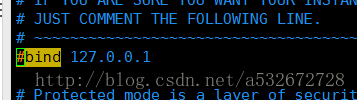

(mac系统安装完Redis后,在终端中输入:
$src/redis-server
即可启动Redis服务。)
3、启动start.bat
链接命令:redis-cli -h 127.0.0.1 -p 6379 -a admin
4、
commons-pool-1.5.6.jar
commons-pool2-2.0.jar
jedis-2.7.2.jar
junit-4.9b2.jar
5、
package junit;

import java.util.HashMap;

import java.util.Iterator;

import java.util.List;

import java.util.Map;

import org.junit.Before;

import org.junit.Test;

import redis.clients.jedis.Jedis;

public class TestRedis {

    private Jedis jedis;

    @Before

    public void setCon(){

        jedis = new Jedis("192.168.76.76", );

        jedis.auth("admin");

    }

    /**

     *

     */

    @Test

    public void testString(){

        /*jedis.set("password", "123");

        System.out.println(jedis.get("password"));

        jedis.append("password", "456");

        System.out.println(jedis.get("password"));

        jedis.del("password");

        System.out.println(jedis.get("password"));*/

        jedis.mset("name", "taop", "age", "", "qq", "");

        jedis.incr("age");

        System.out.println(jedis.get("name") + "-" + jedis.get("age") + "-" + jedis.get("qq"));

    }

    @Test

    public void testMap(){

        Map<String, String> map = new HashMap<String, String>();

        map.put("name", "taop");

        map.put("age", "");

        map.put("qq", "");

        jedis.hmset("userMap", map);

        List<String> userMap = jedis.hmget("userMap", "name", "age", "qq");

        System.out.println(userMap.get());

        System.out.println(jedis.hlen("userMap"));

        System.out.println(jedis.exists("userMap"));

        System.out.println(jedis.hkeys("userMap"));

        System.out.println(jedis.hvals("userMap"));

        jedis.hdel("userMap", "name");

        System.out.println(jedis.hmget("userMap", "name"));

        Iterator<String> iterator = jedis.hkeys("userMap").iterator();

        while(iterator.hasNext()){

            String key = iterator.next();

            System.out.println("value:"+jedis.hmget("userMap", key).get());

        }

    }

    @Test

    public void testList(){

        /*jedis.lpush("framework", "spring");

        jedis.lpush("framework", "ibatis");

        jedis.lpush("framework", "jedis");

        jedis.lpush("framework", "struts");

        jedis.lpush("framework", "hibernate");*/

        System.out.println(jedis.lrange("framework", , -));

        List<String> frameList = jedis.lrange("framework", , );

        System.out.println(frameList);

    }

    @Test

    public void testRedisPool(){

        JedisUtil.getJedis().set("username", "中文");

        System.out.println(JedisUtil.getJedis().get("username"));

    }

}
连接池封装
package junit;

import redis.clients.jedis.Jedis;

import redis.clients.jedis.JedisPool;

import redis.clients.jedis.JedisPoolConfig;

public class JedisUtil {

    private static String ADDR = "192.168.76.76";

    private static int PORT = 6379;

    private static String AUTH = "admin";

    private static int MAX_ACTIVE = 1024;

    private static int MAX_IDLE = 200;

    private static int MAX_WAIT = 10000;

    private static int TIMEOUT = 10000;

    private static boolean TEST_ON_BORROW = true;

    private static JedisPool jedisPool = null;

    static {

        try{

            JedisPoolConfig config = new JedisPoolConfig();

            config.setMaxIdle(MAX_IDLE);

            config.setMaxWaitMillis(MAX_WAIT);

            config.setTestOnBorrow(TEST_ON_BORROW);

            jedisPool = new JedisPool(config,ADDR,PORT,TIMEOUT,AUTH);

        }catch (Exception e) {

            e.printStackTrace();

        }

    }

    public synchronized static Jedis getJedis(){

        try{

            if(jedisPool != null){

                Jedis jedis = jedisPool.getResource();

                return jedis;

            }else{

                return null;

            }

        }catch (Exception e) {

            e.printStackTrace();

            return null;

        }

    }

    public static void returnResource(final Jedis jedis){

        if(jedis != null){

            jedisPool.returnResource(jedis);

        }

    }

}
redis 配置初体验的更多相关文章
- Redis Sentinel初体验
自Redis增加Sentinel集群工具以来,本博主就从未尝试过使用该工具.最近在调研目前主流的Redis集群部署方案,所以详细地看了一遍官方对于Sentinel的介绍并在自己的台式机上完成了 ...
- redis 之初体验(window)
1 下载window版本的redis :https://github.com/MSOpenTech/redis/releases 2 解压压缩包.我的放在了E盘: E:/redis 3 程序,输入cm ...
- 【NC基础操作】开发环境配置初体验
当我们拿到开发工具UAP-STUDIO-6.5.0.2和Home文件的时候,意味着我们可以用这两样东西开始进行项目开发了(默认其他准备已就绪). 运行UAP-STUDIO-6.5.0.2 双击进入&q ...
- 【Python3爬虫】爬取美女图新姿势--Redis分布式爬虫初体验
一.写在前面 之前写的爬虫都是单机爬虫,还没有尝试过分布式爬虫,这次就是一个分布式爬虫的初体验.所谓分布式爬虫,就是要用多台电脑同时爬取数据,相比于单机爬虫,分布式爬虫的爬取速度更快,也能更好地应对I ...
- 【Python3爬虫】学习分布式爬虫第一步--Redis分布式爬虫初体验
一.写在前面 之前写的爬虫都是单机爬虫,还没有尝试过分布式爬虫,这次就是一个分布式爬虫的初体验.所谓分布式爬虫,就是要用多台电脑同时爬取数据,相比于单机爬虫,分布式爬虫的爬取速度更快,也能更好地应对I ...
- SQL Server 全文搜索 配置、查询初体验
原文:SQL Server 全文搜索 配置.查询初体验 一.使用SQL Server全文搜索配置 要使用SQL Server的全文搜索服务,需要进行如下配置. 1.开启全文搜索服务: 2.开启数据库的 ...
- 香蕉派(or 皮?)上手初体验 -- 外观鉴赏,安装,配置&总结
一.前言及简单介绍 watermark/2/text/aHR0cDovL2Jsb2cuY3Nkbi5uZXQvbG9uZ2Vyem9uZQ==/font/5a6L5L2T/fontsize/400/f ...
- Online开发初体验——Jeecg-Boot 在线配置图表
Online开发——初体验(在线配置图表) 01 通过JSON数据,快速配置图形报表 02 通过SQL数据,快速配置图形报表 03 图表模板配置,实现不同数据源图表合并展示 04 图表布局,支持单排. ...
- Spring boot集成redis初体验
pom.xml: <?xml version="1.0" encoding="UTF-8"?> <project xmlns="ht ...
随机推荐
- css hsla和rgba的区别
在CSS3里可以使用RGBA和HSLA两种色彩模式,都可以用来在设置颜色的同时也可以设置它的透明度.RGBA指的是“红色.绿色.蓝色和Alpha透明度”(Red-Green-Blue-Alpha),而 ...
- python语法_使用占位符进行格式化输出
“%s” 占位符 name = input("name:") age = input("age:") job = input("job:" ...
- Gym 102056I - Misunderstood … Missing - [DP][The 2018 ICPC Asia-East Continent Final Problem I]
题目链接:https://codeforces.com/gym/102056/problem/I Warm sunshine, cool wind and a fine day, while the ...
- Luogu 1098 - 字符串的展开 - [字符串操作][模拟]
题目链接:https://www.luogu.org/problemnew/show/P1098 题目描述在初赛普及组的“阅读程序写结果”的问题中,我们曾给出一个字符串展开的例子:如果在输入的字符串中 ...
- PowerBI新功能: 自定义数据连接器(Data Connector)
你是不是觉得原有的数据连接器(Data Connector)列表,就像女人的衣柜,总少那么一件你想要的呐? 现在,你的救星来了!你可以自己造一个了! Power BI的数据连接器(Data Conne ...
- Python Async/Await入门指南
转自:https://zhuanlan.zhihu.com/p/27258289 本文将会讲述Python 3.5之后出现的async/await的使用方法,以及它们的一些使用目的,如果错误,欢迎指正 ...
- 怎样用Java自制优秀的图片验证码?这样!
Completely Automated Public Turing test to tell Computers and Humans Apart 全自动区分计算机和人类的图灵测试 简称CAPTCH ...
- python数据结构-如何在列表、字典、集合中根据条件筛选数据
如何在列表.字典.集合中根据条件筛选数据 问题举例: 过滤列表[1, 2, 5, -1, 9, 10]中的负数 筛选字典{“zhangsan”:97, "lisi":80, &qu ...
- 两个有序数组的上中位数和第K小数问题
哈,再介绍个操蛋的问题.当然,网上有很多解答,但是能让你完全看懂的不多,即便它的结果是正确的,可是解释上也是有问题的. 所以,为了以示正听,我也做了分析和demo,只要你愿意学习,你就一定能学会,并且 ...
- HBase笔记5(诊断)
阻塞急救: RegionServer内存设置太小: 解决方案: 设置Region Server的内存要在conf/hbase-env.sh中添加export HBASE_REGIONSERVER_OP ...