
使用netty编写IM通信界面
前驱知识
WebSocket
维基百科:
WebSocket是一种在单个TCP连接上进行全双工通信的协议。WebSocket通信协议于2011年被IETF定为标准RFC 6455,并由RFC7936补充规范。WebSocket API也被W3C定为标准。
WebSocket使得客户端和服务器之间的数据交换变得更加简单,允许服务端主动向客户端推送数据。在WebSocket API中,浏览器和服务器只需要完成一次握手,两者之间就直接可以创建持久性的连接,并进行双向数据传输。
添加maven依赖
    <build>

        <plugins>

            <plugin>

                <groupId>org.apache.maven.plugins</groupId>

                <artifactId>maven-compiler-plugin</artifactId>

                <configuration>

                    <source>8</source>

                    <target>8</target>

                </configuration>

            </plugin>

        </plugins>

    </build>

    <dependencies>

        <dependency>

            <groupId>io.netty</groupId>

            <artifactId>netty-all</artifactId>

            <version>4.1.25.Final</version>

        </dependency>

    </dependencies>
编写代码
Chat处理器
import io.netty.channel.ChannelHandlerContext;

import io.netty.channel.SimpleChannelInboundHandler;

import io.netty.channel.group.ChannelGroup;

import io.netty.channel.group.DefaultChannelGroup;

import io.netty.handler.codec.http.websocketx.TextWebSocketFrame;

import io.netty.util.concurrent.GlobalEventExecutor;

import java.time.LocalDateTime;

/**

 * @author: Tu9ohost

 * 处理消息的handler

 * TextWebSocketFrame: 在netty中,是用于为websocket专门处理文本的对象,frame是消息的载体

 */

public class ChatHandler extends SimpleChannelInboundHandler<TextWebSocketFrame> {

    // 用于记录和管理所有客户端的channle

    private static ChannelGroup clients =

            new DefaultChannelGroup(GlobalEventExecutor.INSTANCE);

    @Override

    protected void channelRead0(ChannelHandlerContext ctx, TextWebSocketFrame msg)

            throws Exception {

        // 获取客户端传输过来的消息

        String content = msg.text();

        System.out.println("接受到的数据:" + content);

//		for (Channel channel: clients) {

//			channel.writeAndFlush(

//				new TextWebSocketFrame(

//						"[服务器在]" + LocalDateTime.now()

//						+ "接受到消息, 消息为:" + content));

//		}

        // 下面这个方法,和上面的for循环,一致

        clients.writeAndFlush(

                new TextWebSocketFrame(

                        "[服务器在]" + LocalDateTime.now()

                                + "接受到消息, 消息为:" + content));

    }

    /**

     * 当客户端连接服务端之后(打开连接)

     * 获取客户端的channle,并且放到ChannelGroup中去进行管理

     */

    @Override

    public void handlerAdded(ChannelHandlerContext ctx) throws Exception {

        clients.add(ctx.channel());

    }

    @Override

    public void handlerRemoved(ChannelHandlerContext ctx) throws Exception {

        // 当触发handlerRemoved,ChannelGroup会自动移除对应客户端的channel

//		clients.remove(ctx.channel());

        System.out.println("客户端断开,channle对应的长id为:"

                + ctx.channel().id().asLongText());

        System.out.println("客户端断开,channle对应的短id为:"

                + ctx.channel().id().asShortText());

    }

}
编写服务初始化
import io.netty.channel.ChannelInitializer;

import io.netty.channel.ChannelPipeline;

import io.netty.channel.socket.SocketChannel;

import io.netty.handler.codec.http.HttpObjectAggregator;

import io.netty.handler.codec.http.HttpServerCodec;

import io.netty.handler.codec.http.websocketx.WebSocketServerProtocolHandler;

import io.netty.handler.stream.ChunkedWriteHandler;

/**

 * @author: Tu9ohost

 */

public class WSServerInitiazer extends ChannelInitializer<SocketChannel> {

    @Override

    protected void initChannel(SocketChannel ch) throws Exception {

        ChannelPipeline pipeline = ch.pipeline();

        // websocket 基于http协议,所以要有http编解码器

        pipeline.addLast(new HttpServerCodec());

        // 对写大数据流的支持

        pipeline.addLast(new ChunkedWriteHandler());

        // 对httpMessage进行聚合,聚合成FullHttpRequest或FullHttpResponse

        // 几乎在netty中的编程,都会使用到此hanler

        pipeline.addLast(new HttpObjectAggregator(1024*64));

        // ====================== 以上是用于支持http协议    ======================

        // ====================== 以下是支持httpWebsocket ======================

        /**

         * websocket 服务器处理的协议,用于指定给客户端连接访问的路由 : /ws

         * 本handler会帮你处理一些繁重的复杂的事

         * 会帮你处理握手动作: handshaking(close, ping, pong) ping + pong = 心跳

         * 对于websocket来讲,都是以frames进行传输的,不同的数据类型对应的frames也不同

         */

        pipeline.addLast(new WebSocketServerProtocolHandler("/ws"));

        // 自定义的handler

        pipeline.addLast(new ChatHandler());

    }

}
主方法
import io.netty.bootstrap.ServerBootstrap;

import io.netty.channel.ChannelFuture;

import io.netty.channel.EventLoopGroup;

import io.netty.channel.nio.NioEventLoopGroup;

import io.netty.channel.socket.nio.NioServerSocketChannel;

/**

 * @author: Tu9ohost

 */

public class WSServer {

    public static void main(String[] args) throws Exception {

        EventLoopGroup mainGroup = new NioEventLoopGroup();

        EventLoopGroup subGroup = new NioEventLoopGroup();

        try {

            ServerBootstrap server = new ServerBootstrap();

            server.group(mainGroup, subGroup)

                    .channel(NioServerSocketChannel.class)

                    .childHandler(new WSServerInitiazer());

            // 定义了端口为8088

            ChannelFuture future = server.bind(8088).sync();

            future.channel().closeFuture().sync();

        } finally {

            mainGroup.shutdownGracefully();

            subGroup.shutdownGracefully();

        }

    }

}
编写界面
<!DOCTYPE html>

<html>

	<head>

		<meta charset="utf-8" />

		<title></title>

	</head>

	<body>

		<div>发送消息:</div>

		<input type="text" id="msgContent"/>

		<input type="button" value="点我发送" onclick="CHAT.chat()"/>

		<div>接受消息:</div>

		<div id="receiveMsg" style="background-color: gainsboro;"></div>

		<script type="application/javascript">

			window.CHAT = {

				socket: null,

				init: function() {

					if (window.WebSocket) {

						CHAT.socket = new WebSocket("ws://127.0.0.1:8088/ws");

						CHAT.socket.onopen = function() {

							console.log("连接建立成功...");

						},

						CHAT.socket.onclose = function() {

							console.log("连接关闭...");

						},

						CHAT.socket.onerror = function() {

							console.log("发生错误...");

						},

						CHAT.socket.onmessage = function(e) {

							console.log("接受到消息:" + e.data);

							var receiveMsg = document.getElementById("receiveMsg");

							var html = receiveMsg.innerHTML;

							receiveMsg.innerHTML = html + "<br/>" + e.data;

						}

					} else {

						alert("浏览器不支持websocket协议...");

					}

				},

				chat: function() {

					var msg = document.getElementById("msgContent");

					CHAT.socket.send(msg.value);

				}

			};

			CHAT.init();

		</script>

	</body>

</html>
检验
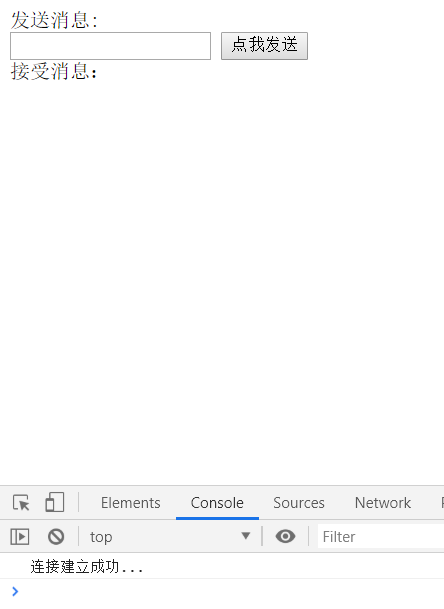
首先运行主方法,再打开界面,按F12,会显式链接建立成功
随意编写,再点击点我发送
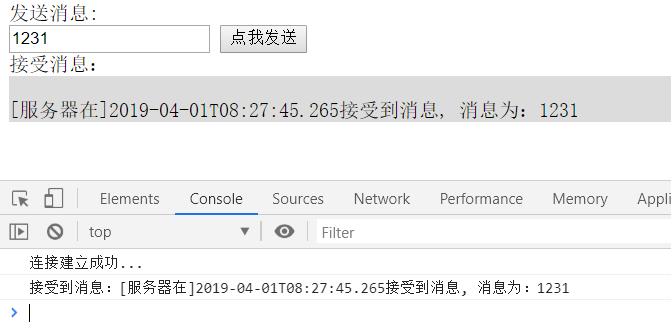
服务端显式

关闭界面窗口,则会显式断开链接id

使用netty编写IM通信界面的更多相关文章
- 为什么选择Netty作为基础通信框架?
在开始之前,我先讲一个亲身经历的故事:曾经有两个项目组同时用到了NIO编程技术,一个项目组选择自己开发NIO服务端,直接使用JDK原生的API,结果两个多月过去了,他们的NIO服务端始终无法稳定,问题 ...
- 二、Django用Eclipse编写一个登录界面
一.Django用Eclipse编写一个登录界面 二.Django用Eclipse编写一个登录界面Ajax和Django交互 各软件版本:Python 2.7.14,django 1.6.11 原来已 ...
- 一、Django用Eclipse编写一个登录界面
一.Django用Eclipse编写一个登录界面 二.Django用Eclipse编写一个登录界面Ajax和Django交互 Eclipse安装Python插件和Django的步骤直接省略. 创建de ...
- C#如何在VS2015 2017版本中编写WPF UI界面引入第三方SVG图形
原文:C#如何在VS2015 2017版本中编写WPF UI界面引入第三方SVG图形 在VS2015 2017版本中编写WPF UI界面引入第三方SVG图形 最近在写WPF界面的时候遇到一个情 ...
- android#编写一个聊天界面
摘自<第一行代码>——郭霖 既然是要编写一个聊天界面,那就肯定要有收到的消息和发出的消息.上一节中我们制作的message_left.9.png可以作为收到消息的背景图,那么毫无疑问你还需 ...
- Qt编写串口通信程序全程图文解说
(说明:我们的编程环境是windows xp下,在Qt Creator中进行,假设在Linux下或直接用源代码编写,程序稍有不同,请自己修改.) 在Qt中并没有特定的串口控制类,如今大部分人使用的是第 ...
- 转:Qt编写串口通信程序全程图文讲解
转载:http://blog.csdn.net/yafeilinux/article/details/4717706 作者:yafeilinux (说明:我们的编程环境是windows xp下,在Q ...
- Qt编写串口通信程序全程图文讲解 .
在Qt中并没有特定的串口控制类,现在大部分人使用的是第三方写的qextserialport类,我们这里也是使用的该类.我们可以去 http://sourceforge.net/projects/qex ...
- 【转】Qt编写串口通信程序全程图文讲解
本文章原创于www.yafeilinux.com 转载请注明出处. (说明:我们的编程环境是windows xp下,在Qt Creator中进行,如果在Linux下或直接用源码编写,程序稍有不同,请自 ...
随机推荐
- 非关系型数据库(nosql)介绍
非关系型数据库也叫Nosql数据库,全称是not noly sql. 2009年初,Johan Oskarsson举办了一场关于开源分布式数据库的讨论,Eric Evans在这次讨论中提出了NoSQL ...
- bash:express:command not found
重新设置了node_global和node_cache目录后,总是显示command not found 找了几篇博文后,终于解决了这个问题 步骤如下: 1.新建node_global和node_ ...
- ngx_lua 模块
ngx_lua模块的原理: 1.每个worker(工作进程)创建一个Lua VM,worker内所有协程共享VM:2.将Nginx I/O原语封装后注入 Lua VM,允许Lua代码直接访问:3.每个 ...
- .NET日志记录之——log4net划重点篇
.NET日志记录之--log4net划重点篇 1.概述 log4net是.Net下一个非常优秀的开源日志记录组件.log4net记录日志的功能非常强大.它可以将日志分不同的等级,以不同的格式,输出到不 ...
- Centos下DNS+NamedManager高可用部署方案完整记录
之前说到了NamedManager单机版的配置,下面说下DNS+NamedManager双机高可用的配置方案: 1)机器环境 主机名 ip地址 dns01.kevin.cn 192.168.10.20 ...
- HTTP协议冷知识大全
如果不用HTTPS,HTTP协议如何安全的传输密码信息? HTTP协议是纯文本协议,没有任何加密措施.通过HTTP协议传输的数据都可以在网络上被完全监听.如果用户登陆时将用户名和密码直接明文通过HTT ...
- Indidual Homework Assignment
一.Pair work的得与失 合作编程在以前的学习过程中也进行过,基本也就是各人负责一部分最后再将之拼凑起来,而这次作业要求的双人合作,要求的并不是这样,而是两人应该在一起进行工作,这样的要求理想情 ...
- 软件工程驻足篇章:第十七周和BugPhobia团队漫长的道别
0x01 :序言 I am a slow walker, but I never walk backwards. 成长于被爱,学着爱人 成长的故事 也是年少的星期六结束的故事 就仿佛我和BugPhob ...
- 20135316Linux内核学习笔记第六周
20135316王剑桥<Linux内核分析>MOOC课程http://mooc.study.163.com/course/USTC 1000029000 一.进程控制块PCB--task_ ...
- 20135327郭皓--Linux内核分析第六周 进程的描述和进程的创建
进程的描述和进程的创建 一.进程的描述 操作系统三大功能: 进程管理 内存管理 文件系统 进程描述符task_struct数据结构 task _ struct:为了管理进程,内核必须对每个进程进行清晰 ...