
轻量级.NET CORE ORM框架Insql使用教程
Insql 国人开发,是一款汲取 Mybatis 优点的.NET ORM 框架。追求简单直观,使用自由灵活等特点。
项目主页:https://rainrcn.github.io/insql
此 ORM 是以 Mybatis 的 Sql 配置方式,以 Dapper 为对象映射的基础上建立。喜欢写 SQL 的同学们肯定会喜欢的。另外因为对象映射使用 Dapper 的关系,所以性能上不用过多担心。
创建项目
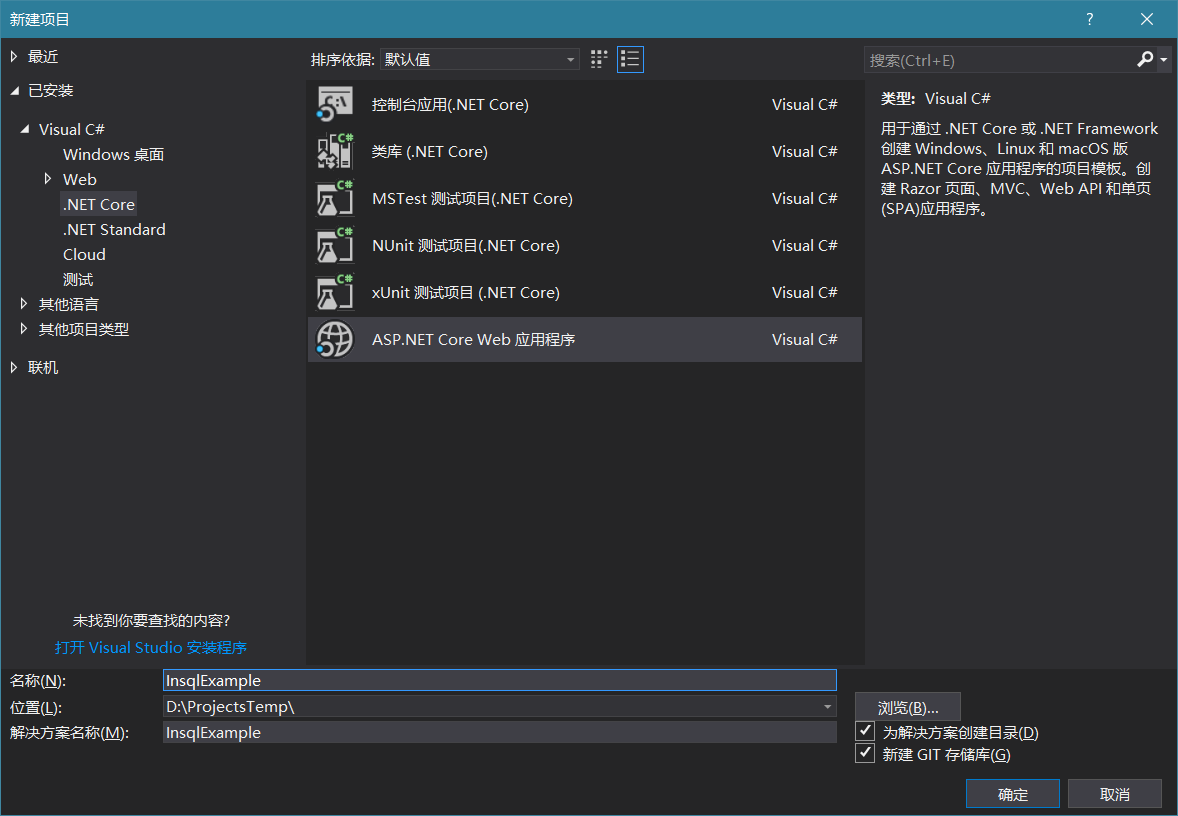
模板选择Api或Web应用程序,如果会自己大家结构选择空也是可以的。
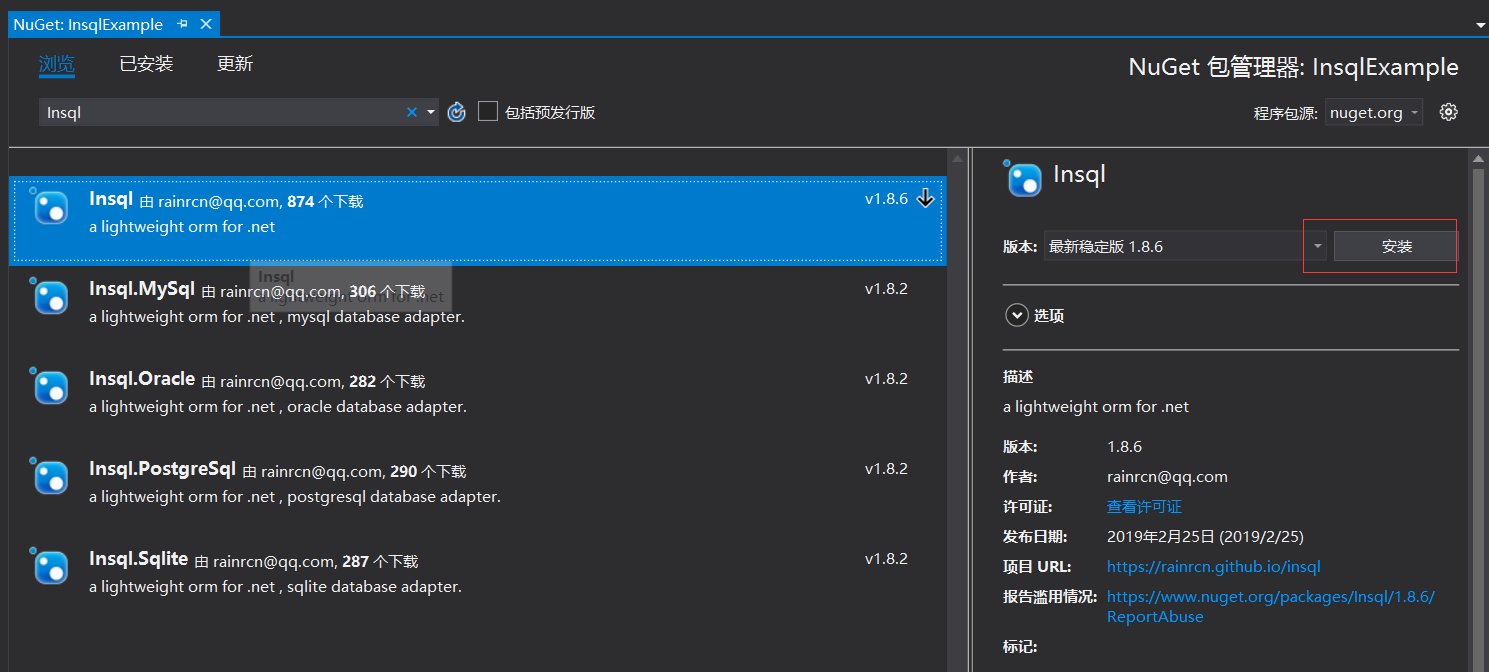
在项目上鼠标右键选择管理Nuget程序包,搜索Insql并添加安装,Insql 包自带 SqlServer 数据库连接,如果需要 MySql 数据库,需要另外安装Insql.MySql。
使用
打开Startup.cs,在ConfigureServices中加入AddInsql
public void ConfigureServices(IServiceCollection services)

{

    services.AddInsql();

    services.AddMvc().SetCompatibilityVersion(CompatibilityVersion.Version_2_2);

}
Insql 就已经可以开始用了。
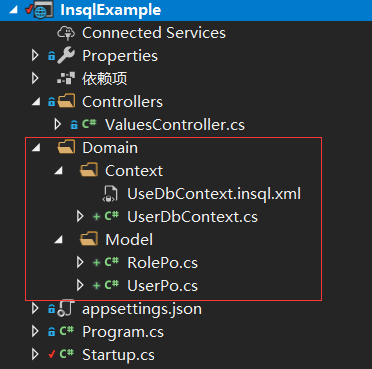
在项目下创建Domain目录,并创建UserDbContext.cs UserDbContext.insql.xml UserPo.cs RolePo.cs 文件
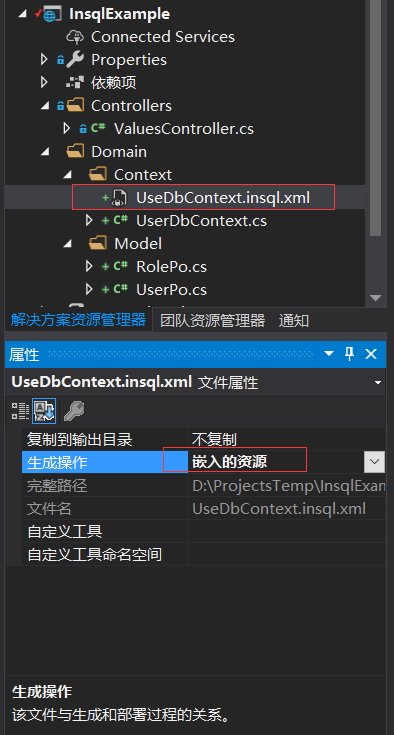
UserDbContext.insql.xml 要右键属性选择嵌入式资源
写代码
1. 创建数据库模型类 UserPo.cs RolePo.cs
public class UserPo

{

    public string UserId { get; set; }

    public string UserName { get; set; }

    public DateTime CreateTime { get; set; }

}

public class RolePo

{

    public string RoleCode { get; set; }

    public string RoleName { get; set; }

    public int RoleOrder { get; set; }

}
2. 创建UseDbContext.insql.xmlSQL 配置
<insql type="InsqlExample.Domain.Context.UserDbContext,InsqlExample" >

  <!--定义UserPo类型数据库字段到对象属性映射-->

  <map type="InsqlExample.Domain.Model.UserPo,InsqlExample">

    <key name="user_id" to="UserId" />

    <column name="user_name" to="UserName" />

    <column name="create_time" to="CreateTime" />

  </map>

  <map type="InsqlExample.Domain.Model.RolePo,InsqlExample">

    <key name="role_code" to="RoleCode" />

    <column name="role_name" to="RoleName" />

    <column name="role_order" to="RoleOrder" />

  </map>

  <select id="GetUser">

    select * from user_info where user_id = @userId

  </select>

  <insert id="InsertUser">

    insert into user_info (user_id,user_name,create_time) value (@UserId,@UserName,@CreateTime)

  </insert>

  <update id="UpdateUser">

    update user_info

    <set>

      <if test="UserName != null">

        user_name = @UserName,

      </if>

    </set>

    where user_id = @UserId

  </update>

  <delete id="DeleteUser">

    delete from user_info where user_id = @userId

  </delete>

  <select id="GetRoleList">

    select * from role_info order by role_order

  </select>

</insql>
select,insert,update,delete 分别代表增删改查,可以看到在update中有特殊 xml 元素,可以进项目文档查看详细说明,有 Mybatis 经验的同学自然就理解了
3. 创建UserDbContext数据上下文
public class UserDbContext : DbContext

{

    public UserDbContext(DbContextOptions<UserDbContext> options) : base(options)

    {

    }

    public UserPo GetUser(string userId)

    {

        //"GetUser"对应 select上的id,

        //第二个查询参数支持 PlainObject和 IDictionary<string,object>两种类型

        return this.Query<UserPo>("GetUser", new { userId }).SingleOrDefault();

    }

    public void InsertUser(UserPo user)

    {

        this.Execute(nameof(InsertUser), user);

    }

    public void UpdateUser(UserPo user)

    {

        this.Execute(nameof(UpdateUser), user);

    }

    public void DeleteUser(string userId)

    {

        this.Execute(nameof(DeleteUser), new { userId });

    }

    public IEnumerable<RolePo> GetRoleList()

    {

        return this.Query<RolePo>("GetRoleList");

    }

}
别忘了在Startup.cs中注册 UserDbContext。 命名空间 using Insql;一下
public void ConfigureServices(IServiceCollection services)

{

    services.AddInsql();

    services.AddInsqlDbContext<UserDbContext>(options =>

    {

        //这里代表这个上下文使用这个SqlServer数据库

        options.UseSqlServer("这里是连接字符串");

    });

    services.AddMvc().SetCompatibilityVersion(CompatibilityVersion.Version_2_2);

}
增删改查这就 OK 了。然后我们可以在 Controller 或者 Service 中直接注入 UserDbContext 来用。
4. 在ValuesController.cs中使用UserDbContext
[Route("api/[controller]")]

[ApiController]

public class ValuesController : ControllerBase

{

    private readonly UserDbContext dbContext;

    public ValuesController(UserDbContext dbContext)

    {

        this.dbContext = dbContext;

    }

    [HttpGet]

    public ActionResult<IEnumerable<string>> Get()

    {

        //查询用户

        var user1 = this.dbContext.GetUser("tome");

        //增加用户

        this.dbContext.InsertUser(new UserPo

        {

            UserId = Guid.NewGuid().ToString(),

            UserName = "tom",

            CreateTime = DateTime.Now

        });

        //查询角色列表

        var roleList = this.dbContext.GetRoleList();

        //....其他的不演示了

        //还可以这样用,通过dbContext直接调用sql,和在DbContext里面写方法一样的

        var userJerry = this.dbContext.Query<UserPo>("GetUser", new { userId = "jerry" });

        return new string[] { "value1", "value2" };

    }

}
行这就完事了。
可以去看看项目文档,支持功能还挺多的。代码生成器也有。
轻量级.NET CORE ORM框架Insql使用教程的更多相关文章
- OsharpNS轻量级.net core快速开发框架简明入门教程-从零开始启动Osharp
OsharpNS轻量级.net core快速开发框架简明入门教程 教程目录 从零开始启动Osharp 1.1. 使用OsharpNS项目模板创建项目 1.2. 配置数据库连接串并启动项目 1.3. O ...
- OsharpNS轻量级.net core快速开发框架简明入门教程-Osharp.Redis使用
OsharpNS轻量级.net core快速开发框架简明入门教程 教程目录 从零开始启动Osharp 1.1. 使用OsharpNS项目模板创建项目 1.2. 配置数据库连接串并启动项目 1.3. O ...
- OsharpNS轻量级.net core快速开发框架简明入门教程-代码生成器的使用
OsharpNS轻量级.net core快速开发框架简明入门教程 教程目录 从零开始启动Osharp 1.1. 使用OsharpNS项目模板创建项目 1.2. 配置数据库连接串并启动项目 1.3. O ...
- OsharpNS轻量级.net core快速开发框架简明入门教程-基于Osharp实现自己的业务功能
OsharpNS轻量级.net core快速开发框架简明入门教程 教程目录 从零开始启动Osharp 1.1. 使用OsharpNS项目模板创建项目 1.2. 配置数据库连接串并启动项目 1.3. O ...
- OsharpNS轻量级.net core快速开发框架简明入门教程-Osharp.Hangfire使用
OsharpNS轻量级.net core快速开发框架简明入门教程 教程目录 从零开始启动Osharp 1.1. 使用OsharpNS项目模板创建项目 1.2. 配置数据库连接串并启动项目 1.3. O ...
- OsharpNS轻量级.net core快速开发框架简明入门教程-Osharp.Permissions使用
OsharpNS轻量级.net core快速开发框架简明入门教程 教程目录 从零开始启动Osharp 1.1. 使用OsharpNS项目模板创建项目 1.2. 配置数据库连接串并启动项目 1.3. O ...
- OsharpNS轻量级.net core快速开发框架简明入门教程-切换数据库(从SqlServer改为MySql)
OsharpNS轻量级.net core快速开发框架简明入门教程 教程目录 从零开始启动Osharp 1.1. 使用OsharpNS项目模板创建项目 1.2. 配置数据库连接串并启动项目 1.3. O ...
- OsharpNS轻量级.net core快速开发框架简明入门教程-多上下文配置(多个数据库的使用)
OsharpNS轻量级.net core快速开发框架简明入门教程 教程目录 从零开始启动Osharp 1.1. 使用OsharpNS项目模板创建项目 1.2. 配置数据库连接串并启动项目 1.3. O ...
- PetaPoco - 轻量级高性能的ORM框架(支持.NET Core)
我们都知道ORM全称叫做Object Relationship Mapper,也就是可以用object来map我们的db. 而且市面上的orm框架有很多,有重量级的Entity Framework,有 ...
随机推荐
- java 多线程通知 CountDownLatch 倒数计数器的使用
package com.hra.riskprice; import com.hra.riskprice.SysEnum.Factor_Type; import org.springframework. ...
- PHP-循环结构-数组(难)
今日目标: (1)循环结构 —— do..while.. —— 掌握 (2)循环结构 —— for —— 重点 (3)数组 —— 重点 1.PHP中的循环结构 —— do..while... do: ...
- 【转】linux 查看进程启动路径
在linux下查看进程大家都会想到用 ps -ef|grep XXX可是看到的不是全路径,怎么看全路径呢?每个进程启动之后在 /proc下面有一个于pid对应的路径例如:ps -ef|grep pyt ...
- 13. The Impact of New Technology on Business 新科技对商务的影响
13. The Impact of New Technology on Business 新科技对商务的影响 (1) New technology links the world as never b ...
- GitHub上好的Java项目
1. java-design-patterns(Star:36k)Github地址:https://github.com/iluwatar/java-design-patterns 介绍:设计模式是形 ...
- 秒杀系统-service
在Dao层我们只完成了针对表的相关操作,包括写了接口方法和映射文件中的sql语句,并没有编写逻辑的代码,例如对多个Dao层方法的拼接,当我们用户成功秒杀商品时我们需要进行商品的减库存操作(调用Seck ...
- lucene的suggest(搜索提示功能的实现)
1.首先引入依赖 <!-- https://mvnrepository.com/artifact/org.apache.lucene/lucene-suggest --> <!-- ...
- day15_雷神_前端03
# 前端 day03 内容回顾 javascript: 1.ECMAScript5.0 es6(阮一峰) es7 es8 (1)声明变量 var let (2)内置函数 Date Math.rando ...
- 171. Excel表列序号
题目:给定一个Excel表格中的列名称,返回其相应的列序号. 例如, A -> 1 B -> 2 C -> 3 ... Z -> 26 AA -> 27 AB -> ...
- Windows核心编程:第10章 同步设备IO与异步设备IO
Github https://github.com/gongluck/Windows-Core-Program.git //第10章 同步设备IO与异步设备IO.cpp: 定义应用程序的入口点. // ...