
springboot + freemarker 实现国际化
前言
写过一篇springboot+freemarker国际化过程中的细节问题,但没有写过具体的国际化实现过程。正好有人在问,我就把我实现的过程贴出来,即使自己知识的一个备份,如果对别人有点用,那是再好不过了。
1.springboot项目创建
springboot步入2.0后,已经逐步成为了java web快速开发的首选框架,项目的创建过程也是非常简单,教程非常多,我就不赘述了。下图时我创建的一个demo项目。
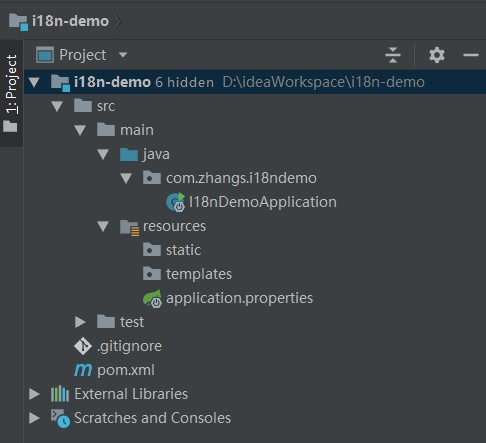
pom文件:
 <?xml version="1.0" encoding="UTF-8"?>

 <project xmlns="http://maven.apache.org/POM/4.0.0" xmlns:xsi="http://www.w3.org/2001/XMLSchema-instance"

          xsi:schemaLocation="http://maven.apache.org/POM/4.0.0 http://maven.apache.org/xsd/maven-4.0.0.xsd">

     <modelVersion>4.0.0</modelVersion>

     <groupId>com.zhangs</groupId>

     <artifactId>i18n-demo</artifactId>

     <version>0.0.1-SNAPSHOT</version>

     <packaging>jar</packaging>

     <name>i18n-demo</name>

     <description>Demo project for Spring Boot</description>

     <parent>

         <groupId>org.springframework.boot</groupId>

         <artifactId>spring-boot-starter-parent</artifactId>

         <version>2.0.6.RELEASE</version>

         <relativePath/> <!-- lookup parent from repository -->

     </parent>

     <properties>

         <project.build.sourceEncoding>UTF-8</project.build.sourceEncoding>

         <project.reporting.outputEncoding>UTF-8</project.reporting.outputEncoding>

         <java.version>1.8</java.version>

     </properties>

     <dependencies>

         <dependency>

             <groupId>org.springframework.boot</groupId>

             <artifactId>spring-boot-starter-freemarker</artifactId>

         </dependency>

         <dependency>

             <groupId>org.springframework.boot</groupId>

             <artifactId>spring-boot-starter-web</artifactId>

         </dependency>

         <dependency>

             <groupId>org.springframework.boot</groupId>

             <artifactId>spring-boot-starter-test</artifactId>

             <scope>test</scope>

         </dependency>

     </dependencies>

     <build>

         <plugins>

             <plugin>

                 <groupId>org.springframework.boot</groupId>

                 <artifactId>spring-boot-maven-plugin</artifactId>

             </plugin>

         </plugins>

     </build>

 </project>
2. 各种配置
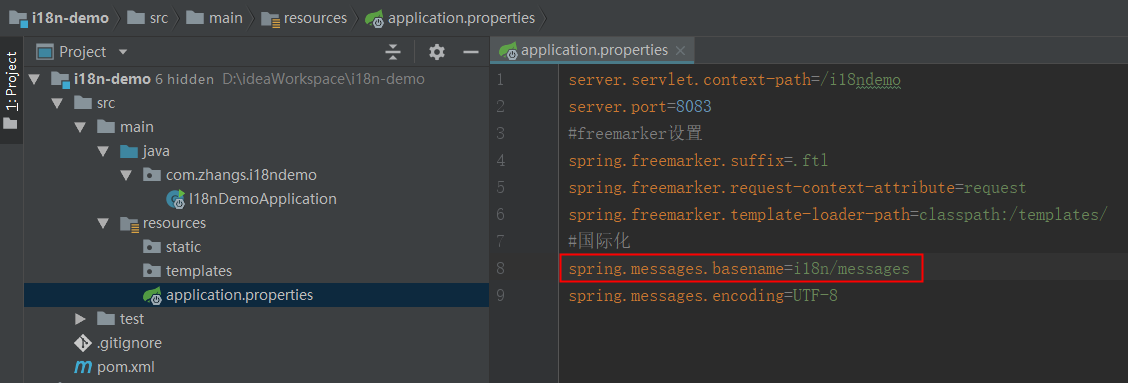
2.1 首先是application.properties的配置
spring.messages.basename 指定了国际化文件的路径+文件前缀(不同语言,后缀是不一样的),如果不指定,默认是classpath下的messages_*.properties
2.2 增加一个全局配置类MainConfig,继承WebMvcConfigurationSupport
addInterceptors方法中增加了一个国际化拦截器,会拦截前端_lang参数,因为localeResolver方法中实例化了CookieLocaleResolver对象,所以_lang参数会存在cookie中,所有的页面都可以从cookie中取到_lang参数。
你也可以使用SessionLocaleResolver将参数存到session。
 @Configuration

 @ComponentScan

 @EnableAutoConfiguration

 public class MainConfig extends WebMvcConfigurationSupport {

     @Bean

     public LocaleResolver localeResolver() {

         CookieLocaleResolver slr = new CookieLocaleResolver();

         // 默认语言

         slr.setDefaultLocale(Locale.US);

         return slr;

     }

     @Bean

     public LocaleChangeInterceptor localeChangeInterceptor() {

         LocaleChangeInterceptor lci = new LocaleChangeInterceptor();

         // 参数名

         lci.setParamName("_lang");

         return lci;

     }

     @Override

     public void addInterceptors(InterceptorRegistry registry) {

         registry.addInterceptor(localeChangeInterceptor());

     }

     @Override

     public void addResourceHandlers(ResourceHandlerRegistry registry) {

         registry.addResourceHandler("/static/**").addResourceLocations("classpath:/static/");

     }

 }
3. 创建国际化资源文件
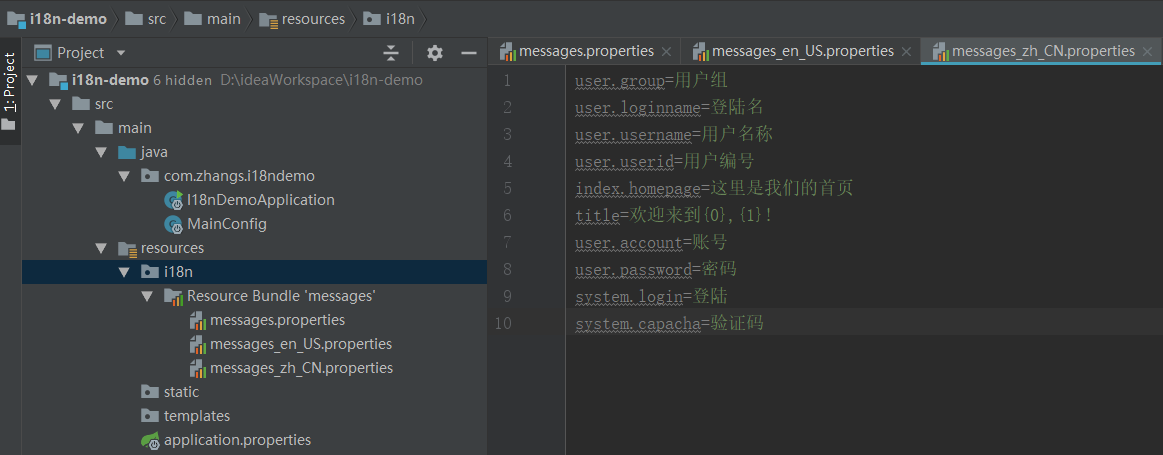
资源文件/i18n/message_*.properties。*号的实际值(zh_CN,en_US等)就是上一步中_lang参数的值,决定了使用哪个资源文件
英文资源message_en_US.properties

中文资源message_zh_CN.properties
4. 测试ftl页面index.ftl

index.ftl
 <!DOCTYPE html>

 <html lang="en">

 <head>

     <#import "spring.ftl" as spring>

     <#assign arg = ["AAA","张三"]>

     <title><@spring.messageArgs "title" ,arg /></title>

     <meta charset="UTF-8">

 </head>

 <body>

 <br/>

 <a class="changeLang" href="javascript:void(0);">english</a><br/>

 <a class="changeLang" href="javascript:void(0);">中文</a><br/>

 <@spring.message code="user.loginname"/><br/>

 </body>

 <script src="${request.contextPath}/static/jquery.js"></script>

 <script>

     $(".changeLang").on("click", function () {

         switch ($(this).text()) {

             case "中文": {

                 window.location.href = "index?_lang=zh_CN";

                 break;

             }

             case "english": {

                 window.location.href = "index?_lang=en_US";

                 break;

             }

         }

     })

 </script>

 </html>
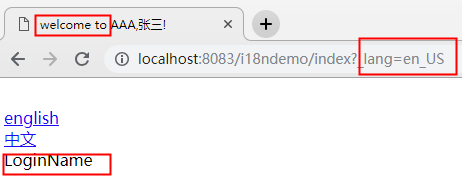
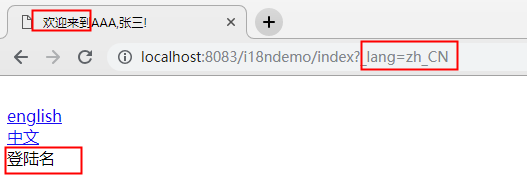
5. 测试结果
ps:因为"AAA,张三"这几个字符是在ftl中写死了,所以不会变
英文:
中文:
项目地址: https://github.com/czs208112/i18n-demo
springboot + freemarker 实现国际化的更多相关文章
- SpringBoot起飞系列-国际化(六)
一.前言 国际化这个功能可能我们不常用,但是在有需要的地方还是必须要上的,今天我们就来看一下怎么在我们的web开发中配置国际化,让我们的网站可以根据语言来展示不同的形式.本文接续上一篇SpringBo ...
- springboot+freemarker毕业设计项目错误合集
1.springboot的主程序类必须在最外层. 换句话说,报错: This application has no explicit mapping for /error, so you are se ...
- SpringBoot系列——i18n国际化
前言 国际化是项目中不可或缺的功能,本文将实现springboot + thymeleaf的HTML页面.js代码.java代码国际化过程记录下来. 代码编写 工程结构 每个文件里面的值(按工程结构循 ...
- springboot+freemarker
springboot添加freemarker支持 1.application.properties中添加配置 #freemarker config spring.freemarker.allow-re ...
- springBoot 实现中文国际化
一:实现效果如下: 二 SpringBoot 国际化配置 1.创建国际化配置文件(3个): messages.properties messages.user.name=用户名 messages.us ...
- idea+springboot+freemarker热部署(转)
今天在学习springboot集成freemarker模板引擎修改代码时,发现每次修改一次freemarker文件时,都必须重启下应用,浏览器刷新才能显示修改后的内容,这样效率太低,每次启动一次应用都 ...
- springboot自动配置国际化失效分析
最近在整理springBoot国际化时,发现国际化没有生效,通过报错提示在 MessageTag -> doEndTag处打断点 最后发现messageSource并不是ResourceBund ...
- SpringBoot 快速支持国际化i18n
学习目标 快速学会如何在工程中支持国际化语言. 快速查阅 专题阅读:<SpringBoot 布道系列> 源码下载:springboot-locale-i18n — Hey Man,Don' ...
- 用maven配置springboot+freemarker
1.创建项目 直接点下一步 原因: 不勾选 Create from archetype,是项目创建的骨架的时候,由于不知道什么原因就卡住了,一直在刷新 2.创建之后完成之后 添加依赖 <pa ...
随机推荐
- linux虚拟机配置上网(静态IP)和配置tomcat服务环境
常用命令:vi或者vim编辑 ,按i编辑模式,按ecs进入基本模式,按 :w 保存:按 :wq 退出并保存:mv移动::q退出 :ln -sv apache-tomcat-8.0.24 tomca ...
- finereport 下拉复选框多选
- 基于akka-http搭建restfull框架
1.scala开发环境介绍 2.scala插件的demo模板介绍 3.akka-http提供demo研究 4.添加路由机制解析 package org.netsharp.rest import akk ...
- 搭建repo服务器和上传源码
https://blog.csdn.net/qq_28449863/article/details/79992191 https://blog.csdn.net/qq_28449863/article ...
- Alpha 冲刺(1)
Alpha 冲刺 (1/10) Part.1 开篇 队名:彳艮彳亍团队 组长博客:戳我进入 作业博客:班级博客本次作业的链接 Part.2 成员汇报 组员1(组长)柯奇豪 过去两天完成了哪些任务 ...
- 关于使用Visual编译静态库动态库及其使用的问题
本文主要讲述了如何使用Visual Studio 2013 编译静态库和动态库,并使用. 一.静态库 1. 编写静态库 若要创建将引用并使用刚创建的静态库的应用程序,请从“文件”菜单中选择“新建”, ...
- [Unity插件]DOTween基础
官方文档链接:http://dotween.demigiant.com/documentation.PHP#globalSettings 普通版下载地址:http://dotween.demigian ...
- 2018/7/26号碰到了个奇怪的问题(http有问题,但是ftp没毛病)
过程大概是这样的 本来测试服务器中发ajax没问题,突然暴毙了,服务器又通过ajax发了另外一个请求(与之前不一样). nginx reload 没毛病 ,ftp 也使用正常. 出了什么问题呢? ...
- Java中的Lock接口
Synchronized & Lock synchronized 是Java语言中的关键字,由monitorenter,monitorexit两个指令实现.JVM会将monitorenter指 ...
- Java 内存回收机制——GC机制
一.Java GC 概念说明 Java GC(Garbage Collection,垃圾收集,垃圾回收)机制,是Java与C++/C的主要区别之一,作为Java开发者,一般不需要专门编写内存回收和垃圾 ...