
A brief introduction to per-cpu variables
墙外通道:http://thinkiii.blogspot.com/2014/05/a-brief-introduction-to-per-cpu.html
per-cpu variables are widely used in Linux kernel such as per-cpu counters, per-cpu cache. The advantages of per-cpu variables are obvious: for a per-cpu data, we do not need locks to synchronize with other cpus. Without locks, we can gain more performance.
There are two kinds of type of per-cpu variables: static and dynamic. For static variables are defined in build time. Linux provides a DEFINE_PER_CPU macro to defines this per-cpu variables.
#define DEFINE_PER_CPU(type, name)

static DEFINE_PER_CPU(struct delayed_work, vmstat_work);
Dynamic per-cpu variables can be obtained in run-time by __alloc_percpu API. __alloca_percpu returns the per-cpu address of the variable.
void __percpu *__alloc_percpu(size_t size, size_t align)

s->cpu_slab = __alloc_percpu(sizeof(struct kmem_cache_cpu), * sizeof(void *));
One big difference between per-cpu variable and other variable is that we must use per-cpu variable macros to access the real per-cpu variable for a given cpu. Accessing per-cpu variables without through these macros is a bug in Linux kernel programming. We will see the reason later.
Here are two examples of accessing per-cpu variables:
struct vm_event_state *this = &per_cpu(vm_event_states, cpu);

struct kmem_cache_cpu *c = per_cpu_ptr(s->cpu_slab, cpu);
Let's take a closer look at the behaviour of Linux per-cpu variables. After we define our static per-cpu variables, the complier will collect all static per-cpu variables to the per-cpu sections. We can see them by 'readelf' or 'nm' tools:
 D __per_cpu_start

...

000000000000f1c0 d lru_add_drain_work

000000000000f1e0 D vm_event_states

000000000000f420 d vmstat_work

000000000000f4a0 d vmap_block_queue

000000000000f4c0 d vfree_deferred

000000000000f4f0 d memory_failure_cpu

...

0000000000013ac0 D __per_cpu_end
[] .vvar             PROGBITS         ffffffff81698000

     00000000000000f0    WA

[] .data..percpu     PROGBITS           00a00000

     0000000000013ac0    WA

[] .init.text        PROGBITS         ffffffff816ad000  00aad000

     000000000003fa21    AX
You can see our vmstat_work is at 0xf420, which is within __per_cpu_start and __per_cpu_end. The two special symbols (__per_cpu_start and __per_cpu_end) mark the start and end address of the per-cpu section.
One simple question: there are only one entry of vmstat_work in the per-cpu section, but we should have NR_CPUS entries of it. Where are all other vmstat_work entries?
Actually the per-cpu section is just a roadmap of all per-cpu variables. The real body of every per-cpu variable is allocated in a per-cpu chunk at runt-time. Linux make NR_CPUS copies of static/dynamic varables. To get to those real bodies of per-cpu variables, we use per_cpu or per_cpu_ptr macros.
What per_cpu and per_cpu_ptr do is to add a offset (named __per_cpu_offset) to the given address to reach the read body of the per-cpu variable.
#define per_cpu(var, cpu) \

        (*SHIFT_PERCPU_PTR(&(var), per_cpu_offset(cpu)))

#define per_cpu_offset(x) (__per_cpu_offset[x])
It's easier to understand the idea by a picture:
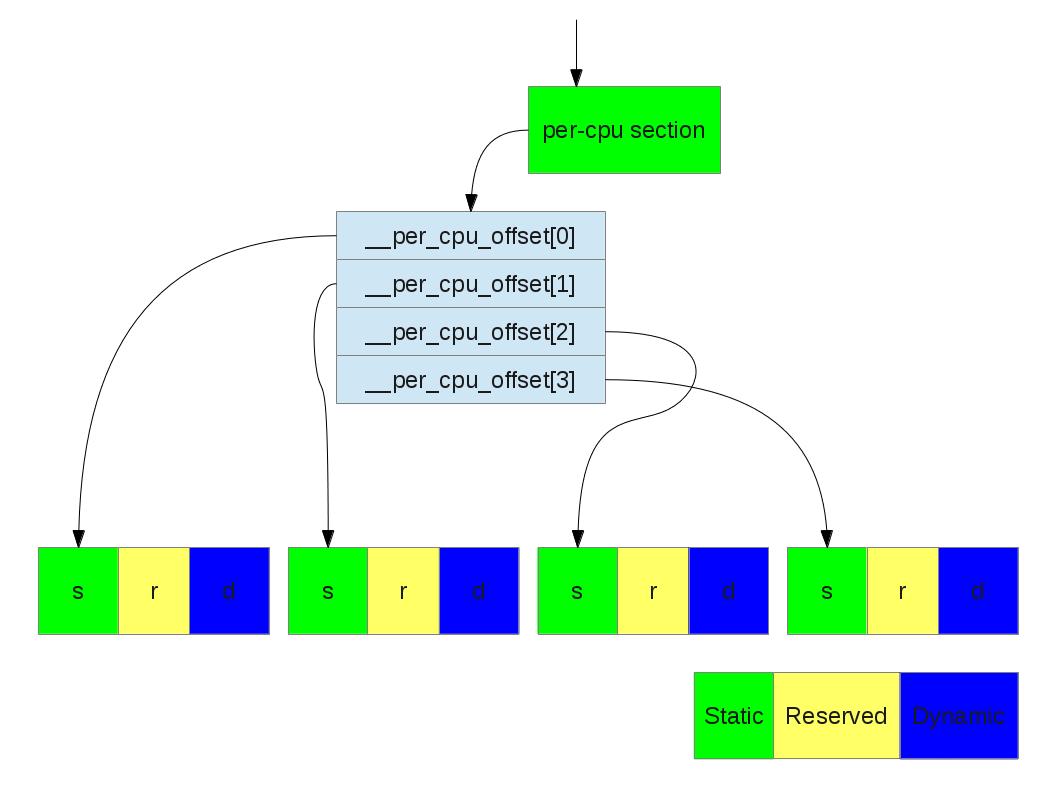
Translating a per-cpu variable to its real body (NR_CPUS = 4)
Take a closer look:
There are three part of an unit: static, reserved, and dynamic.
static: the static per-cpu variables. (__per_cpu_end - __per_cpu_start)
reserved: per-cpu slot reserved for kernel modules
dynamic: slots for dynamic allocation (__alloc_percpu)
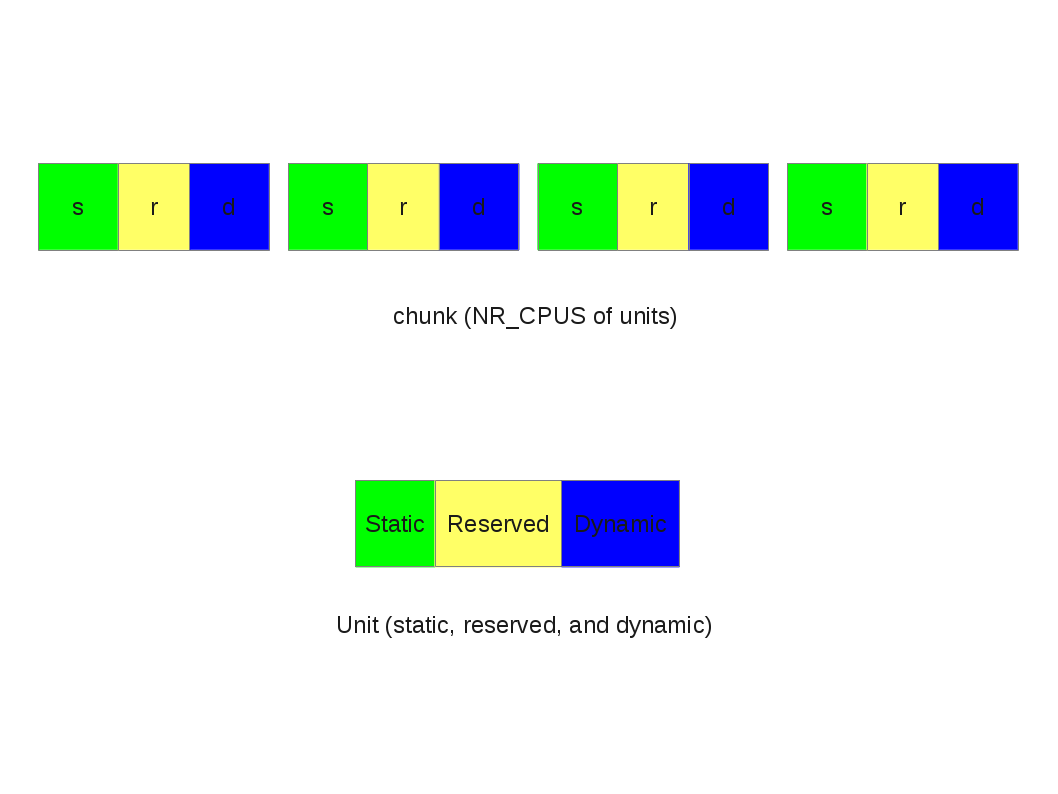
Unit and chunk
static struct pcpu_alloc_info * __init pcpu_build_alloc_info(

                                size_t reserved_size, size_t dyn_size,

                                size_t atom_size,

                                pcpu_fc_cpu_distance_fn_t cpu_distance_fn)

{

        static int group_map[NR_CPUS] __initdata;

        static int group_cnt[NR_CPUS] __initdata;

        const size_t static_size = __per_cpu_end - __per_cpu_start;

+--  lines: int nr_groups = , nr_units = ;----------------------

        /* calculate size_sum and ensure dyn_size is enough for early alloc */

        size_sum = PFN_ALIGN(static_size + reserved_size +

                            max_t(size_t, dyn_size, PERCPU_DYNAMIC_EARLY_SIZE));

        dyn_size = size_sum - static_size - reserved_size;

+-- lines: Determine min_unit_size, alloc_size and max_upa such that--

}
After determining the size of the unit, the chunk is allocated by the memblock APIs.
int __init pcpu_embed_first_chunk(size_t reserved_size, size_t dyn_size,

                                  size_t atom_size,

                                  pcpu_fc_cpu_distance_fn_t cpu_distance_fn,

                                  pcpu_fc_alloc_fn_t alloc_fn,

                                  pcpu_fc_free_fn_t free_fn)

{

+--  lines: void *base = (void *)ULONG_MAX;---------------------------------

        /* allocate, copy and determine base address */

        for (group = ; group < ai->nr_groups; group++) {

                struct pcpu_group_info *gi = &ai->groups[group];

                unsigned int cpu = NR_CPUS;

                void *ptr;

                for (i = ; i < gi->nr_units && cpu == NR_CPUS; i++)

                        cpu = gi->cpu_map[i];

                BUG_ON(cpu == NR_CPUS);

                /* allocate space for the whole group */

                ptr = alloc_fn(cpu, gi->nr_units * ai->unit_size, atom_size);

                if (!ptr) {

                        rc = -ENOMEM;

                        goto out_free_areas;

                }

                /* kmemleak tracks the percpu allocations separately */

                kmemleak_free(ptr);

                areas[group] = ptr;

                base = min(ptr, base);

        }

+--  lines: Copy data and free unused parts.  This should happen after all---

}
static void * __init pcpu_dfl_fc_alloc(unsigned int cpu, size_t size,

                                       size_t align)

{

        return  memblock_virt_alloc_from_nopanic(

                        size, align, __pa(MAX_DMA_ADDRESS));

}
A brief introduction to per-cpu variables的更多相关文章
- InnoDB Spin rounds per wait在>32位机器上可能为负
今天发现一个系统innodb的spin rounds per wait为负,感觉很奇怪,原来是个bug: For example (output from PS but we have no patc ...
- 机器学习、NLP、Python和Math最好的150余个教程(建议收藏)
编辑 | MingMing 尽管机器学习的历史可以追溯到1959年,但目前,这个领域正以前所未有的速度发展.最近,我一直在网上寻找关于机器学习和NLP各方面的好资源,为了帮助到和我有相同需求的人,我整 ...
- 超过 150 个最佳机器学习,NLP 和 Python教程
超过 150 个最佳机器学习,NLP 和 Python教程 微信号 & QQ:862251340微信公众号:coderpai简书地址:http://www.jianshu.com/p/2be3 ...
- Introduction to Parallel Computing
Copied From:https://computing.llnl.gov/tutorials/parallel_comp/ Author: Blaise Barney, Lawrence Live ...
- Linux CPU Hotplug CPU热插拔
http://blog.chinaunix.net/uid-15007890-id-106930.html CPU hotplug Support in Linux(tm) Kernel Linu ...
- Sed - An Introduction and Tutorial by Bruce Barnett
http://www.grymoire.com/unix/sed.html Quick Links - NEW Sed Commands : label # comment {....} Block ...
- An Introduction to Lock-Free Programming
Lock-free programming is a challenge, not just because of the complexity of the task itself, but bec ...
- Android 性能优化(20)多核cpu入门:SMP Primer for Android
SMP Primer for Android 1.In this document Theory Memory consistency models Processor consistency CPU ...
- Introduction to Linux Threads
Introduction to Linux Threads A thread of execution is often regarded as the smallest unit of proces ...
随机推荐
- eclipse-查看继承层次图/继承实现层次图
阅读代码时,如果想要看某个类继承了哪些类.实现了哪些接口.哪些类继承了这个类,恰巧这个类的继承实现结构又比较复杂,那么如果对开发工具不是很熟练,这个需求是比较难以实现的.eclipse中的type h ...
- 简述Python入门小知识
如今的Python开发工程师很受企业和朋友们的青睐,现在学习Python开发的小伙伴也很多,本篇文章就和大家探讨一下Python入门小知识都有哪些. 扣丁学堂简述Python入门小知识Python培训 ...
- downLoad
String root= ServletActionContext.getServletContext().getRealPath(File.separator).replace("\\&q ...
- leveldb 学习记录(七) SSTable构造
使用TableBuilder构造一个Table struct TableBuilder::Rep { // TableBuilder内部使用的结构,记录当前的一些状态等 Options options ...
- Python(五) 字典
- 主键生成策略sequence
http://blog.csdn.net/shanhuhau/article/details/24978253 表示:如果不写序列名,会走默认的序列 若写,则seq_表名_属性名
- 20175316 盛茂淞 2018-2019-2 《Java程序设计》实验一 Java开发环境的熟悉 实验报告
20175316 盛茂淞 2018-2019-2 <Java程序设计>实验一 Java开发环境的熟悉 实验报告 一.实验要求 1.使用JDK编译.运行简单的Java程序: 2.使用IDEA ...
- oracle表空间扩容方法
1.使用navicat连接要扩容的数据库,进入其他-表空间 2.添加数据文件和设置配置项即可
- Mac could not read from remote repository
IDE clone数据的时候要使用SSH,不使用HTTPS,就解决了问题
- GitHub--创建新的分支(转)
如何在 GitHub 的项目中创建一个分支呢? 其实很简单啦,直接点击 Branch,然后在弹出的文本框中添加自己的 Branch Name 然后点击蓝色的Create branch就可以了,这样一来 ...