
安卓开发ScrollView嵌套ListView只显示一行
在用列表控件做一个“更多功能”的界面的时候
 <?xml version="1.0" encoding="utf-8"?>

 <ScrollView xmlns:android="http://schemas.android.com/apk/res/android"

 android:id="@+id/ScrollView"

  android:layout_width="fill_parent"

 android:layout_height="wrap_content"

 android:scrollbars="vertical">

 <LinearLayout

     android:layout_width="match_parent"

     android:layout_height="fill_parent"

     android:orientation="vertical" >

     <ListView

         android:id="@+id/list_more_top"

         android:layout_width="match_parent"

         android:layout_height="fill_parent" >

     </ListView>

     <ImageView

         android:id="@+id/imageView1"

         android:layout_width="fill_parent"

         android:layout_height="wrap_content"

         android:src="@drawable/divider" />

     <ListView

         android:id="@+id/list_more_center"

         android:layout_width="match_parent"

         android:layout_height="wrap_content" >

     </ListView>

     <ImageView

         android:id="@+id/imageView2"

         android:layout_width="fill_parent"

         android:layout_height="wrap_content"

         android:src="@drawable/divider" />

     <ListView

         android:id="@+id/list_more_buttom"

         android:layout_width="match_parent"

         android:layout_height="wrap_content" >

     </ListView>

 </LinearLayout>

 </ScrollView>
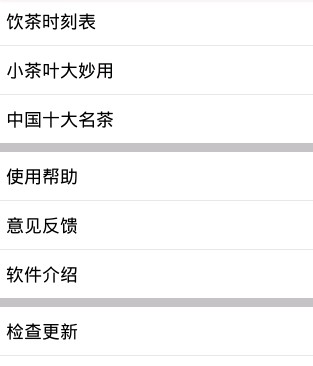
原本用ScrollView嵌套ListView 但是在测试的时候 ListView列表只显示一列! 这不是我希望得到的
我希望的是可以整个拖动三个列表
于是上网查询 发现的问题所在
在ScrollView中嵌套ListView空间,无法正确的计算ListView的大小,导致只显示列表第一项
故可以通过代码,根据当前的ListView的列表项计算列表的尺寸。
 package songsong;

 import com.example.xqx_tea.R;

 import android.app.Activity;

 import android.app.AlertDialog;

 import android.app.Notification.Builder;

 import android.content.DialogInterface;

 import android.content.Intent;

 import android.os.Bundle;

 import android.app.AlertDialog;

 import android.view.View;

 import android.view.ViewGroup;

 import android.view.Window;

 import android.widget.AdapterView;

 import android.widget.AdapterView.OnItemClickListener;

 import android.widget.ArrayAdapter;

 import android.widget.ListAdapter;

 import android.widget.ListView;

 public class MenuMore extends Activity{

     ListView list_more_top;

     ListView list_more_center;

     ListView list_more_buttom;

     @Override

     protected void onCreate(Bundle savedInstanceState) {

         // TODO Auto-generated method stub

         super.onCreate(savedInstanceState);

         requestWindowFeature(Window.FEATURE_NO_TITLE);

     setContentView(R.layout.menu_more);

     ListView list_more_top = (ListView) findViewById(R.id.list_more_top);

     ListView list_more_center = (ListView) findViewById(R.id.list_more_center);

     ListView list_more_buttom = (ListView) findViewById(R.id.list_more_buttom);

     String[] adapterData_top = new String[] { "饮茶时刻表", "小茶叶大妙用","中国十大名茶"};

     list_more_top.setAdapter(new ArrayAdapter<String>(this,android.R.layout.simple_list_item_1,adapterData_top));

     String[] adapterData_center = new String[] { "使用帮助", "意见反馈","软件介绍"};

     list_more_center.setAdapter(new ArrayAdapter<String>(this,android.R.layout.simple_list_item_1,adapterData_center));

     String[] adapterData_buttom = new String[] { "检查更新", "退出软件"};

     list_more_buttom.setAdapter(new ArrayAdapter<String>(this,android.R.layout.simple_list_item_1,adapterData_buttom));

     setListViewHeightBasedOnChildren(list_more_top);

     setListViewHeightBasedOnChildren(list_more_center);

     setListViewHeightBasedOnChildren(list_more_buttom);

     //为列表视图中选中的项添加响应事件

     list_more_top.setOnItemClickListener(new OnItemClickListener() {

         @Override

         public void onItemClick(AdapterView<?> parent, View arg1, int pos,

                 long id) {

             // TODO Auto-generated method stub

         }

     });

   //为列表视图中选中的项添加响应事件

     list_more_center.setOnItemClickListener(new OnItemClickListener() {

         @Override

         public void onItemClick(AdapterView<?> parent, View arg1, int pos,

                 long id) {

             // TODO Auto-generated method stub

         }

     });

   //为列表视图中选中的项添加响应事件

     list_more_buttom.setOnItemClickListener(new OnItemClickListener() {

         @Override

         public void onItemClick(AdapterView<?> parent, View arg1, int pos,

                 long id) {

             // TODO Auto-generated method stub

             if( == id)

                 {

                     finish();

                 }

             if( == id)

                 {

                 Intent intent = new Intent();

                 intent.setClass(MenuMore.this, More_submitdeal.class);

                 startActivity(intent);

                 }

         }

     });

     }

     public void setListViewHeightBasedOnChildren(ListView listView) {

                 // 获取ListView对应的Adapter

                 ListAdapter listAdapter = listView.getAdapter();

                 if (listAdapter == null) {

                     return;

                 }

                 int totalHeight = ;

                 for (int i = , len = listAdapter.getCount(); i < len; i++) {

                     // listAdapter.getCount()返回数据项的数目

                     View listItem = listAdapter.getView(i, null, listView);

                     // 计算子项View 的宽高

                     listItem.measure(, );

                     // 统计所有子项的总高度

                     totalHeight += listItem.getMeasuredHeight();

                 }

                ViewGroup.LayoutParams params = listView.getLayoutParams();

                 params.height = totalHeight+ (listView.getDividerHeight() * (listAdapter.getCount() - ));

                 // listView.getDividerHeight()获取子项间分隔符占用的高度

                 // params.height最后得到整个ListView完整显示需要的高度

                 listView.setLayoutParams(params);

             }

 }
给三个列表分别求出ListView完全显示需要的高度 便可以整体上下滑动三个列表了
安卓开发ScrollView嵌套ListView只显示一行的更多相关文章
- ScrollView嵌套ListView只显示一行之计算的高度不正确的解决办法(转)
ScrollView嵌套ListView只显示一行之计算的高度不正确的解决办法 分类: android应用开发2013-12-19 09:40 1045人阅读 评论(3) 收藏 举报 AndroidS ...
- ScrollView嵌套ListView只显示一行
错误描述 ScrollView嵌套ListView中导致ListView高度计算不正确,只显示一行. 解决方法 重写ListView的onMeasure方法,代码如下. @Override publi ...
- ScrollView嵌套ListView只显示一行解决方案
在ScrollView里边嵌套了个ListView,后边就发现数据源里好多数据,但ListView只是显示1行. 各种debug,打log,数据什么的都没问题,上网百度了下,发现原来是ScrollVi ...
- 冲突--ScrollView嵌套ListView只显示一行
在开发的过程当中,由于手机屏幕的大小的限制,我们经常需要使用滑动的方式,来显示更多的内容.在最近的工作中,遇见一个需求,需要将ListView嵌套到ScrollView中显示.于是乎有了如下布局: & ...
- 日积月累:ScrollView嵌套ListView只显示一行
在开发的过程当中,由于手机屏幕的大小的限制,我们经常需要使用滑动的方式,来显示更多的内容.在最近的工作中,遇见一个需求,需要将ListView嵌套到ScrollView中显示.于是乎有了如下布局: & ...
- 解决lScrollView嵌套ListView只显示一行的问题,listvie显示全部的item
ScrollView嵌套ListView只显示一行的问题 1.思路:给listview重新添加一个高度. listview的高度==listview.item的高度之和. 2.注意:关键是添加list ...
- 一键解决ScrollView嵌套ListView仅仅显示一行的问题
/** * 解决ScrollView嵌套ListView仅仅显示一行的问题 * * @param listView */ private void setListViewHeightBasedOnCh ...
- ScrollView中嵌套GridView,ListView只显示一行的解决办法
转载:http://blog.csdn.net/luohai859/article/details/39347583 关于为什么只显示一行,个人理解是:如果单独使用GridView和ListView, ...
- RecyclerView, ListView 只显示一行内容 问题解决
Adapter 中的data有多行,但是RecyclerView只显示一行. 原因出在item的layout xml, 用了自动生成的RelativeLayout, 她的默认高度height属性是ma ...
随机推荐
- js中的行为委托和无类编程
概述 <你不知道的JavaScript>中有这么一段话:不幸的是,将类和继承的设计模式思维带入Javascript的想法是你所做的最坏的事情,因为语法可能会让你迷惑不已,让你以为真的有类这 ...
- 开发微信小程序——古龙小说阅读器
概述 由于面试的关系接触了一下微信小程序,花了2晚上开发了一个带书签功能的古龙小说阅读器,并且已经提交审核等待发布.这篇博文记录了我的开发过程和对微信小程序的看法,供以后开发时参考,相信对其他人也有用 ...
- Mybatis框架一:搭建测试
Mybatis框架不再介绍: 在JDBC中存在一些问题: 1.频繁连接和释放资源浪费内存 2.编码完成后不便于维护 于是产生了简化数据库操作的框架:Hibernate.Mybatis等等,这里介绍My ...
- Mac下命令行tree生成文件树
不像Windows,Mac环境本身是没有tree命令的,但可以后天呐~ 1.下载文件包并将其放在系统目录下(本人存放路径为/Users/) https://homebrew.bintray.com/b ...
- MLlib之LR算法源码学习
/** * :: DeveloperApi :: * GeneralizedLinearModel (GLM) represents a model trained using * Generaliz ...
- [,,].length等于几
分别测试了谷歌.欧朋,火狐,QQ.搜狗,Edge,ie5.7.8.9.10.11 其中ie5,ie7,ie8得到的结果为3 其他均为2:如果最后一个逗号后面为空,则不识别最后一位
- kubernetes入门之构建单机集群
1.kubernetes简介 kubernetes简称k8s,它是一个全新的基于容器技术的分布式架构方案,它是谷歌十几年来大规模应用容器技术的经验累积和升华的一个重要成果.如果我们的系统设计遵循了k8 ...
- SQL Server性能优化(9)聚集索引的存储结构
一.索引的概念和分类 索引的概念大家都知道,日常开发中我们也会使用常见的聚集索引.非聚集索引.但是除了这两者以外,sqlserver中还提供其他的索引,如: a. 唯一索引:不包含重复键的索引,聚集索 ...
- gitlab ssh_key
ubuntu下生成git的密钥 1 生成ssh key 执行 命令 ssh-keygen -t rsa -C “wangwei@**.com.cn” 邮箱根据自己实际修改,一直回车 2 查看生成的密钥 ...
- 一款Timer倒计时器
http://files.cnblogs.com/Alandre/Time.zip自己做的哦 欢迎关注