
iOS中发送HTTP请求的方案
在iOS中,常见的发送HTTP请求的方案有
苹果原生(自带)
- NSURLConnection:用法简单,最古老最经典的一种方案
- NSURLSession:功能比NSURLConnection更加强大,推荐使用这种技术(2013年推出)
- CFNetwork:NSURL的底层,纯C语言
第三方框架
- ASIHttpRequest:外号:“HTTP终结者”,功能及其强大,早已不维护
- AFNETworking:简单易用,提供了基本够用的常用功能,维护和使用者居多
- MKNetworkKit:简单易用,来自印度,维护使用者少
建议
为了提高开发效率,企业开发用的基本是第三方框架
一.使用NSURLConnection
//同步请求

+ (NSData *)sendSynchronousRequest:(NSURLRequest *)request returningResponse:(NSURLResponse **)response error:(NSError **)error;
//异步请求:根据对服务器返回数据的处理方式的不同,又可以分为2种

//block回调

+ (void)sendAsynchronousRequest:(NSURLRequest*) request  queue:(NSOperationQueue*) queue                                                  completionHandler:(void (^)(NSURLResponse* response, NSData* data, NSError* connectionError)) handler;

//代理

- (id)initWithRequest:(NSURLRequest *)request delegate:(id)delegate;

+ (NSURLConnection*)connectionWithRequest:(NSURLRequest *)request delegate:(id)delegate;

- (id)initWithRequest:(NSURLRequest *)request delegate:(id)delegate startImmediately:(BOOL)startImmediately;
代理相关的方法
#pragma mark -NSURLConnectionDelegate - begin

/**

 请求失败(比如请求超时)

 */

- (void)connection:(NSURLConnection *)connection didFailWithError:(NSError *)error {

}

/**

 接收到服务器的响应

 */

- (void)connection:(NSURLConnection *)connection didReceiveResponse:(NSURLResponse *)response {

    NSLog(@"didReceiverResponse");

    //初始化

    self.responseData = [NSMutableData data];

}

/**

 接收到服务器的数据(如果数据量比较大,这个方法会调用多次)

 */

- (void)connection:(NSURLConnection *)connection didReceiveData:(NSData *)data {

    NSLog(@"didReceiveData - %zd",data.length);

    //拼接

    [self.responseData appendData:data];

}

/**

 服务器的数据成功,接收完毕

 */

- (void)connectionDidFinishLoading:(NSURLConnection *)connection {

    NSLog(@"connectionDidFinishLoading");

    //显示数据

    NSString *str = [[NSString alloc] initWithData:self.responseData encoding:NSUTF8StringEncoding];

    NSLog(@"%@",str);

}
二.使用NSURLSession
使用NSURLSession对象创建Task,然后执行Task
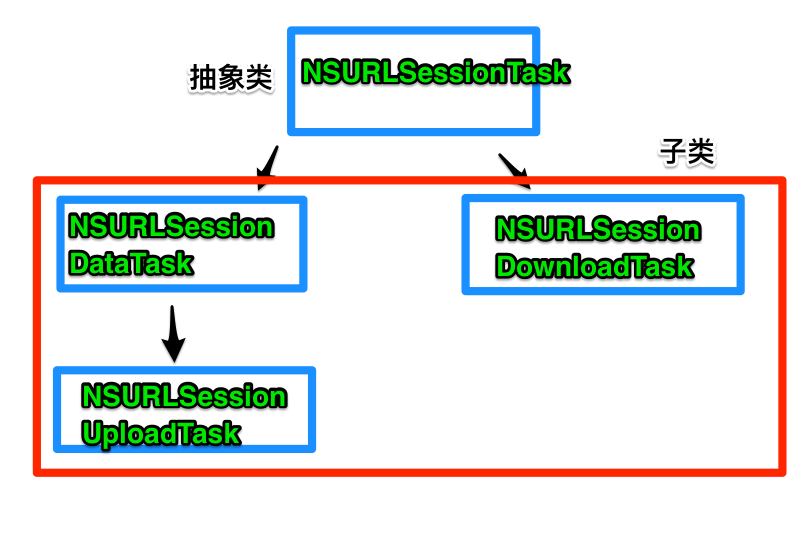
1.使用NSURLSessionDataTask
post请求
- (void)post {

    //获取NSURLSession对象

    NSURLSession *session = [NSURLSession sharedSession];

    //创建请求

    NSMutableURLRequest *request = [NSMutableURLRequest requestWithURL:[NSURL URLWithString:@"http://120.25.226.186:32812/resources/images/minion_01.png"]];

    request.HTTPMethod = @"POST";

    request.HTTPBody = [@"username=520it&pwd=520it" dataUsingEncoding:NSUTF8StringEncoding];

    //创建任务

    NSURLSessionDataTask *task = [session dataTaskWithRequest:request completionHandler:^(NSData * _Nullable data, NSURLResponse * _Nullable response, NSError * _Nullable error) {

        NSLog(@"%@",[NSJSONSerialization JSONObjectWithData:data options:kNilOptions error:nil]);

    }];

    //启动任务

    [task resume];

}
get请求
- (void)get {

    NSURLSession *session = [NSURLSession sharedSession];

    NSURLSessionDataTask *task = [session dataTaskWithURL:[NSURL URLWithString:@"http://120.25.226.186:32812/login?username=123&pwd=123"] completionHandler:^(NSData * _Nullable data, NSURLResponse * _Nullable response, NSError * _Nullable error) {

        NSLog(@"%@",[NSJSONSerialization JSONObjectWithData:data options:kNilOptions error:nil]);

    }];

    //启动

    [task resume];

}
代理方法
- (void)touchesBegan:(NSSet<UITouch *> *)touches withEvent:(UIEvent *)event{

    NSURLSession *session = [NSURLSession sessionWithConfiguration:[NSURLSessionConfiguration defaultSessionConfiguration] delegate:self delegateQueue:[[NSOperationQueue alloc] init]];

    NSURLSessionDataTask *task = [session dataTaskWithURL:[NSURL URLWithString:@"http://120.25.226.186:32812/login?username=123&pwd=123"]];

    //启动

    [task resume];

}

#pragma mark -<NSURLSessionDataDelegate>

/**

 * 1.接收到服务器的响应

 */

- (void)URLSession:(NSURLSession *)session dataTask:(NSURLSessionDataTask *)dataTask didReceiveResponse:(NSURLResponse *)response completionHandler:(void (^)(NSURLSessionResponseDisposition))completionHandler {

    NSLog(@"----%s----",__func__);

    //允许处理服务器的响应

    completionHandler(NSURLSessionResponseAllow);

}

/**

 * 2.接收到服务器的数据(可能会被调用多次)

 */

- (void)URLSession:(NSURLSession *)session dataTask:(NSURLSessionDataTask *)dataTask didReceiveData:(NSData *)data {

    NSLog(@"----%s----",__func__);

}

/**

 * 3.请求成功或者失败(如果失败,error有值)

 */

- (void)URLSession:(NSURLSession *)session task:(NSURLSessionTask *)task didCompleteWithError:(NSError *)error {

    NSLog(@"----%s----",__func__);

}
二.使用AFNetworking框架
网址:https://github.com/AFNetworking/AFNetworking
AFHTTPRequestOperationManager内部包装了NSURLConnection
- (void)get {

    AFHTTPRequestOperationManager *mgr = [AFHTTPRequestOperationManager manager];

    NSDictionary *params = @{

                             @"username" : @"520it",

                             @"pwd" : @"520it"

                             };

    [mgr GET:@"http://120.25.226.186:32812/login" parameters:params success:^(AFHTTPRequestOperation *operation, id responseObject) {

        NSLog(@"请求成功----%@",[responseObject class]);

    } failure:^(AFHTTPRequestOperation *operation, NSError *error) {

        NSLog(@"请求失败----%@",error);

    }];

}
AFHTTPSessionManager内部包装了NSURLSession
- (void)get2 {

    //AFHTTPSessionManager内部包装了NSURLSession

    AFHTTPSessionManager *mgr = [AFHTTPSessionManager manager];

    NSDictionary *params = @{

                             @"username" : @"520it",

                             @"pwd" : @"520it"

                             };

    [mgr GET:@"http://120.25.226.186:32812/login" parameters:params success:^(NSURLSessionDataTask *task, id responseObject) {

        NSLog(@"请求成功----%@",[responseObject class]);

    } failure:^(NSURLSessionDataTask *task, NSError *error) {

        NSLog(@"请求失败----%@",error);

    }];

}
AFN这个框架默认使用了JSON解析器,如果服务器返回的是XML格式的
你需要将框架中的解析器换成XML解析器
    AFHTTPSessionManager *mgr = [AFHTTPSessionManager manager];

    //responseSerializer 用来解析服务器返回的数据

    //告诉AFN 以XML形式解析服务器返回的数据

    mgr.responseSerializer = [AFXMLParserResponseSerializer serializer];
iOS中发送HTTP请求的方案的更多相关文章
- Vue中发送ajax请求——axios使用详解
axios 基于 Promise 的 HTTP 请求客户端,可同时在浏览器和 node.js 中使用 功能特性 在浏览器中发送 XMLHttpRequests 请求 在 node.js 中发送 htt ...
- IE6—在链接click事件的响应函数中发送jsonp请求不生效
$("#link").click(function(){ $.ajax({ type: 'GET', dataType: 'jsonp', ...
- 如何在WinForm中发送HTTP请求
如何在WinForm中请求发送HTTP 手工发送HTTP请求主要是调用 System.Net的HttpWebResponse方法 手工发送HTTP的GET请 求: string strURL = &q ...
- IOS中DES与MD5加密方案
0 2 项目中用的的加密算法,因为要和安卓版的适配,中间遇到许多麻烦. MD5算法和DES算法是常见的两种加密算法. MD5:MD5是一种不可逆的加密算法,按我的理解,所谓不可逆,就是不能解密,那 ...
- golang中发送http请求的几种常见情况
整理一下golang中各种http的发送方式 方式一 使用http.Newrequest 先生成http.client -> 再生成 http.request -> 之后提交请求:clie ...
- iOS中几种数据持久化方案
概论 所谓的持久化,就是将数据保存到硬盘中,使得在应用程序或机器重启后可以继续访问之前保存的数据.在iOS开发中,有很多数据持久化的方案,接下来我将尝试着介绍一下5种方案: plist文件(属性列表) ...
- rails中发送ajax请求
最近在写一个blog系统练练手,遇到一个一个问题,用户添加评论的时候想发送ajax请求,但是rails里的ajax和Python中的不太一样,Python中的ajax是用js,jquery实现的和ra ...
- iOS中几种数据持久化方案:我要永远地记住你!
http://www.cocoachina.com/ios/20150720/12610.html 作者:@翁呀伟呀 授权本站转载 概论 所谓的持久化,就是将数据保存到硬盘中,使得在应用程序或机器重启 ...
- java中发送http请求的方法
package org.jeecgframework.test.demo; import java.io.BufferedReader; import java.io.FileOutputStream ...
随机推荐
- unity4.6 failed to update unity web player
unity4.6 failed to update unity web player 新升级的 4.6.2P2 版本修复了IOS很多的bug. 但突然发现导出的Web版本反而不能工作了. “faile ...
- python内置模块(3)
博主所有python文章均为python3.5.1环境. 目录: 1.collections 2.subprocess 3.configparser 4.XML 5.shutil 一. collect ...
- 利用百度词典API和Volley网络库开发的android词典应用
关于百度词典API的说明,地址在这里:百度词典API介绍 关于android网络库Volley的介绍说明,地址在这里:Android网络通信库Volley 首先我们看下大体的界面布局!
- css中zoom和transform:scale的区别
css中zoom和transform:scale的区别 关于zoom: 以前只是看到别人的代码中用过zoom,自己从未使用过,今天在探究ie7兼容inline-block时,发现里面提到了zoom.下 ...
- 基于HTML5的电信网管3D机房监控应用
先上段视频,不是在玩游戏哦,是规规矩矩的电信网管企业应用,嗯,全键盘的漫游3D机房: 随着PC端支持HTML5浏览器的普及,加上主流移动终端Android和iOS都已支持HTML5技术,新一代的电信网 ...
- JS 中 this上下文对象的使用方式
JavaScript 有一套完全不同于其它语言的对 this 的处理机制. 在五种不同的情况下 ,this 指向的各不相同. 有句话说得很在理 -- 谁调用它,this就指向谁 一.全局范围内 在全局 ...
- C#客户端Redis服务器的分布式缓存
介绍 在这篇文章中,我想介绍我知道的一种最紧凑的安装和配置Redis服务器的方式.另外,我想简短地概述一下在.NET / C#客户端下Redis hash(哈希类型)和list(链表)的使用. 在这篇 ...
- Azure开发者任务之三:理解Azure应用程序(上)
作为Windows Azure的托管服务被设计和开发的应用程序由这两部分组成: 1,托管代码 2,XML配置文件 托管代码对应不同的角色 XML文件对应不同的配置设置 我们可以看一下下面这张图,它详细 ...
- C# 实现WinForm窗口最小化到系统托盘代码,并且判断左右鼠标的事件
1.设置WinForm窗体属性showinTask=false 2.加notifyicon控件notifyIcon1,为控件notifyIcon1的属性Icon添加一个icon图标. 3.添加窗体最小 ...
- [PE结构分析] 11.资源表结构
资源表是一个树形结构,可以设置成2的31次方的层数,Windows 使用了3级: 类型->名称->语言 其中涉及到四个结构: Data Description Resource Direc ...