
从代码分析Android-Universal-Image-Loader的图片加载、显示流程
从UNIVERSAL IMAGE LOADER. PART 3(四个DisplayImage重载方法详解)中,我们学习了Android-Universal-Image-Loader(以下简称UIL)中四个DisplayImage重载方法的使用,如果你还没有学习,最好先返回去看看,不然可能不理解这篇文章。在这篇文章中我们将主要探讨Android-Universal-Image-Loader的主要流程和这些流程相关的类的分析。
我们先了解一下UIL加载图片的流程(可以通过查看ImageLoader.displayImage(…)方法分析得出),如下图
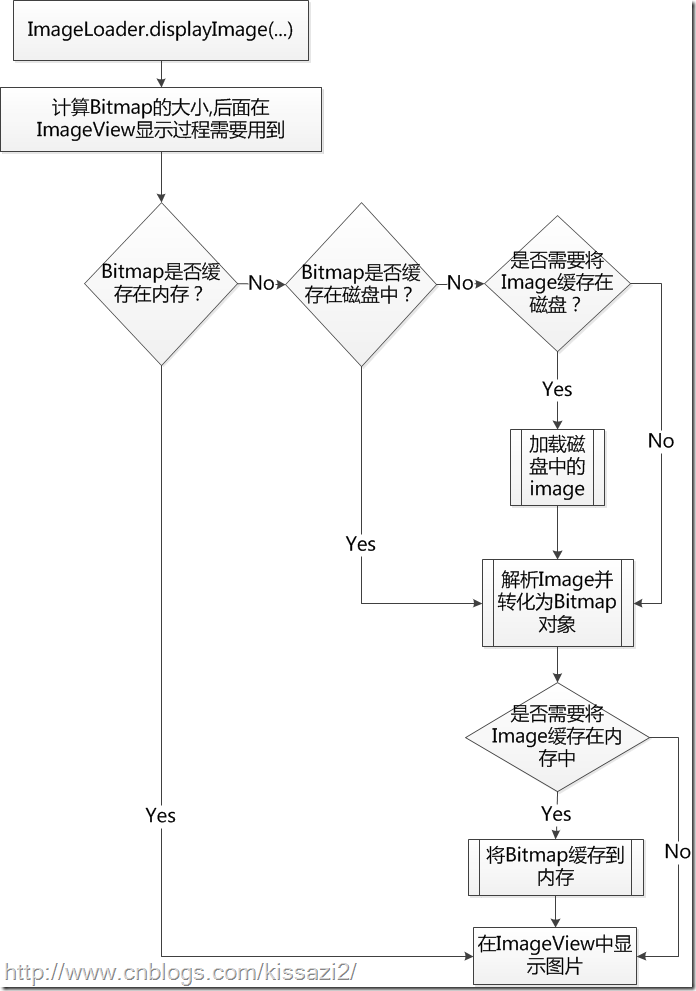
从上图中,我们可以看出,UIL加载图片的一般流程是先判断内存中是否有对应的Bitmap,再判断磁盘(disk)中是否有,如果没有就从网络中加载。最后根据原先在UIL中的配置判断是否需要缓存Bitmap到内存或磁盘中。Bitmap加载完后,就对它进行解析,然后显示到特定的ImageView中。
有了对UIL对图片加载和处理流程的初步认识之后,我们就可以着手分析它的源代码了。先从ImageLoader.displayImage(...)入手,毕竟一切都因它而始。
     public void displayImage(String uri, ImageAware imageAware, DisplayImageOptions options,

             ImageLoadingListener listener, ImageLoadingProgressListener progressListener) {

         //检查UIL的配置是否被初始化

         checkConfiguration();

         if (imageAware == null) {

             throw new IllegalArgumentException(ERROR_WRONG_ARGUMENTS);

         }

         if (listener == null) {

             listener = emptyListener;

         }

         if (options == null) {

             options = configuration.defaultDisplayImageOptions;

         }

         if (TextUtils.isEmpty(uri)) {

             engine.cancelDisplayTaskFor(imageAware);

             listener.onLoadingStarted(uri, imageAware.getWrappedView());

             if (options.shouldShowImageForEmptyUri()) {

                 imageAware.setImageDrawable(options.getImageForEmptyUri(configuration.resources));

             } else {

                 imageAware.setImageDrawable(null);

             }

             listener.onLoadingComplete(uri, imageAware.getWrappedView(), null);

             return;

         }

         //计算Bitmap的大小,以便后面解析图片时用

         ImageSize targetSize = ImageSizeUtils.defineTargetSizeForView(imageAware, configuration.getMaxImageSize());

         String memoryCacheKey = MemoryCacheUtils.generateKey(uri, targetSize);

         engine.prepareDisplayTaskFor(imageAware, memoryCacheKey);

         listener.onLoadingStarted(uri, imageAware.getWrappedView());

         //Bitmap是否缓存在内存?

         Bitmap bmp = configuration.memoryCache.get(memoryCacheKey);

         if (bmp != null && !bmp.isRecycled()) {

             L.d(LOG_LOAD_IMAGE_FROM_MEMORY_CACHE, memoryCacheKey);

             if (options.shouldPostProcess()) {

                 ImageLoadingInfo imageLoadingInfo = new ImageLoadingInfo(uri, imageAware, targetSize, memoryCacheKey,

                         options, listener, progressListener, engine.getLockForUri(uri));

                 //处理并显示图片

                 ProcessAndDisplayImageTask displayTask = new ProcessAndDisplayImageTask(engine, bmp, imageLoadingInfo,

                         defineHandler(options));

                 if (options.isSyncLoading()) {

                     displayTask.run();

                 } else {

                     engine.submit(displayTask);

                 }

             } else {

                 //显示图片

                 options.getDisplayer().display(bmp, imageAware, LoadedFrom.MEMORY_CACHE);

                 listener.onLoadingComplete(uri, imageAware.getWrappedView(), bmp);

             }

         } else {

             if (options.shouldShowImageOnLoading()) {

                 imageAware.setImageDrawable(options.getImageOnLoading(configuration.resources));

             } else if (options.isResetViewBeforeLoading()) {

                 imageAware.setImageDrawable(null);

             }

             ImageLoadingInfo imageLoadingInfo = new ImageLoadingInfo(uri, imageAware, targetSize, memoryCacheKey,

                     options, listener, progressListener, engine.getLockForUri(uri));

             //启动一个线程,加载并显示图片

             LoadAndDisplayImageTask displayTask = new LoadAndDisplayImageTask(engine, imageLoadingInfo,

                     defineHandler(options));

             if (options.isSyncLoading()) {

                 displayTask.run();

             } else {

                 engine.submit(displayTask);

             }

         }

     }
代码有点多,但是有很多代码是进行异常判断处理和函数的回调,为了先把握整体的流程,我们先放弃细节方面的追踪。基本上重要的处理流程我都有用注释标出。不过,从这段代码中我们也可以看出这段代码的结构非常清晰。对图片的整个的加载流程都有对应的监听接口(ImageLoadingListener.onLoadingStarted,ImageLoadingListener.onLoadingComplete,ImageLoadingListener这个类就是用来监听图片的加载过程的),也就是说整个的图片加载过程程序员都可以进行相应的处理。我们先关注一下图片从无到有的加载过程,毕竟这部分是大家最为关心的。看到第63行中的LoadAndDisplayImageTask,跟进LoadAndDisplayImageTask.run()方法中。在这个run()方法中,除了 bmp = tryLoadBitmap();这一句是对图片进行加载,其他的函数都是对Bitmap进行处理或者显示。我们继续进入看看。
 private Bitmap tryLoadBitmap() throws TaskCancelledException {

         Bitmap bitmap = null;

         try {

             //尝试从磁盘缓存中读取Bitmap

             File imageFile = configuration.diskCache.get(uri);

             if (imageFile != null && imageFile.exists()) {

                 L.d(LOG_LOAD_IMAGE_FROM_DISK_CACHE, memoryCacheKey);

                 loadedFrom = LoadedFrom.DISC_CACHE;

                 checkTaskNotActual();

                 bitmap = decodeImage(Scheme.FILE.wrap(imageFile.getAbsolutePath()));

             }

             //没有缓存在磁盘,从网络中下载图片

             if (bitmap == null || bitmap.getWidth() <= 0 || bitmap.getHeight() <= 0) {

                 L.d(LOG_LOAD_IMAGE_FROM_NETWORK, memoryCacheKey);

                 loadedFrom = LoadedFrom.NETWORK;

                 String imageUriForDecoding = uri;

                 if (options.isCacheOnDisk() && tryCacheImageOnDisk()) {

                     imageFile = configuration.diskCache.get(uri);

                     if (imageFile != null) {

                         imageUriForDecoding = Scheme.FILE.wrap(imageFile.getAbsolutePath());

                     }

                 }

                 checkTaskNotActual();

                 bitmap = decodeImage(imageUriForDecoding);

                 if (bitmap == null || bitmap.getWidth() <= 0 || bitmap.getHeight() <= 0) {

                     fireFailEvent(FailType.DECODING_ERROR, null);

                 }

             }

         } catch (IllegalStateException e) {

             fireFailEvent(FailType.NETWORK_DENIED, null);

         } catch (TaskCancelledException e) {

             throw e;

         } catch (IOException e) {

             L.e(e);

             fireFailEvent(FailType.IO_ERROR, e);

         } catch (OutOfMemoryError e) {

             L.e(e);

             fireFailEvent(FailType.OUT_OF_MEMORY, e);

         } catch (Throwable e) {

             L.e(e);

             fireFailEvent(FailType.UNKNOWN, e);

         }

         return bitmap;

     }
从3~12行是尝试从磁盘缓存中加载Bitmap。第19行判断磁盘中是否有缓存,就开始进行网络下载(tryCacheImageOnDisk())。在tryCacheImageOnDisk()函数中有个tryCacheImageOnDisk()的 loaded = downloadImage()这行进行图片下载。
    private boolean downloadImage() throws IOException {

        InputStream is = getDownloader().getStream(uri, options.getExtraForDownloader());

        return configuration.diskCache.save(uri, is, this);

    }
这个函数做的事情很简单,就是获取一个实现Image Downloader的downloader(当然这里,作者根据网络情况将downloader分为慢速(slowNetworkDownloader)、正常速度(downloader)、网络拒绝(networkDeniedDownloader)情况下的download,在这里我们不展开,你只要知道他们是imageDownloader接口的实现者就行,后面的文章会探讨这个问题),然后利用Disk Cache将Bitmap写入磁盘缓存中。返回到之前我们进入downloadImage()函数中的tryLoadBitmap(),在将图片缓存到磁盘中。是否缓存到磁盘跟配置有关)后,紧接着调用 bitmap = decodeImage(Scheme.FILE.wrap(imageFile.getAbsolutePath()));解析图片。进入decodeImage()函数中,我们发现UIL调用Image Decoder进行图片的解析。
     private Bitmap decodeImage(String imageUri) throws IOException {

         ViewScaleType viewScaleType = imageAware.getScaleType();

         ImageDecodingInfo decodingInfo = new ImageDecodingInfo(memoryCacheKey, imageUri, uri, targetSize, viewScaleType,

                 getDownloader(), options);

         return decoder.decode(decodingInfo);

     }
decode()函数最终是调用BaseImageDecoder.decode()方法进行解析的,这个利用之前获得的inputStream,直接从它身上读取数据,然后进行解析,并对整个下载任务的网络接口进行重置。
 public Bitmap decode(ImageDecodingInfo decodingInfo) throws IOException {

         Bitmap decodedBitmap;

         ImageFileInfo imageInfo;

         InputStream imageStream = getImageStream(decodingInfo);

         try {

             imageInfo = defineImageSizeAndRotation(imageStream, decodingInfo);

             imageStream = resetStream(imageStream, decodingInfo);

             Options decodingOptions = prepareDecodingOptions(imageInfo.imageSize, decodingInfo);

             decodedBitmap = BitmapFactory.decodeStream(imageStream, null, decodingOptions);

         } finally {

             IoUtils.closeSilently(imageStream);

         }

         if (decodedBitmap == null) {

             L.e(ERROR_CANT_DECODE_IMAGE, decodingInfo.getImageKey());

         } else {

             decodedBitmap = considerExactScaleAndOrientatiton(decodedBitmap, decodingInfo, imageInfo.exif.rotation,

                     imageInfo.exif.flipHorizontal);

         }

         return decodedBitmap;

     }
接下来,有了解析好的Bitmap对象后,剩下的就是在Image View对象中显示它了。我们回到文章一开始介绍到的ImageLoader.displayImage(...)函数中(相关的代码在文章的开头处可以看到)。
为了方便,我还是将ImageLoader.displayImage(...)中涉及的代码贴在下面。
         DisplayBitmapTask displayBitmapTask = new DisplayBitmapTask(bmp, imageLoadingInfo, engine, loadedFrom);

         runTask(displayBitmapTask, syncLoading, handler, engine);
我们进去DisplayBitmapTask.run()函数中看看。除去前面几行的ImageLoadingListener.ImageLoadingListener()代码,相关代码其实就一行 displayer.display(bitmap, imageAware, loadedFrom),它其实就是调用BitmapDisplayer这个对象将Bitmap对象显示到ImageView上。根据实现BitmapDisplayer接口的不同对象,还有SimpleBitmapDisplayer、FadeInBitmapDisplayer、RoundedBitmapDisplayer、RoundedVignetteBitmapDisplayer这5种对象。
最后,让我们用任务流图概况以上的处理流程中对应接口。

在接下去的文章中,我们会介绍UIL中的包设计、缓冲、下载、多任务机制。
从代码分析Android-Universal-Image-Loader的图片加载、显示流程的更多相关文章
- Android开源库--Universal Image Loader通用图片加载器
如果说我比别人看得更远些,那是因为我站在了巨人的肩上. github地址:https://github.com/nostra13/Android-Universal-Image-Loader 介绍 ...
- Linux内核启动代码分析二之开发板相关驱动程序加载分析
Linux内核启动代码分析二之开发板相关驱动程序加载分析 1 从linux开始启动的函数start_kernel开始分析,该函数位于linux-2.6.22/init/main.c start_ke ...
- Android Fresco (Facebook开源的图片加载管理库)
Fresco是Facebook开源的一个图片加载和管理库. 这里是Fresco的GitHub网址. 同类型的开源库市面有非常多,比如Picasso, Universal Image Loader, G ...
- Android开发笔记——以Volley图片加载、缓存、请求及展示为例理解Volley架构设计
Volley是由Google开源的.用于Android平台上的网络通信库.Volley通过优化Android的网络请求流程,形成了以Request-RequestQueue-Response为主线的网 ...
- Android开发三种第三方图片加载的框架
最近在项目中用到了大量图片加载,第三方优秀框架还不错,下面介绍三款榜首的框架用法和问题,做一个记录. 现在项目使用的是Android Studio开发的,现在也没有多少人使用Eclipse了吧. 一. ...
- Android 开发 框架系列 Android-Universal-Image-Loader 图片加载使用demo
Android-Universal-Image-Loader github地址:https://github.com/nostra13/Android-Universal-Image-Loader 加 ...
- Android中常见的图片加载框架
图片加载涉及到图片的缓存.图片的处理.图片的显示等.而随着市面上手机设备的硬件水平飞速发展,对图片的显示要求越来越高,稍微处理不好就会造成内存溢出等问题.很多软件厂家的通用做法就是借用第三方的框架进行 ...
- Android之Fresco(facebook的强大Android图片加载的框架)
Fresco是Facebook最新推出的一款用于Android应用中展示图片的强大图片库,可以从网络.本地存储和本地资源中加载图片.其中的Drawees可以显示占位符,直到图片加载完成.而当图片从屏幕 ...
- Android图片加载神器之Fresco,基于各种使用场景的讲解
Fresco是Facebook开源Android平台上一个强大的图片加载库,也是迄今为止Android平台上最强大的图片加载库. 优点:相对于其他开源的第三方图片加载库,Fresco拥有更好的内存管理 ...
- Android图片加载神器之Fresco, 基于各种使用场景的讲解
Fresco是Facebook开源Android平台上一个强大的图片加载库,也是迄今为止Android平台上最强大的图片加载库. 优点:相对于其他开源的第三方图片加载库,Fresco拥有更好的内存管理 ...
随机推荐
- sqoop job 踩过的坑
sqoop 执行可以以job形式 也可以执行用命令执行,再用sqoopjob时,踩了几个坑,分享一下 1.服务器重启 由于服务器增加硬盘,需要重启后,发现sqoop job 无法执行,报连接数据库IO ...
- 函数的定义和声明以及this
this = $(this)[0]; var person = { name : "lisa", age : "20", init : function(){ ...
- ORACLE rowid切分大表
通过如下sql获取rowid切分范围 ) || dbms_rowid.rowid_create(, DOI, lo_fno, lo_block, ) ) || ) || dbms_rowid.rowi ...
- centos安装Python2.7
1. 查看本机系统及python版本 # cat /etc/redhat-release CentOS release 6.7 (Final) 查看CentOS release 6.7 (Final) ...
- 5.HotSpot的算法实现
1.枚举根节点 在可达性分析中,可以作为GC Roots的节点有很多,但是现在很多应用仅仅方法区就有上百MB,如果逐个检查的话,效率就会变得不可接受. 而且,可达性分析必须在一个一致性的快照中进行-即 ...
- jsp学习---使用jsp和JavaBean实现超简单网页计算器
一.需求 如题,用jsp实现一个超简单的网页计算器. 二.实现 1.效果图 1)初始界面: 2)随便输入两个数进行相乘: 3)当除数为零时提示报错: 2.代码 Calculator.java pack ...
- 使用apache和htaccess对目录访问设置密码保护配置教程
对目录设置密码保护配置说明我们有时候访问某些网站的时候,要求输入用户名和密码才能访问.这是为了保护隐私,只让经过许可的人访问.在本教程中主要介绍两种方法,一种是通过apache httpd.conf配 ...
- kubernetes Ubuntu部署
规划节点 安装 ubuntu 14.04 LTS 准备password-less SSH登录 建立 ssh-key 证书,切换到root 账户,使用命令 ssh-keygen -t rsa Gener ...
- hibernate多表查询,结果封装在自己定义的一个实体类当中(在自己定义的类中增加构造函数)
hibernate的hql查询直接返回java对象时出现问题3 向大家请教一个问题,现在有三张表,表之间没有关联,我需要将三张表里面的所有东西查询出来存储到一个新的对象中,该如何实现,使用hibern ...
- Add sharing to your app via UIActivityViewController
http://www.codingexplorer.com/add-sharing-to-your-app-via-uiactivityviewcontroller/ April 4, 2014 Ev ...