
Wcf Restful Service服务搭建
- 目的
使用Wcf(C#)搭建一个Restful Service
- 背景
最近接到一个项目,客户要求使用Restful 方式接收到数据,并对数据提供对数据的统计显示功能,简单是简单,但必须要使用Restful方式,客户端传递数据就必须使用Rest ful的格式的url,提交方式为Post。
其实在之前的公司里边就开发过一个restful服务,但只记得自己使用的wcf,而今已经忘记的差不多了,还以为只是简单的搭建一个wcf就可以,今天起初就创建了一个wcf项目,发现wcf项目http://localhost:6001/Test.svc好像很让人纠结就是这个url就是多出一个。svc,wsd什么之类的,根本就不是restful,后来上网上搜到原来我们之前不是用的简单的wcf工程,而是通过Wcf rest service template工程创建的。
- 创建Wcf rest service template工程:
在vs 新建工程-》online templates-》在搜索框中输入Wcf rest service template-》

创建好工程的工程:
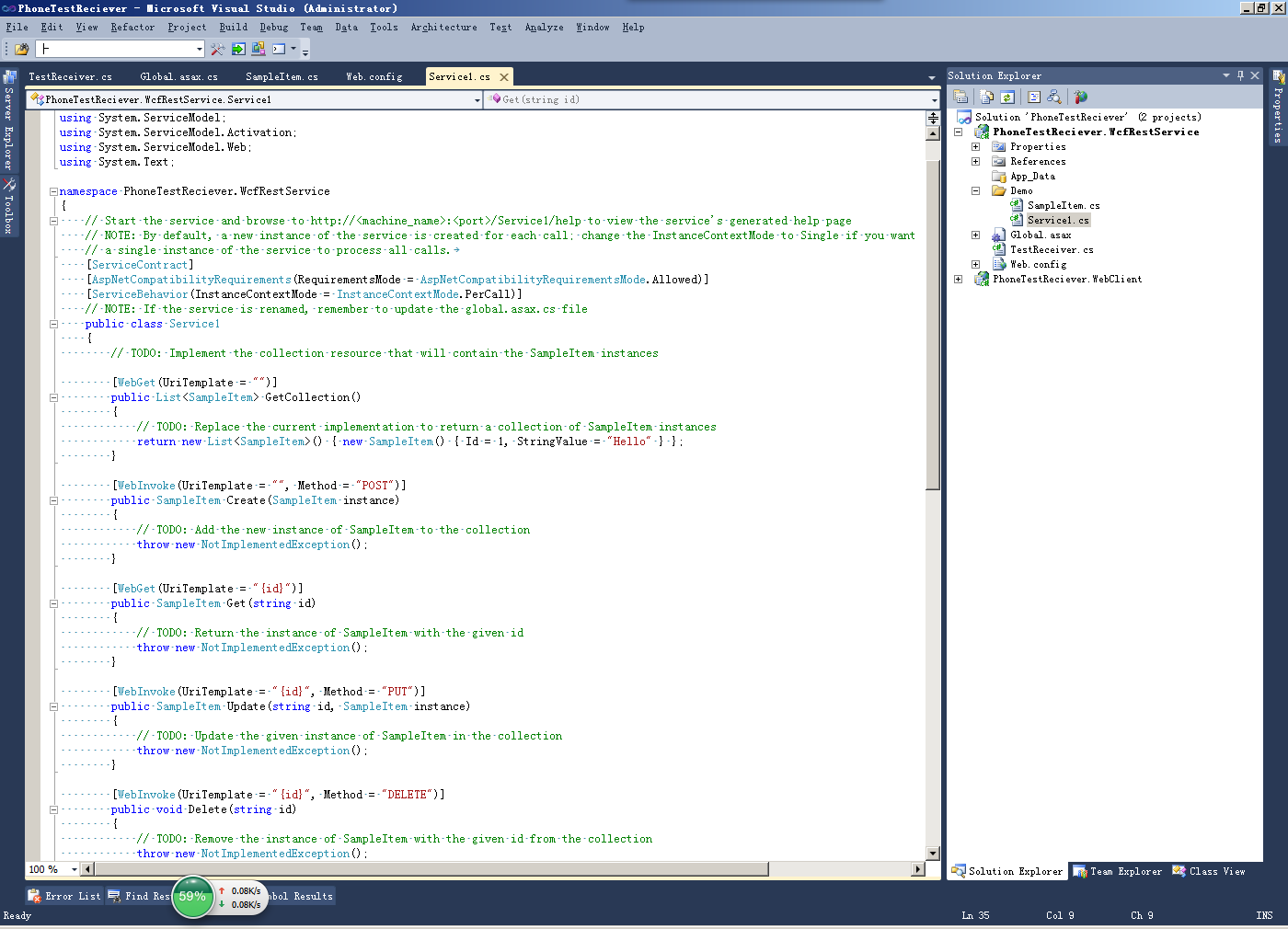
- 这个工程值得注意的有以下地方:
1, Gobal.asax文件中的代码:
  public class Global : HttpApplication

     {

         void Application_Start(object sender, EventArgs e)

         {

             RegisterRoutes();

         }

         private void RegisterRoutes()

         {

             // Edit the base address of Service1 by replacing the "Service1" string below

             RouteTable.Routes.Add(new ServiceRoute("Service1", new WebServiceHostFactory(), typeof(Service1)));

         }

     }
这里边是注册了url访问 route,这个访问格式就包含一下集中restful访问类型:
2.访问方式
备注:我默认的url host url为:http://localhost:6001/
访问url:http://localhost:6001/Service1 提交方式:GET 调用函数为:GetCollection
访问url:http://localhost:6001/Service1 提交方式:POST 调用函数为:Create
访问url:http://localhost:6001/Service1/1 提交方式:Get 调用函数为:Get(...)
访问url:http://localhost:6001/Service1/1 提交方式:PUT 调用函数为:Update(...)
访问url:http://localhost:6001/Service1/1 提交方式:PUT 调用函数为:Delete(...)
3.怎么注册访问方式
[WebGet(UriTemplate = "")]
List<SampleItem> GetCollection()
[WebInvoke(UriTemplate = "", Method = "POST")]
SampleItem Create(SampleItem instance)
[WebGet(UriTemplate = "{id}")]
SampleItem Get(string id)
[WebInvoke(UriTemplate = "{id}", Method = "PUT")]
SampleItem Update(string id, SampleItem instance)
[WebInvoke(UriTemplate = "{id}", Method = "DELETE")]
void Delete(string id)
其实我们可以注意到这些"访问url"访问到的“调用的函数”上的注解:
指定了访问url为:http://localhost:6001/Service1
WebGetAttribute:
a. 决定了提交方式为Get,
b. UriTemplate ,决定了是否在http://localhost:6001/Service1后边追加其他路径
c. 其他参数RequestFormat = WebMessageFormat.Xml, ResponseFormat = WebMessageFormat.Json等
WebInvokeAttribute
a.UriTemplate ,决定了是否在http://localhost:6001/Service1后边追加其他路径
b.Method,决定了提交方式,可选参数包含Get,Post,Put,Delete,当然也支持Header等其他方式。
c. 其他参数RequestFormat = WebMessageFormat.Xml, ResponseFormat = WebMessageFormat.Json等
- 关于请求、返回数据格式
REST被受到欢迎原因:
1,分布式架构
2,请求、返回格式支持xml,json。
3,支持异步请求/提交数据,这使得Javascript可以轻松调用RESTful服务。
A.如果手动配置请求、返回数据格式?
wcf rest service template内置了简单的注册方式:在上边我们提到的WebGetAttribute,WebInvokerAttribute中都支持参数RequestFormat,ResponseFormat,可以手动的在代码中制定他们的参数类型:
  // Summary:

     //     An enumeration that specifies the format of Web messages.

     public enum WebMessageFormat

     {

         // Summary:

         //     The XML format.

         Xml = ,

         //

         // Summary:

         //     The JavaScript Object Notation (JSON) format.

         Json = ,

     }
B.如果动态配置请求、返回数据格式?
相比手动配置之下,动态选择格式还是更灵活。打开之前创建的项目,在web.config中,设置:
<standardEndpoint name="" helpEnabled="true" automaticFormatSelectionEnabled="true"/>
将automaticFormatSelectionEnabled设置为true
设置后,我们就可以通过url访问到当前我们可以访问的路径接口等.
测试客户端
比如我们Restful Service代码如下:
  [WebInvoke(UriTemplate = "Servlet", Method = "POST", ResponseFormat = WebMessageFormat.Json)]

        public string Welcome()

        {

            try

            {

               // 接收传递的参数信息

               string param= HttpContext.Current.Request["param"];

               // do somthing

               // 返回成功操作状态信息

               return "{\"status\": 0, \"msg\": \"操作成功!\"}";

            }

            catch (Exception ex)

            {

                // 返回失败操作状态信息

                return "{\"status\": 1, \"msg\": \"操作失败!\"}"; ;

            }

        }
客户端调试:
static void Main(string[] args)

        {

            NameValueCollection responseEntity = new NameValueCollection();

            responseEntity.Add("param", "");

            string baseUrl = "http://localhost:6001/TestReceiver/Welcome";

            try

            {

                WebClient webClient = new WebClient();

                // 采取POST方式必须加的header,如果改为GET方式的话就去掉这句话即可

                webClient.Headers.Add("Content-Type", "application/x-www-form-urlencoded");

                // 得到返回字符流

                byte[] responseData = webClient.UploadValues(baseUrl, "POST", responseEntity);

                // 解码返回值

                string byRemoteInfo = Encoding.UTF8.GetString(responseData);

                Console.WriteLine(byRemoteInfo);

            }

            catch (Exception ex)

            {

                Console.WriteLine(ex.Message);

                Console.WriteLine(ex.StackTrace);

            }

            Console.ReadKey();

        }
上边我们采用的接收参数的方式是HttpContext.Current.Request.Params["param"]的方式来接收参数,确切说,这种方式在vs的调试模式下是可以接收到参数的,但是在iis上就不是这么好说了(具体问题,我不是太清楚是不是因为我的服务器上没有注册WCF组建的方式(验证方案参考:http://blog.csdn.net/findsafety/article/details/9045721),还是其他问题;具体原因我暂时不能去确认,服务器远程不了,只能明天去确认)。
- 服务器端在函数的参数中写入要接收的参数信息,作为函数的参数,这种方式是可行的。
demo:
 public class Global : HttpApplication

 {

     void Application_Start(object sender, EventArgs e)

     {

         RegisterRoutes();

     }

     private void RegisterRoutes()

     {

         // Edit the base address of Service1 by replacing the "Test" string below

         RouteTable.Routes.Add(new ServiceRoute("Test", new WebServiceHostFactory(), typeof(Test)));

     }

 }

 [ServiceContract]

 [AspNetCompatibilityRequirements(RequirementsMode = AspNetCompatibilityRequirementsMode.Allowed)]

 [ServiceBehavior(InstanceContextMode = InstanceContextMode.PerCall)]

 // NOTE: If the service is renamed, remember to update the global.asax.cs file

 public class Test

 {

     private Logger logger = LogManager.GetCurrentClassLogger();

     [WebInvoke(UriTemplate = "Login", Method = "POST", BodyStyle = WebMessageBodyStyle.WrappedRequest)]

     public bool Login(string userName, string userPassword)

     {

         //模拟登录,实际使用时需数据库访问

         if (userName == "huangbo" && userPassword == "")

         {

             return true;

         }

         return false;

     }

 }

 public class UserInfo

 {

     public string userName { get; set; }

     public string userPassword { get; set; }

 }

 class Program

 {

     static void Main(string[] args)

     {

         string baseUrl = "http://localhost:6001/Test/Login";

         UserInfo info = new UserInfo

         {

             userName = "",

             userPassword = ""

         };

         //先访问LoginService,得到授权

         var request = (HttpWebRequest)WebRequest.Create(baseUrl);

         request.ContentType = "application/json;charset=utf-8";

         request.Method = "POST";

         request.KeepAlive = true;

         //request.ClientCertificates.Add(cert);

         //使用JSON.NET将对象序列化成JSON字符串

         var requestBody = Newtonsoft.Json.JsonConvert.SerializeObject(info);

         byte[] databytes = Encoding.UTF8.GetBytes(requestBody);

         request.ContentLength = databytes.Length;

         using (var writer = request.GetRequestStream())

         {

             writer.Write(databytes, , databytes.Length);

         }

         var response = request.GetResponse();

         using (var stream = response.GetResponseStream())

         {

             using (var reader = new StreamReader(stream))

             {

                 Console.WriteLine(reader.ReadToEnd());

             }

         }

     }

 }
参考资料:
http://www.cnblogs.com/xiarifeixue/archive/2011/04/27/restful.html
http://www.cnblogs.com/bearhb/archive/2012/07/11/2586412.html
怎么接收参数:
UserInfo info = new UserInfo
{
userName = “user”,
userPassword = “pwd”
};
string strJson=Newtonsoft.Json.JsonConvert.SerializeObject(message);
byte[] jsonBytes=Encoding.UTF8.GetBytes(strJson);
test client post method: json string UploadData(string url,string method,byte[] bytes);
webClient.UploadData("url","Post",jsonBytes);
mapping WCF Rest Service method:
[WebInvoke(UriTemplate = "", Method = "POST",BodyStyle=WebMessageBodyStyle.WrappedRequest)]
Wcf Restful Service服务搭建的更多相关文章
- 构建基于WCF Restful Service的服务
前言 传统的Asmx服务,由于遵循SOAP协议,所以返回内容以xml方式组织.并且客户端需要添加服务端引用才能使用(虽然看到网络上已经提供了这方面的Dynamic Proxy,但是没有这种方式简便), ...
- WCF Restful Service的服务
构建基于WCF Restful Service的服务 前言 传统的Asmx服务,由于遵循SOAP协议,所以返回内容以xml方式组织.并且客户端需要添加服务端引用才能使用(虽然看到网络上已经提供了这方面 ...
- [转]构建基于WCF Restful Service的服务
本文转自:http://www.cnblogs.com/scy251147/p/3566638.html 前言 传统的Asmx服务,由于遵循SOAP协议,所以返回内容以xml方式组织.并且客户端需要添 ...
- WCF Restful Service
对 Web Services.WCF 和 Restful 的扫盲可参见:https://www.cnblogs.com/scy251147/p/3382436.html 关于之前对 WCF 的学习,可 ...
- WCF Restful Service Get / Post请求
Rest 它是用于创建分布式超文本媒体的一种架构方式,我们可以通过标准的HTTP(GET,POST,PUT,DELETE)操作来构建基于面向资源的软件架构方式(Resource-Oriented Ar ...
- [转]WCF RESTful service and WebGrid in ASP.NET MVC 5
使用WebClient调用WCF服务 流程:从View获取实体类-->序列化-->写入内存流中-->传给远端的WCF服务 Get.POST.PUT.DELETE,客户端以流的方式调用 ...
- 在IIS8.5的环境下配置WCF的Restful Service
今天在客户的环境中(Windows Server 2012 R2 + IIS 8.5)搭建Call WCF Restful Service的功能,发现了几个环境配置的问题,记录如下: 1):此环境先安 ...
- [经验] - JQuery.Ajax + 跨域 (crossDomain) + POST + JSON + WCF RESTful, 5大陷阱和解决方案
最近在开发WSS RESTful服务的时候, 碰到了这些个纠结的问题. 在网上查找了半天, 找到n多种解决方案, 但是都是部分的, 要么是没有跨域的情况, 要么是没有post的情况, 要么不是用WCF ...
- JQuery.Ajax + 跨域 (crossDomain) + POST + JSON + WCF RESTful, 5大陷阱和解决方案
JQuery.Ajax + 跨域 (crossDomain) + POST + JSON + WCF RESTful, 5大陷阱和解决方案 最近在开发WSS RESTful服务的时候, 碰到了这些个纠 ...
随机推荐
- 如何开启mysql计划事件
如何开启mysql计划事件 (2012-07-26 12:21:23) 转载▼ 标签: mysql 事件计划 it 分类: MySQL 首先在sql中查询计划事件的状态:SHOW VARIABLES ...
- A20板子上的触摸屏设备号变化后解决
- Python For Data Analysis -- IPython
IPython Basics 首先比一般的python shell更方便一些 比如某些数据结构的pretty-printed,比如字典 更方便的,整段代码的copy,执行 并且可以兼容部分system ...
- 发现了一个很好的Pasical编程软件Lazarus
下载地址:http://www.lazarus.freepascal.org/ 中文社区:http://www.fpccn.com/ 该软件有几点如下特征: 1.跨平台.体积小(只有100多M) 2. ...
- BadgeView的使用介绍
在现在大部分的信息发布类应用,都有这样的一个功能:当后台数据更新,比如有系统消息或者是用户间有互动的时候,通过在控件上显示一个小红点来提示用户有新的信息.一般来说,这种业务需求,我们可以在布局文件中隐 ...
- 取消svn关联
把下面这段文字保存成一个reg文件 Windows Registry Editor Version 5.00[HKEY_LOCAL_MACHINE\SOFTWARE\Classes\Folder\sh ...
- extjs MVC模式的个人看法
针对一个后台管理页面是mvc模式,后台也是mvc模式下的项目,要怎么去熟悉呢? 首先以我个人的认解,先从后台的管理界面来看,会有control,model,store,view:其中先看view的代码 ...
- jfinal
http://blog.csdn.net/zb0567/article/details/21083021
- Qt获取组合键
CTRL+Enter发送信息的实现 在现在的即时聊天程序中,一般都设置有快捷键来实现一些常用的功能,类似QQ可以用CTRL+Enter来实现信息的发送. 在QT4中,所有的事件都继承与QEvent这个 ...
- 针对JD-GUI
switch(0){ case 1001: JSONObject jsoObj; String data = null; boolean isclose = false; try{ jsoObj = ...