
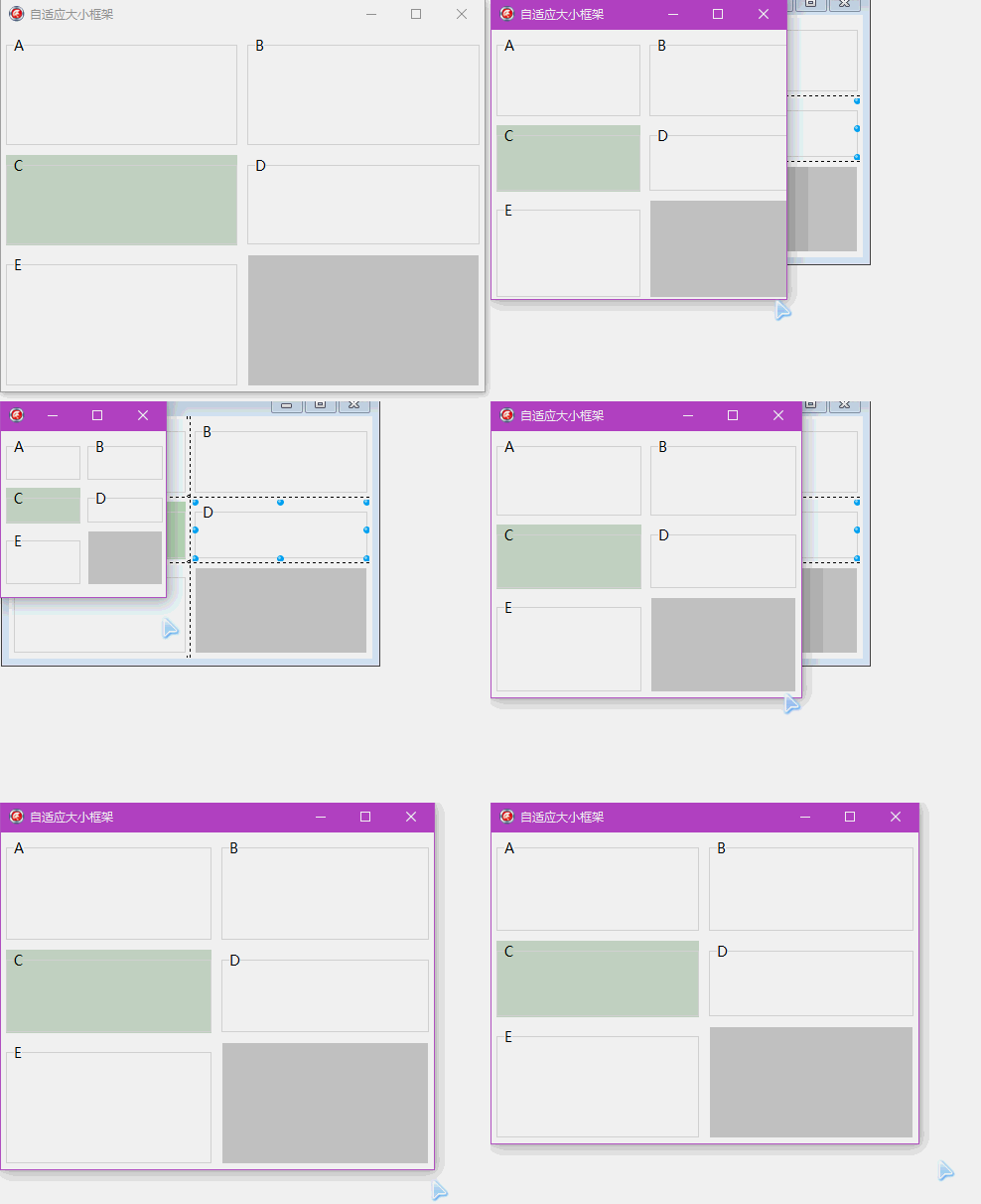
TGridPanel做一个自动按比例缩放的窗体
object grdpnlAdd: TGridPanel

  Left =

  Top =

  Width =

  Height =

  Align = alClient  //重要

  BevelOuter = bvNone

  BorderWidth =

  Color = clWhite

  ColumnCollection = < //设定3列 设定比例

    item

      Value = 49.500000000000000000

    end

    item

      Value = 1.000000000000000000

    end

    item

      Value = 49.500000000000000000

    end>

  ControlCollection = <

    item

      Column =

      Control = pnlVehicleInfo //每个格子控制的容器

      Row =

    end

    item

      Column =

      Control = pnlTransportInfo

      Row =

    end

    item

      Column =

      Control = pnlCarrageUnit

      Row =

    end

    item

      Column =

      Control = pnlConsignUnit

      Row =

    end

    item

      Column =

      Control = pnl1CargoInfo

      Row =

    end

    item

      Column =

      Control = pnl1Hint

      Row =

    end>

  DoubleBuffered = True

  ExpandStyle = emFixedSize

  Locked = True

  Padding.Left =

  Padding.Top =

  Padding.Right =

  Padding.Bottom =

  ParentBackground = False

  ParentDoubleBuffered = False

  RowCollection = < //添加五行,设定比例

    item

      Value = 33.000000000000000000

    end

    item

      Value = 1.000000000000000000

    end

    item

      Value = 27.000000000000000000

    end

    item

      Value = 1.000000000000000000

    end

    item

      Value = 38.000000000000000000

    end>

  TabOrder =

  VerticalAlignment = taAlignBottom

  ExplicitTop = -

  ExplicitWidth =

  ExplicitHeight =

  object pnlVehicleInfo: TPanel

    Left =

    Top =

    Width =

    Height =

    Align = alClient

    BevelOuter = bvNone

    BevelWidth =

    BorderWidth =

    Color =

    Font.Charset = ANSI_CHARSET

    Font.Color = clWindowText

    Font.Height = -

    Font.Name = ####

    Font.Style = []

    ParentBackground = False

    ParentFont = False

    TabOrder =

    ExplicitWidth =

    ExplicitHeight =

    object grpVehicleInfo: TGroupBox

      Left =

      Top =

      Width =

      Height =

      Align = alClient

      Caption = ' '####' '

      Font.Charset = ANSI_CHARSET

      Font.Color = clWindowText

      Font.Height = -

      Font.Name = ####

      Font.Style = []

      ParentFont = False

      TabOrder =

      ExplicitWidth =

      ExplicitHeight =

    end

  end

  object pnlTransportInfo: TPanel

    Left =

    Top =

    Width =

    Height =

    Align = alClient

    BevelOuter = bvNone

    BevelWidth =

    BorderWidth =

    Color =

    Font.Charset = ANSI_CHARSET

    Font.Color = clWindowText

    Font.Height = -

    Font.Name = ####

    Font.Style = []

    ParentBackground = False

    ParentFont = False

    TabOrder =

    ExplicitTop =

    ExplicitWidth =

    ExplicitHeight =

    object grpTransportInfo: TGroupBox

      Left =

      Top =

      Width =

      Height =

      Align = alClient

      Caption = ' '####' '

      Font.Charset = ANSI_CHARSET

      Font.Color = clWindowText

      Font.Height = -

      Font.Name = ####

      Font.Style = []

      ParentFont = False

      TabOrder =

      ExplicitWidth =

      ExplicitHeight =

    end

  end

  object pnlCarrageUnit: TPanel

    Left =

    Top =

    Width =

    Height =

    Align = alClient

    BevelOuter = bvNone

    BevelWidth =

    BorderWidth =

    Color =

    Font.Charset = ANSI_CHARSET

    Font.Color = clWindowText

    Font.Height = -

    Font.Name = ####

    Font.Style = []

    ParentBackground = False

    ParentFont = False

    TabOrder =

    ExplicitLeft =

    ExplicitWidth =

    ExplicitHeight =

    object grpCarrageUnit: TGroupBox

      Left =

      Top =

      Width =

      Height =

      Align = alClient

      Caption = ####' '

      Font.Charset = ANSI_CHARSET

      Font.Color = clWindowText

      Font.Height = -

      Font.Name = ####

      Font.Style = []

      ParentFont = False

      TabOrder =

      ExplicitWidth =

      ExplicitHeight =

    end

  end

  object pnlConsignUnit: TPanel

    Left =

    Top =

    Width =

    Height =

    Align = alClient

    BevelOuter = bvNone

    BevelWidth =

    BorderWidth =

    Color =

    Font.Charset = ANSI_CHARSET

    Font.Color = clWindowText

    Font.Height = -

    Font.Name = ####

    Font.Style = []

    ParentBackground = False

    ParentFont = False

    TabOrder =

    ExplicitLeft =

    ExplicitTop =

    ExplicitWidth =

    ExplicitHeight =

    object grpConsignUnit: TGroupBox

      Left =

      Top =

      Width =

      Height =

      Align = alClient

      Caption = ' '####' '

      Font.Charset = ANSI_CHARSET

      Font.Color = clWindowText

      Font.Height = -

      Font.Name = ####

      Font.Style = []

      ParentFont = False

      TabOrder =

      ExplicitWidth =

      ExplicitHeight =

    end

  end

  object pnl1CargoInfo: TPanel

    Left =

    Top =

    Width =

    Height =

    Align = alClient

    BevelOuter = bvNone

    BevelWidth =

    BorderWidth =

    Color =

    Font.Charset = ANSI_CHARSET

    Font.Color = clWindowText

    Font.Height = -

    Font.Name = ####

    Font.Style = []

    ParentBackground = False

    ParentFont = False

    TabOrder =

    ExplicitTop =

    ExplicitWidth =

    ExplicitHeight =

    object grpCargoInfo: TGroupBox

      Left =

      Top =

      Width =

      Height =

      Align = alClient

      Caption = ' '####' '

      Font.Charset = ANSI_CHARSET

      Font.Color = clWindowText

      Font.Height = -

      Font.Name = ####

      Font.Style = []

      ParentFont = False

      TabOrder =

      ExplicitWidth =

      ExplicitHeight =

    end

  end

  object pnl1Hint: TPanel

    AlignWithMargins = True

    Left =

    Top =

    Width =

    Height =

    Align = alClient

    BevelOuter = bvNone

    BevelWidth =

    BorderWidth =

    Color =

    Font.Charset = ANSI_CHARSET

    Font.Color = clWindowText

    Font.Height = -

    Font.Name = ####

    Font.Style = []

    ParentBackground = False

    ParentFont = False

    TabOrder =

    ExplicitLeft =

    ExplicitTop =

    ExplicitWidth =

    ExplicitHeight =

  end

end
全选复制,粘贴到XE 的空窗体上即可。
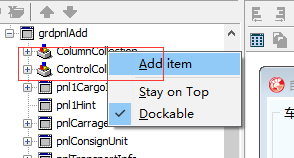
添加行 控件的ColumnCollection属性右键添加 Add item
添加列 控件的RowCollection 属性右键添加 Add item
控制的格子ControlCollection 就自动出来了,在上面放panel等容器,然后通过这个属性选择容器对应受到哪个格子控制。
或者用代码控制
{grdpnlAdd.ColumnCollection.BeginUpdate;
grdpnlAdd.ColumnCollection[0].Value := 49.5;
grdpnlAdd.ColumnCollection[1].Value := 1;
grdpnlAdd.ColumnCollection[2].Value := 49.5;
grdpnlAdd.ColumnCollection.EndUpdate;
grdpnlAdd.RowCollection.BeginUpdate;
grdpnlAdd.RowCollection[0].Value := 32;
grdpnlAdd.RowCollection[1].Value := 1;
grdpnlAdd.RowCollection[2].Value := 32;
grdpnlAdd.RowCollection[3].Value := 1;
grdpnlAdd.RowCollection[4].Value := 33;
grdpnlAdd.RowCollection.EndUpdate; }
TGridPanel做一个自动按比例缩放的窗体的更多相关文章
- 做一个自动修改本机IP和mac的bat文件
原文:做一个自动修改本机IP和mac的bat文件 1.ip bat修改理论探讨 前两天我突然萌生了一个念头:能不能做一个小程序来实现自动配置或修改IP和mac,达到一键搞定的目的,这样尤其适合那些带着 ...
- Micropython 如何用Turnipbit做一个自动浇水装置
最近在研究Turnipbit这块板子,打算是连接一个摄像头模块,正在实验练习中,(祝自己早日弄好)上篇文章我们讲了用Turnipbit连接LCD5110显示英文词句,前几天给家里花浇水的时候发现花招了 ...
- [转]用Python做一个自动生成读表代码的小脚本
写在开始(本片文章不是写给小白的,至少你应该知道一些常识!) 大家在Unity开发中,肯定会把一些数据放到配置文件中,尤其是大一点的项目,每次开发一个新功能的时候,都要重复的写那些读表代码.非常烦.来 ...
- 【按键精灵篇】如何做一个自动打开APP进入注册页面自动输入自己手机号
按键精灵,虽然很早听过,但是一直没有真正使用过,所以最近有点时间也简单试一下,通过脚本自动清理APP缓存,打开百家号并自动进入注册页面输入自己的手机号. 软件清单 1. 雷电手机模拟器:https:/ ...
- 今天做一个winform,想直接把窗体改成输出类库,其他地方直接调结果总提示不能注册组件,回来调度,可以,总结,windows还是直接用新建的类型项目,改容易出错
如题, 对于winform程序,还是新建一个类库,这样,在类库里面可以添加窗体.这样可以提供其他程序集来调用里面的窗体
- 使用java AWT做一个增加按钮的简单菜单窗体
package com.ysq.Swing; import java.awt.BorderLayout; import java.awt.Container; import java.awt.Flow ...
- 更新到PS CC 2019 缩放的时候 按住shift变成不规则缩放了 反而不按住shift是等比例缩放
更新到PS CC 2019 缩放的时候 按住shift变成不规则缩放了 反而不按住shift是等比例缩放 更新到PS CC 2019 缩放的时候 按住shift变成不规则缩放了 反而不按住shift是 ...
- 做了一个图片等比缩放的js
做了一个图片等比缩放的js 芋头 发布在view:8447 今天改了一下博客的主题,发现博客主题在ie6下变样了,后来发现是因为某篇文章里的某个图片太大了撑开了容器,导致样式错位,前几天公司需求里 ...
- delphi 一个自动控制机的硅控板检测程序,用多线程和API,没有用控件,少做改动就能用 用485开发
一个自动控制机的硅控板检测程序,用多线程和API,没有用控件,少做改动就能用Unit CommThread; Interface Uses Windows, Classes, SysUtils, G ...
随机推荐
- 第二轮冲刺-Runner站立会议07
今天:实现日历界面 明天:优化日历界面
- flask-whooshalchemy需要注意的一点
在学习mega—tutorial时全文搜索模块遇到了问题,那就是使用全文搜索查询出来的数据为空的列表,输出了sql语句后发现where后没有条件,困扰了许久,后来才发现是自己不细心,在进行全文索引时应 ...
- jquery + header
官网上搜索headers 基本用法(直接用下楼上的代码了) $.ajax({ //请求类型,这里为POST type: 'POST', //你要请求的api的URL url: url , //是否使用 ...
- Android之仿微信Tab滑动
这个项目实现了以下的功能:有三个标签聊天.发现和通讯录,左右滑动下面的ViewPager可以切换不同的标签,且标签下面的蓝色条可以随着手指的滑动来实时滑动.另外,如果第二次滑动到“聊天”界面,可以在“ ...
- codevs2572 路面修整
题目描述 Description Mr. Ling打算好好修一下学校门口的那条凹凸不平的路.按照Mr. Ling的设想,修好后的路面高度应当单调上升或单调下降,也就是说,高度上升与高度下降的路段不能同 ...
- 【荐】MongoDB基本命令大全
DB Shell数据操作 shell命令操作语法和JavaScript很类似,其实控制台底层的查询语句都是用JavaScript脚本完成操作的. #数据库 操作 1.Help查看命令提示 > h ...
- linux各目录的作用
- ASP.NET基础代码备忘
使用ASP.NET原生的__doPostBack方法触发asp:Button //javaScript部分 __doPostBack('<%=btnAmountDivided.UniqueID ...
- p2p音视频通信
今年音频没事干了,根据业务需求,调研音视频p2p通信,减小服务器压力,一切从0开始. 需要信令服务器,打洞服务器,帮助链接打通双方,实现p2p音视频通信. 服务器和客服端交互等都需要实现. 谷歌web ...
- java导出生成word(类似简历导出)
参考帖子: http://www.cnblogs.com/lcngu/p/5247179.html http://www.cnblogs.com/splvxh/archive/2013/03/15/2 ...