
Python实例---CRM管理系统分析180331
注意:一个项目基本都设计增删改查,且第一个需要做的就是设计表结构
思维导图:
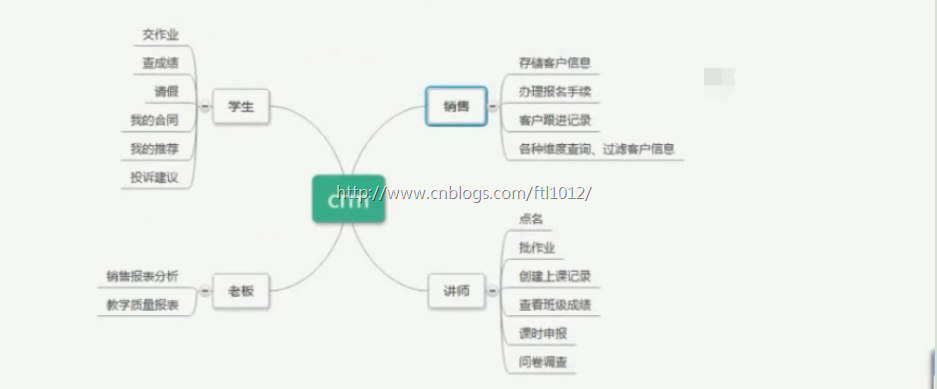
组件使用: Django + bootStrap + Jquery
数据库表结构设计:
外键关联: 2种方式,
1. oneTooneField -->底层也是ForenignKey,但是有Unique限制
2. ForeingnKey
Django自带的用户认证模块:
from django.contrib.auth.models import User
user = models.OneToOneField(User, on_delete=True) # 相当于继承了auth.models里面的User表
注意多对多是不能在列上显示的
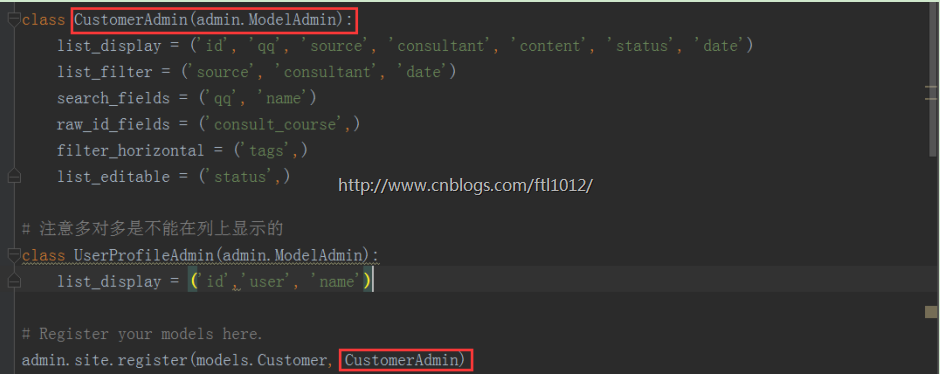
项目问答
问: 为什么是request.user?
答: 这里是利用了Django自带认证系统,前端模板里嵌套了request对象,除了获取request.user还可以获取request.method等方法。
如果是自定义的User【未继承auth.model】,想在前端利用request.userprofile获取用户信息,则需要在request对象里面添加userprofile对象的信息
models.py

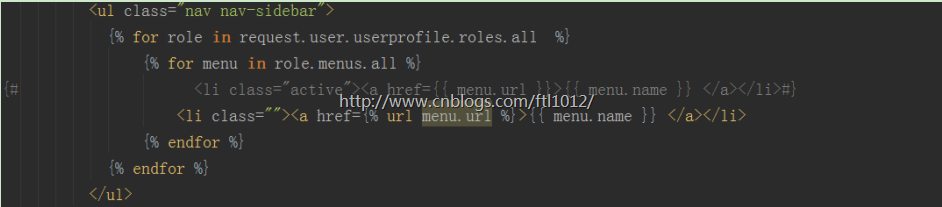
问:为什么是request.user.userprofile.roles.all ?
答:因为Django中只能从request属性中获取user[这里的user是Django封装后,auth里面的user],而user和userprofiel是一对一的外键关系,所以这里是反向查值,一对一的反向不是【字段名_set】来获取的,而是根据request.user.userprofile获取,再拿到账号信息后根据多对多的Role查找角色信息最后找到menus菜单信息。
index.html
models.py

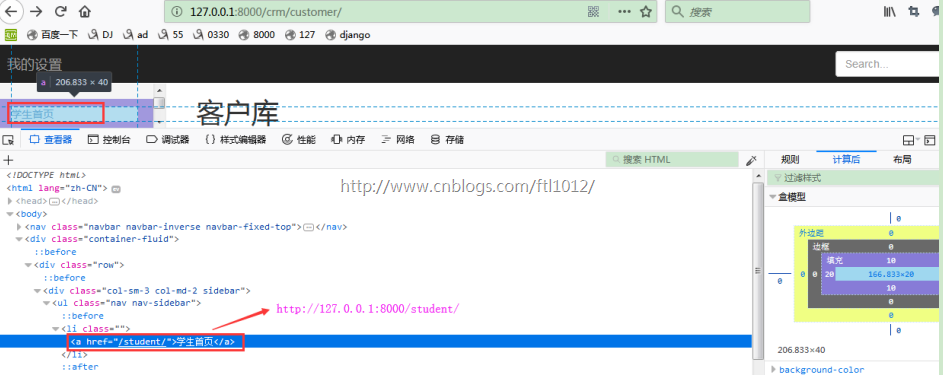
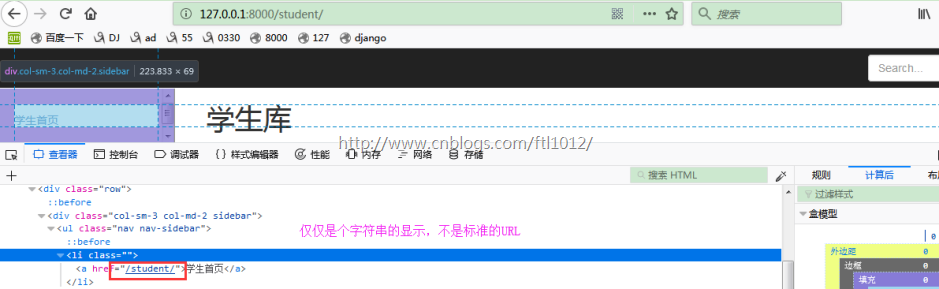
问: 为什么是 {% url menu.url %} ?
答:因为{% url menu.url %}是个URL,而{{ menu.url }}仅仅显示一个字符串
Index.html中{% url menu.url %}显示效果:
Index.html中{{ menu.url }}显示效果:
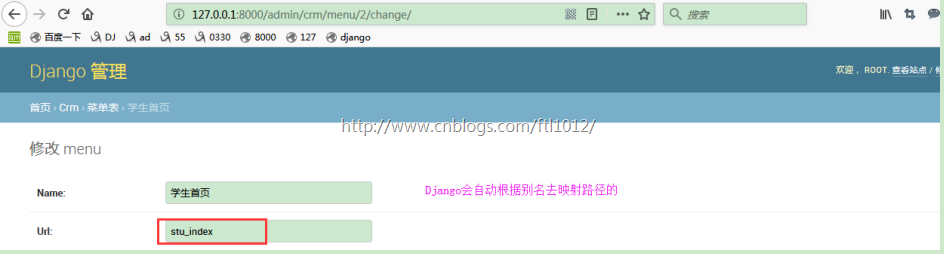
问:为什么要在urls.py里面写别名?
答:因为我们生成动态菜单的时候,是根据url来跳转对应的界面的,如果这里不写别名的话,则需要在a表的href里面写死url路径,不方便后期的维护。

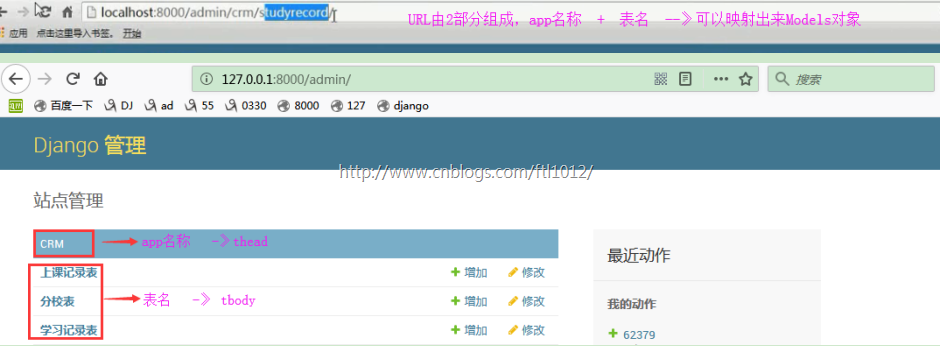
问:通用模板进行前端页面的显示? -->【king_admin】
答: DjangoAdmin的URL由2部分组成,app名称 + 表名
DjangoAdmin的页面可以定义,由 表名 + 类名组成
admin.site.register(models.UserProfile,UserProfileAdmin) -->UserAdmin是自定义的类
问:Python如何查看类中的方法
答: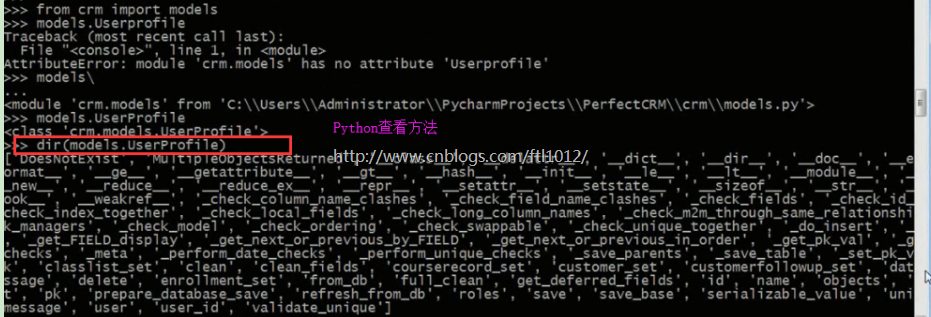
项目要点
要点一:传递字典给前台进行渲染,因为字典可以根据key获取内容,如果列表则需要循环来实现,效率低
{

  'App名称[CRM]':{

      '表名[userprofile]': '类对象[admin_class]'  # admin_class定义了我们显示的字段

  }

}
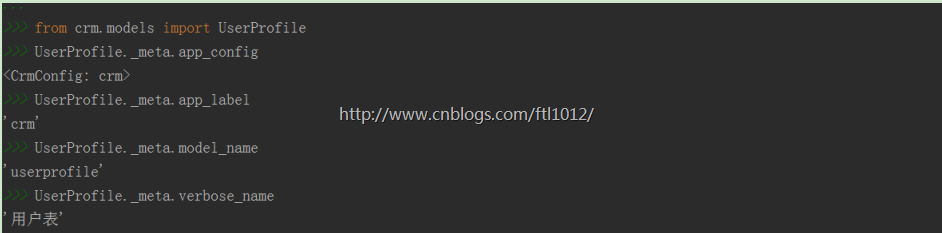
要点二: 根据对象获取App名以及表名
>>>from crm.models import UserProfile

>>>UserProfile._meta.app_config

<CrmConfig: crm>

>>>UserProfile._meta.app_label

'crm'

>>>UserProfile._meta.model_name

'userprofile'

>>>UserProfile._meta.verbose_name

'用户表'
要点三:自定义前台的字符串格式
{

'crm': {

   'customer': < class 'king_admin.king_admin.CustomerAdmin' > ,

   'customerfollowup': < class 'king_admin.king_admin.CustomerFollowUpAdmin' >

  }

   print(king_admin.enable_admins['crm'])  # 上面就是enable_admin内容

   # <class 'king_admin.king_admin.CustomerFollowUpAdmin'>

   print(king_admin.enable_admins['crm']['customerfollowup'])

   # <class 'crm.models.CustomerFollowUp'>  -->获取model对象,关联对象和admin类

   print(king_admin.enable_admins['crm']['customerfollowup'].model)

要点四: 根据app名称和table名称【即字符串】反射导入model类文件
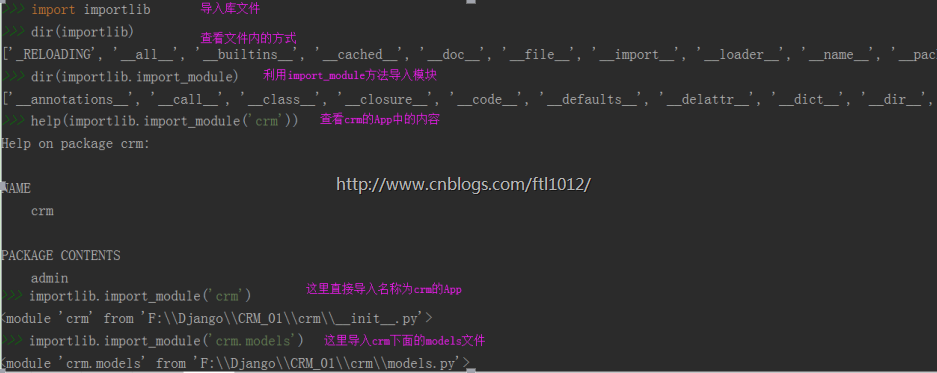
方法一: 利用iportlib库导入文件,然后根据for循环.meta_model_name表名进行内容匹配
>>>import importlib

>>>dir(importlib)

['_RELOADING', '__all__', '__builtins__', '__cached__', '__doc__', '__file__', '__import__', '__loader__', '__name__', '__package__', '__path__', '__spec__', '_bootstrap', '_bootstrap_external', '_imp', '_r_long', '_w_long', 'abc', 'find_loader', 'import_module', 'invalidate_caches', 'machinery', 'reload', 'sys', 'types', 'util', 'warnings']

>>>dir(importlib.import_module)

['__annotations__', '__call__', '__class__', '__closure__', '__code__', '__defaults__', '__delattr__', '__dict__', '__dir__', '__doc__', '__eq__', '__format__', '__ge__', '__get__', '__getattribute__', '__globals__', '__gt__', '__hash__', '__init__', '__kwdefaults__', '__le__', '__lt__', '__module__', '__name__', '__ne__', '__new__', '__qualname__', '__reduce__', '__reduce_ex__', '__repr__', '__setattr__', '__sizeof__', '__str__', '__subclasshook__']

>>>help(importlib.import_module('crm'))

Help on package crm:

NAME

    crm

PACKAGE CONTENTS

    admin

    apps

    migrations (package)

    models

    tests

    urls

    views

FILE

    f:\django\crm_01\crm\__init__.py

>>>importlib.import_module('crm')            // 查找到crm的App

<module 'crm' from 'F:\\Django\\CRM_01\\crm\\__init__.py'>

>>>importlib.import_module('crm.models')     // 导入models文件

<module 'crm.models' from 'F:\\Django\\CRM_01\\crm\\models.py'>

>>>m=importlib.import_module('crm.models')

>>>m.CustomerFollowUp

<class 'crm.models.CustomerFollowUp'>

>>>m.CustomerFollowUp._meta.model_name    // 查看表名,小写的哈

'customerfollowup'

方案二: 从我们自定义的king_admin中的字典获取model类

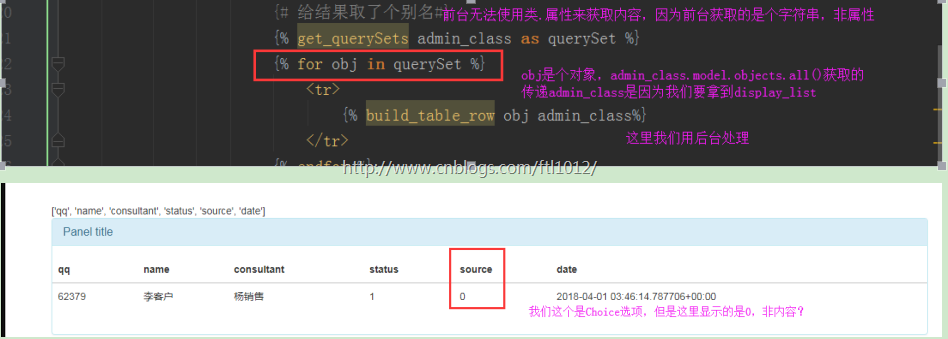
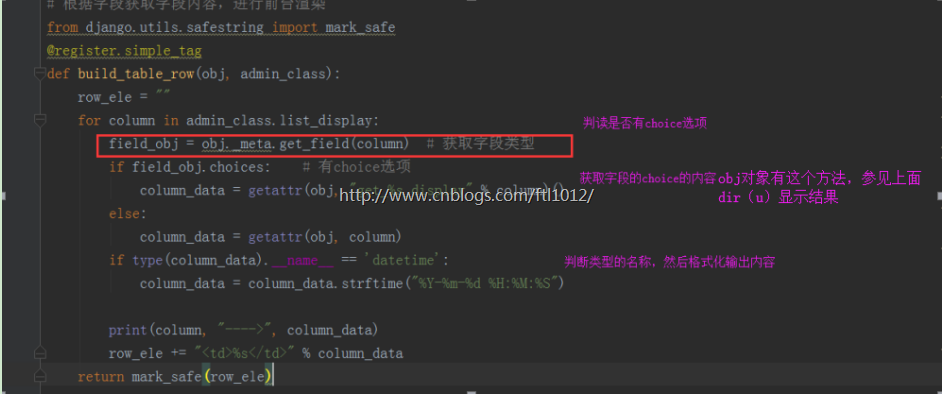
要点五: 如何根据前台显示的列的顺序进行内容渲染
接上面的操作,根据反射获取内容
>>>u = m.Customer.objects.all()[0]

>>>getattr(u, 'name')

'李客户'

>>>u.source

0

>>>u._meta.get_field('source')

<django.db.models.fields.SmallIntegerField: source>

>>>dir(u._meta.get_field('source'))

['__class__', '__copy__', '__deepcopy__', '__delattr__', '__dict__', '__dir__', '__doc__', '__eq__', '__format__', '__ge__', '__getattribute__', '__gt__', '__hash__', '__init__', '__le__', '__lt__', '__module__', '__ne__', '__new__', '__reduce__', '__reduce_ex__', '__repr__', '__setattr__', '__sizeof__', '__str__', '__subclasshook__', '__weakref__', '_check_backend_specific_checks', '_check_choices', '_check_db_index', '_check_deprecation_details', '_check_field_name', '_check_max_length_warning', '_check_null_allowed_for_primary_keys', '_check_validators', '_clear_cached_lookups', '_db_tablespace', '_description', '_error_messages', '_get_default', '_get_flatchoices', '_get_lookup', '_unique', '_unregister_lookup', '_validators', '_verbose_name', 'attname', 'auto_created', 'auto_creation_counter', 'blank', 'cached_col', 'cast_db_type', 'check', 'choices', 'class_lookups', 'clean', 'clone', 'column', 'concrete', 'contribute_to_class', 'creation_counter', 'db_check', 'db_column', 'db_index', 'db_parameters', 'db_tablespace', 'db_type', 'db_type_parameters', 'db_type_suffix', 'deconstruct', 'default', 'default_error_messages', 'default_validators', 'description', 'editable', 'empty_strings_allowed', 'empty_values', 'error_messages', 'flatchoices', 'formfield', 'get_attname', 'get_attname_column', 'get_choices', 'get_col', 'get_db_converters', 'get_db_prep_save', 'get_db_prep_value', 'get_default', 'get_filter_kwargs_for_object', 'get_internal_type', 'get_lookup', 'get_lookups', 'get_pk_value_on_save', 'get_prep_value', 'get_transform', 'has_default', 'help_text', 'hidden', 'is_relation', 'many_to_many', 'many_to_one', 'max_length', 'merge_dicts', 'model', 'name', 'null', 'one_to_many', 'one_to_one', 'pre_save', 'primary_key', 'register_lookup', 'rel_db_type', 'related_model', 'remote_field', 'run_validators', 'save_form_data', 'select_format', 'serialize', 'set_attributes_from_name', 'system_check_deprecated_details', 'system_check_removed_details', 'to_python', 'unique', 'unique_for_date', 'unique_for_month', 'unique_for_year', 'validate', 'validators', 'value_from_object', 'value_to_string', 'verbose_name']

>>>u._meta.get_field('source').get_choices(0)

[(0, '转介绍'), (1, 'QQ群'), (2, '官网'), (3, '百度推广'), (4, '51CTO'), (5, '知乎'), (6, '市场推广')]

>>>getattr(u, "get_source_display")()

'转介绍'

>>>dir(u)

['DoesNotExist', 'MultipleObjectsReturned', '__class__', '__delattr__', '__dict__', '__dir__', '__doc__', '__eq__', '__format__', '__ge__', '__getattribute__', '__getstate__', '__gt__', '__hash__', '__init__', '__le__', '__lt__', '__module__', '__ne__', '__new__', '__reduce__', '__reduce_ex__', '__repr__', '__setattr__', '__setstate__', '__sizeof__', '__str__', '__subclasshook__', '__weakref__', '_check_column_name_clashes', '_check_field_name_clashes', '_check_fields', '_check_id_field', '_check_index_together', '_check_local_fields', '_check_long_column_names', '_check_m2m_through_same_relationship', '_check_managers', '_check_model', '_check_model_name_db_lookup_clashes', '_check_ordering', '_check_swappable', '_check_unique_together', '_do_insert', '_do_update', '_get_FIELD_display', '_get_next_or_previous_by_FIELD', '_get_next_or_previous_in_order', '_get_pk_val', '_get_unique_checks', '_meta', '_perform_date_checks', '_perform_unique_checks', '_save_parents', '_save_table', '_set_pk_val', '_state', 'check', 'clean', 'clean_fields', 'consult_course', 'consult_course_id', 'consultant', 'consultant_id', 'content', 'customerfollowup_set', 'date', 'date_error_message', 'delete', 'enrollment_set', 'from_db', 'full_clean', 'get_deferred_fields', 'get_next_by_date', 'get_previous_by_date', 'get_source_display', 'get_status_display', 'id', 'memo', 'name', 'objects', 'payment_set', 'phone', 'pk', 'prepare_database_save', 'qq', 'qq_name', 'referral_from', 'refresh_from_db', 'save', 'save_base', 'serializable_value', 'source', 'source_choice', 'status', 'status_choices', 'tags', 'unique_error_message', 'validate_unique']

遇到的问题记录
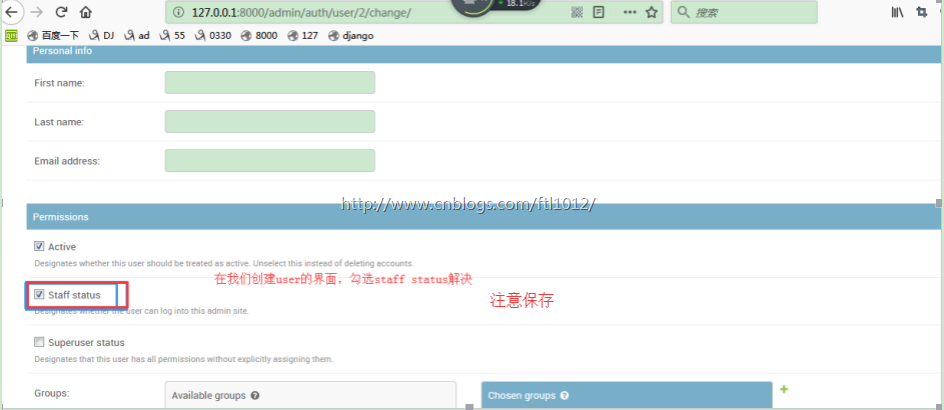
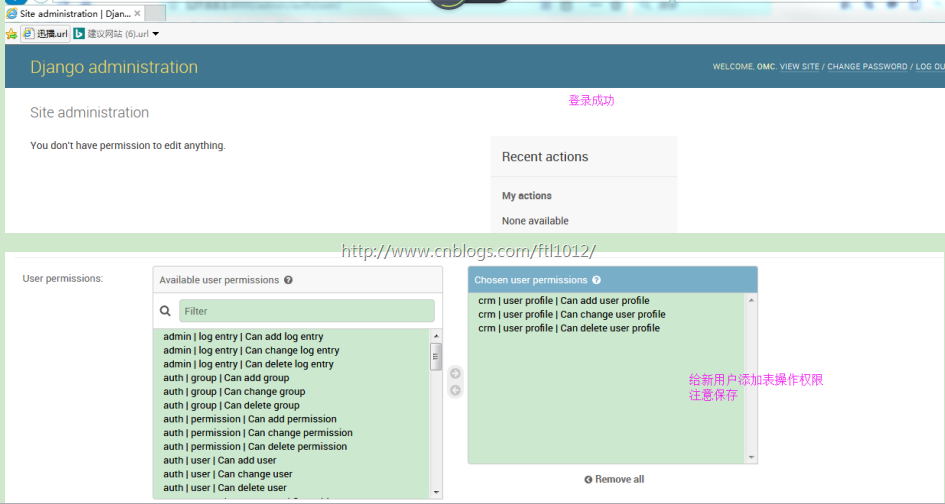
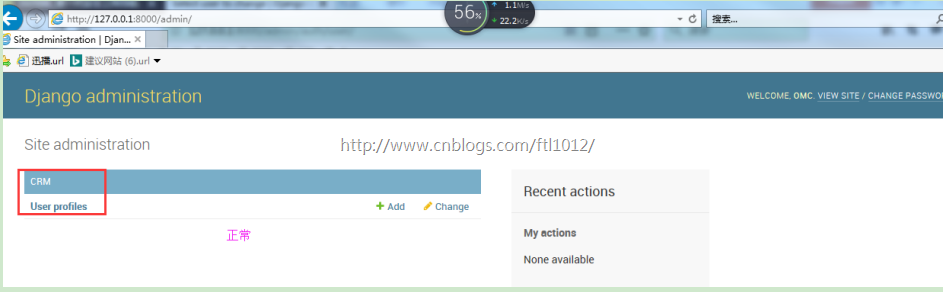
问题一: 创建的用户无法登陆
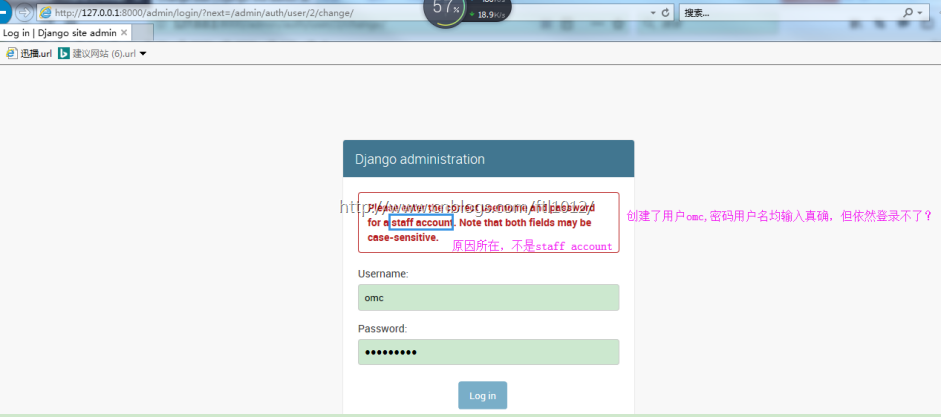
答:实则少个权限,界面勾选staff status 解决

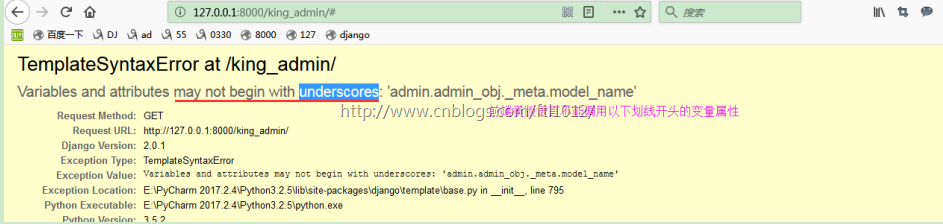
问题二:TemplateSyntaxError at /king_admin/
Variables and attributes may not begin with underscores: 'admin.admin_obj._meta.model_name'
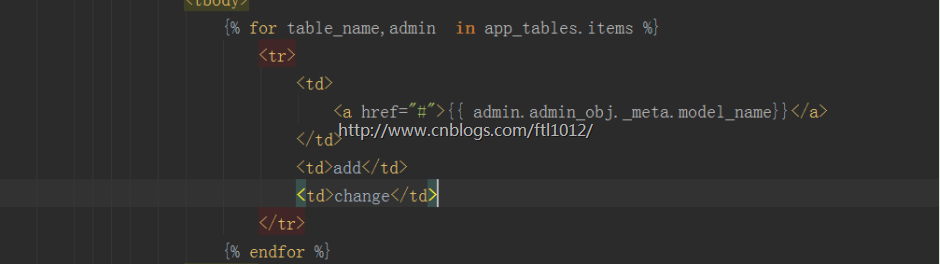
通过自定义标签解决:

问题三: 模板语言中写a标签格式错误:
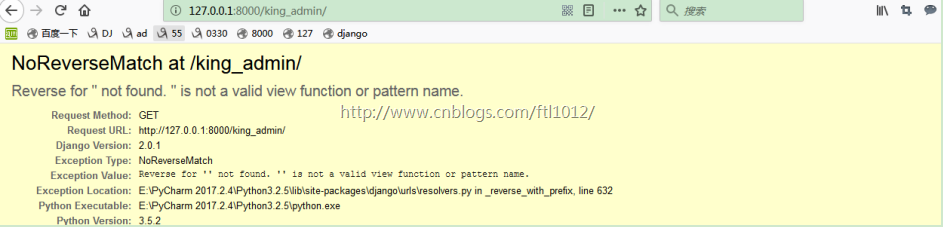
解决:

Python实例---CRM管理系统分析180331的更多相关文章
- (转)Python实例手册
原文地址:http://hi.baidu.com/quanzhou722/item/cf4471f8e23d3149932af2a7 实在是太好的资料了,不得不转 python实例手册 #encodi ...
- Python的包管理
0.Python的包管理 在刚开始学习Python的时候比较头疼各种包的管理,后来搜到一些Python的包管理工具,比如setuptools, easy_install, pip, distribut ...
- 转载 python实例手册
python实例手册 #encoding:utf8# 设定编码-支持中文 0说明 手册制作: 雪松 更新日期: 2013-12-19 欢迎系统运维加入Q群: 198173206 # 加群请回答问题 请 ...
- 【转载】python实例手册
今天写爬虫的时候遇到了问题,在网上不停地查找资料,居然碰到两篇好文章: 1.python实例手册 作者:没头脑的土豆 另一篇在这:shell实例手册 python实例手册 #encoding:ut ...
- Python实例手册
在电脑中突然发现一个这么好的资料,雪松大神制作,不敢独享,特与大家共享.连他的广告也一并复制了吧! python实例手册 #encoding:utf8 # 设定编码-支持中文 0说明 手册制作: 雪松 ...
- centOS7安装RabbitMQ及python实例
1.rabbitmq是有erlang开发的,所以首先要先安装erlang rpm -ivh erlang-18.1-1.el7.centos.x86_64.rpm rpm -ivh rabbitmq- ...
- 第一个python实例--监控cpu
#第一个python实例:监控cpu #/bin/bash/env Python from __future__ import print_function from collections impo ...
- Python的包管理工具Pip (zz )
Python的包管理工具Pip 接触了Ruby,发现它有个包管理工具RubyGem很好用,并且有很完备的文档系统http://rdoc.info 发现Python下也有同样的工具,包括easy_ins ...
- python学习笔记10(Python的内存管理)
用这张图激励一下自己,身边也就只有一位全栈数据工程师!!! 32. Python的内存管理 1. 对象的内存使用 对于整型和短字符串对象,一般内存中只有一个存储,多次引用.其他的长字符串和其他对象 ...
随机推荐
- 玩转mongodb(五):mongodb 3.0+ 查询性能分析
mongodb性能分析方法:explain() 为了演示的效果,我们先来创建一个有200万个文档的记录.(我自己的电脑耗了15分钟左右插入完成.如果你想插更多的文档也没问题,只要有耐心等就可以了.) ...
- Hive集成HBase实践
#step1: create hive table 't_test' hive -e "create table test.t_user(id int,name string,age int ...
- C#语法之Linq查询基础一
Linq做.Net开发的应该都用过,有些地方很复杂的逻辑用Linq很方便的解决.对于Linq to object.Linq to xml.Linq to sql.Linq to Entity(EF)都 ...
- mvc中的action验证登录(ActionFilterAttribute)
方法一 : 1.创建一个全局action过滤器 (在appstart 的filterconfig中注册 filters.Add(new LoginAttribute());) 2.不需要登 ...
- 使用eclipse 开发lisp
https://www.ibm.com/developerworks/cn/opensource/os-eclipse-lispcusp/ eclipse有一个插件,可以支持lisp的开发,叫cusp ...
- EventProxy流程控制
EventProxy流程控制 EventProxy是一个通过控制事件触发顺序来控制业务流程的工具. 1. 利用事件机制解耦复杂业务逻辑2. 移除被广为诟病的深度callback嵌套问题3. 将串行等待 ...
- 解决Coursera平台上Andrew.Ng的机器学习课程无法正常提交编程作业的问题
课程链接:https://www.coursera.org/learn/machine-learning/home/welcome 我使用的环境是MATLAB R2016a,Win10系统. 执行su ...
- mybatis-plus的集成与使用
Mybatis-Plus: Mybatis-Plus(简称MP)是一个 Mybatis 的增强工具,在 Mybatis 的基础上只做增强不做改变,为简化开发.提高效率而生. 官方网站:http://m ...
- win Apache服务消失或无法启动
在bin目录中找到httpd.exe命令,如下图所示.启动cmd,即命令行,使用管理员身份运行,cd至该bin目录下. 使用cmd执行如下命令进行服务的安装:httpd.exe -k instal ...
- 解决:jsp 页面不全,response 内容不完整
前言:今天 jsp 页面输出不完整这个问题困扰了我几个小时,终于发现问题并解决了. 环境: tomcat 8.0.17 x64 jsp springmvc vue 问题: 本来页面正常,但加了几行代码 ...