
Elasticsearch简单使用和环境搭建
Elasticsearch简单使用和环境搭建
1 Elasticsearch简介

Elasticsearch是一个可用于构建搜索应用的成品软件,它最早由Shay Bannon创建并于2010年2月发布。现在已经非常流行,成为商业解决方案之外一个开源的重要选择。
Elasticsearch是一个基于Lucene的搜索服务器,提供一个分布式多用户能力的全文搜索引擎,基于RESTful web借口,使用Java开发,在Apache许可条款下开发源代码发布。做到准实时搜索、稳定、可靠、安装使用方便。
Elasticsearch具有合理的默认配置,默认就是分布式工作模式,使用对等架构(P2P)避免单点故障(SPOF),易于横向扩展新的节点。此外由于没有对索引中的数据结构强行添加限制,从而允许用户调整现有数据模型。
2 Elasticsearch下载安装
官网下载页面中有ZIP、TAR、DEB、RPM几种格式的安装包提供下载。
step1 下载

下载并解压Elasticsearch的最新版本
step2 运行

在Uinx上运行命令: bin/elasticsearch,在Windows环境下运行命令:bin\elasticsearch.bat。
step3 访问

运行命令: curl -X GET http://localhost:9200/
结果:
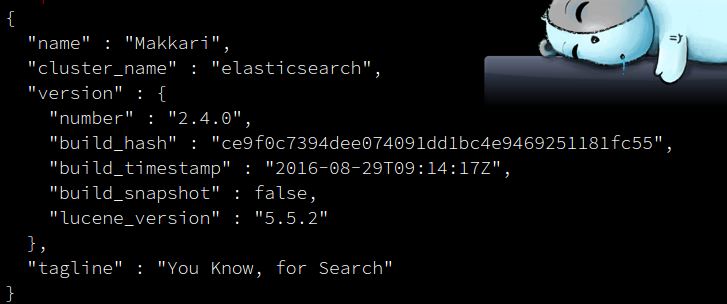
3 插件的安装和使用
3.1 head插件
elasticsearch-head是elastic search集群的一个web前端。源代码托管在github.com,地址是:https://github.com/mobz/elasticsearch-head。这是一个学习elasticsearch的利器。
安装
有两种方式来使用head。一种方式是作为ealsticsearch的插件,另一种是将其作为一个独立的webapp来运行。这里将其作为elasticsearch插件来使用。
在线安装步骤:
- sudo elasticsearch/bin/plugin install mobz/elasticsearch-head
- 在浏览器中浏览,http://localhost:9200/_plugin/head/
离线安装步骤:
- wget https://github.com/mobz/elasticsearch-head/archive/master.zip
- elasticsearch/bin/plugin file:/path/elasticsearch-head-master.zip
- 在浏览器中浏览,http://localhost:9200/_plugin/head/

3.2 IK分词插件
这里使用的是elasticsearch-analysis-ik,这是一个将Lucence IK分词器集成到elasticsearch的ik分词器插件,并且支持自定义的词典。源代码托管在github.com上,地址是:https://github.com/medcl/elasticsearch-analysis-ik。
安装
- 1,在github上下载同elasticsearch匹配的版本
- 2,将下载zip包,在解压到elasticsearch/plugin/ik下
- 3,重启elasticsearch
3.2.1测试IK分词
IK分词安装后有三种分词策略:ik、ik_max_word和ik_smart。ik和ik_max_word分词效果相同,对输入文本根据词典穷尽各种分割方法是细力度分割策略。ik_smart会对输入文本根据词典以及歧义判断等方式进行一次最合理的粗粒度分割。可以在Terml中使用curl查看分词效果。
- 分词策略ik/ik_max_word
$ curl -G 'localhost:9200/_analyze?analyzer=ik&pretty=true' --data-urlencode "text=中华人民共和国国歌"

{

  "tokens" : [ {

    "token" : "中华人民共和国",

    "start_offset" : 0,

    "end_offset" : 7,

    "type" : "CN_WORD",

    "position" : 0

  }, {

    "token" : "中华人民",

    "start_offset" : 0,

    "end_offset" : 4,

    "type" : "CN_WORD",

    "position" : 1

  }, {

    "token" : "中华",

    "start_offset" : 0,

    "end_offset" : 2,

    "type" : "CN_WORD",

    "position" : 2

  }, {

    "token" : "华人",

    "start_offset" : 1,

    "end_offset" : 3,

    "type" : "CN_WORD",

    "position" : 3

  }, {

    "token" : "人民共和国",

    "start_offset" : 2,

    "end_offset" : 7,

    "type" : "CN_WORD",

    "position" : 4

  }, {

    "token" : "人民",

    "start_offset" : 2,

    "end_offset" : 4,

    "type" : "CN_WORD",

    "position" : 5

  }, {

    "token" : "共和国",

    "start_offset" : 4,

    "end_offset" : 7,

    "type" : "CN_WORD",

    "position" : 6

  }, {

    "token" : "共和",

    "start_offset" : 4,

    "end_offset" : 6,

    "type" : "CN_WORD",

    "position" : 7

  }, {

    "token" : "国",

    "start_offset" : 6,

    "end_offset" : 7,

    "type" : "CN_CHAR",

    "position" : 8

  }, {

    "token" : "国歌",

    "start_offset" : 7,

    "end_offset" : 9,

    "type" : "CN_WORD",

    "position" : 9

  } ]

}
- 分词策略ik_smart
$ curl -G 'localhost:9200/_analyze?analyzer=ik_smart&pretty=true' --data-urlencode "text=中华人民共和国国歌"

{

  "tokens" : [ {

    "token" : "中华人民共和国",

    "start_offset" : 0,

    "end_offset" : 7,

    "type" : "CN_WORD",

    "position" : 0

  }, {

    "token" : "国歌",

    "start_offset" : 7,

    "end_offset" : 9,

    "type" : "CN_WORD",

    "position" : 1

  } ]

}
注
这里使用的版本分别是:
| soft | version |
|---|---|
| elasticsearch | 2.4.0 |
| elasticsearch-head | master分支的当前版本 |
| elasticsearch-analysis-ik | 1.10.0 |
Elasticsearch简单使用和环境搭建的更多相关文章
- 分布式搜索ElasticSearch单机与服务器环境搭建
从上方插件官网中下载适合的dist包,然后解压.进入bin目录,可以看到一堆sh脚本.在bin目录下创建一个test.sh: bin=/home/csonezp/Dev/elasticsearch-j ...
- 最简单的SVN环境搭建过程
本文简单描述最简单的SVN环境搭建过程 搭建环境:windows (个人验证了windows2003,windows xp) 使用软件:Setup-Subversion-1.6.17 //Serve ...
- Elasticsearch快速入门和环境搭建
内容概述 什么是Elasticsearch,为什么要使用它? 基础概念简介 节点(node) 索引(index) 类型映射(mapping) 文档(doc) 本地环境搭建,创建第一个index 常用R ...
- elasticsearch 源码本地环境搭建
elasticsearch6.0.0 源码本地环境搭建步骤如下: 1.资源准备 ElasicSearch版本:6.0.0: https://github.com/elastic/elasticsear ...
- 渣渣菜鸡的 ElasticSearch 源码解析 —— 环境搭建
关注我 转载请务必注明原创地址为:http://www.54tianzhisheng.cn/2018/08/25/es-code01/ 软件环境 1.Intellij Idea:2018.2版本 2. ...
- springMVC的简单了解和环境搭建
一,什么mvc 模型-视图-控制器(MVC)是一个众所周知的以设计界面应用程序为基础的设计思想.它主要通过 分离模型.视图及控制器在应用程序中的角色 将业务逻辑从界面中解耦.通常, 模型负责封装应用程 ...
- spring boot-1.简单介绍及环境搭建
1.简介 spring boot 是在spring 基础上进行了全面整合的架构,个人认为优点在于以下几点: 1.简化配置,甚至零配置即可开发出一个web应用.spring boot 默认配置了大量的s ...
- Appium+python(1)简单的介绍环境搭建
环境搭建其实并不难,只不过安装的东西有点多,要加的环境变量有点多. 链接:https://pan.baidu.com/s/1nwLhNIT 密码:56wn 这个压缩包里要用的都有了,只需要下载,然后安 ...
- Ionic01 简单介绍、环境搭建、创建项目、项目结构、创建组件、创建页面、子页面跳转
1 Ionic 基本介绍 Ionic 是一款基于 Angular.Cordova 的强大的 HTML5 移动应用开发框架 , 可以快速创建一个跨平台的移动应用.可以快速开发移动 App.移动端 WEB ...
随机推荐
- 【转载&&干货】Noip应试技巧
NOIP应试技巧 如何看待别人的经验? 我想大家都有台上的学长滔滔不绝,但是自己在台下漠不关心,或是老师考试前的叮嘱说完一会儿功夫就忘记了的经历吧.所以,有可能我接下来的所说的话,一到考场上就全部忘记 ...
- AutoFac简介
在.NET上现在存在许多的依赖注入容器, 如:Castle Windsor.StructureMap.Autofac .Unity. 这里主要介绍一下Autofac,Autofac和其他容器的不同之处 ...
- WCF使用net.tcp寄宿到IIS中
一.IIS部分 1. 安装WAS,如下图所示: 2. 网站net.tcp协议绑定,如下图所示: 3. 网站启用net.tcp,如下图所示: 二.WCF代码部分 1. DesignCaseService ...
- 理解RESTFul和SOA
RESTFul:面向资源的架构(roa) RESTFul基于HTTP协议,是一种明确构建在客户端/服务端体系结构上的一种风格, rest是Representational State Transfer ...
- 使用swiper 轮播插件ajax 请求加载图片时,无法滑动问题
因为图片是动态创建的,在插件开始初始化时,文档流中没用图片,故没有创建相应宽度.通过调整js加载顺序,问题还是没有解决. 最后找到swiper插件 api 有属性是可以根据内容变动,自动初始化插件的, ...
- jQuery下拉框操作系列$("option:selected",this) &&(锋利的jQuery)
jQuery下拉框操作系列$("option:selected",this) &&(锋利的jQuery) <!DOCTYPE html> <ht ...
- node、npm的安装和环境变量的配置
在使用node过程中踩过好几次坑,这次记录下来,以防以后在掉下去. 用npm安装nrm模块后,输入nrm 提示 “nrm”不是内部或外部命令,也不是可运行的程序.我就奇怪了,安装成功了,怎么还提示不是 ...
- Cannot perform conversion to XML from legacy HTML:
错误信息:Cannot perform conversion to XML from legacy HTML: The nekoHTML library is not in classpath. ne ...
- 倒计时5,4,3,2,1css实现(count down from 5 to 1 using css)
//count down from 5 to 1, a useful animation. show the code to you: <!DOCTYPE html> <html ...
- ArcGIS for JavaScript 关于路径开发的一些记录(一)
今年毕业,进入公司的第一个任务就是单独负责一个项目的地图模块,用ArcGIS API for JavaScript来开发web地图.花了大概一个礼拜的时间学会了安装和搭建ArcGIS Server和A ...