
微信小程序开发动感十足的加载动画--都在这里!
一、前期准备工作
软件环境:微信开发者工具
官方下载地址:https://mp.weixin.qq.com/debug/wxadoc/dev/devtools/download.html
1、基本需求。
- 实现加载动画
- 带动画(动画可做参靠,个人要是觉得不好看可以自定义动画)
2、案例目录结构
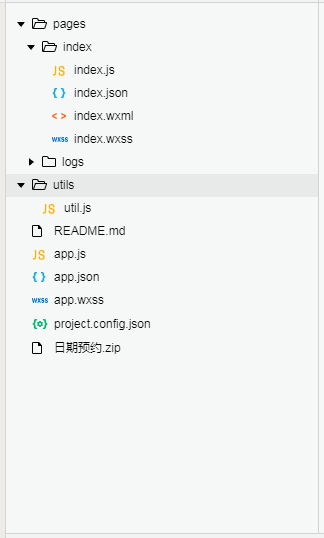
二、程序实现具体步骤
1.index.wxml代码
<view class="tui-loading-row">

  <view class="tui-loading-cell">

    <view class="circle-line">

      <text></text>

      <text></text>

      <text></text>

      <text></text>

      <text></text>

      <text></text>

      <text></text>

      <text></text>

    </view>

  </view>

  <view class="tui-loading-cell">

    <view class="circle-line-spin">

      <text></text>

      <text></text>

      <text></text>

      <text></text>

      <text></text>

      <text></text>

      <text></text>

      <text></text>

    </view>

  </view>

  <view class="tui-loading-cell">

    <view class="circle-round">

      <text></text>

      <text></text>

      <text></text>

      <text></text>

      <text></text>

      <text></text>

      <text></text>

      <text></text>

    </view>

  </view>

</view>

<view class="tui-loading-row">

  <view class="tui-loading-cell">

    <view class="circle-round-fade">

      <text></text>

      <text></text>

      <text></text>

      <text></text>

      <text></text>

      <text></text>

      <text></text>

      <text></text>

    </view>

  </view>

  <view class="tui-loading-cell">

    <view class="line-square">

      <text></text>

      <text></text>

      <text></text>

      <text></text>

      <text></text>

    </view>

  </view>

  <view class="tui-loading-cell">

    <view class="line-round">

      <text></text>

      <text></text>

      <text></text>

      <text></text>

      <text></text>

    </view>

  </view>

</view>

<view class="tui-loading-row">

  <view class="tui-loading-cell">

    <view class="line-bounce">

      <text></text>

      <text></text>

      <text></text>

      <text></text>

      <text></text>

    </view>

  </view>

  <view class="tui-loading-cell">

    <view class="loader-circle">

    </view>

  </view>

  <view class="tui-loading-cell">

    <view class="loading-circle">

    </view>

  </view>

</view>

<view class="tui-loading-row">

  <view class="tui-loading-cell">

    <view class="loading-sun">

    </view>

  </view>

  <view class="tui-loading-cell">

    <view class="loading-heart">

    </view>

  </view>

  <view class="tui-loading-cell">

    <view class="loading-spinner" style="background: url('../../src/images/load.png') no-repeat center top;">

    </view>

  </view>

</view>
2.部分index.wxss代码
.tui-loading-row{

    width: 100%;

    display: table;

    table-layout: fixed;

}

.tui-loading-cell{

  width: 100%;

  display: table-cell;

  text-align: center;

}

/*动画一:单个渐变  */

.circle-line{

    width: 100px;

    height: 100px;

    display: inline-block;

    position: relative;

}

.circle-line text{

    display: block;

    width: 50%;

    height: 5px;

    opacity: .7;

    position: absolute;

    top: calc(50% - 2.5px);

    left: 0px;

    transform-origin: center right;

    animation: circle 1.5s linear infinite;

}

.circle-line text::before{

    content: '';

    display: block;

    width: 15px;

    height: 5px;

    position: absolute;

    top: 0;

    right: 10px;

    background-color: blue;

}

.circle-line text:nth-child(1){

    transform: rotate(0deg);

    animation-delay: 0.2s;

}

.circle-line text:nth-child(2){

    transform: rotate(45deg);

    animation-delay: 0.4s;

}

.circle-line text:nth-child(3){

    transform: rotate(90deg);

    animation-delay: 0.6s;

}

.circle-line text:nth-child(4){

    transform: rotate(135deg);

    animation-delay: 0.8s;

}

.circle-line text:nth-child(5){

    transform: rotate(180deg);

    animation-delay: 1s;

}

.circle-line text:nth-child(6){

    transform: rotate(225deg);

    animation-delay: 1.2s;

}

.circle-line text:nth-child(7){

    transform: rotate(270deg);

    animation-delay: 1.4s;

}

.circle-line text:nth-child(8){

    transform: rotate(315deg);

    animation-delay: 1.6s;

}

@keyframes circle {

    0%{

        opacity: 0.05;

    }

    100%{

        opacity: 0.9;

    }

}

/*动画二:整体旋转  */

.circle-line-spin{

    width: 100px;

    height: 100px;

    display: inline-block;

    position: relative;

    animation: circle-line 1.5s linear infinite;

}

.circle-line-spin text{

    display: block;

    width: 50%;

    height: 5px;

    opacity: .7;

    position: absolute;

    top: calc(50% - 2.5px);

    left: 0px;

    transform-origin: center right;

}
3.index.js逻辑代码
不需要就是这么任性
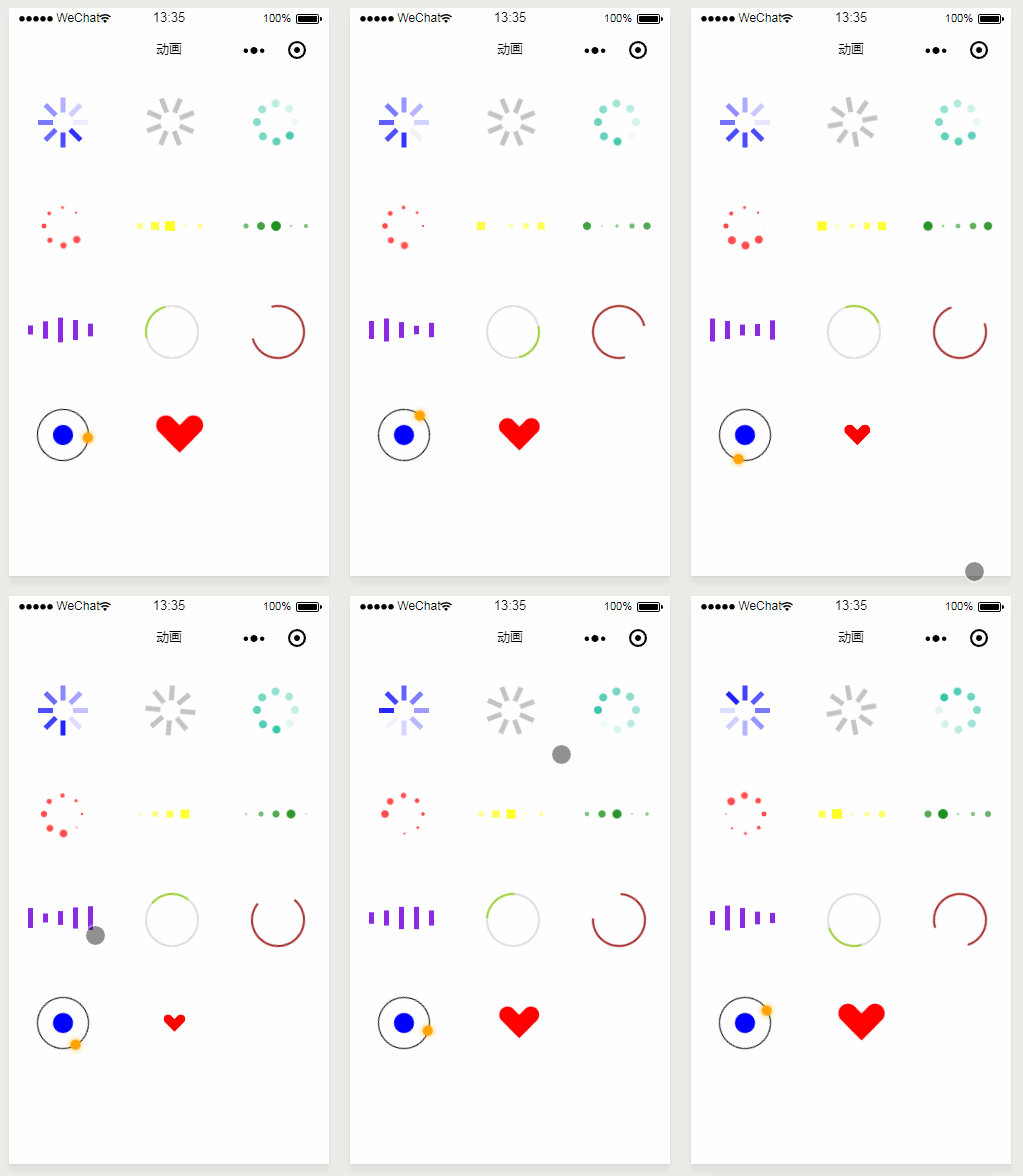
三、案例运行效果图
四、总结与备注
暂无微信小程序开发动感十足的加载动画--都在这里!
注:本文著作权归作者,由demo大师代发,拒绝转载,转载需要作者授权
微信小程序开发动感十足的加载动画--都在这里!的更多相关文章
- 微信小程序开发——模板中加载html代码
最新方法可以使用微信小程序提供的 rich-text (富文本)组件直接写解析html,详见 rich-text: <rich-text class='f13 c_9' nodes=" ...
- 微信小程序的图片懒加载
在普通的web页面当中,我们都知道图片懒加载可以提升浏览器的加载速度.原理是图片用空或者占位图片进行显示,当屏幕移动到图片位置的时候,再把图片的地址换成它的地址.那么,在小程序当中呢,最近老大让看一下 ...
- 微信小程序web-view之动态加载html页面
官方推出的web-view方便了很多开发人员. 我们在做的时候,经常会想到写一个小程序的page然后通过动态加载web-view的形式来完成其他功能页面的开发. 之前研究web-view的时候发现网上 ...
- 分享下自己写的一个微信小程序请求远程数据加载到页面的代码
1 思路整理 就是页面加载完毕的时候 请求远程接口,然后把数据赋值给页面的变量 ,然后列表循环 2 js相关代码 我是改的 onload函数 /** * 生命周期函数--监听页面加载 */ on ...
- 微信小程序实现滚动分页加载更多
参考网址:https://www.cnblogs.com/Smiled/p/8203306.html 1.wxml: <view class='myScroll' style='float:le ...
- 在应用中显示的图片很多情况不满足业务需求,我们需要动态根据图片的宽高进行缩放或加载中显示的缺省图片,这是我没就需要监听图片加载完成回调,来看看微信小程序怎么实现图片加载完成回调。
<swiper-item> <image src="{{item.image}}" class="slide-image" mode=&quo ...
- 微信小程序交流群,欢迎加入,其中微信小程序开发群、Jenkins开发群是有问必答群
微信小程序开发,请加群511389428,511389428 有问必答群:React开发,请加群523838207:523838207Jenkins开发,请加群155799363,155799363 ...
- 【微信小程序开发•系列文章六】生命周期和路由
这篇文章理论的知识比较多一些,都是个人观点,描述有失妥当的地方希望读者指出. [微信小程序开发•系列文章一]入门 [微信小程序开发•系列文章二]视图层 [微信小程序开发•系列文章三]数据层 [微信小程 ...
- 微信小程序开发日记——高仿知乎日报(下)
本人对知乎日报是情有独钟,看我的博客和github就知道了,写了几个不同技术类型的知乎日报APP 要做微信小程序首先要对html,css,js有一定的基础,还有对微信小程序的API也要非常熟悉 我将该 ...
随机推荐
- 如何开启解决android studio的模拟器的问题
来自:http://jingyan.baidu.com/article/03b2f78c0a19e75ea237ae24.html 有的时候因为电脑系统或者是安装的一些问题我们可能需要对症下药的解决模 ...
- Windows 7 下玩游戏不能全屏
问题描述:许多用户反映,在 Windows 7 环境下,全屏游戏时两边屏幕都是黑的,只好窗口运行了.其实这是正常现象:有些游戏本身并没有提供宽屏分辨率支持.其图形界面都是按照一定比例(如 4:3)来设 ...
- UML九种图 之 用例图和类图
前言 近期写UML文档,看视频的时候感觉掌握的还能够,当真正写文档的时候才发现不是一件easy的事.写文档自己又翻开自己的笔记看了一遍又一遍. 以下就给大家介绍一下我画的几张图: 用例图 ...
- myeclipse 修改freemarker ftl 不重启tomcat
最 近的项目是SSH,View层采用Freemarker,但是遇到了一个很大问题,每次修改完ftl文件,都要重新启动tomcat才可以看到所修改的内 容,不但麻烦,而且浪费时间,特别怀念jsp,后来在 ...
- iOS7以下设备获取mac地址
注意,是iOS7以下的设备,直接上源码,获取mac地址都是为了唯一标识一个设备的,但iOS7设备的mac地址为 020000000000 MacAddress.h #include <sys/s ...
- 快速近似最近邻搜索库 FLANN - Fast Library for Approximate Nearest Neighbors
What is FLANN? FLANN is a library for performing fast approximate nearest neighbor searches in high ...
- Web系统自己主动化部署脚本
Web开发的项目,除了在本地直接执行外,还可能常常须要在server上部署. 写了个自己主动化部署的脚本,仅供參考. 不少地方须要配置路径.个人建议使用绝对路径,不用依赖执行脚本时所在的路径. #!/ ...
- Javascript中的Array(数组) 、{}(映射) 与JSON解析
做网页总会使用javascript,使用javascript总会使用JSON.最近用到一下,就写写. 下面是总结: 1.将javascript中的Array和{}转化为json字符串可以使用json2 ...
- HttpClient 学习整理
HttpClient 是我最近想研究的东西,以前想过的一些应用没能有很好的实现,发现这个开源项目之后就有点眉目了,令人头痛的cookie问题还是有办法解决滴.在网上整理了一些东西,写得很好,寄放在这里 ...
- pytorch hook使用
由于pytorch会自动舍弃图计算的中间结果,所以想要获取这些数值就需要使用钩子函数. 钩子函数包括Variable的钩子和nn.Module钩子,用法相似. import torch from to ...