
Eclipse使用jdbc连接MySql数据库报:java.sql.SQLException: Access denied for user 'root'@'localhost' (using password: YES)
在使用eclipse连接mysql数据库时报异常:
java.sql.SQLException: Access denied for user 'root'@'localhost' (using password: YES)
at com.mysql.jdbc.SQLError.createSQLException(SQLError.java:1073)
at com.mysql.jdbc.MysqlIO.checkErrorPacket(MysqlIO.java:3609)
at com.mysql.jdbc.MysqlIO.checkErrorPacket(MysqlIO.java:3541)
at com.mysql.jdbc.MysqlIO.checkErrorPacket(MysqlIO.java:943)
at com.mysql.jdbc.MysqlIO.secureAuth411(MysqlIO.java:4113)
at com.mysql.jdbc.MysqlIO.doHandshake(MysqlIO.java:1308)
at com.mysql.jdbc.ConnectionImpl.coreConnect(ConnectionImpl.java:2336)
at com.mysql.jdbc.ConnectionImpl.connectOneTryOnly(ConnectionImpl.java:2369)
at com.mysql.jdbc.ConnectionImpl.createNewIO(ConnectionImpl.java:2153)
at com.mysql.jdbc.ConnectionImpl.<init>(ConnectionImpl.java:792)
at com.mysql.jdbc.JDBC4Connection.<init>(JDBC4Connection.java:47)
at sun.reflect.NativeConstructorAccessorImpl.newInstance0(Native Method)
at sun.reflect.NativeConstructorAccessorImpl.newInstance(NativeConstructorAccessorImpl.java:57)
at sun.reflect.DelegatingConstructorAccessorImpl.newInstance(DelegatingConstructorAccessorImpl.java:45)
at java.lang.reflect.Constructor.newInstance(Constructor.java:526)
at com.mysql.jdbc.Util.handleNewInstance(Util.java:411)
at com.mysql.jdbc.ConnectionImpl.getInstance(ConnectionImpl.java:381)
at com.mysql.jdbc.NonRegisteringDriver.connect(NonRegisteringDriver.java:305)
at java.sql.DriverManager.getConnection(DriverManager.java:571)
at java.sql.DriverManager.getConnection(DriverManager.java:233)
at cn.itcast.mybatis.jdbc.jdbcTest.main(jdbcTest.java:36)
jdk版本:1.7.0_79,mysql为5.7,使用mysql-connector-java-5.1.18.jar。
代码如下:
import java.sql.Connection;

import java.sql.DriverManager;

import java.sql.PreparedStatement;

import java.sql.ResultSet;

import java.sql.SQLException;

/**

 *

 * @author lilia

 *

 */

public class jdbcTest {

    //mysql数据库地址

    private static final String url = "jdbc:mysql://localhost:3306/mybatis?characterEncoding=utf-8";

    //mysql数据库用户名

    private static final String username = "root";

    //myslq数据库密码

    private static final String password = "root";

    public static void main(String[] args) {

        //数据库连接

        Connection connection = null;

        //预编译的statement(使用预编译的statement可以提高数据库的性能)

        PreparedStatement preparedStatement = null;

        //结果集对象

        ResultSet resultSet = null;

        try {

            //加载数据驱动

            Class.forName("com.mysql.jdbc.Driver");

            //通过驱动管理类获取数据库连接

            connection = DriverManager.getConnection(url, username, password);

            //定义sql语句

            String sql = "select * from user where username = ?";

            //获取预处理statement,并把sql放入到statement中。

            preparedStatement = connection.prepareStatement(sql);

            //参数赋值,序号从1开始

            preparedStatement.setString(1, "王五");

            //向数据库发出sql执行查询,并返回查询结果集

            resultSet = preparedStatement.executeQuery();

            while (resultSet.next()) {

                System.out.println(resultSet.getString("id") + ":" + resultSet.getString("username"));

            }

        } catch (Exception e) {

            e.printStackTrace();

        } finally {

            //释放资源

            if (resultSet != null) {

                try {

                    resultSet.close();

                } catch (SQLException e) {

                    e.printStackTrace();

                }

            }

            if(preparedStatement != null){

                try {

                    preparedStatement.close();

                } catch (SQLException e) {

                    e.printStackTrace();

                }

            }

            if(connection != null){

                try {

                    connection.close();

                } catch (SQLException e) {

                    e.printStackTrace();

                }

            }

        }

    }

}
执行后报错如上。
网上搜索很多解决方案行不通,最终找到问题所在:root帐户默认不开放远程访问权限,所以需要修改一下相关权限。,参考:https://blog.csdn.net/jack__love/article/details/79019049
具体解决步骤如下:
- 打开MySQL目录下的my.ini文件(win10默认安装在C:\ProgramData\MySQL\MySQL Server 5.7\my.ini),在文件的最后添加一行“skip-grant-tables”,保存并关闭文件。
- 重启mysql服务,通过服务管理器(服务名称:mysql57)或者cmd(>net stop mysql57 >net start mysql57)都行。
- 通过命令行进入MySQL的安装目录BIN下(WIN10默认安装,BIN目录为:C:\Program Files\MySQL\MySQL Server 5.7\bin,如果配置过mysql环境变量可不进入该目录,直接执行命令),输入“mysql -u root -p”(不输入密码),提示输入密码不用管,直接Enter回车即可进入数据库。
- 执行“use mysql;”,使用mysql数据库。
- 执行命令“update user set authentication_string=PASSWORD("root") where user='root';”(修改root的密码)。
- 打开MySQL目录下的my.ini文件,删除最后一行的“skip-grant-tables”,保存并关闭文件。
- 重启MySQL服务。
- 重新执行代码,执行成功。
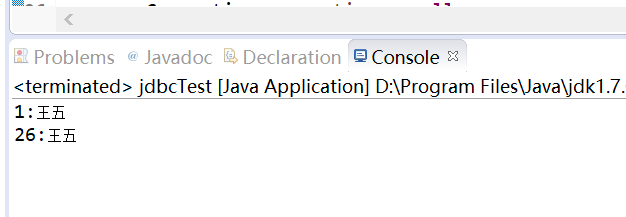
问题解决。
Eclipse使用jdbc连接MySql数据库报:java.sql.SQLException: Access denied for user 'root'@'localhost' (using password: YES)的更多相关文章
- 连接mysql时提示java.sql.SQLException: Access denied for user 'root'@'DESKTOP-N2B2D9A' (using password: YES)
用root连接mysql时提示:访问被拒绝 检查一下mysql server是否开启,发现后台在运行着.. 然后查了一下mysql的用户表,发现root只能运行使用本地ip(localhost或者1 ...
- 数据库异常 :java.sql.SQLException: Access denied for user 'root'@'localhost' (using password: YES)
最近在新项目中突然出现了 java.sql.SQLException: Access denied for user 'root'@'localhost' (using password: YES) ...
- 技术笔记1:java.sql.SQLException: Access denied for user 'root'@'localhost' (using password)
在myEclipse10中运行java项目的时候,遇到java.sql.SQLException: Access denied for user 'root'@'localhost' (using p ...
- java.sql.SQLException: Access denied for user 'root'@'localhost' (using password: NO)
在更新项目之后,做了一定的改动后发现竟然报错了,刚才还好好的. java.sql.SQLException: Access denied for user 'root'@'localhost' (us ...
- java.sql.SQLException: Access denied for user 'root'@'localhost' (using password: YES) 解决办法
一.背景 在Spark中,将DStream写入到MySQL出现错误:java.sql.SQLException: Access denied for user 'root'@'localhost' ( ...
- [Spring MVC - 2A] - java.sql.SQLException: Access denied for user 'root'@'localhost' (using password: YES)
严重: Servlet.service() for servlet [springMVC] in context with path [/ExceptionManageSystem] threw ex ...
- java.sql.SQLException: Access denied for user 'root'@'localhost' (using password: YES)解决方案
java.sql.SQLException: Access denied for user 'root'@'localhost' (using password: YES) at com.mysql. ...
- java.sql.SQLException: Access denied for user 'root'@'localhost' (using password: YES)
:: - [localhost-startStop-] INFO - Root WebApplicationContext: initialization started -- :: - [local ...
- mysql jdbc连接时的小问题java.sql.SQLException: Access denied for user 'root'@'localhost' (using password: YES)
这次重新修改老程序时出现了上面的错误,排查过后最终找到问题所在:root帐户默认不开放远程访问权限,所以需要修改一下相关权限. 打开MySQL目录下的my.ini文件(win10默认安装在C:\Pro ...
随机推荐
- Vue的css动画原理
<!DOCTYPE html> <html lang="en"> <head> <meta charset="UTF-8&quo ...
- form表单和CSS
一.form表单 1. form表单有什么用 能够获取用户输入的信息(输入,选择, 上传的文件),并且将这些数据全部发送给后端 2. form表单的用法 (1)有两个重要参数: action : 控制 ...
- java<T>泛型
泛型 1.泛型的概述 在JDK1.5之前,把对象放入到集合中,集合不会记住元素的类型,取出时,全都变成Object类型.泛型是jdk5引入的类型机制,就是将类型参数化,它是早在1999年就制定的jsr ...
- [SpringBoot] 通过spring.factory文件来加载第三方的bean
在springboot的开发过程中,我们经常需要加载一些bean,如果bean使我们自己写的类,那很好办,加个@Component注解就搞定了,然后过程启动会扫描启动类所在的包及其子包,如果我 ...
- ASP设置动态表头
/// <summary> /// 设置动态表头 /// </summary> /// <param name="sender"></pa ...
- Redis实战(十三)Redis的三种集群方式
序言 能聊聊redis cluster集群模式的原理吗 资料 https://www.cnblogs.com/51life/p/10233340.html Redis 集群分片原理
- Spring Boot教程(十五)使用Intellij中的Spring Initializr来快速构建Spring Boot/Cloud工程
在之前的所有Spring Boot和Spring Cloud相关博文中,都会涉及Spring Boot工程的创建.而创建的方式多种多样,我们可以通过Maven来手工构建或是通过脚手架等方式快速搭建,也 ...
- python调用c++类方法(2)
testpy.cpp: #include<iostream> #include<vector> struct point{ float pointx; float pointy ...
- 电脑出现了一块tap window adapter v9 网卡 以及虚拟机桥接模式无法通信原因
计算机与外界局域网的连接是通过主机箱内插入一块网络接口板(或者是在笔记本电脑中插入一块PCMCIA卡).网络接口板又称为通信适配器或网络适配器(network adapter)或网络接口卡NIC(Ne ...
- 在vi vim中使用正则表达式与 普通perl正则的区别?
参考这篇文章很好 vim中的正则表达式常用的命令有种, 即搜索和替换 /: 搜索 :s 替换 在vim中的正则表达式和perl编程的正则表达式还是有区别的: 正则表达式中的内容包括: 字面字符... ...