
使用System.ComponentModel.DataAnnotations验证字段数据正确性
C#文档地址:System.ComponentModel.DataAnnotations
public class Person

{

    [Required(ErrorMessage = "{0} 必须填写")]

    [DisplayName("姓名")]

    public string Name { get; set; }

    [Required(ErrorMessage = "{0} 必须填写")]

    [RegularExpression(@"[A-Za-z0-9._%+-]+@[A-Za-z0-9.-]+\.[A-Za-z]{2,4}", ErrorMessage = "邮件格式不正确")]

    public string Email { get; set; }

    [Required(ErrorMessage = "{0} 必须填写")]

    [Range(, , ErrorMessage = "超出范围")]

    public int Age { get; set; }

    [Required(ErrorMessage = "{0} 必须填写")]

    [StringLength(, MinimumLength = , ErrorMessage = "{0}输入长度不正确")]

    public string Phone { get; set; }

    [Required(ErrorMessage = "{0} 必须填写")]

    [Range(typeof(decimal), "1000.00", "2000.99")]

    public decimal Salary { get; set; }

}
然后实现一个ValidatetionHelper静态类,这里主要用到的是Validator.TryValidateObject方法。
public static class ValidatetionHelper

{

    public static ValidResult IsValid(object value)

    {

        ValidResult result = new ValidResult();

        try

        {

            var validationContext = new ValidationContext(value, null, null);

            var results = new List<ValidationResult>();

            var isValid = Validator.TryValidateObject(value, validationContext, results, true);

            if (!isValid)

            {

                result.IsVaild = false;

                result.ErrorMembers = new List<ErrorMember>();

                foreach (var item in results)

                {

                    result.ErrorMembers.Add(new ErrorMember()

                    {

                        ErrorMessage = item.ErrorMessage,

                        ErrorMemberName = item.MemberNames.FirstOrDefault()

                    });

                }

            }

            else

            {

                result.IsVaild = true;

            }

        }

        catch (Exception ex)

        {

            result.IsVaild = false;

            result.ErrorMembers = new List<ErrorMember>();

            result.ErrorMembers.Add(new ErrorMember()

            {

                ErrorMessage = ex.Message,

                ErrorMemberName = "Internal error"

            });

        }

        return result;

    }

}
其中需要的返回结果类
public class ValidResult

{

    public List<ErrorMember> ErrorMembers { get; set; }

    public bool IsVaild { get; set; }

}

public class ErrorMember

{

    public string ErrorMessage { get; set; }

    public string ErrorMemberName { get; set; }

}
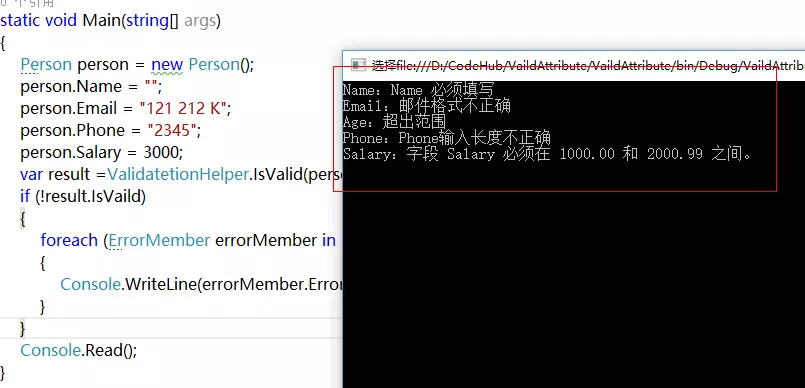
实现一个测试代码,这里看到对应验证数据比使用多个if简洁很多,整个代码也十分美观。
static void Main(string[] args)

{

    Person person = new Person();

    person.Name = "";

    person.Email = "121 212 K";

    person.Phone = "";

    person.Salary = ;

    var result = ValidatetionHelper.IsValid(person);

    if (!result.IsVaild)

    {

        foreach (ErrorMember errorMember in result.ErrorMembers)

        {

            Console.WriteLine(errorMember.ErrorMemberName + ":" + errorMember.ErrorMessage);

        }

    }

    Console.Read();

}
通过测试,可以看到得到正确的验证结果。
后续有时间,把DisplayName给显示上去,那就更完美了。
参考:使用System.ComponentModel.DataAnnotations验证字段数据正确性
使用System.ComponentModel.DataAnnotations验证字段数据正确性的更多相关文章
- 对System.ComponentModel.DataAnnotations 的学习应用
摘要 你还在为了验证一个Class对象中很多数据的有效性而写很多If条件判断吗?我也同样遇到这种问题,不过,最近学了一项新的方法,让我不在写很多if条件做判断,通过给属性标注特性来验证数据规则,从此再 ...
- System.ComponentModel.DataAnnotations 命名空间和RequiredAttribute 类
System.ComponentModel.DataAnnotations 命名空间提供定义 ASP.NET MVC 和 ASP.NET 数据控件的类的特性. RequiredAttribute 指定 ...
- System.ComponentModel.DataAnnotations 冲突
项目从原来的.NET Framework4.0 升级到 .NET Framework4.5 编译报错. 查找原因是: Entity Framework 与 .net4.5 的 System.Compo ...
- System.ComponentModel.DataAnnotations.Schema.TableAttribute 同时存在于EntityFramework.dll和System.ComponentModel.DataAnnotations.dll中
Entity Framework 与 .net4.5 的 System.ComponentModel.DataAnnotations 都有 System.ComponentModel.DataAnno ...
- System.ComponentModel.DataAnnotations.Schema 冲突
System.ComponentModel.DataAnnotations.Schema 冲突 Entity Framework 与 .net4.5 的 System.ComponentModel.D ...
- 解决EntityFramework与System.ComponentModel.DataAnnotations命名冲突
比如,定义entity时指定一个外键, [ForeignKey("CustomerID")] public Customer Customer { get; set; } 编译时报 ...
- ASP.NET Core 6.0 基于模型验证的数据验证
1 前言 在程序中,需要进行数据验证的场景经常存在,且数据验证是有必要的.前端进行数据验证,主要是为了减少服务器请求压力,和提高用户体验:后端进行数据验证,主要是为了保证数据的正确性,保证系统的健壮性 ...
- C# 特性 System.ComponentModel 命名空间属性方法大全,System.ComponentModel 命名空间的特性
目录: System.ComponentModel 特性命名空间与常用类 System.ComponentModel.DataAnnotations ComponentModel - Classes ...
- “CreateRiaClientFilesTask”任务意外失败。 未能加载文件程序集“System.ComponentModel.DataAnnot...
错误 77 “CreateRiaClientFilesTask”任务意外失败. System.Web.HttpException (0x80004005): 未能加载文件或程序集“System. ...
随机推荐
- Vue常用修饰符
Vue提供了事件修饰符用于DOM的事件处理,常用的事件修饰符有以下几个: (1). stop:阻止冒泡(通俗讲就是阻止事件向上级DOM元素传递) 点击内层div的结果: 点击外层div的结果: 修改代 ...
- 通过JNI实现java调用C代码和C代码调用java的代码
一.java调用C代码 1)java中需要声明调用的函数,也就是native方法,并通过System.LoadLibrary来调用dll或者so(C代码).实例代码如下: public class H ...
- ftp建立虚拟用户实现文件上传和下载
环境 centos7 1.开启vsftpd服务 2.检查vsftpd服务是否开启 3.添加虚拟用户口令文件 vi etc/vsftpd/vuser.txt 4.生成虚拟用户口令认证文件 如果没有db_ ...
- Delphi 赋值语句和程序的顺序结构
- neutron网络服务部署
控制节点执行 #第一步 登陆数据库 mysql -u root -p #导入neutron这个库 CREATE DATABASE neutron; #创建neutron这个用户和密码,并允许本地登陆和 ...
- eddx
eddx是亿图绘图文件,可以使用EdrawSoft Edraw Max软件打开.这是一款流程图绘图软件,它内置丰富的预定义模板和例子,可以创建各种图示.包括商务绘图.工程及科学绘图.思维导图和数据库. ...
- 隐马尔可夫模型中基于比例因子的前向算法(java实现)
直接上干货哈,其他子算法,后续补上. System.out.print ...
- [易学易懂系列|rustlang语言|零基础|快速入门|(4)|借用Borrowing]
[易学易懂系列|rustlang语言|零基础|快速入门|(4)] Borrowing 继续讲讲另一个重要的概念:借用(borrowing), 什么是借用? 我们先来看前一文章([易学易懂系列|rust ...
- Python socket服务
套接字(socket)是一个抽象层,应用程序可以通过它发送或接收数据,可对其进行像对文件一样的打开.读写和关闭等操作. 1. 实现客户端发送字符,服务器返回大写的字符: 服务器: import soc ...
- .align 5 .MACRO .ENDM .word
ARM的.align 5就是2的5次方对齐,也就是4字节对齐 .macro <name> {<arg_1} {,<arg_2>} … {,<arg_N>} 定 ...