
ofbiz webservice 例解
1、定义controller.xml文件,controller文件:ofbiz当前项目的所有请求的入口,通过对应request-map:将所有的请求uri对应到指定的处理函数上。
<request-map uri="httpService">

    <event type="java" path="org.ofbiz.service.engine.HttpEngine" invoke="httpEngine"/>

    <response name="success" type="none"/>

    <response name="error" type="none"/>

</request-map>

<request-map uri="ExamWebService">

    <event type="soap"/>

    <response name="error" type="none"/>

    <response name="success" type="none"/>

</request-map>

<request-map uri="xmlrpc" track-serverhit="false" track-visit="false">

    <event type="xmlrpc"/>

    <response name="error" type="none"/>

    <response name="success" type="none"/>

</request-map>
通过在controller.xml文件上的支持,才能将httpService,SOAPService,xmlrpc这些服务对外提供
2、定义ofbiz的service(servicedef下面的server.xml):这个是ofbiz赖以骄傲的设计方式。她可以将所有内部实体对象的CRUD都使用service的方式提供,不同系统之间可以通过互相调用service来完成业务操作。如果想将ofbiz的某个服务开放成webservice只需要将我们定义service文件中的service属性中的export设定为true即可。
<service name="findAllOrderPlanList" engine="java"

    location="org.eheluo.ecloud.service.webService.WebService" invoke="findAllOrderPlanList"

    export="true" auth="false">

    <attribute name="examKsZqs" mode="IN" type="String" optional="false" />

    <attribute name="result" mode="OUT" type="String" />

</service>
上面代码表示:将:org.eheluo.ecloud.service.webService.WebService类中的findAllOrderPlanList作为soap接口提供出去。attribute的mode属性:IN表示输入参数,OUT表示输出参数,INOUT表示输入输出同用。如果auth="true",则必须做用户验证,否则会报错:org.ofbiz.service.ServiceAuthException: User authorization is required for this service: findAllOrderPlanList
3、实际业务类:(注意:入参和出参都是map类型)
public class WebService extends BaseService {

    public static Map<String, Object> findAllOrderPlanList(DispatchContext dc, Map<String, ? extends Object> context)

            throws ServiceAuthException {

        Delegator delegator = dc.getDelegator();

        List<EntityCondition> ec = FastList.newInstance();

        String examKsZqs= (String) context.get("examKsZqs");

        if(examKsZqs != null && !"".equals(examKsZqs)){

            ec.add(EntityCondition.makeCondition("examKsZqs", EntityOperator.EQUALS, Integer.valueOf(examKsZqs)));

        }

        Map<String, Object> map = findAll(delegator, "OrderPlan",

                ec.size() > 0 ? EntityCondition.makeCondition(ec,

                        EntityOperator.AND) : null, UtilMisc.toList("examKsZqs DESC"),dc,context);

        List<GenericValue> orderList = (List<GenericValue>) map.get("modellist");

        JSONArray jsonArray = new JSONArray();

        if (orderList != null && orderList.size() > 0) {

            for (GenericValue gv : orderList) {

                JSONObject jsonObject = new JSONObject();

                jsonObject.put("guid", gv.getString("guid"));

                jsonObject.put("examKsZqs", gv.getInteger("examKsZqs"));

                jsonObject.put("bmbName", gv.getString("bmbName"));

                jsonArray.add(jsonObject);

            }

        }

        Map<String, Object> resultMap = new HashMap<String, Object>();

        resultMap.put("result", jsonArray.toString());

        return resultMap;

    }

}
通过这三步就可以对外发布服务了,wsdl的访问方式:http://localhost:8080/ecloud/control/ExamWebService?wsdl
访问结果:

点击方法名得到结果:

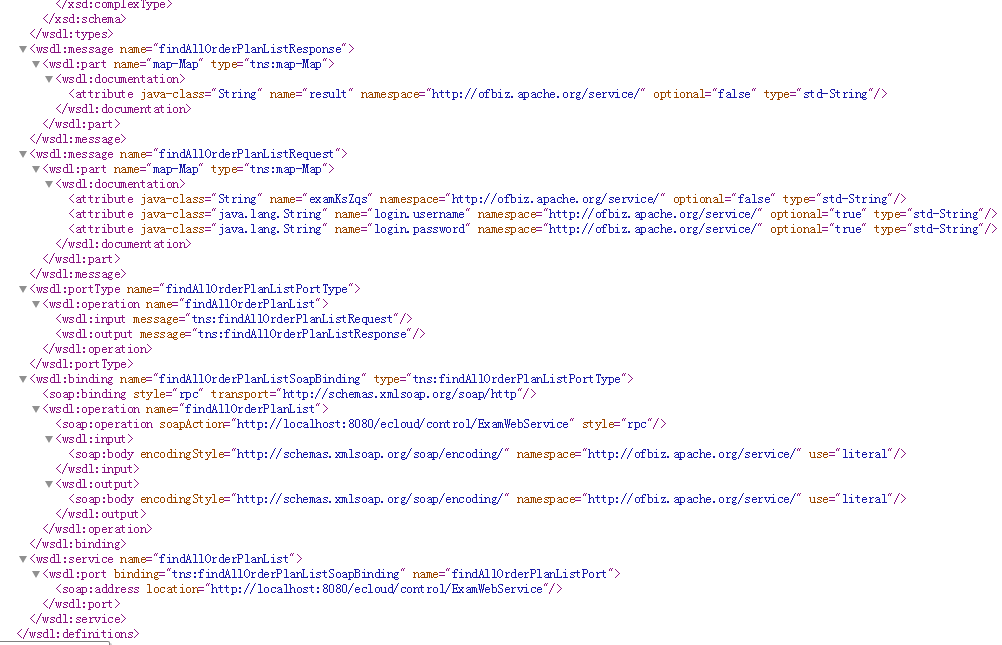
类似这样的结果,则表示webservice发布成功。
4、测试:
(1):SOAPWebService
1):java测试
import org.apache.axiom.om.OMAbstractFactory;
import org.apache.axiom.om.OMAttribute;
import org.apache.axiom.om.OMElement;
import org.apache.axiom.om.OMFactory;
import org.apache.axiom.om.OMNamespace;
import org.apache.axis2.addressing.EndpointReference;
import org.apache.axis2.client.Options;
import org.apache.axis2.client.ServiceClient;
String endpoint = "http://localhost:8080/ecloud/control/ExamWebService";
String tempuri = "http://ofbiz.apache.org/service/";
OMFactory fac = OMAbstractFactory.getOMFactory();

OMNamespace omNs = fac.createOMNamespace(tempuri, "");

ServiceClient sc = new ServiceClient();

Options opts = new Options();

opts.setTo(new EndpointReference(endpoint));

opts.setAction("findAllOrderPlanList");

sc.setOptions(opts);

OMElement method = fac.createOMElement("findAllOrderPlanList", omNs);

OMElement parameters = fac.createOMElement("map-Map", omNs);

parameters.addChild(createMapEntry(fac, omNs, "login.username", "admin"));

parameters.addChild(createMapEntry(fac, omNs, "login.password", "ofbiz"));

parameters.addChild(createMapEntry(fac, omNs, "examKsZqs", examKsZqs));

method.addChild(parameters);

OMElement res = sc.sendReceive(method);

System.out.println(res);
private static OMElement createMapEntry(OMFactory fac, OMNamespace omNs, String key, String val) {

    OMElement mapEntry = fac.createOMElement("map-Entry", omNs);

    // create the key

    OMElement mapKey = fac.createOMElement("map-Key", omNs);

    OMElement keyElement = fac.createOMElement("std-String", omNs);

    OMAttribute keyAttribute = fac.createOMAttribute("value", null, key);

    mapKey.addChild(keyElement);

    keyElement.addAttribute(keyAttribute);

    // create the value

    OMElement mapValue = fac.createOMElement("map-Value", omNs);

    OMElement valElement = fac.createOMElement("std-String", omNs);

    OMAttribute valAttribute = fac.createOMAttribute("value", null, val);

    mapValue.addChild(valElement);

    valElement.addAttribute(valAttribute);

    // attach to map-Entry

    mapEntry.addChild(mapKey);

    mapEntry.addChild(mapValue);

    return mapEntry;

}
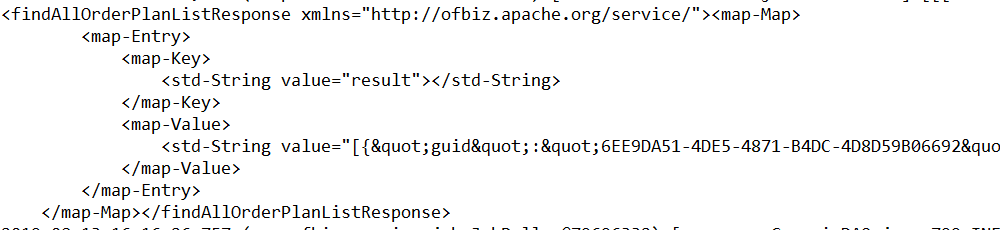
得到结果:
2):Postman测试
<SOAP-ENV:Envelope xmlns:SOAP-ENV="http://schemas.xmlsoap.org/soap/envelope/" xmlns:SOAP-ENC="http://schemas.xmlsoap.org/soap/encoding/" xmlns:xsi="http://www.w3.org/2001/XMLSchema-instance" xmlns:xsd="http://www.w3.org/2001/XMLSchema">

    <SOAP-ENV:Body>

        <findAllOrderPlanList xmlns="http://ofbiz.apache.org/service/">

            <map-Map>

                <map-Entry>

                    <map-Key>

                        <std-String value="login.username"></std-String>

                    </map-Key>

                    <map-Value>

                        <std-String value="admin"></std-String>

                    </map-Value>

                </map-Entry>

                <map-Entry>

                    <map-Key>

                        <std-String value="login.password"></std-String>

                    </map-Key>

                    <map-Value>

                        <std-String value="ofbiz"></std-String>

                    </map-Value>

                </map-Entry>

                <map-Entry>

                    <map-Key>

                        <std-String value="examKsZqs"></std-String>

                    </map-Key>

                    <map-Value>

                        <std-String value=""></std-String>

                    </map-Value>

                </map-Entry>

            </map-Map>

        </findAllOrderPlanList>

    </SOAP-ENV:Body>

</SOAP-ENV:Envelope>
得到结果:

(2):xmlrpc
java测试:
import org.apache.xmlrpc.client.XmlRpcClient;
import org.apache.xmlrpc.client.XmlRpcClientConfigImpl;
String endpoint = "http://localhost:8080/ecloud/control/xmlrpc";

XmlRpcClientConfigImpl config = new XmlRpcClientConfigImpl();

config.setServerURL(new URL(endpoint));

config.setEnabledForExceptions(true);

config.setEnabledForExtensions(true);

XmlRpcClient client = new XmlRpcClient();

client.setConfig(config);

Map paramMap = new HashMap();

paramMap.put("examKsZqs", examKsZqs);

paramMap.put("login.username", "admin");

paramMap.put("login.password", "ofbiz");

Object[] params = new Object[]{paramMap};

Map result = (Map) client.execute("findAllOrderPlanList", params);

System.out.println(result.toString());
得到结果:

ofbiz webservice 例解的更多相关文章
- 基础拾遗------webservice详解
基础拾遗 基础拾遗------特性详解 基础拾遗------webservice详解 基础拾遗------redis详解 基础拾遗------反射详解 基础拾遗------委托详解 基础拾遗----- ...
- SQL 连接 JOIN 例解。(左连接,右连接,全连接,内连接,交叉连接,自连接)
SQL 连接 JOIN 例解.(左连接,右连接,全连接,内连接,交叉连接,自连接) 最近公司在招人,同事问了几个自认为数据库可以的应聘者关于库连接的问题,回答不尽理想-现在在这写写关于它们的作用假设有 ...
- 图文例解C++类的多重继承与虚拟继承
文章导读:C++允许为一个派生类指定多个基类,这样的继承结构被称做多重继承. 在过去的学习中,我们始终接触的单个类的继承,但是在现实生活中,一些新事物往往会拥有两个或者两个以上事物的属性,为了解决这个 ...
- 《挑战30天C++入门极限》图文例解C++类的多重继承与虚拟继承
图文例解C++类的多重继承与虚拟继承 在过去的学习中,我们始终接触的单个类的继承,但是在现实生活中,一些新事物往往会拥有两个或者两个以上事物的属性,为了解决这个问题,C++引入了多重继承的概念 ...
- Axis2开发webservice详解
Axis2开发webservice详解 标签: javawebserviceAxis2 2015-08-10 10:58 1827人阅读 评论(0) 收藏 举报 分类: JAVA(275) 服务器 ...
- Webservice详解
WebService是什么? 1. 基于Web的服务:服务器端整出一些资源让客户端应用访问(获取数据) 2. 一个跨语言.跨平台的规范(抽象) 3. 多个跨平台.跨语言的应用间通信整合的方案(实际) ...
- Android平台调用WebService详解
上篇文章已经对Web Service及其相关知识进行了介绍(Android开发之WebService介绍 ),相信有的朋友已经忍耐不住想试试在Android应用中调用Web Service.本文将通过 ...
- 例解 autoconf 和 automake 生成 Makefile 文件
本文介绍了在 linux 系统中,通过 Gnu autoconf 和 automake 生成 Makefile 的方法.主要探讨了生成 Makefile 的来龙去脉及其机理,接着详细介绍了配置 Con ...
- WebService详解(二)
WsExplorer和Tcp/Ip Monitor工具本身就存在于eclipse和MyEclipse中 使用工具的原因: 1. 使用工具可以更好的了解WebService请求的过程 2. 使 ...
随机推荐
- vue 生命周期函数详解
beforeCreate( 创建前 ) 在实例初始化之后,数据观测和事件配置之前被调用,此时组件的选项对象还未创建,el 和 data 并未初始化,因此无法访问methods, data, compu ...
- 4,JPA
一,什么是JPA JPA全称Java Persistence API.JPA通过JDK 5.0注解或XML描述对象-关系表的映射关系,并将运行期的实体对象持久化到数据库中. JPA(Java Pers ...
- 「NOI2017」蔬菜 解题报告
「NOI2017」蔬菜 首先考虑流 可以从 \(s\) 流入表示得到蔬菜,流出到 \(t\) 表示卖出蔬菜,给每个蔬菜拆点,并给它它每天应得的蔬菜. 但是我们没办法直接给,注意到如果把变质看成得到并可 ...
- LOJ 3093 「BJOI2019」光线——数学+思路
题目:https://loj.ac/problem/3093 考虑经过种种反射,最终射下去的光线总和.往下的光线就是这个总和 * a[ i ] . 比如只有两层的话,设射到第二层的光线是 lst ,那 ...
- RHEL/CentOS通用性能优化、安全配置参考
RHEL/CentOS通用性能优化.安全配置参考 本文的配置参数是笔者在实际生产环境中反复实践总结的结果,完全适用绝大多数通用的高负载.安全性要求的网络服务器环境.故可以放心使用. 若有异议,欢迎联系 ...
- 怎么更改win7登录界面
方法/步骤 1 第一步,先打开注册表.快捷键是win+R.Win就是Windows图片那个键.打开会是这个. 2 在其中输入Regedit.就打开了传说中的注册表了.然后在注册表中选择.选择的顺序 ...
- ValueError: invalid literal for int() with base 10问题处理
问题描述: 在用pthon写脚本得过程中,发生错误,ValueError: invalid literal for int() with base 10,这种错误是值得类型转换错误,int()函数是可 ...
- mac使用相关笔记
1.软件提示已损坏,需要移到废纸篓的解决方法 -> sudo spctl --master-disable xattr -r -d com.apple.quarantine <path&g ...
- xcodebuild 自动化打包
altool 文档 使用xcode自带的xcodebuild 命令通过脚本进行打包 打包->导出ipa, 两行关键的脚本代码 1.Archive xcodebuild archive -arch ...
- 记录java
1.从今天起,我会将自己在java学习道路上的一些心得体会记录下来.