
spring cloud学习--eureka 02
开启eureka client的注解@EnableDiscoveryClient的功能类DiscoveryClient梳理图
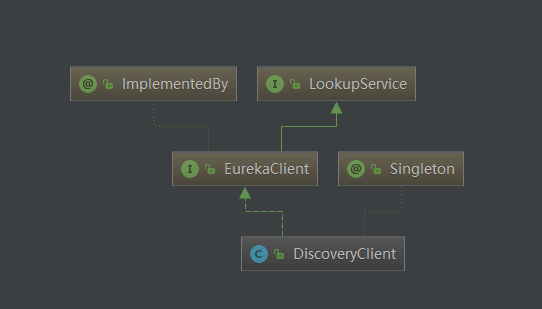
获取server url位于类EndpointUtils的getServiceUrlsMapFromConfig方法上
public static Map<String, List<String>> getServiceUrlsMapFromConfig(EurekaClientConfig clientConfig, String instanceZone, boolean preferSameZone) {

        Map<String, List<String>> orderedUrls = new LinkedHashMap();

        //获取regin,一个微服务应用只有一个region

        String region = getRegion(clientConfig);

        //获取zone,一个微服务可以有多个zone

        String[] availZones = clientConfig.getAvailabilityZones(clientConfig.getRegion());

        if (availZones == null || availZones.length == 0) {

            //如果zone为null,就设置为default

            availZones = new String[]{"default"};

        }

        logger.debug("The availability zone for the given region {} are {}", region, Arrays.toString(availZones));

        int myZoneOffset = getZoneOffset(instanceZone, preferSameZone, availZones);

        String zone = availZones[myZoneOffset];

        //根据region和zone得出server url, 并且可以配置多个server url

        List<String> serviceUrls = clientConfig.getEurekaServerServiceUrls(zone);

        if (serviceUrls != null) {

            orderedUrls.put(zone, serviceUrls);

        }

        int currentOffset = myZoneOffset == availZones.length - 1 ? 0 : myZoneOffset + 1;

        while(currentOffset != myZoneOffset) {

            zone = availZones[currentOffset];

            serviceUrls = clientConfig.getEurekaServerServiceUrls(zone);

            if (serviceUrls != null) {

                orderedUrls.put(zone, serviceUrls);

            }

            if (currentOffset == availZones.length - 1) {

                currentOffset = 0;

            } else {

                ++currentOffset;

            }

        }

        if (orderedUrls.size() < 1) {

            throw new IllegalArgumentException("DiscoveryClient: invalid serviceUrl specified!");

        } else {

            return orderedUrls;

        }

    }
服务注册DiscoveryClient initScheduledTasks方法
 private void initScheduledTasks() {

        int renewalIntervalInSecs;

        int expBackOffBound;

        if (this.clientConfig.shouldFetchRegistry()) {

            renewalIntervalInSecs = this.clientConfig.getRegistryFetchIntervalSeconds();

            expBackOffBound = this.clientConfig.getCacheRefreshExecutorExponentialBackOffBound();

            this.scheduler.schedule(new TimedSupervisorTask("cacheRefresh", this.scheduler, this.cacheRefreshExecutor, renewalIntervalInSecs, TimeUnit.SECONDS, expBackOffBound, new DiscoveryClient.CacheRefreshThread()), (long)renewalIntervalInSecs, TimeUnit.SECONDS);

        }

        //配置文件注册服务

        if (this.clientConfig.shouldRegisterWithEureka()) {

            renewalIntervalInSecs = this.instanceInfo.getLeaseInfo().getRenewalIntervalInSecs();

            expBackOffBound = this.clientConfig.getHeartbeatExecutorExponentialBackOffBound();

            logger.info("Starting heartbeat executor: renew interval is: " + renewalIntervalInSecs);

            this.scheduler.schedule(new TimedSupervisorTask("heartbeat", this.scheduler, this.heartbeatExecutor, renewalIntervalInSecs, TimeUnit.SECONDS, expBackOffBound, new DiscoveryClient.HeartbeatThread()), (long)renewalIntervalInSecs, TimeUnit.SECONDS);

            this.instanceInfoReplicator = new InstanceInfoReplicator(this, this.instanceInfo, this.clientConfig.getInstanceInfoReplicationIntervalSeconds(), 2);

            this.statusChangeListener = new StatusChangeListener() {

                public String getId() {

                    return "statusChangeListener";

                }

                public void notify(StatusChangeEvent statusChangeEvent) {

                    if (InstanceStatus.DOWN != statusChangeEvent.getStatus() && InstanceStatus.DOWN != statusChangeEvent.getPreviousStatus()) {

                        DiscoveryClient.logger.info("Saw local status change event {}", statusChangeEvent);

                    } else {

                        DiscoveryClient.logger.warn("Saw local status change event {}", statusChangeEvent);

                    }

                    DiscoveryClient.this.instanceInfoReplicator.onDemandUpdate();

                }

            };

            if (this.clientConfig.shouldOnDemandUpdateStatusChange()) {

                this.applicationInfoManager.registerStatusChangeListener(this.statusChangeListener);

            }

            //开启一个任务

            this.instanceInfoReplicator.start(this.clientConfig.getInitialInstanceInfoReplicationIntervalSeconds());

        } else {

            logger.info("Not registering with Eureka server per configuration");

        }

    }
上面代码中 this.instanceInfoReplicator.start(this.clientConfig.getInitialInstanceInfoReplicationIntervalSeconds());开启了一个任务,该任务的代码如下
public void run() {

        boolean var6 = false;

        ScheduledFuture next;

        label53: {

            try {

                var6 = true;

                this.discoveryClient.refreshInstanceInfo();

                Long dirtyTimestamp = this.instanceInfo.isDirtyWithTime();

                if (dirtyTimestamp != null) {

                    //真正触发了注册

                    this.discoveryClient.register();

                    this.instanceInfo.unsetIsDirty(dirtyTimestamp);

                    var6 = false;

                } else {

                    var6 = false;

                }

                break label53;

            } catch (Throwable var7) {

                logger.warn("There was a problem with the instance info replicator", var7);

                var6 = false;

            } finally {

                if (var6) {

                    ScheduledFuture next = this.scheduler.schedule(this, (long)this.replicationIntervalSeconds, TimeUnit.SECONDS);

                    this.scheduledPeriodicRef.set(next);

                }

            }

            next = this.scheduler.schedule(this, (long)this.replicationIntervalSeconds, TimeUnit.SECONDS);

            this.scheduledPeriodicRef.set(next);

            return;

        }

        next = this.scheduler.schedule(this, (long)this.replicationIntervalSeconds, TimeUnit.SECONDS);

        this.scheduledPeriodicRef.set(next);

    }
真正触发了注册的代码为this.discoveryClient.register();
注册的代码为:
boolean register() throws Throwable {

        logger.info("DiscoveryClient_" + this.appPathIdentifier + ": registering service...");

        EurekaHttpResponse httpResponse;

        try {

            //通过REST请求进行注册

            httpResponse = this.eurekaTransport.registrationClient.register(this.instanceInfo);

        } catch (Exception var3) {

            logger.warn("{} - registration failed {}", new Object[]{"DiscoveryClient_" + this.appPathIdentifier, var3.getMessage(), var3});

            throw var3;

        }

        if (logger.isInfoEnabled()) {

            logger.info("{} - registration status: {}", "DiscoveryClient_" + this.appPathIdentifier, httpResponse.getStatusCode());

        }

        return httpResponse.getStatusCode() == 204;

    }
spring cloud学习--eureka 02的更多相关文章
- spring cloud学习--eureka 01
本博客为学习使用,学习教程翟永超 spring cloud 微服务实战 搭建eureka server注册中心 spring initialize构建spring boot项目 构建网址:https: ...
- spring cloud 学习(9) - turbine stream无法在eureka注册的解决办法
turbine是啥就不多解释了,初次接触的可以移步spring cloud 学习(4) - hystrix 服务熔断处理 拉到最后看一下,turbine stream默认情况下启动成功后,eureka ...
- Spring Cloud学习(一):Eureka服务注册与发现
1.Eureka是什么 Eureka是Netflix开发的服务发现框架,本身是一个基于REST的服务,主要用于定位运行在AWS域中的中间层服务,以达到负载均衡和中间层服务故障转移的目的. Eureka ...
- Spring Cloud 学习 之 Spring Cloud Eureka(源码分析)
Spring Cloud 学习 之 Spring Cloud Eureka(源码分析) Spring Boot版本:2.1.4.RELEASE Spring Cloud版本:Greenwich.SR1 ...
- Spring cloud系列教程第十篇- Spring cloud整合Eureka总结篇
Spring cloud系列教程第十篇- Spring cloud整合Eureka总结篇 本文主要内容: 1:spring cloud整合Eureka总结 本文是由凯哥(凯哥Java:kagejava ...
- spring cloud之eureka简介
最近线上的接口出了一些问题,有一些可能不是代码的问题,但是由于是测试和其他方面的同事爆出来的,所以感觉对接口的监控应该提上日程. 经过搜索发现,spring cloud的eureka就是专门做这方面工 ...
- spring cloud 学习资料
spring cloud 学习资料 网址 拜托!面试请不要再问我Spring Cloud底层原理 https://mp.weixin.qq.com/s/ZH-3JK90mhnJPfdsYH2yDA
- Spring Boot和Spring Cloud学习资源推荐
Spring Boot和Spring Cloud学习资源推荐 比较好的学习资源,分享一下. 1.Spring Boot官方文档:http://projects.spring.io/spring-b ...
- Spring Cloud Security&Eureka安全认证(Greenwich版本)
Spring Cloud Security&Eureka安全认证(Greenwich版本) 一·安全 Spring Cloud支持多种安全认证方式,比如OAuth等.而默认是可以直接添加spr ...
随机推荐
- hdu 4453 约会安排(线段树区间合并)
约会安排 Time Limit: 2000/1000 MS (Java/Others) Memory Limit: 65535/32768 K (Java/Others)Total Submis ...
- JSON对象与JavaScript对象的区别
//js对象的字面量表示法: var people1={ name:'hehe', age:18 }; //json的格式是: var people1={ "name":'hehe ...
- 2018-10-11-WPF-拖动滚动
title author date CreateTime categories WPF 拖动滚动 lindexi 2018-10-11 14:10:41 +0800 2018-2-13 17:23:3 ...
- pass value from shell to sql
echo 'please enter new userid need create' read new_usr echo 'please enter userid to model' read mod ...
- Oracle 存储过程--01
1.简单的例子 /* 1.求圆的面积 */ create or replace procedure proc_1 is pi constant number(9,7):=3.1415927; radi ...
- STREAM Benchmark及其操作性能分析
STREAM 是业界广为流行的综合性内存带宽实际性能 测量 工具之一.随着处理器处理核心数量的增多,内存带宽对于提升整个系统性能越发重要,如果某个系统不能够足够迅速地将内存中的数据传输到处理器当中,若 ...
- elasticsearch相关聚合查询示例
索引(index):logstash-nginx-*,type:nginx_access 请求路径: 1.按照某个字段进行分组统计访问量 { "query": { "bo ...
- MetaException(message:For direct MetaStore DB connections, we don't support retries at the client level.)
在mysql中执行以下命令: drop database hive; create database hive; alter database hive character set latin1 ...
- 【串线篇】Mybatis缓存之二级缓存
1.应用 二级缓存:namespace级别的缓存:SqlSession关闭或者提交以后有效 一级缓存:SqlSession关闭或者提交以后,一级缓存的数据会放在二级缓存中: 二级缓存的使用:mybat ...
- 10.整合email
整合email <dependency> <groupId>org.springframework.boot</groupId> <artifactId> ...