
区块链——java实现
简述
本文主要的内容试一次关于区块链的作业,本次作业中有很多地方和实际的区块链不符合,比如hash,本文实现的区块链只是用了区块本身的hash并没去区分,头部和数据部分。仅供参考学习。
介绍
内容有点儿多,详情看pdf吧。


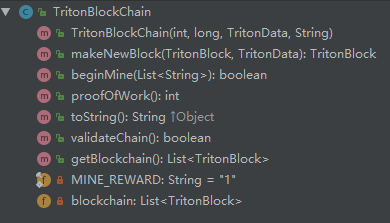
以上三个类分别为 存储数据的类,区块类,区块链的实现类
TritonData主要存储的交易(事件)的记录
TritonBlock 主要字段有上一个区块的hash和本区块的hash值
TritonBlockChain 将所有区块组织成区块链
注意:在hash的过程中我使用的是自己写的hash函数(因为作业要求呀),实际在使用的使用请使用比较好的如sha-256等函数。
具体实现
TritonData
 import java.util.ArrayList;

 import java.util.LinkedList;

 import java.util.List;

 public class TritonData {

     private List<String> transactions;

     private int proofId;

     /**

      * Triton Data Constructor

      */

     public TritonData() {

         transactions = new ArrayList<String>();

         proofId = 1;

     }

     /*Constructor if specific values are specified*/

     public TritonData(int proofId, List<String> transactions) {

         this.transactions = transactions;

         this.proofId = proofId;

     }

     /*Get transactions*/

     public List<String> getTransactions() {

         return transactions;

     }

     /*Get proofId*/

     public int getProofId() {

         return proofId;

     }

     /*Print the data block*/

     public String toString() {

         StringBuilder sb = new StringBuilder();

         sb.append("DATA Start--------------------------------\n");

         sb.append("Proof of work:" + proofId + "\n");

         for (int i = 0; i < transactions.size(); ++i) {

             sb.append("Transaction " + i + "\n");

             sb.append("Transaction Content:" + transactions.get(i) + "\n");

         }

         sb.append("DATA End --------------------------------\n\n");

         return sb.toString();

     }

 }
TritonBlock
 import java.math.BigInteger;

 public class TritonBlock {

     /*Class variables, all the attributes of the block*/

     private int index;

     private long timestamp;

     private TritonData data;

     private String prev_hash;

     private String self_hash;

     /*Constructor, builds a block with passed in variables, then creates a hash for curr block*/

     public TritonBlock(int index, long timestamp, TritonData data, String prev_hash) {

         this.index = index;

         this.timestamp = timestamp;

         this.data = data;

         this.prev_hash = prev_hash;

         this.self_hash = hashBlock();

     }

     //使用CRC variant方式

     private String hashBlock() {

 //        BigInteger bigInteger=new BigInteger()

         BigInteger bigInteger = new BigInteger("0");

         for (String s : data.getTransactions()) {

             char[] arr = s.toCharArray();

             for (char c : arr) {

                 bigInteger = bigInteger.add(BigInteger.valueOf(c & 0xf8000000));

             }

         }

         bigInteger = bigInteger.add(BigInteger.valueOf(timestamp));

         bigInteger = bigInteger.add(BigInteger.valueOf(index));

         char[] arr = prev_hash.toCharArray();

         for (char c : arr) {

             bigInteger = bigInteger.add(BigInteger.valueOf(c & 0xf8000000));

         }

         return bigInteger.toString(16);

     }

     /*Get index*/

     public int getIndex() {

         return index;

     }

     /*Get timestamp*/

     public long getTimestamp() {

         return timestamp;

     }

     /*Get data block*/

     public TritonData getData() {

         return data;

     }

     /*Get previous hash*/

     public String getPrev_hash() {

         return prev_hash;

     }

     /*Get current hash*/

     public String getSelf_hash() {

         return self_hash;

     }

     /*Print the block*/

     public String toString() {

         StringBuilder sb = new StringBuilder();

         sb.append("TritonBlock " + index + "\n");

         sb.append("Index: " + index + "\n");

         sb.append("Timestamp: " + timestamp + "\n");

         sb.append("Prev Hash: " + prev_hash + "\n");

         sb.append("Hash: " + self_hash + "\n");

         sb.append(data.toString());

         return sb.toString();

     }

 }
TritonBlockChain
 import java.util.*;

 public class TritonBlockChain {

     private static final String MINE_REWARD = "1";

     /*Blockchain clas variable*/

     private List<TritonBlock> blockchain;

     /*Constructor, takes in genesis block data to start the blockchain*/

     public TritonBlockChain(int index, long timestamp, TritonData data, String prev_hash) {

         blockchain = new ArrayList<TritonBlock>();

         blockchain.add(new TritonBlock(index, timestamp, data, prev_hash));

     }

     /*Makes the next block after the proof of work from mining is finished*/

     public TritonBlock makeNewBlock(TritonBlock lastBlock, TritonData newData) {

         return new TritonBlock(lastBlock.getIndex() + 1,

                 System.currentTimeMillis(), newData, lastBlock.getPrev_hash());

     }

     /*Mines the transaction and creates the block to add to the blockchain*/

     public boolean beginMine(List<String> curTransactions) {

         if (curTransactions.isEmpty()) {

             return false;

         }

         int proofId = proofOfWork();

         curTransactions.add("Triton coined earned: " + MINE_REWARD);

 //      TritonData(int proofId, List<String> transactions)

         TritonData newData = new TritonData(proofId, curTransactions);

         TritonBlock lastBlock = blockchain.get(blockchain.size() - 1);

         TritonBlock newBlock = new TritonBlock(lastBlock.getIndex() + 1,

                 System.currentTimeMillis(), newData, lastBlock.getSelf_hash());

         blockchain.add(newBlock);

         return true;

     }

     /*Simple proof of work algorithm to prove cpu usage was used to mine block*/

     public int proofOfWork() {

         TritonBlock tb = blockchain.get(blockchain.size() - 1);

         int lastProofId = tb.getData().getProofId();

         //use loop

         int temp = Math.max(lastProofId, 13);

         ++temp;

         while (true) {

             if (temp % 13 == 0 && temp % lastProofId == 0) {

                 return temp;

             }

             ++temp;

         }

     }

     /*Prints current blockchain*/

     public String toString() {

         StringBuilder sb = new StringBuilder();

         sb.append("~~~~~~~~~~~~~~~~~~~~~~~~~~~~~~~~~\n" +

                 "T R I T O N B L O C K C H A I N\n" +

                 "~~~~~~~~~~~~~~~~~~~~~~~~~~~~~~~~~\n\n");

         for (TritonBlock tb : blockchain) {

             sb.append(tb.toString());

         }

         return sb.toString();

     }

     /*Validates each block in the chain looking for any hash pointer descrepancies, which can point to a tampering problem*/

     public boolean validateChain() {

         for (int i = 1; i < blockchain.size(); ++i) {

             TritonBlock preBlock = blockchain.get(i - 1);

             TritonBlock cntBlock = blockchain.get(i);

             if (!cntBlock.getPrev_hash().equals(preBlock.getSelf_hash())) {

                 return false;

             }

         }

         return true;

     }

     /*Get blockchain*/

     public List<TritonBlock> getBlockchain() {

         return blockchain;

     }

 }
测试
 import java.io.BufferedReader;

 import java.io.IOException;

 import java.io.InputStreamReader;

 import java.util.ArrayList;

 import java.util.List;

 import java.io.FileReader;

 import java.util.Random;

 import java.util.StringTokenizer;

 /*Sets up server, manages blockchains, takes in and acts on user input*/

 public class TritonMiner {

     private static final int BLOCK_SIZE = 2;

     public static void main(String[] args) throws IOException {

         /*Initialize the local blockchain*/

         long timestamp = System.currentTimeMillis();

         /*Created local blockchain and added genesis block*/

         TritonBlockChain blockchain = new TritonBlockChain(0, timestamp, new TritonData(), "0");

         /*Represents the queue for all transactions*/

         //read in trascatipn and put in transcation queue

         List<String> transaction_queue = new ArrayList<String>();

         loadTranscation(transaction_queue, "transaction/transaction_1.txt");

         List<String> currentTransaction = new ArrayList<String>();

         for (int i = 0; i < transaction_queue.size(); i++) {

             currentTransaction.add(transaction_queue.get(i));

             if (currentTransaction.size() == BLOCK_SIZE) {

                 //mine

                 blockchain.beginMine(new ArrayList<>(currentTransaction));

                 //reintilize

                 currentTransaction.clear();

             }

         }

         /*Print blockchain*/

         System.out.println(blockchain.toString());

         /*Validate the blockchain Mine*/

         System.out.println("This block chain is: "+blockchain.validateChain());

     }

     public static boolean loadTranscation(List<String> transaction_queue, String fname) {

         String line;

         BufferedReader inputStrem;

         StringTokenizer st;

         try {

             inputStrem = new BufferedReader(new FileReader(fname));

             while ((line = inputStrem.readLine()) != null) {

                 transaction_queue.add(line);

             }

         } catch (IOException e) {

             System.out.println (e.toString());

             System.out.println("Could not find file " + fname);

         }

         return true;

     }

 }
结果
~~~~~~~~~~~~~~~~~~~~~~~~~~~~~~~~~

T R I T O N B L O C K C H A I N

~~~~~~~~~~~~~~~~~~~~~~~~~~~~~~~~~

TritonBlock 0

Index: 0

Timestamp: 1541995814844

Prev Hash: 0

Hash: 167061cdfbc

DATA Start--------------------------------

Proof of work:1

DATA End --------------------------------

TritonBlock 1

Index: 1

Timestamp: 1541995814851

Prev Hash: 167061cdfbc

Hash: 167061cdfc4

DATA Start--------------------------------

Proof of work:26

Transaction 0

Transaction Content:mary bob 10$

Transaction 1

Transaction Content:mary bob 12$

Transaction 2

Transaction Content:Triton coined earned: 1

DATA End --------------------------------

TritonBlock 2

Index: 2

Timestamp: 1541995814851

Prev Hash: 167061cdfc4

Hash: 167061cdfc5

DATA Start--------------------------------

Proof of work:52

Transaction 0

Transaction Content:simon tian 3$

Transaction 1

Transaction Content:tian ming 3$

Transaction 2

Transaction Content:Triton coined earned: 1

DATA End --------------------------------

This block chain is: true
总结
通过做这个作业,我收获很多:
- 什么是挖矿,什么是矿工,他们如何挣钱。提供计算资源的人叫矿工,提供的机器叫矿机,挖矿就是通过记录交易来获取收益。
- 本次作业也给了很多hash函数可以自己选择,比如我使用的CRC variant就是一个比较简单的hash函数(我一般就是用取余哈哈)
- 通过自己的辛苦获得了大洋(很开心)
区块链——java实现的更多相关文章
- 以太坊区块链Java(EthereumJ)学习笔记:概述
本系列文章介绍以太坊区块链基于Java语言的解决方案.通过介绍EthereumJ定义的主要模块和Class,希望为大家学习和使用EthereumJ提供一些帮助. 整体架构 以太坊的Java解决方案主要 ...
- [币严BIZZAN区块链]Java生成ETH钱包助记词、私钥、地址
本文主要介绍在Java工程中如何生成ETH钱包的助记词.私钥.地址. 一.在之前创建的spring boot 项目中的 pom.xml文件中加入需要的依赖 <dependency> < ...
- 只用120行Java代码写一个自己的区块链
区块链是目前最热门的话题,广大读者都听说过比特币,或许还有智能合约,相信大家都非常想了解这一切是如何工作的.这篇文章就是帮助你使用 Java 语言来实现一个简单的区块链,用不到 120 行代码来揭示区 ...
- java开发区块链只需150行代码
本文目的是通过java实战开发教程理解区块链是什么.将通过实战入门学习,用Java自学开发一个很基本的区块链,并在此基础上能扩展如web框架应用等.这个基本的java区块链也实现简单的工作量证明系统. ...
- 【原】用Java编写第一个区块链(一)
写这篇随笔主要是尝试帮助自己了解如何学习区块链技术开发. [本文禁止任何形式的全文粘贴式转载,本文来自 zacky31 的随笔] 目标: 创建一个最基本的"区块链" 实现一个简单的 ...
- 【原】用Java编写第一个区块链(二)
这篇文章将去介绍如何使用区块链进行交易. [本文禁止任何形式的全文粘贴式转载,本文来自 zacky31 的随笔] 目标: 在上一篇文章中,我们已经创建了一个可信任的区块链.但是目前所创建的链中包含的有 ...
- 用Hyperledger Fabric(超级账本)来构建Java语言开发区块链的环境
面向 Java 开发人员的链代码简介 您或许听说过区块链,但可能不确定它对 Java™ 开发人员有何用.本教程将帮助大家解惑.我将分步展示如何使用 Hyperledger Fabric v0.6 来构 ...
- 用Java为Hyperledger Fabric(超级账本)开发区块链智能合约链代码之部署与运行示例代码
部署并运行 Java 链代码示例 您已经定义并启动了本地区块链网络,而且已构建 Java shim 客户端 JAR 并安装到本地 Maven 存储库中,现在已准备好在之前下载的 Hyperledger ...
- 用Java为Hyperledger Fabric(超级账本)编写区块链智能合约链代码
编写第一个 Java 链代码程序 在上一节中,您已经熟悉了如何构建.运行.部署和调用链代码,但尚未编写任何 Java 代码. 在本节中,将会使用 Eclipse IDE.一个用于 Eclipse 的 ...
随机推荐
- C# 跨线程更新 UI
Winforms 跨线程更新 UI 在 Winforms 中, 所有的控件都包含 InvokeRequired 属性, 如果我们要更新UI,通过它我们可以判断是否需要调用 [Begin]Invoke. ...
- 当C++使用引用传递参数时,应当注意的问题
如果实参与引用参数不匹配,C++将生成临时变量.如果引用参数是const,则编译器在下面两种情况下生成临时变量: 实参类型是正确的,但不是左值 实参类型不正确,但可以转换为正确的类型 左值参数是可被引 ...
- Django路由系统-分组命名匹配
Django路由系统 分组命名匹配 在上述基本配置示例中,使用了简单的正则表达式分组匹配来捕获URL中的值并以位置参数的形式传递给视图,例如url(r'^articles/([0-9]{4})/( ...
- 机器学习笔记:支持向量机(svm)
支持向量机(svm)英文为Support Vector Machines 第一次接触支持向量机是2017年在一个在线解密游戏"哈密顿行动"中的一个关卡的二分类问题,用到了台湾教授写 ...
- VMware重装:网络适配器驱动安装失败解决办法
参考链接:https://blog.csdn.net/theConqueror/article/details/80449125
- 解决Eclipse发布到Tomcat丢失依赖jar包的问题
解决Eclipse发布到Tomcat丢失依赖jar包的问题 如果jar文件是以外部依赖的形式导入的.Eclipse将web项目发布到Tomcat时,是不会自动发布这些依赖的. 可以通过Eclipse在 ...
- kaggle笔记
roc曲线介绍:https://www.cnblogs.com/dlml/p/4403482.html one-hot encode: 1) Drop Categorical Variables 2) ...
- %300为0的个数(牛客第四场)-- number
题意: 给你一串数,问你如题. 思路: 我不是这样的作法,从后往前,先取00,再算%3==0的个数,往前推的时候有递推关系: #define IOS ios_base::sync_with_stdio ...
- eclipse运行jsp出现404错误怎么办?
Window/Show View/Other/Server/Servers/双击“Tomcat v7.0 Server at localhost”在Server Locations配置中选择第二个选项 ...
- ion-icon
观察默认的使用 关于Ion-icon 图标的自定义,首先,看一看默认内置的图标的显示,是怎么来的 可以看到默认的路径为:/svg/ios-xxx.svg 自定义实现 那么这种路径是哪里来的,明显是an ...