
正经Python汤不热爬虫
转自:https://github.com/facert/tumblr_spider
install
pip install -r requirements.txt
run
python tumblr.py username (usename 为任意一个热门博主的 usename)
snapshoot
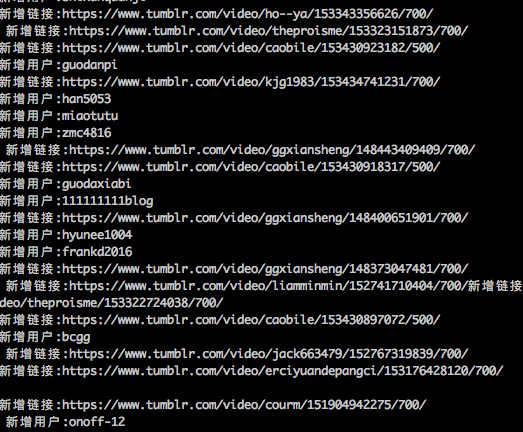
爬取结果
user.txt是爬取的博主用户名结果,source.txt是视频地址集
原理
根据一个热门博主的 usename, 脚本自动会获取博主转过文章的其他博主的 username,并放入爬取队列中,递归爬取。
申明
这是一个正经的爬虫(严肃脸),爬取的资源跟你第一个填入的 username 有很大关系,另外由于某些原因,导致 tumblr 被墙,所以最简单的方式就是用国外 vps 去跑。
# -*- coding:utf-8 -*-

import signal

import sys

import requests

import threading

import queue

import time

from bs4 import BeautifulSoup

mutex = threading.Lock()

is_exit = False

class Tumblr(threading.Thread):

    def __init__(self, queue):

        self.user_queue = queue

        self.total_user = []

        self.total_url = []

        self.f_user = open('user.txt', 'a+')

        self.f_source = open('source.txt', 'a+')

        threading.Thread.__init__(self)

    def download(self, url):

        res = requests.get(url)

        source_list = []

        soup = BeautifulSoup(res.text)

        iframes = soup.find_all('iframe')

        tmp_source = []

        for i in iframes:

            source = i.get('src', '').strip()

            if source and source.find('https://www.tumblr.com/video') != -1 and source not in self.total_url:

                source_list.append(source)

                tmp_source.append(source)

                print (u'新增链接:' + source)

        tmp_user = []

        new_users = soup.find_all(class_='reblog-link')

        for user in new_users:

            username = user.text.strip()

            if username and username not in self.total_user:

                self.user_queue.put(username)

                self.total_user.append(username)

                tmp_user.append(username)

                print (u'新增用户:' + username)

        mutex.acquire()

        if tmp_user:

            self.f_user.write('\n'.join(tmp_user)+'\n')

        if tmp_source:

            self.f_source.write('\n'.join(tmp_source)+'\n')

        mutex.release()

    def run(self):

        global is_exit

        while not is_exit:

            user = self.user_queue.get()

            url = 'http://%s.tumblr.com/' % user

            self.download(url)

            time.sleep(2)

        self.f_user.close()

        self.f_source.close()

def handler(signum, frame):

    global is_exit

    is_exit = True

    print ("receive a signal %d, is_exit = %d" % (signum, is_exit))

    sys.exit(0)

def main():

    if len(sys.argv) < 2:

        print ('usage: python tumblr.py username')

        sys.exit()

    username = sys.argv[1]

    NUM_WORKERS = 10

    q = queue.Queue()

    # 修改这里的 username

    q.put(username)

    signal.signal(signal.SIGINT, handler)

    signal.signal(signal.SIGTERM, handler)

    threads = []

    for i in range(NUM_WORKERS):

        tumblr = Tumblr(q)

        tumblr.setDaemon(True)

        tumblr.start()

        threads.append(tumblr)

    while True:

        for i in threads:

            if not i.isAlive():

                break

        time.sleep(1)

if __name__ == '__main__':

    main()
正经Python汤不热爬虫的更多相关文章
- Python初学者之网络爬虫(二)
声明:本文内容和涉及到的代码仅限于个人学习,任何人不得作为商业用途.转载请附上此文章地址 本篇文章Python初学者之网络爬虫的继续,最新代码已提交到https://github.com/octans ...
- 零基础入门Python实战:四周实现爬虫网站 Django项目视频教程
点击了解更多Python课程>>> 零基础入门Python实战:四周实现爬虫网站 Django项目视频教程 适用人群: 即将毕业的大学生,工资低工作重的白领,渴望崭露头角的职场新人, ...
- 【Python】:简单爬虫作业
使用Python编写的图片爬虫作业: #coding=utf-8 import urllib import re def getPage(url): #urllib.urlopen(url[, dat ...
- 使用python/casperjs编写终极爬虫-客户端App的抓取-ZOL技术频道
使用python/casperjs编写终极爬虫-客户端App的抓取-ZOL技术频道 使用python/casperjs编写终极爬虫-客户端App的抓取
- [Python学习] 简单网络爬虫抓取博客文章及思想介绍
前面一直强调Python运用到网络爬虫方面很有效,这篇文章也是结合学习的Python视频知识及我研究生数据挖掘方向的知识.从而简介下Python是怎样爬去网络数据的,文章知识很easy ...
- 洗礼灵魂,修炼python(69)--爬虫篇—番外篇之feedparser模块
feedparser模块 1.简介 feedparser是一个Python的Feed解析库,可以处理RSS ,CDF,Atom .使用它我们可从任何 RSS 或 Atom 订阅源得到标题.链接和文章的 ...
- 洗礼灵魂,修炼python(50)--爬虫篇—基础认识
爬虫 1.什么是爬虫 爬虫就是昆虫一类的其中一个爬行物种,擅长爬行. 哈哈,开玩笑,在编程里,爬虫其实全名叫网络爬虫,网络爬虫,又被称为网页蜘蛛,网络机器人,在FOAF社区中间,更经常的称为网页追逐者 ...
- 使用Python + Selenium打造浏览器爬虫
Selenium 是一款强大的基于浏览器的开源自动化测试工具,最初由 Jason Huggins 于 2004 年在 ThoughtWorks 发起,它提供了一套简单易用的 API,模拟浏览器的各种操 ...
- Python 利用Python编写简单网络爬虫实例3
利用Python编写简单网络爬虫实例3 by:授客 QQ:1033553122 实验环境 python版本:3.3.5(2.7下报错 实验目的 获取目标网站“http://bbs.51testing. ...
随机推荐
- luoguP3723 HNOI2017 礼物
链接 首先,两个手环增加非负整数亮度,等于其中一个增加一个整数亮度,可以为负. 令增加量为\(x\),旋转以后的原数列为,那么在不考虑转圈圈的情况下,现在的费用就是: \[\sum_{i=1}^n\l ...
- Git之协同开发
Github之协同开发 一.协同开发 1.引子:假如三个人共同开发同一份代码,每个人都各自安排了任务,当每个人都完成了一半的时候,提交不提交呢? 要提交,提交到dev吗,都上传了一半,这样回家拿出来的 ...
- Python之常用模块三(面向对象相关的三个模块)
hashlib.configparser.logging模块 一.常用模块二 hashlib模块 hashlib提供了常见的摘要算法,如md5和sha1等等. 那么什么是摘要算法呢?摘要算法又称为哈希 ...
- 通信接口是webservice快还是scoket快解决方案
通信接口是webservice快还是scoket快webservice和scoket都可以做为通信接口,一个走HTTP访问,一个走TCP协议访问 问1:通讯速度是webservice快还是scoket ...
- 工作流学习之入门demo
/** * Copyright (C), 2015-2018, XXX有限公司 * FileName: DemoMain * Author: happy * Date: 2018/6/23 16:33 ...
- python中json对象转换出错解决方法
今天在使用python中的json转换碰到一个问题: 接收一个post的json字符串: s={"username":"admin","passwor ...
- python之sys._getframe() 用于查看函数被什么函数调用以及被第几行调用及被调用函数所在文件
import sys def get_cur_info(): print(sys._getframe().f_code.co_filename) # 当前文件名,可以通过__file__获得 prin ...
- 【织梦手机端仿站】和PC一个后台
卸载插件,织梦默认带手机站,无需复杂使用插件以后不方便升级.织梦2015年6月8日更新后,就添加了很多针对手机移动端的设计,最大的设计就是添加了生成二维码的织梦标签和织梦手机模板功能,织梦更新后,默认 ...
- anaconda 安装caffe,cntk,theano-未整理
一,anancona 安装 https://repo.anaconda.com/archive/ conda create -n caffe_gpu -c defaults python=3.6 ca ...
- matlab画二维直方图以及双y轴坐标如何修改另一边y轴的颜色
1.首先讲一下如何用hist画二维直方图 x=[- - - - - - - - - - - - - - - - - - - - - - - - - - - - - - - - - - - - - - ...