
正经Python汤不热爬虫
转自:https://github.com/facert/tumblr_spider
install
pip install -r requirements.txt
run
python tumblr.py username (usename 为任意一个热门博主的 usename)
snapshoot
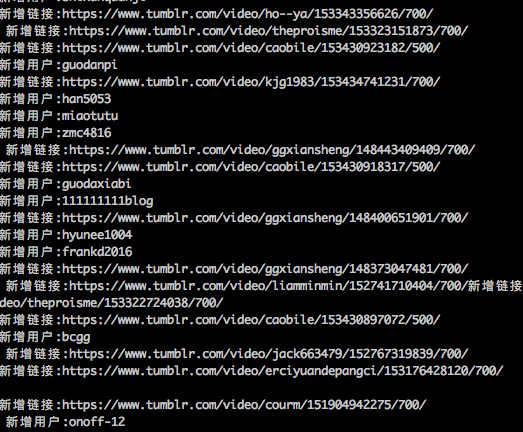
爬取结果
user.txt是爬取的博主用户名结果,source.txt是视频地址集
原理
根据一个热门博主的 usename, 脚本自动会获取博主转过文章的其他博主的 username,并放入爬取队列中,递归爬取。
申明
这是一个正经的爬虫(严肃脸),爬取的资源跟你第一个填入的 username 有很大关系,另外由于某些原因,导致 tumblr 被墙,所以最简单的方式就是用国外 vps 去跑。
# -*- coding:utf-8 -*-

import signal

import sys

import requests

import threading

import queue

import time

from bs4 import BeautifulSoup

mutex = threading.Lock()

is_exit = False

class Tumblr(threading.Thread):

    def __init__(self, queue):

        self.user_queue = queue

        self.total_user = []

        self.total_url = []

        self.f_user = open('user.txt', 'a+')

        self.f_source = open('source.txt', 'a+')

        threading.Thread.__init__(self)

    def download(self, url):

        res = requests.get(url)

        source_list = []

        soup = BeautifulSoup(res.text)

        iframes = soup.find_all('iframe')

        tmp_source = []

        for i in iframes:

            source = i.get('src', '').strip()

            if source and source.find('https://www.tumblr.com/video') != -1 and source not in self.total_url:

                source_list.append(source)

                tmp_source.append(source)

                print (u'新增链接:' + source)

        tmp_user = []

        new_users = soup.find_all(class_='reblog-link')

        for user in new_users:

            username = user.text.strip()

            if username and username not in self.total_user:

                self.user_queue.put(username)

                self.total_user.append(username)

                tmp_user.append(username)

                print (u'新增用户:' + username)

        mutex.acquire()

        if tmp_user:

            self.f_user.write('\n'.join(tmp_user)+'\n')

        if tmp_source:

            self.f_source.write('\n'.join(tmp_source)+'\n')

        mutex.release()

    def run(self):

        global is_exit

        while not is_exit:

            user = self.user_queue.get()

            url = 'http://%s.tumblr.com/' % user

            self.download(url)

            time.sleep(2)

        self.f_user.close()

        self.f_source.close()

def handler(signum, frame):

    global is_exit

    is_exit = True

    print ("receive a signal %d, is_exit = %d" % (signum, is_exit))

    sys.exit(0)

def main():

    if len(sys.argv) < 2:

        print ('usage: python tumblr.py username')

        sys.exit()

    username = sys.argv[1]

    NUM_WORKERS = 10

    q = queue.Queue()

    # 修改这里的 username

    q.put(username)

    signal.signal(signal.SIGINT, handler)

    signal.signal(signal.SIGTERM, handler)

    threads = []

    for i in range(NUM_WORKERS):

        tumblr = Tumblr(q)

        tumblr.setDaemon(True)

        tumblr.start()

        threads.append(tumblr)

    while True:

        for i in threads:

            if not i.isAlive():

                break

        time.sleep(1)

if __name__ == '__main__':

    main()
正经Python汤不热爬虫的更多相关文章
- Python初学者之网络爬虫(二)
声明:本文内容和涉及到的代码仅限于个人学习,任何人不得作为商业用途.转载请附上此文章地址 本篇文章Python初学者之网络爬虫的继续,最新代码已提交到https://github.com/octans ...
- 零基础入门Python实战:四周实现爬虫网站 Django项目视频教程
点击了解更多Python课程>>> 零基础入门Python实战:四周实现爬虫网站 Django项目视频教程 适用人群: 即将毕业的大学生,工资低工作重的白领,渴望崭露头角的职场新人, ...
- 【Python】:简单爬虫作业
使用Python编写的图片爬虫作业: #coding=utf-8 import urllib import re def getPage(url): #urllib.urlopen(url[, dat ...
- 使用python/casperjs编写终极爬虫-客户端App的抓取-ZOL技术频道
使用python/casperjs编写终极爬虫-客户端App的抓取-ZOL技术频道 使用python/casperjs编写终极爬虫-客户端App的抓取
- [Python学习] 简单网络爬虫抓取博客文章及思想介绍
前面一直强调Python运用到网络爬虫方面很有效,这篇文章也是结合学习的Python视频知识及我研究生数据挖掘方向的知识.从而简介下Python是怎样爬去网络数据的,文章知识很easy ...
- 洗礼灵魂,修炼python(69)--爬虫篇—番外篇之feedparser模块
feedparser模块 1.简介 feedparser是一个Python的Feed解析库,可以处理RSS ,CDF,Atom .使用它我们可从任何 RSS 或 Atom 订阅源得到标题.链接和文章的 ...
- 洗礼灵魂,修炼python(50)--爬虫篇—基础认识
爬虫 1.什么是爬虫 爬虫就是昆虫一类的其中一个爬行物种,擅长爬行. 哈哈,开玩笑,在编程里,爬虫其实全名叫网络爬虫,网络爬虫,又被称为网页蜘蛛,网络机器人,在FOAF社区中间,更经常的称为网页追逐者 ...
- 使用Python + Selenium打造浏览器爬虫
Selenium 是一款强大的基于浏览器的开源自动化测试工具,最初由 Jason Huggins 于 2004 年在 ThoughtWorks 发起,它提供了一套简单易用的 API,模拟浏览器的各种操 ...
- Python 利用Python编写简单网络爬虫实例3
利用Python编写简单网络爬虫实例3 by:授客 QQ:1033553122 实验环境 python版本:3.3.5(2.7下报错 实验目的 获取目标网站“http://bbs.51testing. ...
随机推荐
- 【转】Android编译系统详解(一)——build/envsetup.sh
出处 http://www.cloudchou.com/android/post-134.html 本文原创作者:Cloud Chou. 欢迎转载,请注明出处和本文链接 准备好编译环境后,编译Rom的 ...
- web部署命令简单记录
非 root 用户设置环境变量:在< .bash_profile >中设置 后台运行:nohup dosomething >> log.out & nginx 启动ng ...
- SpringCloud系列(一):Eureka 服务注册与服务发现
上一篇,我们介绍了服务注册中心,光有服务注册中心没有用,我们得发服务注册上去,得从它那边获取服务.下面我们注册一个服务到服务注册中心上去. 我们创建一个 hello-service 的 spring ...
- Codeforces1203F2. Complete the Projects (hard version) (贪心+贪心+01背包)
题目链接:传送门 思路: 对于对rating有提升的项目,肯定做越多越好,所以把$b_{i} >= 0$的项目按rating要求从小到大贪心地都做掉,得到最高的rating记为r. 对于剩余的$ ...
- centos7使用cron任务的相关命令(与centos6有区别)
一.cron任务的自启动相关命令 1.检测cron定时服务是否自启用 systemctl is-enabled crond.service 结果展示如下: enable表示已启用自启动 disable ...
- jquery 中 html与text函数的区别
jquery 中 html与text函数的区别 共同点:它们都能讲函数中的参数渲染到页面中: 异同点: text() 只是简单的讲参数的内容写入到页面中: html() 会根据参数的值,判断是否字体符 ...
- WPF界面控件Telerik UI for WPF发布R2 2019 SP1|实现新的属性
Telerik UI for WPF拥有超过100个控件来创建美观.高性能的桌面应用程序,同时还能快速构建企业级办公WPF应用程序.UI for WPF支持MVVM.触摸等,创建的应用程序可靠且结构良 ...
- CSS-overflow-scroll 滑动粘手
长列表的滑动,CSS属性给了 overflow: auto:在IOS上可能会出现“粘手”效果,即滑动很慢.卡顿.粘手 解决: 启动硬件加速渲染: -webkit-overflow-scrolling: ...
- canvas实现圆角图片 (处理原图是长方形或正方形)
/** * 生成图片的缩略图 * @param {[type]} img 图片(img)对象或地址 * @param {[type]} width 缩略图宽 * @param {[type]} hei ...
- rsync服务端排错思路
rsync服务端排错思路 rsync服务端排错思路 查看rsync服务配置文件路径是否正确,正确的默认路径为/etc/rsyncd.conf 查看配置文件里host allow,host ...