
【归纳】springboot中的IOC注解:注册bean和使用bean
目前了解的springboot中IOC注解主要分为两类:
1. 注册bean:@Component和@Repository、@Service、@Controller 、@Configuration
共同之处:这些注解都使用在类上,将类标识为Bean,由Spring扫描到后会生成一个单例bean放到容器中。
不同之处在于:
- @Component是一个泛化的概念,仅仅表示一个组件 (Bean) ,可以作用在任何层;
- @Repository、@Service、@Controller 都包含@Component注解:
| @Repository | 一般修饰持久层——Dao层 |
| @Service | 一般修饰服务层(或业务层)——Service层 |
| @Controller | 通常作用在控制层——Controller层 |
- @Configuration,在@Component的基础上,会对修饰的类做一个增强(利用CGLIB动态代理)。它一般用来修饰配置类——Configuration文件夹。
注:在类上使用以上注解后,还可以用@Bean注解修饰方法,它很明确地告诉被注释的方法产生一个Bean,然后交给Spring容器
2. 使用bean:@Autowired、@Resource
- @Autowired与@Resource都可以用来装配bean, 都可以写在字段上,或写在setter方法上
- @Autowired默认以Type方式注入
- @Resource默认以Name方式注入,但它可以指定为Type方式(传Type值即可),也可以指定为Name和Type同时皆有的方式(那么必须找到一个Bean,它的Name和Type同时满足才可以注入)
示例:
注册bean
@Configuration
public class MyBeans {

    @Bean("autowire")

    public Integer autowire_bean(){

        return 1;

    }

    @Bean("resource_name1")

    public String resource_bean1(){

        return "this is resource_bean1";

    }

    @Bean("resource_name2")

    public String resource_bean2(){

        return "this is resource_bean2";

    }

}
使用bean:
@RestController     //@RestController与@Controller有关

public class MyController {

    //@Autowired默认按类型注入,如果同一类型有多个bean就报错

    @Autowired

    private Integer autowire_bean;

    //@Resource支持name注入或type注入,或同时指定两者注入(需同时满足name和type)

    @Resource(name = "resource_name1")

    private String resource_bean1;

    @Resource(name = "resource_name2",type = String.class)

    private String resource_bean2;

    @GetMapping("/autowire_bean")

    public String getAutowire_bean(){

        return "autowire_bean: " + autowire_bean + "<br>resource_bean1: "

                + resource_bean1 + "<br>resource_bean2: " + resource_bean2;

    }

}
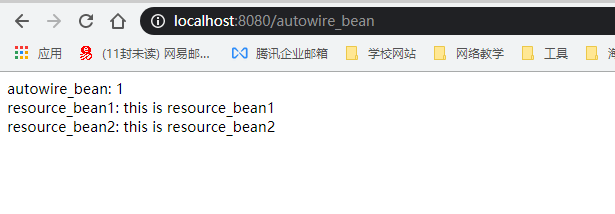
结果:
【归纳】springboot中的IOC注解:注册bean和使用bean的更多相关文章
- springboot中的常用注解
springboot中的常用注解个人觉得springboor中常用的注解主要可以分为三种:放入容器型注解.从容器中取出型注解和功能型注解.其中的放入容器型和从容器中取出型就是我们平时所说的控制反转和依 ...
- springboot中的controller注解没有生效
springboot中的controller注解没有生效 , 启动的Application类没有在controller的父目录或同级目录
- springboot中有用的几个有用aware以及bean操作和数据源操作
本文参考了: https://blog.csdn.net/derrantcm/article/details/76652951 https://blog.csdn.net/derrantcm/arti ...
- SpringBoot 中使用shiro注解使之生效
在shiroConfig配置类中增加如下代码: /** * 开启Shiro的注解(如@RequiresRoles,@RequiresPermissions),需借助SpringAOP扫描使用Shiro ...
- SpringBoot 中定时执行注解(@Scheduled、@EnableScheduling)
项目开发中经常需要执行一些定时任务,比如需要在每天凌晨时候,分析一次前一天的日志信息.Spring为我们提供了异步执行任务调度的方式,提供TaskExecutor .TaskScheduler 接口. ...
- Spring-boot中使用@ConditionalOnExpression注解,在特定情况下初始化bean
想要实现的功能: 我想在配置文件中设置一个开关,enabled,在开关为true的时候才实例化bean,进行相关业务逻辑的操作. 具体实现: 1:要实例化的bean 2. 配置类 代码: 想要实例化的 ...
- springboot中使用自定义注解实现策略模式,去除工厂模式的switch或ifelse,实现新增策略代码零修改
前言 思路与模拟业务 源码地址 https://gitee.com/houzheng1216/springboot 整体思路就是通过注解在策略类上指定约定好的type,项目启动之后将所有有注解的typ ...
- springboot中添加事务注解
1.首先在service层中的方法前添加@Transactional @Service public class UserService { @Autowired private UserMapper ...
- Springboot中如何自定义注解以及使用2例
不说废话,直接进入正题: java自定义注解主要有3步:1.编写@interface接口2.编写@interface对应的处理方法进行处理3.调用处理方法 示例一:判断奇偶:比如有一个字段no要判断奇 ...
随机推荐
- el-tag标签使用三元表达动态改变type类型
<el-tag :type="item.payCode=='在线' ? 'success' : 'danger'" >{{item.payCode}}</el-t ...
- HTML5浏览器
你可以学会如何使用旧的浏览器正确处理新的HTML5. HTML5 浏览器支持 HTML5 支持所有现代浏览器. 此外,所有的浏览器,旧的和新的,自动处理未被识别的元素作为内联元素. 因为这样,你可以& ...
- 替换OSD操作的优化与分析
http://www.zphj1987.com/2016/09/19/%E6%9B%BF%E6%8D%A2OSD%E6%93%8D%E4%BD%9C%E7%9A%84%E4%BC%98%E5%8C%9 ...
- php chunk_split()函数 语法
php chunk_split()函数 语法 作用:把字符串分割为一连串更小的部分.东莞大理石平板 语法:chunk_split(string,length,end) 参数: 参数 描述 string ...
- PHP curl_exec函数
curl_exec — 执行一个cURL会话 说明 mixed curl_exec ( resource $ch ) 执行给定的cURL会话. 这个函数应该在初始化一个cURL会话并且全部的选项都被设 ...
- 【CF1210C】Kamil and Making a Stream(vector,数论,树)
题意:给定一棵n个点带点权的树,i号点的点定义f(i,j)为i到j路径上所有点的gcd,其中i是j的一个祖先,求所有f(i,j)之和mod1e9+7 2<=n<=1e5,0<=a[i ...
- python3下tomorow模块报语法错误def async(n, base_type, timeout=None): ^ SyntaxError: invalid syntax
python3 pip 安装tomorrow模块,调用时候会报错:def async(n, base_type, timeout=None): ^ SyntaxError: invalid synta ...
- css如何让<a>标签,根据输入的内容长度调整宽度,宽度自适应,那位大仙帮帮忙
css如何让<a>标签,根据输入的内容长度调整宽度,宽度自适应,那位大仙帮帮忙 5 样式 .ceshi{float:left; margin-left:13px; width:180px; ...
- JarvisOJ 逆向Writeup
1. 爬楼梯 先运行apk,查看具体的功能 爬一层楼是可以点击的,爬到了,看FLAG是不可以点击的.我们可以大致的了解到到了具体的楼层才可以看到flag,多次打开软件,楼层数目是随机的. 用APKID ...
- 关系型数据库MySQL(一)_增删改查
1.创建表单 create table product (product_id char(4) not null, product_name varchar(100) not null, sa ...