
DDD领域驱动之干活(四)补充篇!
距离上一篇DDD系列完结已经过了很长一段时间,项目也搁置了一段时间,想想还是继续完善下去。
DDD领域驱动之干货(三)完结篇!
上一篇说到了如何实现uow配合Repository在autofac和automapper下实现的功能,今天完善一下事件驱动也就是领域驱动。
领域驱动的概念网上一搜一大推,我就不一一累赘,本文主要讲解如何实现领域事件和事件总线。
事件一共提供三个方法去完成事件的实现-----------注册事件、卸载事件、发布事件
那么在注册事件的时候我们怎么样是定义一个事件呢?
如下图:
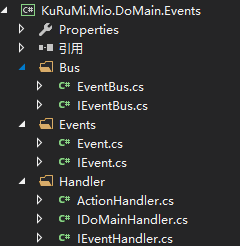
图中的Events为事件,handler为事件的处理,bus为事件总线。
这么一来思路就清晰多了。
首先我们为事件定义一个标识事件的接口。
public interface IEvent

    {

        // 获取产生事件的时间

        DateTime Time { get; set; }

        //事件源

        object Source { get; set; }

    }
所有的事件类都应该实现该接口。
public class Event : IEvent

    {

        public DateTime Time { get; set; }

        public object Source { get; set; }

        public Event() {

            Time = DateTime.Now;

        }

    }
可以把这个Event看过是domianEvent的根事件,所有的领域事件应该继承根事件。
 public class UserEvent :Event

    {

        public User info { get; set; }

    }
事件我们写完了,接下来是需要写事件要执行的处理。
/// <summary>

    /// 标志接口

    /// </summary>

    public interface IHandler

    {

    }

    /// <summary>

    /// 事件处理器接口,所有事件处理器都要实现该接口。

    /// </summary>

    public interface IEventHandler<TEvent> : IHandler where TEvent:IEvent

    {

        // 处理给定的事件

        void Handle(TEvent Event);

    }
然后是写一个委托事件处理器。
public class ActionHandler<TEvent> : IEventHandler<TEvent> where TEvent : IEvent

    {

        public Action<TEvent> Action { get; private set; }

        public ActionHandler() { }

        public ActionHandler(Action<TEvent> handler) {

            Action = handler;

        }

        public void Handle(TEvent Event)

        {

            throw new NotImplementedException();

        }

    }
处理事件的方法定义完成后,我们需要完成领域的处理。
 public class UserHandler :IEventHandler<UserEvent>

    {

        public void Handle(UserEvent Event)

        {

            Event.Source = Event.info;

        }

    }
所有的事件我们定义完成后,接下来就是事件总线出场了。
public interface IEventBus

    {

        //注册事件

        void RegisterAllHandler(IEnumerable<Assembly> assembles);

        void Register<THandle>(IHandler handle);

        void Register(Type eventType, Type handler);

        void Register<THandle>(Action<THandle> action) where THandle : IEvent;

        //反注册事件

        void UnRegisiter<THandle>(Type handleType) where THandle : IEvent;

        void UnRegisterAllHandler<THandle>();

        //触发事件

        void TiggerEvent<THandle>(THandle eventData) where THandle : IEvent;

        void TiggerEvent<THandle>(Type eventHandlerType, THandle eventData) where THandle : IEvent;

        Task TiggerEventAsync<THandle>(THandle eventData) where THandle : IEvent;

        Task TiggerEventAsycn<THandle>(Type eventHandlerType, THandle eventData) where THandle : IEvent;

    }
接口定义好了之后是实现接口。
using System;

using System.Collections.Generic;

using System.Linq;

using System.Text;

using System.Threading.Tasks;

using KuRuMi.Mio.DoMain.Events.Events;

using KuRuMi.Mio.DoMain.Events.Handler;

using System.Reflection;

using System.Collections.Concurrent;

namespace KuRuMi.Mio.DoMain.Events.Bus

{

    /// <summary>

    /// 事件总线

    /// </summary>

    public class EventBus : IEventBus

    {

        private object locker = new object();

        public static EventBus bus => new EventBus();

        private static IEnumerable<Assembly> assemly { get; set; }

        private static readonly ConcurrentDictionary<Type, List<Type>> EventMapping = new ConcurrentDictionary<Type, List<Type>>();

        /// <summary>

        /// 注册所有事件

        /// </summary>

        /// <param name="assembles"></param>

        public void RegisterAllHandler(IEnumerable<Assembly> assembles)

        {

            assemly = assembles;

            foreach (Assembly assembly in assembles)

            {

                Type[] types = assembly.GetTypes();

                foreach (Type type in types)

                {

                    Type handlerInterfaceType = type.GetInterface("IEventHandler`1");

                    if (handlerInterfaceType != null)

                    {

                        Type eventType = handlerInterfaceType.GetGenericArguments()[];

                        if (!EventMapping.Keys.Contains(eventType))

                        {

                            Register(eventType, type);

                        }

                    }

                }

            }

        }

        /// <summary>

        /// 注册到事件总线

        /// </summary>

        /// <param name="eventType"></param>

        /// <returns></returns>

        private List<Type> GetOrCreateHandlers(Type eventType)

        {

            return EventMapping.GetOrAdd(eventType, (type) => new List<Type>());

        }

        #region 注册事件

        /// <summary>

        /// 手动绑定事件

        /// </summary>

        /// <typeparam name="THandle"></typeparam>

        /// <param name="handle"></param>

        public void Register<THandle>(IHandler handle)

        {

            Register(typeof(THandle), handle.GetType());

        }

        public void Register(Type eventType, Type handler)

        {

            lock (locker)

            {

                GetOrCreateHandlers(eventType).Add(handler);

            }

        }

        /// <summary>

        /// 通过委托注册

        /// </summary>

        /// <typeparam name="THandle"></typeparam>

        /// <param name="action"></param>

        public void Register<THandle>(Action<THandle> action) where THandle : IEvent

        {

            ActionHandler<THandle> ActionHandler = new ActionHandler<THandle>(action);

            Register<THandle>(ActionHandler);

        }

        #endregion

        #region 卸载事件

        /// <summary>

        /// 手动卸载单个事件

        /// </summary>

        /// <typeparam name="THandle"></typeparam>

        /// <param name="handleType"></param>

        public void UnRegisiter<THandle>(Type handleType) where THandle : IEvent

        {

            lock (locker)

            {

                GetOrCreateHandlers(typeof(THandle)).RemoveAll(t => t == handleType);

            }

        }

        /// <summary>

        /// 卸载所有事件

        /// </summary>

        /// <typeparam name="THandle"></typeparam>

        public void UnRegisterAllHandler<THandle>()

        {

            lock (locker)

            {

                GetOrCreateHandlers(typeof(THandle)).Clear();

            }

        }

        #endregion

        #region 触发事件

        /// <summary>

        /// 根据事件源触发事件

        /// </summary>

        /// <typeparam name="THandle"></typeparam>

        /// <param name="eventData"></param>

        public void TiggerEvent<THandle>(THandle eventData) where THandle : IEvent

        {

            //获取所有的事件处理

            List<Type> handlerTypes = GetOrCreateHandlers(typeof(THandle));

            if (handlerTypes != null && handlerTypes.Count > )

            {

                foreach (var handlerType in handlerTypes)

                {

                    var handlerInterface = handlerType.GetInterface("IEventHandler`1");

                    foreach (Assembly assembly in assemly)

                    {

                        Type[] types = assembly.GetTypes();

                        foreach (Type type in types)

                        {

                            Type handlerInterfaceType = type.GetInterface("IEventHandler`1");

                            if (handlerInterfaceType != null)

                            {

                                //判断两个类型是否相等

                                if (handlerInterface == handlerInterfaceType)

                                {

                                   var eventType = handlerInterfaceType.GenericTypeArguments[];

                                    EventMapping[eventType].ForEach(s=> {

                                        var obj = Activator.CreateInstance(s) as IEventHandler<THandle>;

                                        obj?.Handle(eventData);

                                    });

                                }

                            }

                        }

                    }

                }

            }

        }

        /// <summary>

        /// 指定handler触发事件

        /// </summary>

        /// <typeparam name="THandle"></typeparam>

        /// <param name="eventData"></param>

        /// <returns></returns>

        public void TiggerEvent<THandle>(Type eventHandlerType, THandle eventData) where THandle : IEvent

        {

            var handlerInterface = eventHandlerType.GetInterface("IEventHandler`1");

            foreach (Assembly assembly in assemly)

            {

                Type[] types = assembly.GetTypes();

                foreach (Type type in types)

                {

                    Type handlerInterfaceType = type.GetInterface("IEventHandler`1");

                    if (handlerInterfaceType != null)

                    {

                        //判断两个类型是否相等

                        if (handlerInterface == handlerInterfaceType)

                        {

                            var eventType = handlerInterfaceType.GenericTypeArguments[];

                            EventMapping[eventType].ForEach(s => {

                                var obj = Activator.CreateInstance(s) as IEventHandler<THandle>;

                                obj?.Handle(eventData);

                            });

                        }

                    }

                }

            }

        }

        /// <summary>

        /// 根据事件源触发事件(异步)

        /// </summary>

        /// <typeparam name="THandle"></typeparam>

        /// <param name="eventData"></param>

        /// <returns></returns>

        public Task TiggerEventAsync<THandle>(THandle eventData) where THandle : IEvent

        {

            return Task.Run(() => TiggerEvent<THandle>(eventData));

        }

        /// <summary>

        /// 指定handler触发事件(异步)

        /// </summary>

        /// <typeparam name="THandle"></typeparam>

        /// <param name="eventHandlerType"></param>

        /// <param name="eventData"></param>

        /// <returns></returns>

        public Task TiggerEventAsycn<THandle>(Type eventHandlerType, THandle eventData) where THandle : IEvent

        {

            return Task.Run(() => TiggerEvent<THandle>(eventHandlerType, eventData));

        }

        #endregion

    }

}
代码上我都有注释,过多了我就不多做说明。
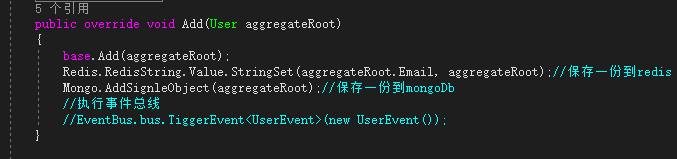
以上就是我对领域事件和领域总线的理解,欢迎大佬指正。
DDD领域驱动之干活(四)补充篇!的更多相关文章
- DDD领域驱动之干货(四)补充篇!
距离上一篇DDD系列完结已经过了很长一段时间,项目也搁置了一段时间,想想还是继续完善下去. DDD领域驱动之干货(三)完结篇! 上一篇说到了如何实现uow配合Repository在autofac和au ...
- C#进阶系列——DDD领域驱动设计初探(四):WCF搭建
前言:前面三篇分享了下DDD里面的两个主要特性:聚合和仓储.领域层的搭建基本完成,当然还涉及到领域事件和领域服务的部分,后面再项目搭建的过程中慢慢引入,博主的思路是先将整个架构走通,然后一步一步来添加 ...
- DDD领域驱动设计初探(四):WCF搭建
前言:前面三篇分享了下DDD里面的两个主要特性:聚合和仓储.领域层的搭建基本完成,当然还涉及到领域事件和领域服务的部分,后面再项目搭建的过程中慢慢引入,博主的思路是先将整个架构走通,然后一步一步来添加 ...
- 基于事件驱动的DDD领域驱动设计框架分享(附源代码)
原文:基于事件驱动的DDD领域驱动设计框架分享(附源代码) 补充:现在再回过头来看这篇文章,感觉当初自己偏激了,呵呵.不过没有以前的我,怎么会有现在的我和现在的enode框架呢?发现自己进步了真好! ...
- 浅谈我对DDD领域驱动设计的理解
从遇到问题开始 当人们要做一个软件系统时,一般总是因为遇到了什么问题,然后希望通过一个软件系统来解决. 比如,我是一家企业,然后我觉得我现在线下销售自己的产品还不够,我希望能够在线上也能销售自己的产品 ...
- DDD 领域驱动设计-领域模型中的用户设计
上一篇:<DDD 领域驱动设计-如何控制业务流程?> 开源地址:https://github.com/yuezhongxin/CNBlogs.Apply.Sample(代码已更新,并增加了 ...
- DDD 领域驱动设计-如何完善 Domain Model(领域模型)?
上一篇:<DDD 领域驱动设计-如何 DDD?> 开源地址:https://github.com/yuezhongxin/CNBlogs.Apply.Sample(代码已更新) 阅读目录: ...
- DDD 领域驱动设计-看我如何应对业务需求变化,领域模型调整?
写在前面 上一篇:DDD 领域驱动设计-看我如何应对业务需求变化,愚蠢的应对? "愚蠢的应对",这个标题是我后来补充上的,博文中除了描述需求变化.愚蠢应对和一些思考,确实没有实质性 ...
- C#进阶系列——DDD领域驱动设计初探(一):聚合
前言:又有差不多半个月没写点什么了,感觉这样很对不起自己似的.今天看到一篇博文里面写道:越是忙人越有时间写博客.呵呵,似乎有点道理,博主为了证明自己也是忙人,这不就来学习下DDD这么一个听上去高大上的 ...
随机推荐
- POJ1850-Code 递推数学
题目链接:http://poj.org/problem?id=1850 题目大意: 按照字典序对升序排列组成的字母进行编号,给出一个长度不超过10的串,求出它的编号是多少?如果无法进行编号则输出0. ...
- Android ec环境配置
ec环境配置 1.0概述 鉴于很多同事,或者新从事android开发,虽然会做android的开发,但是会遇见一些最基本的环境搭建问题,本文仅作为(win7 64位系统)eclipse中集成andro ...
- URI结构
[scheme:][//host:port][path][?query][#fragment] path:从端口后第一个/开始,可以有多个,每个用/连接. query:从第一个?开始,至行尾或#结束. ...
- Swift 入门之简单语法(四)
函数 目标 掌握函数的定义 掌握外部参数的用处 掌握无返回类型的三种函数定义方式 代码实现 函数的定义 格式 func 函数名(行参列表) -> 返回值 {代码实现} 调用 let result ...
- CCS Debug Assertion Failed
下载安装CCS7.1后编译工程时报错,如下: 本来以为这种情况是由于CCS没有安装成功所导致的,但尝试安装其他版本时也发生同样的问题. 于是登录到 TI的wiki 上查找原因,在安装栏下说明: Ens ...
- zookeeper3.4.9 centos6.5 集群安装
安装jdk http://www.cnblogs.com/xiaojf/p/6568426.html [root@m1 jar]# .tar.gz -C ../ [root@m1 jar]# cd . ...
- js实现分页
<html> <head> <meta charset='utf-8'> <script type="text/javascript" s ...
- CORS协议与Spring注解的冲突
众所周知,HTML5的CORS协议,支持各种request method,远胜于仅支持get方式的JSONP. 但今天,我用CORS协议,却一直不成功. 跨域异常,如图 POST http://10. ...
- 配置Nginx作为web server详解
keepalived+nginx:实现高可用 corosync+ngin Nginx: 轻量级的反向代理 web服务器 处理静态文件,索引文件以及自动索引,打开文件描述缓存 使用缓存加速反向代理,简单 ...
- 前端向后台的华丽转身 — PHP入门篇
三个月就这么悄悄溜走了,本K对于前端虽然有了一定的认识,但对一些方面还是处于一种比较萌币的状态,就在这种萌币状态下,本K又跟着大神浩开始了后台语言-PHP语言的学习.PHP的学习对于学过其他语言的人来 ...