
JAR包数字签名与验证
经签名的Jar包内包含了以下内容:
- 原Jar包内的class文件和资源文件
- 签名文件 META-INF/*.SF:这是一个文本文件,包含原Jar包内的class文件和资源文件的Hash
- 签名block文件 META-INF/*.DSA:这是一个数据文件,包含签名者的 certificate 和数字签名。其中 certificate 包含了签名者的有关信息和 public key;数字签名是对 *.SF 文件内的 Hash 值使用 private key 加密得来使用 keytool 和 jarsigner 工具进行 Jar 包签名和验证
1、使用 keytool 和 jarsigner 工具进行 Jar 包签名和验证
JDK 提供了 keytool 和 jarsigner 两个工具用来进行 Jar 包签名和验证。
keytool 用来生成和管理 keystore。keystore 是一个数据文件,存储了 key pair 有关的2种数据:private key 和 certificate,而 certificate 包含了 public key。整个 keystore 用一个密码进行保护,keystore 里面的每一对 key pair 单独用一个密码进行保护。每对 key pair 用一个 alias 进行指定,alias 不区分大小写。
keytool 支持的算法是:
- 如果公钥算法为 DSA,则摘要算法使用 SHA-1。这是默认的
- 如果公钥算法为 RSA,则摘要算法采用 MD5
jarsigner 读取 keystore,为 Jar 包进行数字签名。jarsigner 也可以对签名的 Jar 包进行验证。
下面使用 keytool 和 jarsigner 对它进行签名和验证
第1步:用 keytool 生成 keystore
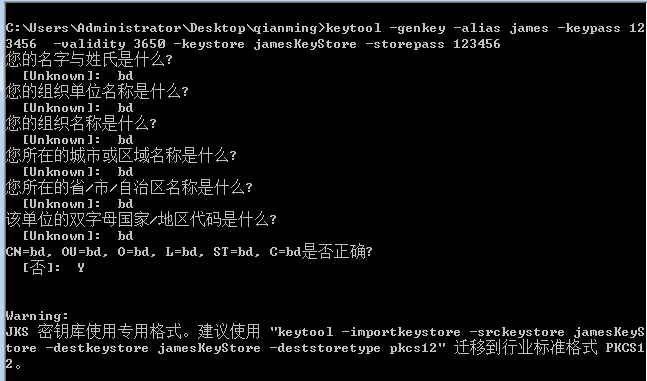
打开CMD窗口,键入如下命令生成keystore文件,其中jamesKeyStore 为公钥秘钥数据文件,james 是alias 的 key pair,keypass 的值123456是秘钥指令,storepass 的值123456是秘钥库指令
| keytool -genkey -alias james -keypass 123456 -validity 3650 -keystore jamesKeyStore -storepass 123456 |
具体生成过程见下图:
第2步:用 jarsigner 对 Jar 包进行签名
使用如下命令可以在CMD窗口中验证签名JAR包
| jarsigner -verify cd-vsb-protect-control-1.0-1.jar |
2、JAVA验证JAR包签名
(1)、JDK对JAR包数字签名验证逻辑
JDK加载包文件提供了两个类JarFile和JarInputStream,两个类由如下构造方法,参数 boolean verify的作用是限制是否要生成JarVerifier对象,JarVerifier类的功能是提供验证JAR包签名的方法。
/**

     * Creates a new <code>JarFile</code> to read from the specified

     * <code>File</code> object.

     * @param file the jar file to be opened for reading

     * @param verify whether or not to verify the jar file if

     * it is signed.

     * @throws IOException if an I/O error has occurred

     * @throws SecurityException if access to the file is denied

     *         by the SecurityManager.

     */

    public JarFile(File file, boolean verify) throws IOException {

        this(file, verify, ZipFile.OPEN_READ);

    }

    /**

     * Creates a new <code>JarFile</code> to read from the specified

     * <code>File</code> object in the specified mode.  The mode argument

     * must be either <tt>OPEN_READ</tt> or <tt>OPEN_READ | OPEN_DELETE</tt>.

     *

     * @param file the jar file to be opened for reading

     * @param verify whether or not to verify the jar file if

     * it is signed.

     * @param mode the mode in which the file is to be opened

     * @throws IOException if an I/O error has occurred

     * @throws IllegalArgumentException

     *         if the <tt>mode</tt> argument is invalid

     * @throws SecurityException if access to the file is denied

     *         by the SecurityManager

     * @since 1.3

     */

    public JarFile(File file, boolean verify, int mode) throws IOException {

        super(file, mode);

        this.verify = verify;

    }
/**

     * Creates a new <code>JarInputStream</code> and reads the optional

     * manifest. If a manifest is present and verify is true, also attempts

     * to verify the signatures if the JarInputStream is signed.

     *

     * @param in the actual input stream

     * @param verify whether or not to verify the JarInputStream if

     * it is signed.

     * @exception IOException if an I/O error has occurred

     */

    public JarInputStream(InputStream in, boolean verify) throws IOException {

        super(in);

        this.doVerify = verify;

        // This implementation assumes the META-INF/MANIFEST.MF entry

        // should be either the first or the second entry (when preceded

        // by the dir META-INF/). It skips the META-INF/ and then

        // "consumes" the MANIFEST.MF to initialize the Manifest object.

        JarEntry e = (JarEntry)super.getNextEntry();

        if (e != null && e.getName().equalsIgnoreCase("META-INF/"))

            e = (JarEntry)super.getNextEntry();

        first = checkManifest(e);

    }

    private JarEntry checkManifest(JarEntry e)

        throws IOException

    {

        if (e != null && JarFile.MANIFEST_NAME.equalsIgnoreCase(e.getName())) {

            man = new Manifest();

            byte bytes[] = getBytes(new BufferedInputStream(this));

            man.read(new ByteArrayInputStream(bytes));

            closeEntry();

            if (doVerify) {

                jv = new JarVerifier(bytes);

                mev = new ManifestEntryVerifier(man);

            }

            return (JarEntry)super.getNextEntry();

        }

        return e;

    }
如下代码所示在JarInputStream类对象调用getNextEntry方法获取JarEntry对象时,如果jv对象不为空时,要调用JarVerifier类的beginEntry方法,而此方法最总调用了ManifestEntryVerifier类的mev.setEntry(null, je)方法,
ManifestEntryVerifier类用来做JAR安全证书验证。
public ZipEntry getNextEntry() throws IOException {

        JarEntry e;

        if (first == null) {

            e = (JarEntry)super.getNextEntry();

            if (tryManifest) {

                e = checkManifest(e);

                tryManifest = false;

            }

        } else {

            e = first;

            if (first.getName().equalsIgnoreCase(JarIndex.INDEX_NAME))

                tryManifest = true;

            first = null;

        }

        if (jv != null && e != null) {

            // At this point, we might have parsed all the meta-inf

            // entries and have nothing to verify. If we have

            // nothing to verify, get rid of the JarVerifier object.

            if (jv.nothingToVerify() == true) {

                jv = null;

                mev = null;

            } else {

                jv.beginEntry(e, mev);

            }

        }

        return e;

    }
 /**

     * This method scans to see which entry we're parsing and

     * keeps various state information depending on what type of

     * file is being parsed.

     */

    public void beginEntry(JarEntry je, ManifestEntryVerifier mev)

        throws IOException

    {

        if (je == null)

            return;

        if (debug != null) {

            debug.println("beginEntry "+je.getName());

        }

        String name = je.getName();

        /*

         * Assumptions:

         * 1. The manifest should be the first entry in the META-INF directory.

         * 2. The .SF/.DSA/.EC files follow the manifest, before any normal entries

         * 3. Any of the following will throw a SecurityException:

         *    a. digest mismatch between a manifest section and

         *       the SF section.

         *    b. digest mismatch between the actual jar entry and the manifest

         */

        if (parsingMeta) {

            String uname = name.toUpperCase(Locale.ENGLISH);

            if ((uname.startsWith("META-INF/") ||

                 uname.startsWith("/META-INF/"))) {

                if (je.isDirectory()) {

                    mev.setEntry(null, je);

                    return;

                }

                if (uname.equals(JarFile.MANIFEST_NAME) ||

                        uname.equals(JarIndex.INDEX_NAME)) {

                    return;

                }

                if (SignatureFileVerifier.isBlockOrSF(uname)) {

                    /* We parse only DSA, RSA or EC PKCS7 blocks. */

                    parsingBlockOrSF = true;

                    baos.reset();

                    mev.setEntry(null, je);

                    return;

                }

                // If a META-INF entry is not MF or block or SF, they should

                // be normal entries. According to 2 above, no more block or

                // SF will appear. Let's doneWithMeta.

            }

        }

        if (parsingMeta) {

            doneWithMeta();

        }

        if (je.isDirectory()) {

            mev.setEntry(null, je);

            return;

        }

        // be liberal in what you accept. If the name starts with ./, remove

        // it as we internally canonicalize it with out the ./.

        if (name.startsWith("./"))

            name = name.substring(2);

        // be liberal in what you accept. If the name starts with /, remove

        // it as we internally canonicalize it with out the /.

        if (name.startsWith("/"))

            name = name.substring(1);

        // only set the jev object for entries that have a signature

        // (either verified or not)

        if (!name.equals(JarFile.MANIFEST_NAME)) {

            if (sigFileSigners.get(name) != null ||

                    verifiedSigners.get(name) != null) {

                mev.setEntry(name, je);

                return;

            }

        }

        // don't compute the digest for this entry

        mev.setEntry(null, je);

        return;

    }
(2)、使用java验证JAR包签名
看了上面JDK提供的JAR相关的工具类,我们可以使用JarInputStream类的逻辑来验证,思想是通过空读取JarEntry对象验证包文件中的每个文件数字签名是否被篡改,在获取JarInputStream类对象时设置verify参数值为true,当声明需要做签名验证时在使用jarIn.getNextJarEntry()获取JarEntry对象如果文件被篡改会跑出异常java.lang.SecurityException: SHA-256 digest error for 文件名,这个时候表明JAR签名验证不通过。
,代码实现如下:
public static void verify(String path) throws IOException{

        File file = new File(path);

        InputStream in = new FileInputStream(file);

        JarInputStream jarIn = new JarInputStream(in,true);

        while(jarIn.getNextJarEntry() != null){

            continue;

        }

    }
JAR包数字签名与验证的更多相关文章
- 给jar包进行数字签名(2014-06-28记)
整理一下两年前用到的一些资料. 为了使Applet或者Java Web Start程序能够访问客户端本地资源,需要对Applet或者JWS程序jar包进行数据签名,当客户端打开Applet或者JWS程 ...
- 写好的mapreduce程序,编译,打包,得到最后的jar包! 验证jar包 ! 整体流程
创建一个bin目录,用于存放编译.java文件产生的.class等结果,然后编译! 编译结果! 打包操作! 打包结果! 验证打包生成的jar包,是否正常,验证成功!!!!!!!!!!!! 结果正确!! ...
- Java 使用poi导入excel,结合xml文件进行数据验证的例子(增加了jar包)
ava 使用poi导入excel,结合xml文件进行数据验证的例子(增加了jar包) 假设现在要做一个通用的导入方法: 要求: 1.xml的只定义数据库表中的column字段,字段类型,是否非空等条件 ...
- jmeter接口测试-调用java的jar包-csv参数化请求-BeanShellPreProcessor生成验签作为请求验证参数-中文乱码----实战
背景及思路: 需求:要做 创建新卡 接口的测试,要求: 1. 不需要每次手动修改请求参数. 方案:文中先用excle将数据准备好,导出为csv格式,再用jmeter的csv请求进行参数化 2. 卡号需 ...
- JAR包结构,META-INF/MANIFEST.MF文件详细说明[全部属性][打包][JDK]
转载请注:[https://www.cnblogs.com/applerosa/p/9736729.html] 常见的属性 jar文件的用途 压缩的和未压缩的 jar工具 可执行的JAR 1.创建可执 ...
- 练习MD5加密jar包编写
简介 参数签名可以保证开发的者的信息被冒用后,信息不会被泄露和受损.原因在于接入者和提供者都会对每一次的接口访问进行签名和验证. 签名sign的方式是目前比较常用的方式. 第1步:接入者把需求访问的接 ...
- Jar包版本查看方法
原文: https://blog.csdn.net/u011287511/article/details/66973559 打开Java的JAR文件我们经常可以看到文件中包含着一个META-INF目 ...
- Dev 日志 | 如何将 jar 包发布到 Maven 中央仓库
摘要 Maven 中央仓库并不支持直接上传 jar 包,因此需要将 jar 包发布到一些指定的第三方 Maven 仓库,比如:Sonatype OSSRH 仓库,然后该仓库再将 jar 包同步到 Ma ...
- 将jar包发布到maven中央仓库
将jar包发布到maven中央仓库 最近做了一个swagger-ui的开源项目,因为是采用vue进行解析swagger-json,需要前端支持,为了后端也能方便的使用此功能,所以将vue项目编译后的结 ...
随机推荐
- [代码审计]青云客Cms前台有条件注入至getshell,后台xss至getshell、至弹你一脸计算器
之前写了一篇关于青云客cms的文章,发在了t00ls,就不copy过来了. 给个链接,好记录一下. https://www.t00ls.net/thread-43093-1-1.html
- 【ASP.NET MVC系列】数据验证和注解
[01]浅谈Google Chrome浏览器(理论篇) [02]浅谈Google Chrome浏览器(操作篇)(上) [03]浅谈Google Chrome浏览器(操作篇)(下) [04]浅谈ASP. ...
- 使用xUnit为.net core程序进行单元测试(中)
第一部分: http://www.cnblogs.com/cgzl/p/8283610.html 下面有一点点内容是重叠的.... String Assert 测试string是否相等: [Fact] ...
- 从Unity中的Attribute到AOP(八)
本文将讲一下在UnityEditor命名空间下的一些特性. CallBackOrder,这个Attribute是所有带callback index的Attribute的基类,由于官方也没有给出详细的说 ...
- IdentityServer(13)- 添加JavaScript客户端
这个快速入门将展示如何构建一个JavaScript客户端应用程序. 用户将登录到IdentityServer,使用IdentityServer发出的访问令牌调用Web API,并注销IdentityS ...
- Hexo next博客添加折叠块功能添加折叠代码块
前言 有大段的东西想要放上去,但又不想占据大量的位置.折叠是最好的选择.下面在Hexo的主题上定制添加折叠功能. 本文基于Hexo Next的主题修改.其他主题应该也差不多. 在main.js中添加折 ...
- cs231n spring 2017 lecture15 Efficient Methods and Hardware for Deep Learning 听课笔记
1. 深度学习面临的问题: 1)模型越来越大,很难在移动端部署,也很难网络更新. 2)训练时间越来越长,限制了研究人员的产量. 3)耗能太多,硬件成本昂贵. 解决的方法:联合设计算法和硬件. 计算硬件 ...
- HTML/CSS/JavaScript学习笔记【持续更新】
HTML <font> 标签 定义和用法 <font> 规定文本的字体.字体尺寸.字体颜色. 实例 规定文本字体.大小和颜色: <font size="3&qu ...
- Codeforces Round #409 (rated, Div. 2, based on VK Cup 2017 Round 2)(A.思维题,B.思维题)
A. Vicious Keyboard time limit per test:2 seconds memory limit per test:256 megabytes input:standard ...
- BZOJ2441: [中山市选2011]小W的问题
题目:http://www.lydsy.com/JudgeOnline/problem.php?id=2441 首先要注意到x1>x3且x5>x3(要是没有这个设定就是树状数组水题了.. ...