
WebApi2 文件图片上传下载
Asp.Net Framework webapi2 文件上传与下载 前端界面采用Ajax的方式执行
一、项目结构

1.App_Start配置了跨域访问,以免请求时候因跨域问题不能提交。具体的跨域配置方式如下,了解的朋友请自行略过。
跨域配置:NewGet安装dll Microsofg.AspNet.Cors

然后在App_Start 文件夹下的WebApiConfig.cs中写入跨域配置代码。
 public static class WebApiConfig
     {
         public static void Register(HttpConfiguration config)
         {
             // Web API configuration and services

             // Web API routes
             config.MapHttpAttributeRoutes();

             // Web API configuration and services
             //跨域配置 //need reference from nuget
             config.EnableCors(new EnableCorsAttribute("*", "*", "*"));

             config.Routes.MapHttpRoute(
                 name: "DefaultApi",
                 routeTemplate: "api/{controller}/{id}",
                 defaults: new { id = RouteParameter.Optional }
             );

             //if config the global filter input there need not write the attributes
             //config.Filters.Add(new App.WebApi.Filters.ExceptionAttribute_DG());
         }
     }
跨域就算完成了,请自行测试。
2.新建两个控制器,一个PicturesController.cs,一个FilesController.cs当然图片也是文件,这里图片和文件以不同的方式处理的,因为图片的方式文件上传没有成功,所以另寻他路,如果在座的有更好的方式,请不吝赐教!
二、项目代码
1.我们先说图片上传、下载控制器接口,这里其实没什么好说的,就一个Get获取文件,参数是文件全名;Post上传文件;直接上代码。
 using QX_Frame.App.WebApi;
 using QX_Frame.FilesCenter.Helper;
 using QX_Frame.Helper_DG;
 using QX_Frame.Helper_DG.Extends;
 using System;
 using System.Collections.Generic;
 using System.Diagnostics;
 using System.IO;
 using System.Linq;
 using System.Net;
 using System.Net.Http;
 using System.Net.Http.Headers;
 using System.Text;
 using System.Threading.Tasks;
 using System.Web.Http;

 /**
  * author:qixiao
  * create:2017-5-26 16:54:46
  * */
 namespace QX_Frame.FilesCenter.Controllers
 {
     public class PicturesController : WebApiControllerBase
     {
         //Get : api/Pictures
         public HttpResponseMessage Get(string fileName)
         {
             HttpResponseMessage result = null;

             DirectoryInfo directoryInfo = new DirectoryInfo(IO_Helper_DG.RootPath_MVC + @"Files/Pictures");
             FileInfo foundFileInfo = directoryInfo.GetFiles().Where(x => x.Name == fileName).FirstOrDefault();
             if (foundFileInfo != null)
             {
                 FileStream fs = new FileStream(foundFileInfo.FullName, FileMode.Open);

                 result = new HttpResponseMessage(HttpStatusCode.OK);
                 result.Content = new StreamContent(fs);
                 result.Content.Headers.ContentType = new System.Net.Http.Headers.MediaTypeHeaderValue("application/octet-stream");
                 result.Content.Headers.ContentDisposition = new ContentDispositionHeaderValue("attachment");
                 result.Content.Headers.ContentDisposition.FileName = foundFileInfo.Name;
             }
             else
             {
                 result = new HttpResponseMessage(HttpStatusCode.NotFound);
             }

             return result;
         }

         //POST : api/Pictures
         public async Task<IHttpActionResult> Post()
         {
             if (!Request.Content.IsMimeMultipartContent())
             {
                 );
             }
             string root = IO_Helper_DG.RootPath_MVC;

             IO_Helper_DG.CreateDirectoryIfNotExist(root + "/temp");

             var provider = new MultipartFormDataStreamProvider(root + "/temp");

             // Read the form data.
             await Request.Content.ReadAsMultipartAsync(provider);

             List<string> fileNameList = new List<string>();

             StringBuilder sb = new StringBuilder();

             ;

             ;

             // This illustrates how to get the file names.
             foreach (MultipartFileData file in provider.FileData)
             {
                 //new folder
                 string newRoot = root + @"Files/Pictures";

                 IO_Helper_DG.CreateDirectoryIfNotExist(newRoot);

                 if (File.Exists(file.LocalFileName))
                 {
                     //new fileName
                     , file.Headers.ContentDisposition.FileName.Length - );

                     ];

                     string newFullFileName = newRoot + "/" + newFileName;

                     fileNameList.Add($"Files/Pictures/{newFileName}");

                     FileInfo fileInfo = new FileInfo(file.LocalFileName);

                     fileTotalSize += fileInfo.Length;

                     sb.Append($" #{fileIndex} Uploaded file: {newFileName} ({ fileInfo.Length} bytes)");

                     fileIndex++;

                     File.Move(file.LocalFileName, newFullFileName);

                     Trace.WriteLine("1 file copied , filePath=" + newFullFileName);
                 }
             }

             return Json(Return_Helper.Success_Msg_Data_DCount_HttpCode($"{fileNameList.Count} file(s) /{fileTotalSize} bytes uploaded successfully!     Details -> {sb.ToString()}", fileNameList, fileNameList.Count));
         }
     }
 }
里面可能有部分代码在Helper帮助类里面写的,其实也仅仅是获取服务器根路径和如果判断文件夹不存在则创建目录,这两个代码的实现如下:
  public static string RootPath_MVC
         {
             get { return System.Web.HttpContext.Current.Server.MapPath("~"); }
         }
 //create Directory
         public static bool CreateDirectoryIfNotExist(string filePath)
         {
             if (!Directory.Exists(filePath))
             {
                 Directory.CreateDirectory(filePath);
             }
             return true;
         }
2.文件上传下载接口和图片大同小异。
 using QX_Frame.App.WebApi;
 using QX_Frame.FilesCenter.Helper;
 using QX_Frame.Helper_DG;
 using System.Collections.Generic;
 using System.Diagnostics;
 using System.IO;
 using System.Linq;
 using System.Net;
 using System.Net.Http;
 using System.Net.Http.Headers;
 using System.Text;
 using System.Threading.Tasks;
 using System.Web;
 using System.Web.Http;

 /**
  * author:qixiao
  * create:2017-5-26 16:54:46
  * */
 namespace QX_Frame.FilesCenter.Controllers
 {
     public class FilesController : WebApiControllerBase
     {
         //Get : api/Files
         public HttpResponseMessage Get(string fileName)
         {
             HttpResponseMessage result = null;

             DirectoryInfo directoryInfo = new DirectoryInfo(IO_Helper_DG.RootPath_MVC + @"Files/Files");
             FileInfo foundFileInfo = directoryInfo.GetFiles().Where(x => x.Name == fileName).FirstOrDefault();
             if (foundFileInfo != null)
             {
                 FileStream fs = new FileStream(foundFileInfo.FullName, FileMode.Open);

                 result = new HttpResponseMessage(HttpStatusCode.OK);
                 result.Content = new StreamContent(fs);
                 result.Content.Headers.ContentType = new System.Net.Http.Headers.MediaTypeHeaderValue("application/octet-stream");
                 result.Content.Headers.ContentDisposition = new ContentDispositionHeaderValue("attachment");
                 result.Content.Headers.ContentDisposition.FileName = foundFileInfo.Name;
             }
             else
             {
                 result = new HttpResponseMessage(HttpStatusCode.NotFound);
             }

             return result;
         }

         //POST : api/Files
         public async Task<IHttpActionResult> Post()
         {
             //get server root physical path
             string root = IO_Helper_DG.RootPath_MVC;

             //new folder
             string newRoot = root + @"Files/Files/";
             //check path is exist if not create it
             IO_Helper_DG.CreateDirectoryIfNotExist(newRoot);

             List<string> fileNameList = new List<string>();

             StringBuilder sb = new StringBuilder();

             ;

             ;

             //get files from request
             HttpFileCollection files = HttpContext.Current.Request.Files;

             await Task.Run(() =>
             {
                 foreach (var f in files.AllKeys)
                 {
                     HttpPostedFile file = files[f];
                     if (!string.IsNullOrEmpty(file.FileName))
                     {

                         string fileLocalFullName = newRoot + file.FileName;

                         file.SaveAs(fileLocalFullName);

                         fileNameList.Add($"Files/Files/{file.FileName}");

                         FileInfo fileInfo = new FileInfo(fileLocalFullName);

                         fileTotalSize += fileInfo.Length;

                         sb.Append($" #{fileIndex} Uploaded file: {file.FileName} ({ fileInfo.Length} bytes)");

                         fileIndex++;

                         Trace.WriteLine("1 file copied , filePath=" + fileLocalFullName);
                     }
                 }
             });

             return Json(Return_Helper.Success_Msg_Data_DCount_HttpCode($"{fileNameList.Count} file(s) /{fileTotalSize} bytes uploaded successfully!     Details -> {sb.ToString()}", fileNameList, fileNameList.Count));
         }
     }
 }
实现了上述两个控制器代码以后,我们需要前端代码来调试对接,代码如下所示。
 <!doctype>

 <head>
     <script src="jquery-3.2.0.min.js"></script>
     <!--<script src="jquery-1.11.1.js"></script>-->
     <!--<script src="ajaxfileupload.js"></script>-->
     <script>
         $(document).ready(function () {
             var appDomain = "http://localhost:3997/";

             $("#btn_fileUpload").click(function () {

                 /**
                  * 用ajax方式上传文件    -----------
                  * */
                 //-------asp.net webapi fileUpload
                 //这种方式10kb内小文件没有问题,超出大小会失败
                 var formData = new FormData($("#uploadForm")[0]);
                 $.ajax({
                     url: appDomain + 'api/Files',
                     type: 'POST',
                     data: formData,
                     async: false,
                     cache: false,
                     contentType: false,
                     processData: false,
                     success: function (data) {
                         console.log(JSON.stringify(data));
                     },
                     error: function (data) {
                         console.log(JSON.stringify(data));
                     }
                 });
                 //----end asp.net webapi fileUpload

                 //----.net core webapi fileUpload
                 // var fileUpload = $("#files").get(0);
                 // var files = fileUpload.files;
                 // var data = new FormData();
                 // for (var i = 0; i < files.length; i++) {
                 //       data.append(files[i].name, files[i]);
                 // }
                 // $.ajax({
                 //     type: "POST",
                 //     url: appDomain+'api/Files',
                 //     contentType: false,
                 //     processData: false,
                 //     data: data,
                 //     success: function (data) {
                 //         console.log(JSON.stringify(data));
                 //     },
                 //     error: function () {
                 //         console.log(JSON.stringify(data));
                 //     }
                 // });
                 //--------end net core webapi fileUpload

                 /**
                  * ajaxfileupload.js 方式上传文件
                  * */
                 // $.ajaxFileUpload({
                 //     type: 'post',
                 //     url: appDomain + 'api/Files',
                 //     secureuri: false,
                 //     fileElementId: 'files',
                 //     success: function (data) {
                 //         console.log(JSON.stringify(data));
                 //     },
                 //     error: function () {
                 //         console.log(JSON.stringify(data));
                 //     }
                 // });

             });
             //end click

         })
     </script>
 </head>
 <title></title>

 <body>
     <article>
         <header>
             <h2>article-form</h2>
         </header>
         <p>
             <form action="/" method="post" id="uploadForm" enctype="multipart/form-data">
                 <input type="file" id="files" name="files" placeholder="file" multiple>file-multiple属性可以选择多项<br><br>
                 <input type="button" id="btn_fileUpload" value="fileUpload">
             </form>
         </p>
     </article>
 </body>
至此,我们的功能已全部实现,下面我们来测试一下:

可见,文件上传成功,按预期格式返回!
下面我们测试单图片上传->

然后我们按返回的地址进行访问图片地址。

发现并无任何压力!
下面测试多图片上传->
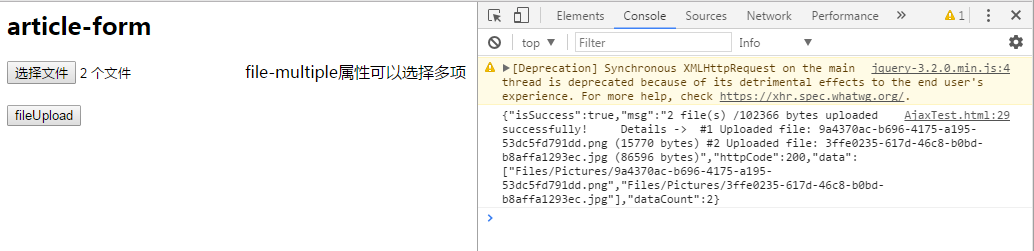
完美~
至此,我们已经实现了WebApi2文件和图片上传,下载的全部功能。
WebApi2 文件图片上传下载的更多相关文章
- [iOS AFNetworking框架实现HTTP请求、多文件图片上传下载]
简单的JSON的HTTP传输就不说了,看一个简单的DEMO吧. 主要明白parameters是所填参数,类型是字典型.我把这部分代码封装起来了,以便多次调用.也许写在一起更清楚点. #pragma m ...
- WebUploader文件图片上传插件的使用
最近在项目中用到了百度的文件图片上传插件WebUploader.分享给大家 需要在http://fex.baidu.com/webuploader/download.html点击打开链接下载WebUp ...
- Retrofit 2.0 轻松实现多文件/图片上传/Json字符串/表单
如果嫌麻烦直接可以用我封装好的库:Novate: https://github.com/Tamicer/Novate 通过对Retrofit2.0的前两篇的基础入门和案例实践,掌握了怎么样使用Retr ...
- 使用Fileupload完成文件的上传下载
目录 使用Fileupload完成文件的上传下载 为什么需要进行文件上传下载? 引入jar包 文件上传 注意事项 编写一个简单的文件上传jsp页面 编写Servlet Student类用于封装数据,后 ...
- 在Window的IIS中创建FTP的Site并用C#进行文件的上传下载
文件传输协议 (FTP) 是一个标准协议,可用来通过 Internet 将文件从一台计算机移到另一台计算机. 这些文件存储在运行 FTP 服务器软件的服务器计算机上. 然后,远程计算机可以使用 FTP ...
- 创建FTP的Site并用C#进行文件的上传下载
创建FTP的Site并用C#进行文件的上传下载 文件传输协议 (FTP) 是一个标准协议,可用来通过 Internet 将文件从一台计算机移到另一台计算机. 这些文件存储在运行 FTP 服务器软件的服 ...
- linux链接及文件互相上传下载
若排版紊乱可查看我的个人博客原文地址 基本操作 本篇博客主要介绍如何去链接远程的linux主机及如何实现本地与远程主机之间文件的上传下载操作,下面的linux系统是CentOS6.6 链接远程linu ...
- Spring实现文件的上传下载
背景:之前一直做的是数据库的增删改查工作,对于文件的上传下载比较排斥,今天研究了下具体的实现,发现其实是很简单.此处不仅要实现单文件的上传,还要实现多文件的上传. 单文件的下载知道了,多文件的下载呢? ...
- SocketIo+SpringMvc实现文件的上传下载
SocketIo+SpringMvc实现文件的上传下载 socketIo不仅可以用来做聊天工具,也可以实现局域网(当然你如果有外网也可用外网)内实现文件的上传和下载,下面是代码的效果演示: GIT地址 ...
随机推荐
- Android ShellUtils
Android中执行Shell命令的工具类 public class ShellUtils { public static final String COMMAND_SU = "su&quo ...
- 浅谈css中单位px和em,rem的区别-转载
px是你屏幕设备物理上能显示出的最小的一个点,这个点不是固定宽度的,不同设备上点的长宽.比例有可能会不同.假设:你现在用的显示器上1px宽=1毫米,但我用的显示器1px宽=两毫米,那么你定义一个div ...
- SQL Server数据库的存储过程中定义的临时表,真的有必要显式删除临时表(drop table #tableName)吗?
本文出处:http://www.cnblogs.com/wy123/p/6704619.html 问题背景 在写SQL Server存储过程中,如果存储过程中定义了临时表,有些人习惯在存储过程结束的时 ...
- Java使用递归找出某目录下的所有子目录以及子文件
/* 使用递归找出某目录("C:\\JavaProducts")下的所有子目录以及子文件 */ import java.util.*; import java.io.*; publ ...
- NPOI操作类
using System; using System.Data; using System.Configuration; using System.Web; using System.Web.Secu ...
- 第四章 Struts2深入
4.1 Struts2架构 1.ActionMapper: 提供请求和Action之间的映射.根据请求查找是否存在对于的action,如有,翻译描述action映射的ActionM ...
- Oracle的登陆问题和初级学习增删改查(省略安装和卸载)
1:学习Oracle首先需要安装Oracle,网上已经有很多很多教程了,这里不做叙述,自己百度即可,这里安装的标准版,个人根据需求安装学习或者企业开发即可.如果安装出错,自己百度Oracle的卸载即可 ...
- APP反编译第一课《如何找到核心代码》
相信很多人都应该会去接触APP反编译,本小七给大家带来入门级别套路,自己也在慢慢摸索学习,一起成长吧.第一步,反编译需要的工具有:一.java环境,其实这里你只要安装了burp就不用管这个的二.apk ...
- VopSdk一个高逼格微信公众号开发SDK
一.我们的目标 分离基础参数和业务参数. 具有高重用和扩展性. 轻量级. 二.实现目标 (一)分离基础参数和业务参数 仔细分析所有接口,抽离出每个模块接口的公共参数. A.针对微信公众号所有接口分析( ...
- BFC块级格式上下文
BFC块级格式上下文,独立的一个渲染区域 1.同一个BFC的两个相邻盒子间的margin会重叠(垂直方向): 2.BFC内部的盒子在垂直方向上会一个接一个的放置: 3.每个子元素的左外边距与包含块的左 ...