
201772020113李清华《面向对象程序设计(java)》第九周学习总结
1、实验目的与要求
(1) 掌握java异常处理技术;
(2) 了解断言的用法;
(3) 了解日志的用途;
(4) 掌握程序基础调试技巧;
2、实验内容和步骤
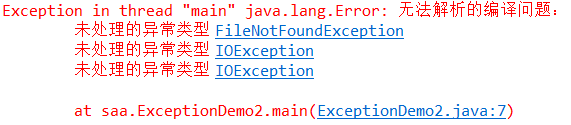
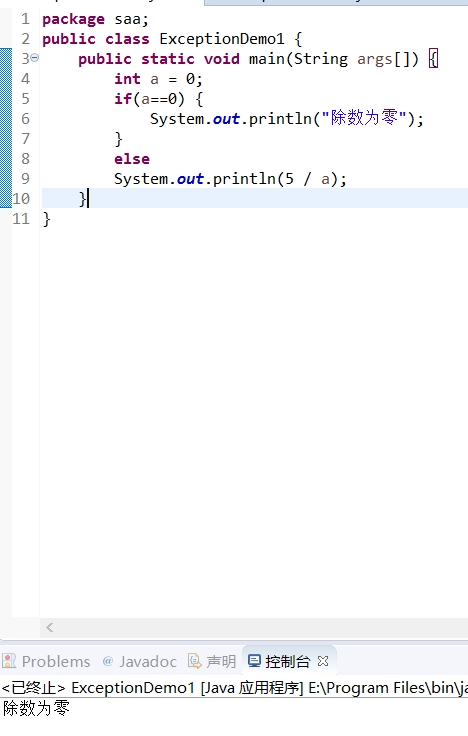
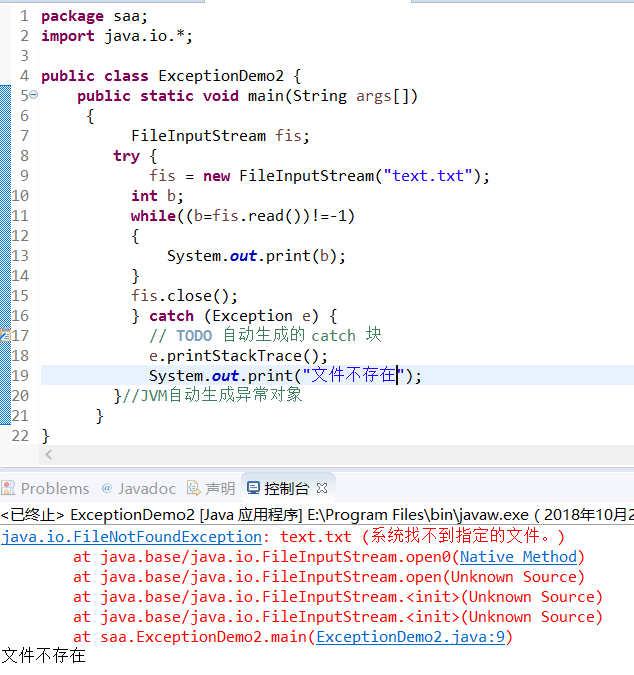
实验1:用命令行与IDE两种环境下编辑调试运行源程序ExceptionDemo1、ExceptionDemo2,结合程序运行结果理解程序,掌握未检查异常和已检查异常的区别。
|
//异常示例1 public class ExceptionDemo1 { public static void main(String args[]) { int a = 0; System.out.println(5 / a); } } |
|
//异常示例2 import java.io.*; public class ExceptionDemo2 { public static void main(String args[]) { FileInputStream fis=new FileInputStream("text.txt");//JVM自动生成异常对象 int b; while((b=fis.read())!=-1) { System.out.print(b); } fis.close(); } } |
实验结果:未检查异常:

修改后:
实验2: 导入以下示例程序,测试程序并进行代码注释。
测试程序1:
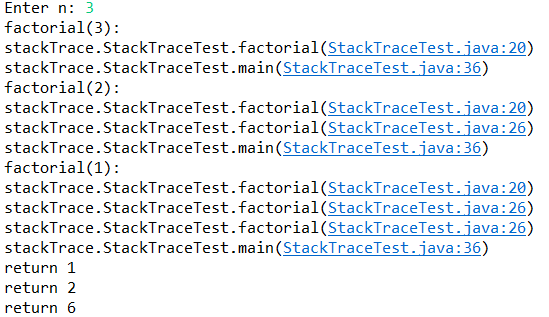
l 在elipse IDE中编辑、编译、调试运行教材281页7-1,结合程序运行结果理解程序;
l 在程序中相关代码处添加新知识的注释;
l 掌握Throwable类的堆栈跟踪方法;
 package stackTrace;

 import java.util.*;

 /**

  * A program that displays a trace feature of a recursive method call.

  * @version 1.01 2004-05-10

  * @author Cay Horstmann

  */

 public class StackTraceTest

 {

    /**

     * Computes the factorial of a number

     * @param n a non-negative integer

     * @return n! = 1 * 2 * . . . * n

     */

    public static int factorial(int n)

    {

       System.out.println("factorial(" + n + "):");

       Throwable t = new Throwable();

       StackTraceElement[] frames = t.getStackTrace();

       for (StackTraceElement f : frames)

          System.out.println(f);

       int r;

       if (n <= 1) r = 1;

       else r = n * factorial(n - 1);

       System.out.println("return " + r);

       return r;

    }

    public static void main(String[] args)

    {

       Scanner in = new Scanner(System.in);

       System.out.print("Enter n: ");

       int n = in.nextInt();

       factorial(n);

    }

 }
测试程序2:
l Java语言的异常处理有积极处理方法和消极处理两种方式;
l 下列两个简答程序范例给出了两种异常处理的代码格式。在elipse IDE中编辑、调试运行源程序ExceptionalTest.java,将程序中的text文件更换为身份证号.txt,要求将文件内容读入内容,并在控制台显示;
掌握两种异常处理技术的特点。
|
//积极处理方式 import java.io.*; class ExceptionTest { public static void main (string args[]) { try{ FileInputStream fis=new FileInputStream("text.txt"); } catch(FileNotFoundExcption e) { …… } …… } } |
|
//消极处理方式 import java.io.*; class ExceptionTest { public static void main (string args[]) throws FileNotFoundExcption { FileInputStream fis=new FileInputStream("text.txt"); } } |
 //积极处理方式

 package aaa;

 import java.io.*;

 public class ExceptionTest {

     public static void main(String args[])

     {

          FileInputStream fis;

         try {

             fis = new FileInputStream("text.txt");

          int b;

          while((b=fis.read())!=-1)

          {

              System.out.print(b);

          }

          fis.close();

         } catch (Exception e) {

             // TODO 自动生成的 catch 块

             e.printStackTrace();

         }//JVM自动生成异常对象

      }

 }
 //消极处理方式

 package aaa;

 import java.io.*;

 public class ExceptionTest {

     public static void main(String args[]) throws IOException

     {

          FileInputStream fis;

          fis = new FileInputStream("text.txt");

          int b;

          while((b=fis.read())!=-1)

          {

              System.out.print(b);

          }

          fis.close();

      }

 }


实验3: 编程练习
练习1:
l 编制一个程序,将身份证号.txt 中的信息读入到内存中;
l 按姓名字典序输出人员信息;
l 查询最大年龄的人员信息;
l 查询最小年龄人员信息;
l 输入你的年龄,查询身份证号.txt中年龄与你最近人的姓名、身份证号、年龄、性别和出生地;
l 查询人员中是否有你的同乡;
l 在以上程序适当位置加入异常捕获代码。
 package test1;

 import java.io.BufferedReader;

 import java.io.File;

 import java.io.FileInputStream;

 import java.io.FileNotFoundException;

 import java.io.IOException;

 import java.io.InputStreamReader;

 import java.util.ArrayList;

 import java.util.Collections;

 import java.util.Scanner;

 public class Main{

     private static ArrayList<Student> studentlist;

     public static void main(String[] args) {

         studentlist = new ArrayList<>();

         Scanner scanner = new Scanner(System.in);

         File file = new File("F:\\身份证号.txt");

         try {

             FileInputStream fis = new FileInputStream(file);

             BufferedReader in = new BufferedReader(new InputStreamReader(fis));

             String temp = null;

             while ((temp = in.readLine()) != null) {

                 Scanner linescanner = new Scanner(temp);

                 linescanner.useDelimiter(" ");

                 String name = linescanner.next();

                 String number = linescanner.next();

                 String sex = linescanner.next();

                 String age = linescanner.next();

                 String province =linescanner.nextLine();

                 Student student = new Student();

                 student.setName(name);

                 student.setnumber(number);

                 student.setsex(sex);

                 int a = Integer.parseInt(age);

                 student.setage(a);

                 student.setprovince(province);

                 studentlist.add(student);

             }

         } catch (FileNotFoundException e) {

             System.out.println("学生信息文件找不到");

             e.printStackTrace();

         } catch (IOException e) {

             System.out.println("学生信息文件读取错误");

             e.printStackTrace();

         }

         boolean isTrue = true;

         while (isTrue) {

             System.out.println("选择你的操作,输入正确格式的选项");

             System.out.println("A.按姓名字典排序");

             System.out.println("B.输出年龄最大和年龄最小的人");

             System.out.println("C.寻找老乡");

             System.out.println("D.寻找年龄相近的人");

             System.out.println("F.退出");

             String m = scanner.next();

             switch (m) {

             case "A":

                 Collections.sort(studentlist);

                 System.out.println(studentlist.toString());

                 break;

             case "B":

                  int max=0,min=100;

                  int j,k1 = 0,k2=0;

                  for(int i=1;i<studentlist.size();i++)

                  {

                      j=studentlist.get(i).getage();

                  if(j>max)

                  {

                      max=j;

                      k1=i;

                  }

                  if(j<min)

                  {

                    min=j;

                    k2=i;

                  }

                  }

                  System.out.println("年龄最大:"+studentlist.get(k1));

                  System.out.println("年龄最小:"+studentlist.get(k2));

                 break;

             case "C":

                  System.out.println("老家?");

                  String find = scanner.next();

                  String place=find.substring(0,3);

                  for (int i = 0; i <studentlist.size(); i++)

                  {

                      if(studentlist.get(i).getprovince().substring(1,4).equals(place))

                          System.out.println("老乡"+studentlist.get(i));

                  }

                  break;

             case "D":

                 System.out.println("年龄:");

                 int yourage = scanner.nextInt();

                 int near=agenear(yourage);

                 int value=yourage-studentlist.get(near).getage();

                 System.out.println(""+studentlist.get(near));

                 break;

             case "F":

                 isTrue = false;

                 System.out.println("退出程序!");

                 break;

                 default:

                 System.out.println("输入有误");

             }

         }

     }

         public static int agenear(int age) {

         int j=0,min=53,value=0,k=0;

          for (int i = 0; i < studentlist.size(); i++)

          {

              value=studentlist.get(i).getage()-age;

              if(value<0) value=-value;

              if (value<min)

              {

                 min=value;

                 k=i;

              }

           }

          return k;

       }

 }
 package test1;

 public class Student implements Comparable<Student> {

     private String name;

     private String number ;

     private String sex ;

     private int age;

     private String province;

     public String getName() {

         return name;

     }

     public void setName(String name) {

         this.name = name;

     }

     public String getnumber() {

         return number;

     }

     public void setnumber(String number) {

         this.number = number;

     }

     public String getsex() {

         return sex ;

     }

     public void setsex(String sex ) {

         this.sex =sex ;

     }

     public int getage() {

         return age;

         }

         public void setage(int age) {

             // int a = Integer.parseInt(age);

         this.age= age;

         }

     public String getprovince() {

         return province;

     }

     public void setprovince(String province) {

         this.province=province ;

     }

     public int compareTo(Student o) {

        return this.name.compareTo(o.getName());

     }

     public String toString() {

         return  name+"\t"+sex+"\t"+age+"\t"+number+"\t"+province+"\n";

     }

 }
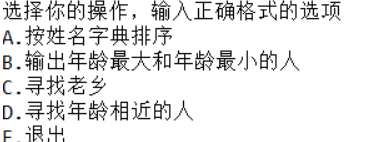
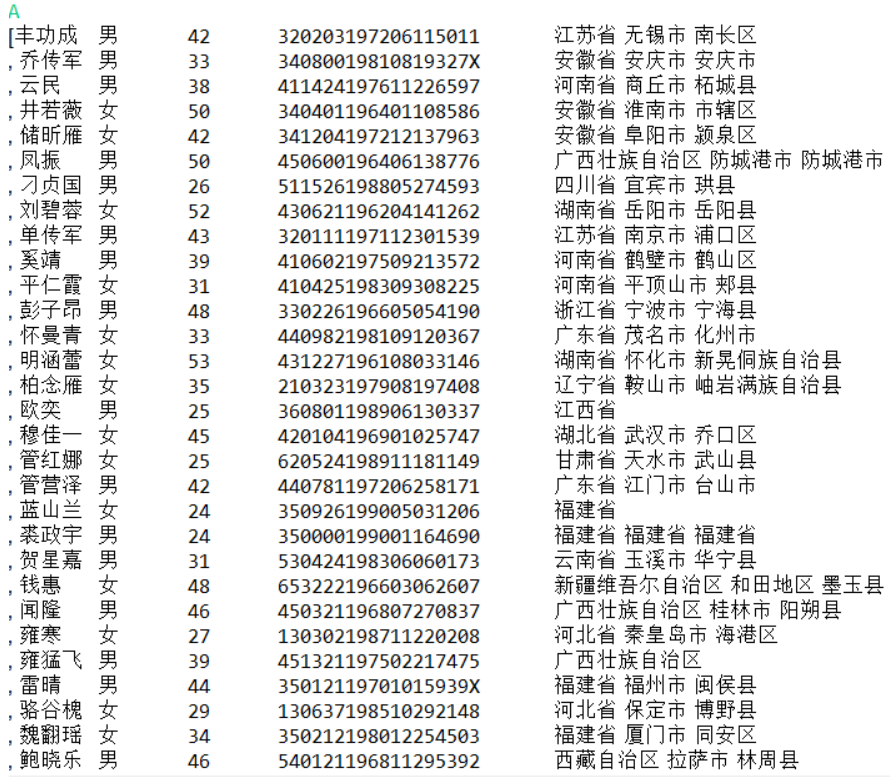
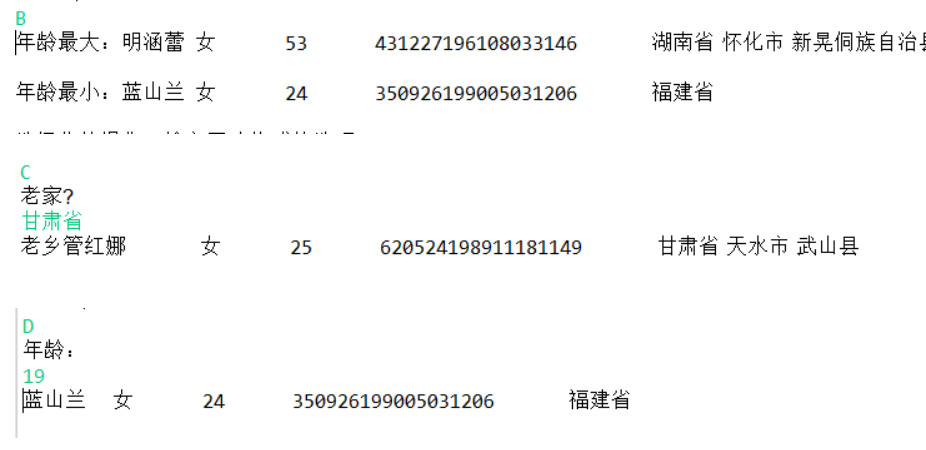
注:以下实验课后完成
练习2:
l 编写一个计算器类,可以完成加、减、乘、除的操作;
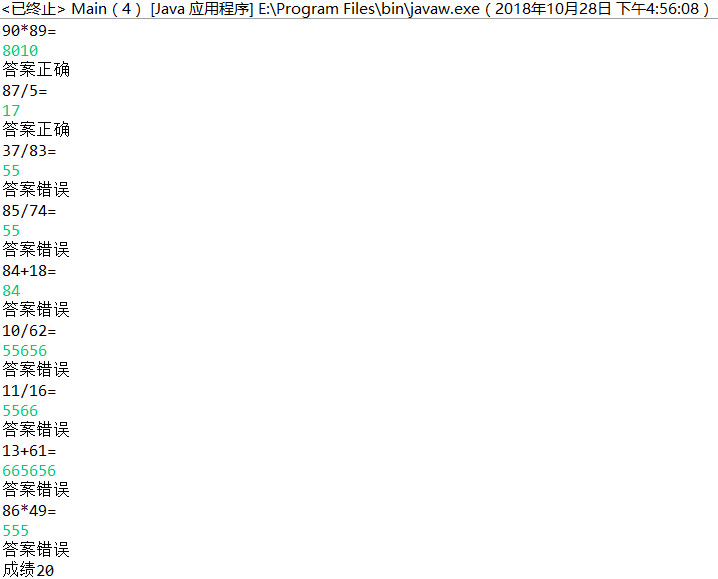
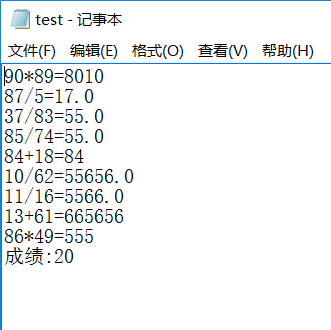
l 利用计算机类,设计一个小学生100以内数的四则运算练习程序,由计算机随机产生10道加减乘除练习题,学生输入答案,由程序检查答案是否正确,每道题正确计10分,错误不计分,10道题测试结束后给出测试总分;
l 将程序中测试练习题及学生答题结果输出到文件,文件名为test.txt;
l 在以上程序适当位置加入异常捕获代码。
实验4:断言、日志、程序调试技巧验证实验。
实验程序1:
|
//断言程序示例 public class AssertDemo { public static void main(String[] args) { test1(-5); test2(-3); }
private static void test1(int a){ assert a > 0; System.out.println(a); } private static void test2(int a){ assert a > 0 : "something goes wrong here, a cannot be less than 0"; System.out.println(a); } } |
l 在elipse下调试程序AssertDemo,结合程序运行结果理解程序;
l 注释语句test1(-5);后重新运行程序,结合程序运行结果理解程序;
l 掌握断言的使用特点及用法。
 package shiyan;

 import java.util.Scanner;

 import java.io.PrintWriter;

 public class Main {

     public static void main(String[] args) throws Exception{

         Scanner in=new Scanner(System.in);

         PrintWriter output=new PrintWriter("E:/test.txt");

         int sum=0;

         jisuanji js=new jisuanji();

         for (int i = 0; i < 10; i++) {

             int a = (int) Math.round(Math.random() * 100);

             int b = (int) Math.round(Math.random() * 100);

             int n = (int) Math.round(Math.random() * 3);

             switch(n)

                {

                case 1:

                    System.out.println(a+"/"+b+"=");

                    while(b==0){

                        b = (int) Math.round(Math.random() * 100);

                        }

                    double c = in.nextDouble();

                    output.println(a+"/"+b+"="+c);

                    if (c == js.chu(a,b)) {

                        sum += 10;

                        System.out.println("答案正确");

                    }

                    else {

                        System.out.println("答案错误");

                    }

                    break;

                case 2:

                    System.out.println(a+"*"+b+"=");

                    int c1 = in.nextInt();

                    output.println(a+"*"+b+"="+c1);

                    if (c1 == js.chen(a, b)) {

                        sum += 10;

                        System.out.println("答案正确");

                    }

                    else {

                        System.out.println("答案错误");

                    }

                    break;

                case 3:

                    System.out.println(a+"+"+b+"=");

                    int c2 = in.nextInt();

                    output.println(a+"+"+b+"="+c2);

                    if (c2 == js.jia(a, b)) {

                        sum += 10;

                        System.out.println("答案正确");

                    }

                    else {

                        System.out.println("答案错误");

                    }

                    break ;

                case 4:

                    System.out.println(a+"-"+b+"=");

                    int c3 = in.nextInt();

                    output.println(a+"-"+b+"="+c3);

                    if (c3 == js.jian(a,b)) {

                        sum += 10;

                        System.out.println("答案正确");

                    }

                    else {

                        System.out.println("答案错误");

                    }

                    break ;

                    }

               }

             System.out.println("成绩"+sum);

             output.println("成绩:"+sum);

             output.close();

         }

     }
 package shiyan;

 public class jisuanji {

     private int a;

     private int b;

     public int jia(int a,int b)

     {

         return a+b;

     }

     public int jian(int a,int b)

     {

         return a-b;

     }

     public int chen(int a,int b)

     {

         return a*b;

     }

     public int chu(int a,int b)

     {

         if(b==0)

         {

             return 0;

         }

         else

             return a/b;

     }

 }
201772020113李清华《面向对象程序设计(java)》第九周学习总结的更多相关文章
- 20155312 2016-2017-2 《Java程序设计》第九周学习总结
20155312 2016-2017-2 <Java程序设计>第九周学习总结 课堂内容总结 两个类有公用的东西放在父类里. 面向对象的三要素 封装 继承 多态:用父类声明引用,子类生成对象 ...
- 20155303 2016-2017-2 《Java程序设计》第九周学习总结
20155303 2016-2017-2 <Java程序设计>第九周学习总结 目录 学习内容总结(Linux命令) 教材学习中的问题和解决过程 代码调试中的问题和解决过程 代码托管 上周考 ...
- 20155321 2016-2017-2 《Java程序设计》第九周学习总结
20155321 2016-2017-2 <Java程序设计>第九周学习总结 教材学习内容总结 JDBC简介 厂商在实现JDBC驱动程序时,依方式可将驱动程序分为四种类型: JDBC-OD ...
- 20145302张薇《Java程序设计》第九周学习总结
20145302 <Java程序设计>第九周学习总结 教材学习内容总结 第十六周 JDBC简介 撰写应用程序是利用通信协议对数据库进行指令交换,以进行数据的增删查找 JDBC目的:让Jav ...
- 20145213《Java程序设计》第九周学习总结
20145213<Java程序设计>第九周学习总结 教材学习总结 "五一"假期过得太快,就像龙卷风.没有一点点防备,就与Java博客撞个满怀.在这个普天同庆的节日里,根 ...
- 21045308刘昊阳 《Java程序设计》第九周学习总结
21045308刘昊阳 <Java程序设计>第九周学习总结 教材学习内容总结 第16章 整合数据库 16.1 JDBC入门 16.1.1 JDBC简介 数据库本身是个独立运行的应用程序 撰 ...
- 20145337 《Java程序设计》第九周学习总结
20145337 <Java程序设计>第九周学习总结 教材学习内容总结 数据库本身是个独立运行的应用程序 撰写应用程序是利用通信协议对数据库进行指令交换,以进行数据的增删查找 JDBC可以 ...
- 《Java程序设计》第九周学习总结
20145224 <Java程序设计>第九周学习总结 第十六章 整合数据库 JDBC入门 ·数据库本身是个独立运行的应用程序 ·撰写应用程序是利用通信协议对数据库进行指令交换,以进行数据的 ...
- 20145236 《Java程序设计》第九周学习总结
20145236 <Java程序设计>第九周学习总结 教材学习内容总结 第十六章 整合数据库 JDBC简介 1.JDBC是java联机数据库的标准规范.它定义了一组标准类与接口,标准API ...
- 201521123061 《Java程序设计》第九周学习总结
201521123061 <Java程序设计>第九周学习总结 1. 本周学习总结 2. 书面作业 本次PTA作业题集异常 1.常用异常 题目5-1 1.1 截图你的提交结果(出现学号) 1 ...
随机推荐
- 学习笔记CB003:分块、标记、关系抽取、文法特征结构
分块,根据句子的词和词性,按照规则组织合分块,分块代表实体.常见实体,组织.人员.地点.日期.时间.名词短语分块(NP-chunking),通过词性标记.规则识别,通过机器学习方法识别.介词短语(PP ...
- layui layui.open弹窗后按enter键不停弹窗问题的解决
问题描述:layui.open弹窗后,点击enter键会不停弹窗,背景颜色变得越来越深 解决办法:1.使用回调函数让按钮失去焦点 var info = layer.open({ type: 2 , t ...
- Windows7 Autoconfiguration IPv4 Address 导致无法上网
Windows7 Autoconfiguration IPv4 Address 导致无法上 (2010-03-30 16:44:57) 转载▼ 标签: 杂谈 分类: 电脑软件问题 Windows7 A ...
- UnicodeEncodeError: 'ascii' codec can't encode characters in position 1-5: ordinal not in range(128)
原因是pip安装python包会加载我的用户目录,我的用户目录恰好是中文的,ascii不能编码.解决办法是: python目录 Python27\Lib\site-packages 建一个文件site ...
- 用于模拟百度分享的errno错误代码
0:成功;-1:由于您分享了违反相关法律法规的文件,分享功能已被禁用,之前分享出去的文件不受影响.;-2:用户不存在;请刷新页面后重试;-3:文件不存在;请刷新页面后重试;-4:登录信息有误,请重新登 ...
- Linux基础入门-基本概念及操作
桌面环境: KDE.GNOME.XFCE.LXDE 实验楼使用的是XFCE 终端: gnome-terminal, kconsole, xterm, rxvt, kvt, nxterm, eterm ...
- docker:构建nginx+php-fpm镜像(一):构建nginx自启动镜像
步骤一:手动安装nginx环境,并记录全过程: #使用yum更新系统 yum -y update #下面编译安装tengine,查看有哪些包需要安装 #安装wget包,用于获取安装软件包 yum ...
- python判断平台
网上找到的判断平台的方法,特此记录 # -*- coding: utf-8 -*- import platform osName = platform.system() if(osName == 'W ...
- HTML 理解标签 - 帧
帧 : frame(已弃用) 是一个HTML元素,它定义了可以显示另一个HTML文档的特定区域.一个框架应该用在一个框架内 <frameset> iframe 表示嵌套的浏览上下文,有效地 ...
- 你云我云•兄弟夜谈会 第三季 企业IT架构
你云我云•兄弟夜谈会 第三季 企业IT架构 你云我云•兄弟夜谈会 第二季 5G 你云我云•兄弟夜谈会 第一季 企业云 0. 概况 时间:2019年2月23日 22:00~23:30 主题:企业IT架构 ...