
Vim常用配置
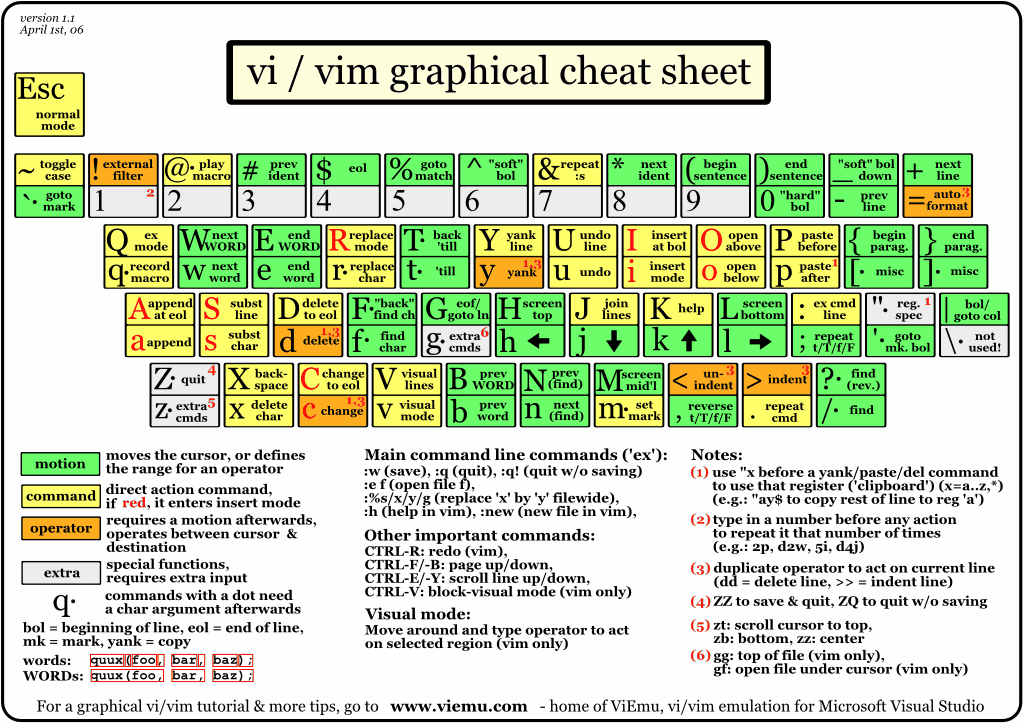
mkdir -p ~/.vim/bundle/Vundle.vim
git clone https://github.com/gmarik/Vundle.vim.git ~/.vim/bundle/Vundle.vim
####################################################.vimrc ####################################################
set nocompatible              " be iMproved, required

filetype off                  " required

" set the runtime path to include Vundle and initialize

set rtp+=~/.vim/bundle/Vundle.vim

call vundle#begin()

" alternatively, pass a path where Vundle should install plugins

"call vundle#begin('~/some/path/here')

" let Vundle manage Vundle, required

Plugin 'VundleVim/Vundle.vim'

Plugin 'taghighlight'

Plugin 'majutsushi/tagbar'

nmap tb :TagbarToggle<CR>

let g:tagbar_ctags_bin='ctags' "ctags程序的路径

let g:tagbar_width=30 "窗口宽度的设置

"map <F3> :Tagbar<CR>

"autocmd BufReadPost *.cpp,*.c,*.h,*.hpp,*.cc,*.cxx call tagbar#autoopen() "如果是c语言的程序的话,tagbar自动开启

Plugin 'scrooloose/nerdtree' "文件资源管理器
nmap fb :NERDTreeToggle<CR>
let NERDTreeWinPos='left'

let NERDTreeWinSize=30

"map <F2> :NERDTreeToggle<CR>

Plugin 'git://github.com/kien/ctrlp.vim.git' "NERDTree 下按Ctrl-p搜索文件名

Plugin 'bling/vim-airline' "状态栏

set laststatus=2

Plugin 'fholgado/minibufexpl.vim'

let g:miniBufExplMapWindowNavVim = 1

let g:miniBufExplMapWindowNavArrows = 1

let g:miniBufExplMapCTabSwitchBufs = 1

let g:miniBufExplModSelTarget = 1

let g:miniBufExplMoreThanOne = 0

map <F11> :MBEbp<CR>

map <F12> :MBEbn<CR>

Plugin 'vim-scripts/DoxygenToolkit.vim'

" The following are examples of different formats supported.

" Keep Plugin commands between vundle#begin/end.

" plugin on GitHub repo

Plugin 'tpope/vim-fugitive'

" plugin from http://vim-scripts.org/vim/scripts.html

" Plugin 'L9'

" Git plugin not hosted on GitHub

""Plugin 'git://git.wincent.com/command-t.git'

" git repos on your local machine (i.e. when working on your own plugin)

""Plugin 'file:///home/gmarik/path/to/plugin'

" The sparkup vim script is in a subdirectory of this repo called vim.

" Pass the path to set the runtimepath properly.

""Plugin 'rstacruz/sparkup', {'rtp': 'vim/'}

" Install L9 and avoid a Naming conflict if you've already installed a

" different version somewhere else.

" Plugin 'ascenator/L9', {'name': 'newL9'}

" All of your Plugins must be added before the following line

call vundle#end()            " required

filetype plugin indent on    " required

" To ignore plugin indent changes, instead use:

"filetype plugin on

"

" Brief help

" :PluginList       - lists configured plugins

" :PluginInstall    - installs plugins; append `!` to update or just:PluginUpdate

" :PluginSearch foo - searches for foo; append `!` to refresh local cache

" :PluginClean      - confirms removal of unused plugins; append `!` to auto-approve removal

"

" see :h vundle for more details or wiki for FAQ

" Put your non-Plugin stuff after this line

set nu

set ts=4

set expandtab

set smartindent

set shiftwidth=4

set encoding=utf-8

set termencoding=utf-8

set fileencodings=utf-8,gbk,latin1

set hls

"hi comment ctermfg=6

func CFileTitle()

    call setline(1, "/**")

    call append(1, "* ".expand("%"))

    call append(2, "* wangkaichao@skyworth.com ".strftime("%Y-%m-%d"))

    call append(3, "*/")

endfunc

map title :call CFileTitle()<CR>

"inoremap { {}<LEFT>

"inoremap [ []<LEFT>

"inoremap ( ()<LEFT>

"inoremap " ""<LEFT>

"inoremap ' ''<LEFT>
#################################################### 基本应用 ####################################################
(1) 调出 vim 命令历史列表
<ESC>q:
(2) 查看 打开的文件缓冲区
<ESC>:ls
(2) 文件缓冲区 文件切换
方法1 <ESC>:bn # n是ls显示的id号
方法2 <Ctrl + 6> #顺序切换
方法3 <ESC>:e filename
(3) <ESC>:vs 垂直分割窗口
(4) <ESC>:sv 水平分割窗口
(5) <ESC><Ctrl + w> hjkl 在窗口之间切换
Ctrl-w H或键入:wincmd H从水平布局到垂直布局。
Ctrl-w J或键入:wincmd J从垂直布局到水平布局。
Ctrl-w r或键入:wincmd r到交换两个缓冲区,但保持窗口布局相同。
Ctrl-w w或键入:wincmd w到移动光标两个窗口/缓冲器之间。
(6) 不同窗口文件间复制粘贴
复制 <ESC>v(进块模式) 选择文件内容 +y 或者*y
粘贴 <ESC>+p 或者*p
(6.1)寄存器复制粘贴
复制 <ESC>v(进块模式) 选择文件内容
"[a-z]y
"[a-z]p
(7) 调整窗口大小
水平调整窗口的各种操作:
<ESC><Ctrl+w> 松手,n+ #窗口边界上移n
<ESC><Ctrl+w> 松手,n- #窗口边界下移n
<ESC><Ctrl+w> _ #将当前窗口调到最大
<ESC><Ctrl+w> = #平分窗口
垂直调整窗口的各种操作:
<ESC><Ctrl+w> 松手,n< #窗口边界左移n
<ESC><Ctrl+w> 松手,n> #窗口边界右移n
<ESC><Ctrl+w> | #将当前窗口调到最大
<ESC><Ctrl+w> = #平分窗口,这个快捷键是通用的。
(8) 常用删除操作
di( #删除括号内内容
di[
di{
daB #删除{内容包括{}
(9) vim 前后台切换
<ESC><Ctrl-z> #进入后台
jobs #查看当前后台的vim
fg n #根据jobs列出的id,将该id切入前台
(10) vim 编辑目录
<ESC>:e pathanme
<ESC>:Exp[lore] pathname # 浏览该目录
<ESC>:Sex[plore] . #在水平分割窗口中浏览该目录
<ESC>:Vex[plore] . #在垂直分割窗口中浏览该目录
(11) vim 使用文件标签tab
<ESC>:tabe filename
<ESC>:tabs #显示已打开标签页的列表,并用“>”标识出当前页面,用“+”标识出已更改的页面。
<ESC>:tabc n #关闭tabs 列出来的签页id=n,tabc不加参数,默认关闭 “>”,即当前标签页 。
<ESC>:tabo #关闭所有的标签页。
<ESC>:tabn或<ESC>gt #移动到下一个标签页。
<ESC>:tabp或<ESC>gT #移动到上一个标签页。
#################################################### cscope ####################################################
#######################################cscope 貌似比ctags强大,存系统api的符号更好,不用更新
apt-get install cscope
find /opt/hisi-linux/x86-arm/arm-hisiv300-linux/arm-hisiv300-linux-uclibcgnueabi/include/c++/4.8.3 -name "*" > c++.files
cscope -bkq -i c++.files -f c++.out
find /opt/hisi-linux/x86-arm/arm-hisiv300-linux/target/usr/include -name "*.[h|c]" > c.files
cscope -bkq -i c.files -f c.out
vim file
<ESC> cs add /path/c.out
注意在查找标识符之前,当前文件一定要<ESC>:w
<ESC> cs find g/s funcname
显示多个项,按空格,输入id,跳转到声明出,返回方法:ls + bn 或者<Ctrl+6>
#################################################### ctags ####################################################
####################################################比较灵活,多用来同步应用代码的标识,要更新
apt-get install ctags
ctags --c++-kinds=+p --fields=+iaS --extra=+q -R -f xxtags ./
# set tags+=xxtags
<Ctrl> + ] 跳转到的定义
<Ctrl> + o/t 返回
=========================================================================================================
set fenc 查看现在文本的编码
:set fenc=编码 转换当前文本的编码为指定的编码
:set enc=编码 以指定的编码显示文本,但不保存到文件中。
:set ff? 查看当前文本的模式类型,一般为dos,unix
:set ff=dos 转换为dos模式
:set ff=unix 转换为unix模式,等同于:%s/^M//g
Vim常用配置的更多相关文章
- Vim - 常用配置
基本配置 不用任何插件的情况下,先按如下配置: set nu syntax on set hlsearch set tabstop=4 set shiftwidth=4 set expandtab s ...
- vim常用配置 vimrc文件
自从接触vim,自己瞎鼓捣.vimrc也有一段时间了.收集记录一下好用的配置. 一.奇技淫巧 1.折叠代码 折叠代码常常用在代码块较长的情况下,比如一个文件里定义了很多个函数,或者注释.括号影响的阅读 ...
- Vim 常用配置及插件安装使用
在 Linux 中习惯了 vim 编辑器. 找了一些资料后自己尝试配置起来了.下面是一些过程. 首先需要知道 vim 相关的配置都是写在 ~/.vimrc 文件中.我下面的笔记只配置了一些我常用的功能 ...
- Vim常用配置(~/.vimrc)(转载)
原文地址:http://www.2cto.com/os/201309/246271.html " This must be first, beacuse it changes other o ...
- Vim常用命令及配置方案
Vim常用命令及配置方案 几句话 很久之前就接触到vim,初学那阵觉得vim很酷炫,但确实对新手不是很友好.我也就简单看了下基本操作就上手了,但又不是长期在vim下工作,这就导致了每一次重新使用v ...
- vim+vundle配置
Linux环境下写代码虽然没有IDE,但通过给vim配置几个插件也足够好用.一般常用的插件主要包括几类,查找文件,查找符号的定义或者声明(函数,变量等)以及自动补全功能.一般流程都是下载需要的工具,然 ...
- Vim 常用技巧:
Vim 常用技巧: 将回车由默认的8个空格改为4个空格: 命令:set sw=4 修改tab为4空格: 命令:set ts=4 设置每一级的缩进长度: 命令:set shiftwidth=4 设置文件 ...
- VMware中安装CentOS7网络配置静态IP地址,常用配置和工具安装
VMware中安装CentOS7网络配置静态IP地址,常用配置和工具安装在阿里云开源镜像地址下载镜像Index of /centos/7.2.1511/isos/x86_64/http://mirro ...
- Linux常用命令及vim的使用、vim常用插件(推荐)
看了3篇文章,很好 vim中的区域拷贝 剪切,粘贴: 正常模式,移动光标到剪切的区域开始处,按v,进入可视模式,然后选择区域.按x键,剪切.到指定位置按p粘贴. 撤销按u 恢复按ctrl-r 简明 ...
随机推荐
- 记一次网络原因导致的mysql连接中断问题(druid)
date: 2018-04-19 21:00 tag: java,mysql,exception,mat,调试,jvm 工具: gceasy.io, MAT 线上系统出现一个诡异的bug,通过heap ...
- 【scrapy】笔记一:安装,以及遇到的坑
一.前提 环境:python 3.7 操作系统: windows ;mac 二.安装步骤 mac : pip3 install scarpy //因为MAC自带python2.7所有我们用pip3指定 ...
- http请求方法之options请求方法
需预检的请求”要求必须首先使用 OPTIONS 方法发起一个预检请求到服务器,以获知服务器是否允许该实际请求. https://developer.mozilla.org/zh-CN/docs/W ...
- Elasticsearch(单节点)
1 Elasticsearch搭建 1.1 通过Wget下载ElasticSearch安装包wget https://artifacts.elastic.co/downloads/elasticsea ...
- Flink神秘工具lib
Flink里面有一个神坑,叫做FI坑.其实只是使用Fi的时候被暴露出来.但是,杀不死你的,终将使你更加强大. Flink集群有一个lib文件件,里面比较happy,可以放各种jar:这样,client ...
- mysql用户管理及授权
以mariadb5.5版本为例 新建用户 登录mariadb # mysql -uroot -p Enter password: Welcome to the MariaDB monitor. Com ...
- AllocateHWnd SetTimer API
unit Unit2; interface uses Windows, Messages, SysUtils, Variants, Classes, Graphics, Controls, Forms ...
- CentOS下Redis的安装(转)
目录 CentOS下Redis的安装 前言 下载安装包 解压安装包并安装 启动和停止Redis 启动Redis 停止Redis 参考资料 CentOS下Redis的安装 前言 安装Redis需要知道自 ...
- 通用路由封装协议——GRE
一.GRE简介 通用路由封装协议GRE(Generic Routing Encapsulation)可以对某些网络层协议(如IPX.ATM.IPv6.AppleTalk等)的数据报文进行封装,使这些被 ...
- Linux简单线程池实现(带源码)
这里给个线程池的实现代码,里面带有个应用小例子,方便学习使用,代码 GCC 编译可用.参照代码看下面介绍的线程池原理跟容易接受,百度云下载链接: http://pan.baidu.com/s/1i3z ...