
ORA-28040: No matching authentication protocol
1.2 前言部分
1.2.1 导读和注意事项
各位技术爱好者,看完本文后,你可以掌握如下的技能,也可以学到一些其它你所不知道的知识,~O(∩_∩)O~:
① 告警日志中频繁出现Using deprecated SQLNET.ALLOWED_LOGON_VERSION parameter、ORA-28040: No matching authentication protocol错误,9i的客户端连接到12c高版本的解决方案
② Windows下使用oerr命令
Tips:
① 本文在itpub(http://blog.itpub.net/26736162)、博客园(http://www.cnblogs.com/lhrbest)和微信公众号(xiaomaimiaolhr)上有同步更新。
② 文章中用到的所有代码、相关软件、相关资料及本文的pdf版本都请前往小麦苗的云盘下载,小麦苗的云盘地址见:http://blog.itpub.net/26736162/viewspace-1624453/。
③ 若网页文章代码格式有错乱,请下载pdf格式的文档来阅读。
④ 在本篇BLOG中,代码输出部分一般放在一行一列的表格中。
本文如有错误或不完善的地方请大家多多指正,ITPUB留言或QQ皆可,您的批评指正是我写作的最大动力。
1.3 故障分析及解决过程
1.3.1 故障环境介绍
|
项目 |
source db |
|
db 类型 |
RAC |
|
db version |
12.1.0.2.0 |
|
db 存储 |
ASM |
|
OS版本及kernel版本 |
SuSE Linux Enterprise Server(SLES 11) 64位 |
1.3.2 故障发生现象及报错信息
告警日志中频繁出现Using deprecated SQLNET.ALLOWED_LOGON_VERSION parameter。
或JDBC连接Oracle12c报如下错误:
|
Caused by: java.sql.SQLException: ORA-28040: No matching authentication protocol at oracle.jdbc.driver.DatabaseError.throwSqlException(DatabaseError.java:112) at oracle.jdbc.driver.T4CTTIoer.processError(T4CTTIoer.java:331) at oracle.jdbc.driver.T4CTTIoer.processError(T4CTTIoer.java:283) at oracle.jdbc.driver.T4CTTIoer.processError(T4CTTIoer.java:278) at oracle.jdbc.driver.T4CTTIoauthenticate.receiveOsesskey(T4CTTIoauthenticate.java:294) at oracle.jdbc.driver.T4CConnection.logon(T4CConnection.java:357) at oracle.jdbc.driver.PhysicalConnection.(PhysicalConnection.java:441) at oracle.jdbc.driver.T4CConnection.(T4CConnection.java:165) at oracle.jdbc.driver.T4CDriverExtension.getConnection(T4CDriverExtension.java:35) at oracle.jdbc.driver.OracleDriver.connect(OracleDriver.java:801) at java.sql.DriverManager.getConnection(DriverManager.java:582) at java.sql.DriverManager.getConnection(DriverManager.java:154) |
或者使用9i的客户端去连接12c的数据库就会报ORA-28040: No matching authentication protocol这个错误。
1.3.3 故障分析及解决过程
使用oerr命令来查看,在Oracle 11g下:
|
[oracle@orcltest ~]$ oerr ora 28040 28040, 0000, "No matching authentication protocol" // *Cause: No acceptible authentication protocol for both client and server // *Action: Administrator should set SQLNET_ALLOWED_LOGON_VERSION parameter // on both client and servers to values that matches the minimum // version supported in the system. [oracle@orcltest ~]$ |
12c下:
|
oracle@HQsPSL-PSCV-R02:/oracle/app/oracle> oerr ora 28040 28040, 0000, "No matching authentication protocol" // *Cause: There was no acceptable authentication protocol for // either client or server. // *Action: The administrator should set the values of the // SQLNET.ALLOWED_LOGON_VERSION_SERVER and // SQLNET.ALLOWED_LOGON_VERSION_CLIENT parameters, on both the // client and on the server, to values that match the minimum // version software supported in the system. // This error is also raised when the client is authenticating to // a user account which was created without a verifier suitable for // the client software version. In this situation, that account's // password must be reset, in order for the required verifier to |
可以看到,该参数在11g和12c下的解决方案是不同的。
查询了一下参数SQLNET.ALLOWED_LOGON_VERSION,发现该参数在12c中以废弃,而是采用SQLNET.ALLOWED_LOGON_VERSION_CLIENT和SQLNET.ALLOWED_LOGON_VERSION_SERVER代替。
客户说是之前碰到了ORA-28040: No matching authentication protocol的错误才加上该参数的。
解决:在Oracle用户(不是grid用户)下,将$ORACLE_HOME/network/admin/sqlnet.ora文件原来的SQLNET.ALLOWED_LOGON_VERSION=8注释掉(如果没有sqlnet.ora文件,那么就创建一个),修改为如下的行:
|
SQLNET.ALLOWED_LOGON_VERSION_SERVER=8 SQLNET.ALLOWED_LOGON_VERSION_CLIENT=8 |
不用重启数据库或者监听,也不用重启应用。
区别如下:
SQLNET.ALLOWED_LOGON_VERSION_SERVER:控制可以连接到12c数据库的客户端版本(client --->orace 12c db)
SQLNET.ALLOWED_LOGON_VERSION_CLIENT:控制12c数据库可以连到哪些版本的数据库(orace 12c db --->其它版本的oracle db),例如:控制通过DB LINK可连接到哪些版本的oracle库。
所以,该案例中主要起作用的是需要配置SQLNET.ALLOWED_LOGON_VERSION_SERVER。
特别需要注意:
(1)如果是RAC,因为RAC是使用grid的监听器,因此很多人以为是在“/u02/app/12.1.0/grid/network/admin/sqlnet.ora” 加“SQLNET.ALLOWED_LOGON_VERSION_SERVER=8”,其实这是错的,而是仍然在$ORACLE_HOME/network/admin/sqlnet.ora加“SQLNET.ALLOWED_LOGON_VERSION_SERVER=8”
(2)上面所说的版本,是指dba_users.password_versions的版本。
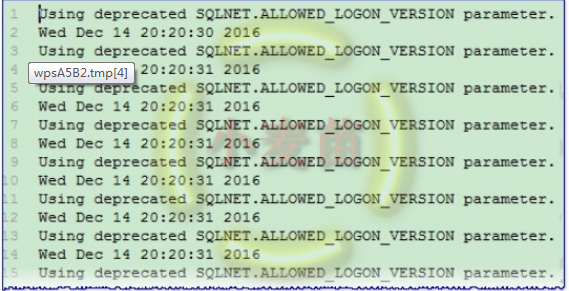
在Oracle 12c中,虽然在sqlnet.ora加SQLNET.ALLOWED_LOGON_VERSION=8可以解决问题,但由于这个参数在12c已经废弃了,而是用SQLNET.ALLOWED_LOGON_VERSION_CLIENT和SQLNET.ALLOWED_LOGON_VERSION_SERVER代替。如果继续使用该参数,会在告警日志中无穷无尽的报“Using deprecated SQLNET.ALLOWED_LOGON_VERSION parameter.”,如下所示:
===================================================================================================================
Error "ORA-28040: No matching authentication protocol" When Using SQLNET.ALLOWED_LOGON_VERSION (文档 ID 755605.1)
In this Document
| Symptoms |
| Changes |
| Cause |
| Solution |
| References |
APPLIES TO:
JDBC - Version 10.1.0 to 12.1.0.2.0
Information in this document applies to any platform.
SYMPTOMS
When using the property "SQLNET.ALLOWED_LOGON_VERSION=10" set in the file sqlnet.ora on the server side, a 10g JDBC thin driver connecting to this 10g oracle database, fails with following errors:
The Network Adapter could not establish the connection
....
ORA-28040: No matching authentication protocol
.
CHANGES
Configuring SQLNET.ORA on the server side.
CAUSE
BUG 6051243 - ORA-28040: WHEN LISTENER USES SQLNET.ALLOWED_LOGON_VERSION
A 10.2 thin jdbc driver is identifying itself as 8.1.5 client and hence the connection is failing with error ORA-28040: No matching authentication protocol
SOLUTION
To resolve the above issue you may implement any one of the following :-
- Change the entry in sqlnet.ora file on the server machine:
from:
SQLNET.ALLOWED_LOGON_VERSION=10
to:
SQLNET.ALLOWED_LOGON_VERSION=8
OR
- Use the OCI driver instead of the THIN driver. The OCI driver identifies itself correctly as a 10.2 client and thus the connection succeeds.
OR
- If you are using 10.2.0.4 or 10.2.0.5 version of the driver then, you may download Patch:6779501 from My Oracle Support.
OR
- If you are using 10.1.0.5.0 version of the driver then, you may download Patch:6505927 from My Oracle Support.
OR
- Use JDBC 11g THIN driver or later.
Note:
If using Oracle Database 12c, please see:
Home / Database / Oracle Database Online Documentation 12c Release 1 (12.1) / Installing and Upgrading
Database Upgrade Guide
8 Deprecated and Desupported Features for Oracle Database 12c
8.3.5 Deprecation of SQLNET.ALLOWED_LOGON_VERSION Parameter
If you are upgrading a system that did not have a SQLNET.ALLOWED_LOGON_VERSION parameter setting (that is, it was using the default 8), then you might need to set the value of the SQLNET.ALLOWED_LOGON_VERSION_SERVER to 8 in the upgraded Oracle Database 12c server to maintain compatibility with clients on earlier releases. Otherwise, if no setting for SQLNET.ALLOWED_LOGON_VERSION_SERVER (or the deprecated SQLNET.ALLOWED_LOGON_VERSION) parameter is made in the upgraded Oracle Database 12c server, then the new default value becomes 11 in the new Oracle Database 12c.
REFERENCES
BUG:6051243 - ORA-28040: WHEN LISTENER USES SQLNET.ALLOWED_LOGON_VERSION
ORA-28040: No matching authentication protocol的更多相关文章
- 【故障处理】ORA-28040: No matching authentication protocol
[故障处理]ORA-28040: No matching authentication protocol 1.1 BLOG文档结构图 1.2 前言部分 1.2.1 导读和注意事项 各位技术爱好者 ...
- plsql developer连接oracle 12.2报错 ora-28040 No matching authentication protocol
使用plsql连接时,发现报ora-28040 No matching authentication protocol 赶紧查了查MOS,原来在默认情况下Oracle12.2对客户端版本有限制, 解决 ...
- No matching authentication protocol
java 连接oracle数据库: 之前连接公司的oracle数据库没有问题,但客户提供的是oracle12C版本的,连接就报 :No matching authentication protocol ...
- oracle12c ORA-28040: No matching authentication protocol
出错原因:11G客户端连12C数据库服务端会报这个错 解决方案一:CSDN优质解决方案,大家都说可以,然而我这边操作了不行 转自13楼:http://bbs.csdn.net/topics/39066 ...
- Cannot create PoolableConnectionFactory (ORA-28040: No matching authentication protocol
Oracle 12c 如果java报这个错误,用oracle自带的ojdbc6.jar,可以解决这个问题.
- navicat for mysql 链接时报错:1251-Client does not support authentication protocol requested by serve
navicat for mysql 链接时报错:1251-Client does not support authentication protocol requested by serve 解决方法 ...
- MySQL Server8.0版本时出现Client does not support authentication protocol requested by server
MySQL Server8.0版本时出现Client does not support authentication protocol requested by server 解决方法: 1.roo ...
- Navicat连接Mysql报错:Client does not support authentication protocol requested by server;
Navicat连接Mysql报错:Client does not support authentication protocol requested by server: 刚安装Mysql,想用Nav ...
- [转]The NTLM Authentication Protocol and Security Support Provider
本文转自:http://davenport.sourceforge.net/ntlm.html#ntlmHttpAuthentication The NTLM Authentication Proto ...
随机推荐
- CSS笔记1:属性--定位
相对定位是“相对于”元素在文档中的初始位置,而绝对定位是“相对于”最近的已定位祖先元素,如果不存在已定位的祖先元素,那么“相对于”最初的包含块. 元素定位 属性 版本 继承 描述 position c ...
- Android联系人列表实现
演示 汉字转拼音 String pinyingStr = PinyinHelper.getShortPinyin( String.valueOf(charSequence).toLowerCase() ...
- ubuntu12.0.4开启root用户登陆
1.命令:sudo passwd root 为root分配密码,按提示进行设置就好. 2.打开终端,输入以下命令: sudo -s 进入root账户下: cd /etc/lightdm g ...
- Android 底部导航栏实现一 Fragment-replace
[效果](这里下载的软件收费的试用有水印) [推荐]这里推荐一个图标网http://iconfont.cn/.以上图标来自此图标网 [项目结构] [步骤] ①创建布局文件,写底部导航栏 <?xm ...
- 测试系统工程师TSE的职责与培养
测试系统工程师TSE的职责与培养 研发资深顾问 杨学明 如今,国内所有的研发型的公司都有测试部门,无论测试团队大小,都有测试组长,测试经理,测试工程师等头衔,但随着产品和业务的质量要求越来越高,产品的 ...
- Android Handler、Message、MessageQueue和Looper官方说明
Handler官方说明 官方API文档:https://developer.android.google.cn/reference/android/os/Handler Handler允许您发送和处理 ...
- LeetCode题解之Keys and Rooms
1.题目描述 2.问题分析 使用深度优先遍历 3.代码 bool canVisitAllRooms(vector<vector<int>>& rooms) { int ...
- [20181219]script使用小技巧.txt
[20181219]script使用小技巧.txt --//前几天在使用strace时遇到问题,它的输出使用标准错误句柄.--//我在想平时使用sqlplus如果输出字段很多,屏幕看起来一片混乱.-- ...
- innodb二阶段日志提交机制和组提交解析
前些天在查看关于innodb_flush_log_at_trx_commit的官网解释时产生了一些疑问,关于innodb_flush_log_at_trx_commit参数的详细解释参见官网: htt ...
- FAT32格式和NTFS格式区别
NTFS(Windows):支持最大分区2TB,最大文件2TB: FAT16(Windows):支持最大分区2GB,最大文件2GB: FAT32(Windows):支持最大分区128GB,最大文件4G ...