
IIS 使用OpenSSL 生成的自签名证书,然后使用SingalR 客户端访问Https 站点通信
使用SignalR 的客户端去发送消息给使用 https 部署的站点,官方文档目前并没有详细的教程,所以在此记录下步骤:
使用管理员身份打开cmd 窗口,选择一个整数保存文件夹的地址,切换到对应的文件夹,然后执行以下步骤:
(一) 生成证书文件
1. openssl genrsa -out test.key 1024

2. openssl req -new -x509 -key test.key -out test.cer -days 365 -subj /CN=10.158.229.20
注:CN=xxx 这里可以填写部署网站的域名或者IP地址

3. openssl pkcs12 -export -out test.pfx -inkey test.key -in test.cer
注:生成了私钥文件 test.pfx, 这一步需要输入密码,密码会在导入IIS的时候使用

在以上步骤完成之后,生成如下几个文件, test.cer, test.key, test.pfx:

4. 添加到证书管理的可信任证书节点中区,这一步非常重要,如果不添加,就会导致SignalR无法正常访问
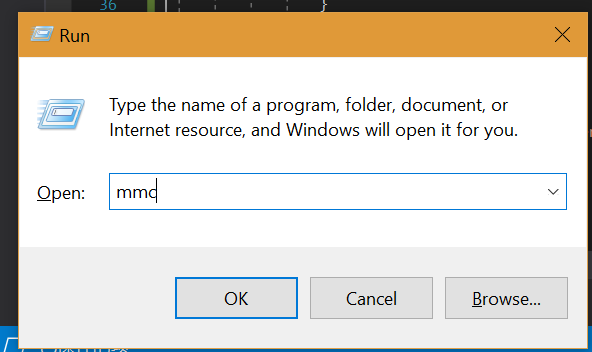
4.1. 运行-->输入mmc
4.2. File 中打开证书管理器

4.3. 在可信任根证书的节点右键导入证书
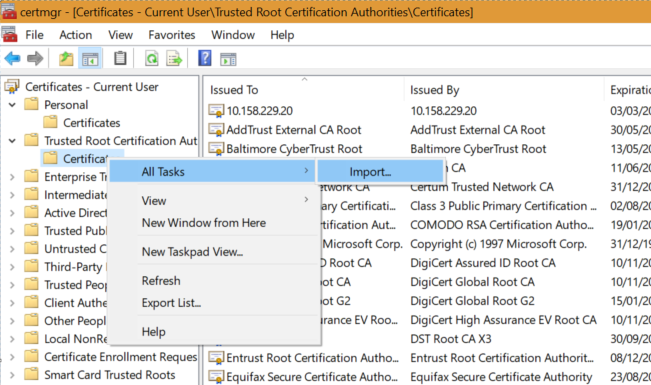
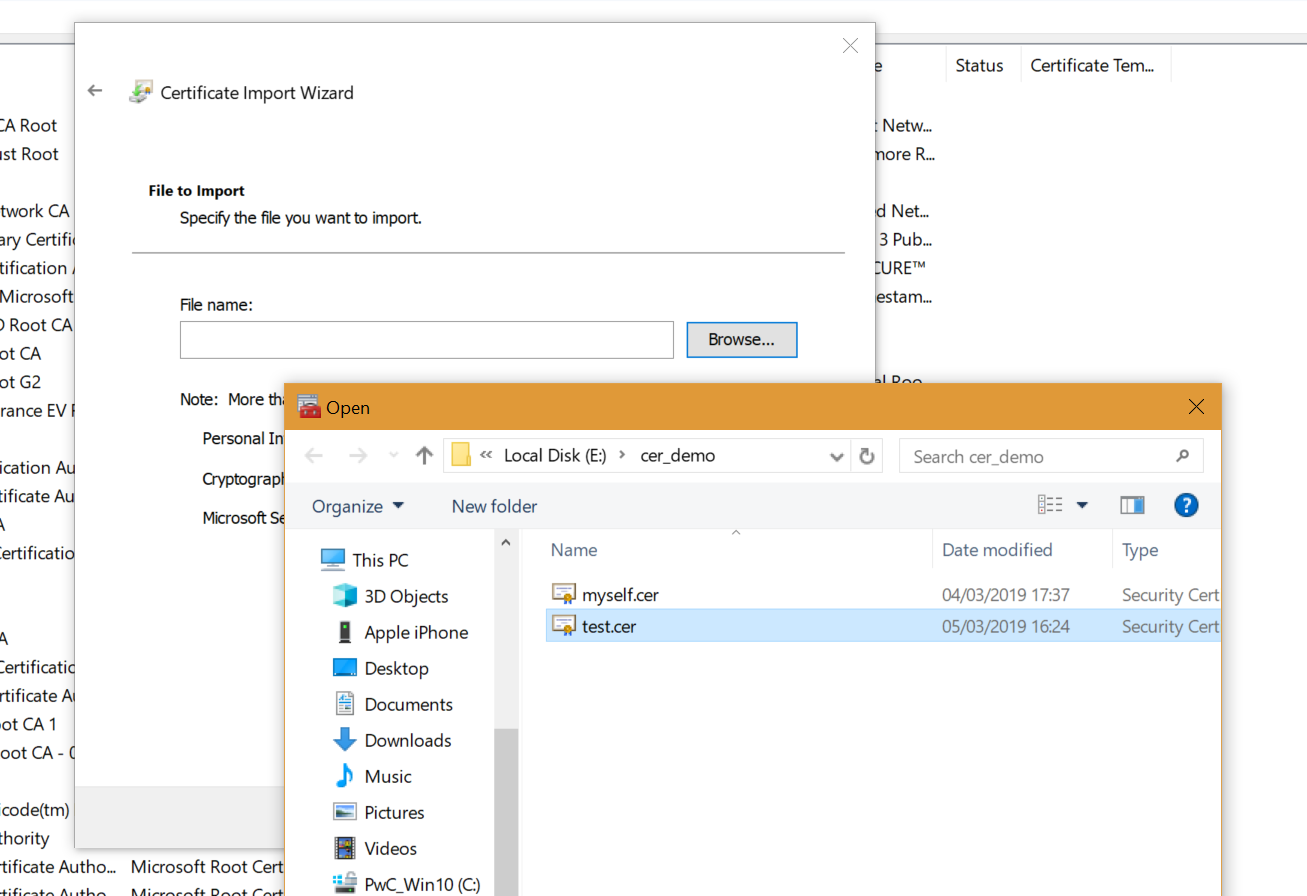
以上工作便完成了证书的创建和添加
(二)接下来开始部署IIS 站点:
1. 在IIS 管理其中选择 服务端证书
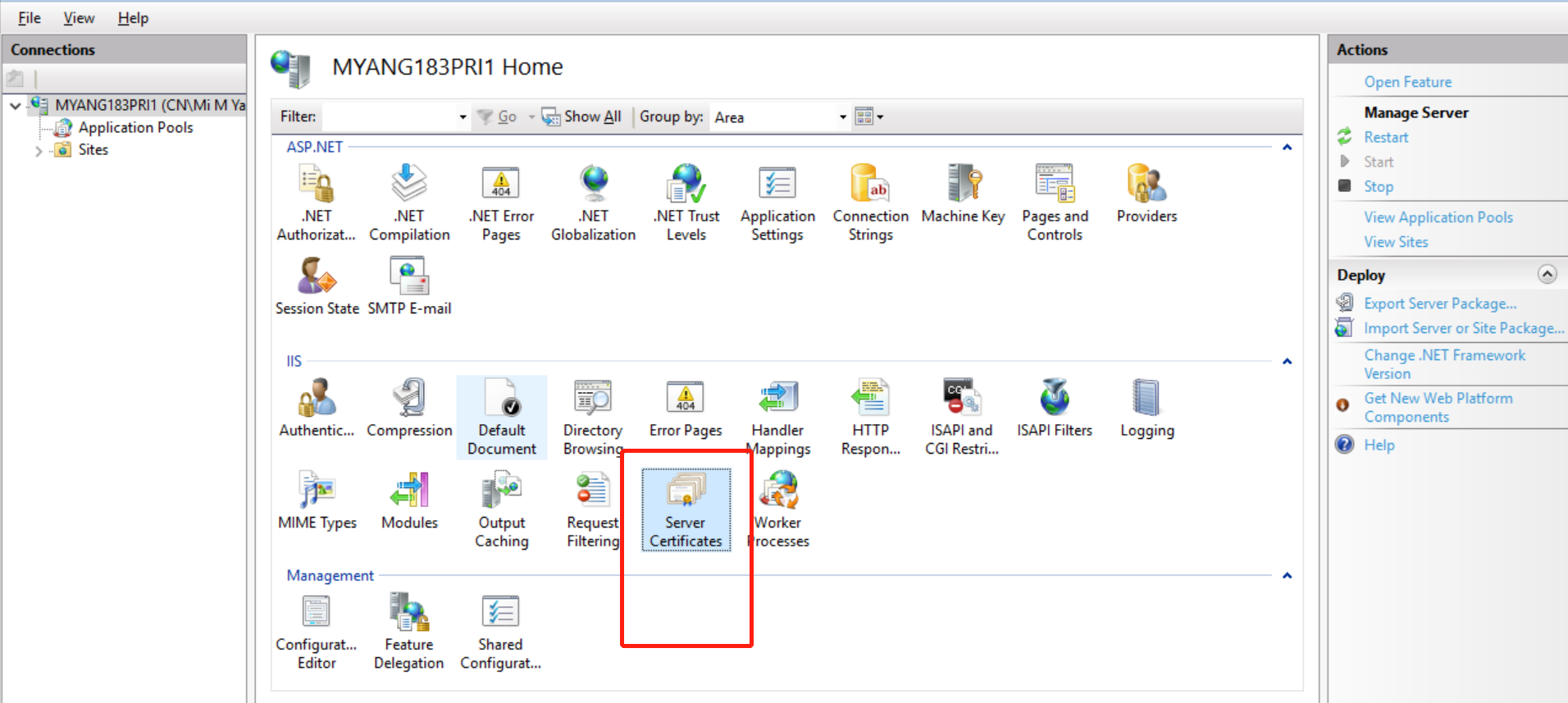
2. 选择导入,找到对应的 .pfx 证书,输入密码后,确认导入
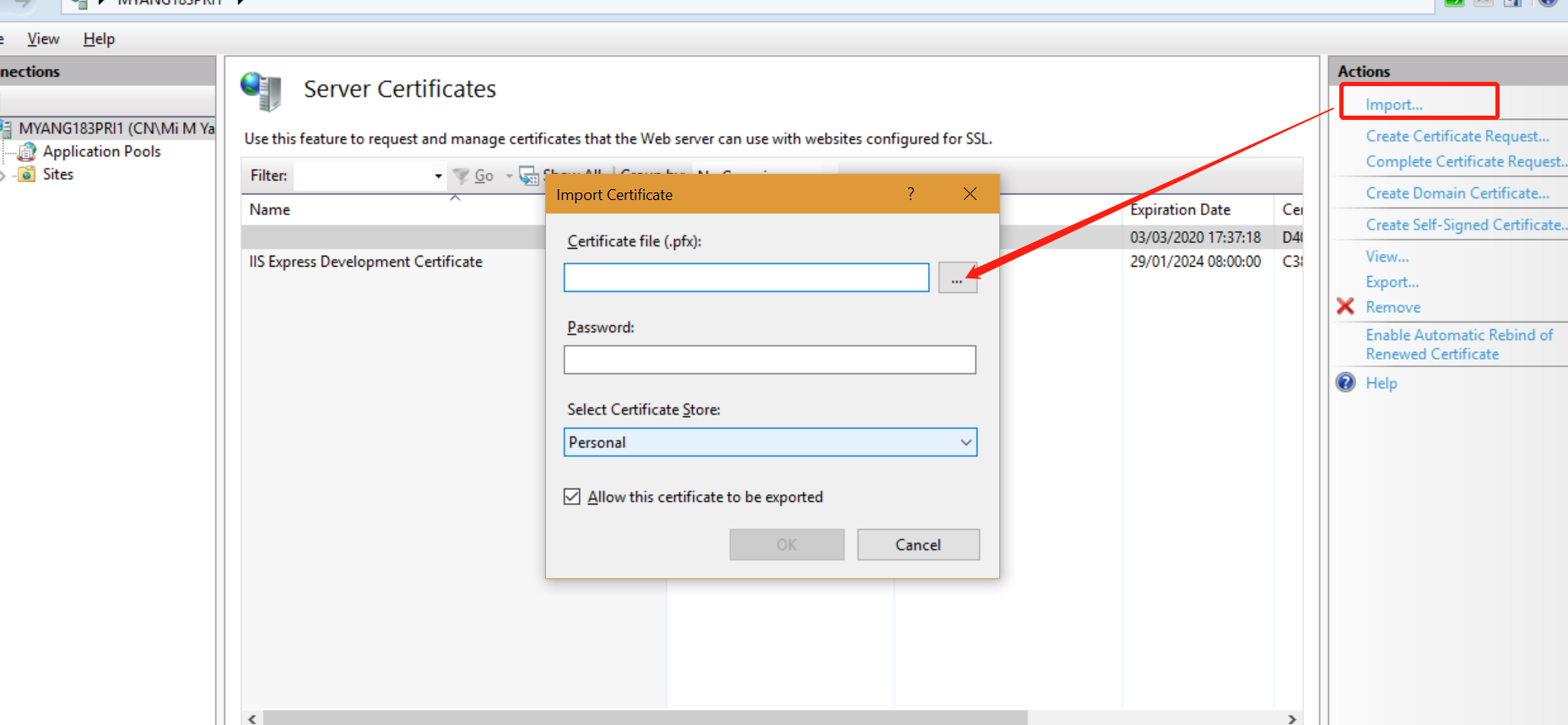
3. 在自己的站点绑定对应的 SSL 证书

完成以上工作后,一个https 站点就已经完成
测试Demo:
客户端:
 using Microsoft.AspNet.SignalR.Client;

 using System;

 using System.Collections.Generic;

 using System.Linq;

 using System.Security.Cryptography.X509Certificates;

 using System.Text;

 using System.Threading.Tasks;

 namespace SignalR_cli

 {

     class Program

     {

         static HubConnection hubConnection = null;

         static IHubProxy proxy = null;

         static void Main(string[] args)

         {

             //这里连接使用OpenSSL 生成的证书部署的 https 站点

             hubConnection = new HubConnection("https://10.158.229.20:443/");

             //var hubConnection = new HubConnection("http://10.158.229.20:8081/");

             //请求的时候一定带上对应站点部署的证书

             hubConnection.AddClientCertificate(X509Certificate.CreateFromSignedFile(@"E:\cer_demo\myself.cer"));

             proxy = hubConnection.CreateHubProxy("ChatHub");

             hubConnection.Start();

             Console.WriteLine((int)hubConnection.State);

             while (true)

             {

                 try

                 {

                     Console.WriteLine("Input:");

                     var msg = Console.ReadLine();

                     Go(msg);//异步发送消息就好了

                 }

                 catch (Exception e)

                 {

                     Console.WriteLine(e.Message);

                 }

             }

         }

         static async Task Go(string msg)

         {

             await proxy.Invoke("Send", "userCenter", msg);

         }

     }

 }
服务端:参考的官方文档
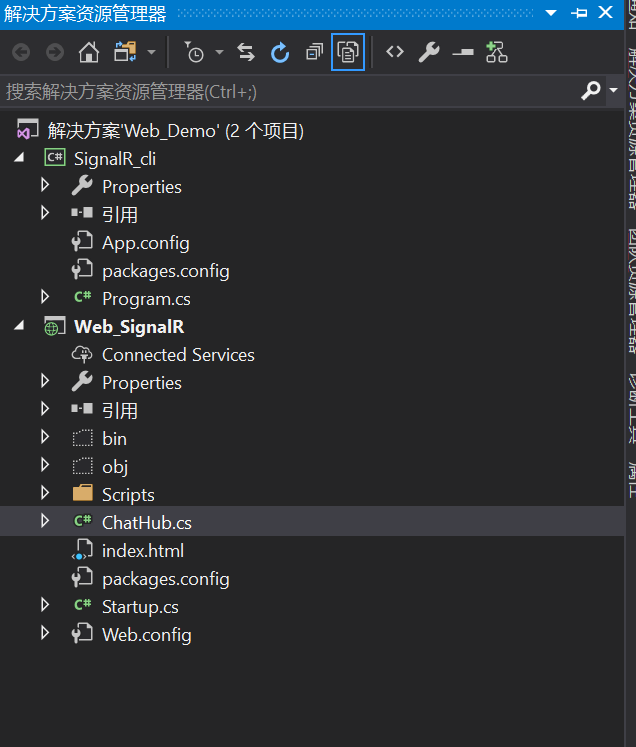
 using System;

 using System.Collections.Generic;

 using System.Linq;

 using System.Web;

 using Microsoft.AspNet.SignalR;

 namespace Web_SignalR

 {

     public class ChatHub : Hub

     {

         public void Send(string name, string message)

         {

             Clients.All.broadcastMessage(name, message);

         }

     }

 }
 using System;

 using System.Threading.Tasks;

 using Microsoft.Owin;

 using Owin;

 [assembly: OwinStartup(typeof(Web_SignalR.Startup))]

 namespace Web_SignalR

 {

     public class Startup

     {

         public void Configuration(IAppBuilder app)

         {

             // 有关如何配置应用程序的详细信息,请访问 https://go.microsoft.com/fwlink/?LinkID=316888

             app.MapSignalR();

         }

     }

 }
<!DOCTYPE html>
<html>
<head>
<title>SignalR Simple Chat</title>
<style type="text/css">
.container {
background-color: #99CCFF;
border: thick solid #;
padding: 20px;
margin: 20px;
}
</style>
</head>
<body>
<div class="container">
<input type="text" id="message" />
<input type="button" id="sendmessage" value="Send" />
<input type="hidden" id="displayname" />
<ul id="discussion"></ul>
</div>
<!--Script references. -->
<!--Reference the jQuery library. -->
<script src="Scripts/jquery-3.3.1.min.js"></script>
<!--Reference the SignalR library. -->
<script src="Scripts/jquery.signalR-2.2.2.min.js"></script>
<!--Reference the autogenerated SignalR hub script. -->
<script src="signalr/hubs"></script>
<!--Add script to update the page and send messages.-->
<script type="text/javascript">
$(function () {
// Declare a proxy to reference the hub.
var chat = $.connection.chatHub;
// Create a function that the hub can call to broadcast messages.
chat.client.broadcastMessage = function (name, message) {
// Html encode display name and message.
var encodedName = $('<div />').text(name).html();
var encodedMsg = $('<div />').text(message).html();
// Add the message to the page.
$('#discussion').append('<li><strong>' + encodedName
+ '</strong>: ' + encodedMsg + '</li>');
};
// Get the user name and store it to prepend to messages.
$('#displayname').val("test");
// Set initial focus to message input box.
$('#message').focus();
// Start the connection.
$.connection.hub.start().done(function () {
$('#sendmessage').click(function () {
// Call the Send method on the hub.
chat.server.send($('#displayname').val(), $('#message').val());
// Clear text box and reset focus for next comment.
$('#message').val('').focus();
});
});
});
</script>
</body>
</html>
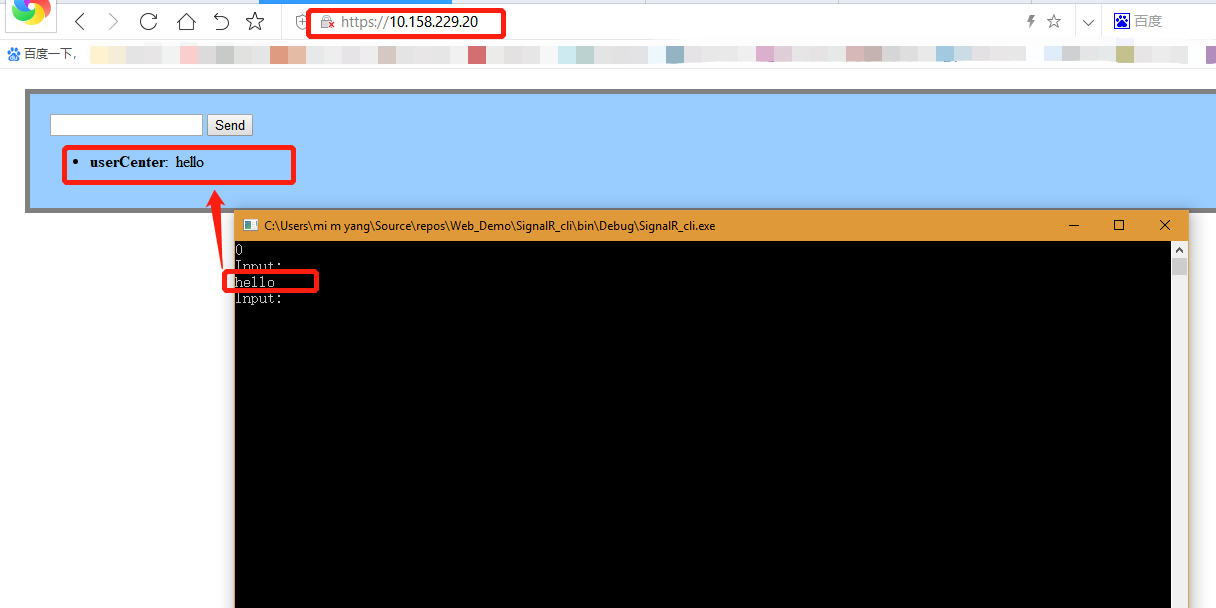
效果演示:
IIS 使用OpenSSL 生成的自签名证书,然后使用SingalR 客户端访问Https 站点通信的更多相关文章
- linux下使用openssl生成 csr crt CA证书
证书文件生成:一.服务器端1.生成服务器端 私钥(key文件);openssl genrsa -des3 -out server.key 1024运行时会提示输入密码,此密码用于加密key文件( ...
- 【Azure 环境】把OpenSSL生产的自签名证书导入到Azure Key Vault Certificate中报错
问题描述 通过本地生成的自签名证书导入到Azure Key Vault Certificate报错. 错误信息 the specified PEM X.509 certificate content ...
- curl+个人证书(又叫客户端证书)访问https站点
摘自http://blog.csdn.net/chary8088/article/details/22990741 curl+个人证书(又叫客户端证书)访问https站点 目前,大公司的OA管理系统( ...
- 用Keytool和OpenSSL生成和签发数字证书
一)keytool生成私钥文件(.key)和签名请求文件(.csr),openssl签发数字证书 J2SDK在目录%JAVA_HOME%/bin提供了密钥库管理工具Keytool,用于管理密 ...
- OPENSSL生成SSL自签证书
OPENSSL生成SSL自签证书 目前,有许多重要的公网可以访问的网站系统(如网银系统)都在使用自签SSL证书,即自建PKI系统颁发的SSL证书,而不是部署支持浏览器的SSL证书. 支持浏览器的SSL ...
- centos7.6使用openssl生成CA签署的证书个人实验笔记
准备:客户端centos6.10 服务端Centos7.6 实验:客户端生成证书请求,服务端颁发证书,最后吊销其中一个证书 1.先在服务端上的/etc/pki/CA/目录生成rsa的私钥: 2.在服 ...
- 一键生成ssl自签名证书脚本
#!/bin/bash -e # * 为必改项 # * 更换为你自己的域名 CN='' # 例如: demo.rancher.com # 扩展信任IP或域名 ## 一般ssl证书只信任域名的访问请求, ...
- C#检测并安装https站点的数字证书,CefSharp和HttpWebRequest通过会话Cookie实现自动登录访问https站点
HttpUtil工具类: using System; using System.Collections.Generic; using System.IO; using System.Linq; usi ...
- requests访问https站点证书告警问题
背景 想使用api的方式去访问公司内部azkaban平台,https站点,azkaban的官方api文档使用的curl语句,如下: curl -k -X POST --data "actio ...
随机推荐
- 高性能Mysql笔记 — 索引
index优化 对于频繁作为查询条件的字段使用索引 注意索引字段类型的隐式转换,数据库类型和应用类型要一致 索引的种类 唯一索引,成为索引的列不能重复 单列索引,一个索引只包含一列 单列前缀索引,有些 ...
- spark之scala程序开发(集群运行模式):单词出现次数统计
准备工作: 将运行Scala-Eclipse的机器节点(CloudDeskTop)内存调整至4G,因为需要在该节点上跑本地(local)Spark程序,本地Spark程序会启动Worker进程耗用大量 ...
- HDUOJ-2089 不要62
Problem Description 杭州人称那些傻乎乎粘嗒嗒的人为62(音:laoer). 杭州交通管理局经常会扩充一些的士车牌照,新近出来一个好消息,以后上牌照,不再含有不吉利的数字了,这样一来 ...
- 【转载】阿里云ECS服务器监控资源使用情况
在阿里云Ecs服务器运维过程中,无论是Centos系统还是Windows系统,有时候我们需要监控分析最新的服务器资源利用率等运行情况,例如最近3个小时CPU使用率情况.内存使用率.网络流入带宽.网络流 ...
- 阿里云redis映射到阿里云服务器
参考文档:https://help.aliyun.com/document_detail/43850.html?spm=a2c4g.11186623.2.3.7yg9VH ECS Windows 篇 ...
- OAuth2.0 授权码理解
OAuth2.0授权模式 本篇文章介绍OAuth的经典授权模式,授权码模式 所谓授权无非就是授权与被授权,被授权方通过请求得到授权方的同意,并赋予某用权力,这个过程就是授权. 那作为授权码 ...
- 菜鸟入门【ASP.NET Core】14:MVC开发:UI、 EF + Identity实现、注册实现、登陆实现
前言 之前我们进行了MVC的web页面的Cookie-based认证实现,接下来的开发我们要基于之前的MvcCookieAuthSample项目做修改. MvcCookieAuthSample项目地址 ...
- 4:Python的while循环
while循环: while count<10: print(count) #count=100 count=count+1 print(123) while循环break:终止所有循环 cou ...
- git 拉取分支代码 合分支
git config --global user.name"yourName" //用户名 yourName git config --global user.email" ...
- Oracle11g: simple sql script examples
---https://docs.oracle.com/cd/B19306_01/server.102/b14200/statements_8003.htm drop user geovin; drop ...