
Python Numpy-基础教程
1. 为什么要学习numpy?
- numpy可以对整个array进行复杂计算,而不需要像list一样写loop
- 它的
ndarray提供了快速的基于array的数值运算 - memory-efficient container that provides fast numerical operations
- 学习pandas的必备
证明numpy比list优秀:
import numpy as np

my_arr = np.arange(1000000)

my_list = list(range(1000000))

%time for _ in range(10): my_arr2 = my_arr * 2                  # Wall time: 25 ms

%time for _ in range(10): my_list2 = [x * 2 for x in my_list]   # Wall time: 933 ms
2. Numpy基本用法
2.1. 创建np.ndarry
注意: numpy只能装同类型的数据
# Method 1: np.array()

## 1-D

a = np.array([1,2,3])

a.shape

a.dtype  # int32, boolean, string, float

a.ndim

## 2-D

a = np.array([[0,1,2],[3,4,5]])

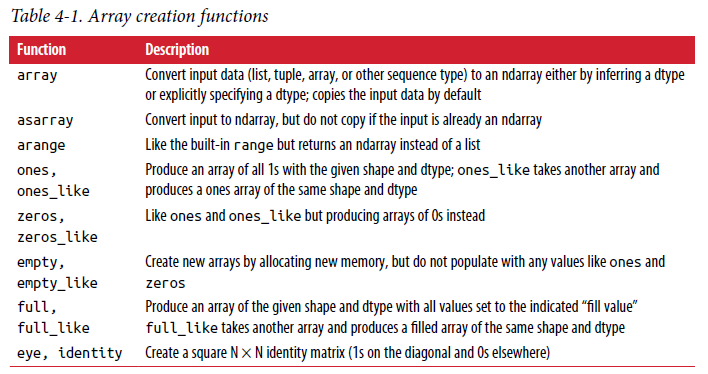
# Method 2:使用函数(arange, linspace, ones, zeros, eys, diag,random)创建

a = np.arange(10)

a = np.linspace(0,1,6, endpoint=False)

a = np.ones((3,3))

a = np.zeros((3,3))

a = np.eye(3)

a = np.diag(np.array([1,2,3,4]))

a = np.triu(np.ones((3,3)),1)

# Method 3: Random values

a = np.random.rand(4)   # unifomr in [0,1]

a = np.random.randn(4) # Gaussian

np.random.seed(1234)
2.2. Indexing and Slicing
- Slice create a view on the original array(change will affect original array)
# 1-D

a = np.arange(10)

a[5], a[-1]    # Index: 4,9

a[5:8] = 12    # Slice: all 5-8 is set as 12

arr[5:8].copy()   # Slice without view

# 2-D

a = np.ones((3,3))

a[2]           # second row

a[2].copy()    # slice without view

a[0][2]        # special value

a[:2]

a[:2, 1:] = 0
Boolean Index
names = np.array(['Bob', 'Joe', 'Will', 'Bob', 'Will', 'Joe', 'Joe'])

data = np.random.randn(7, 4)

data[names == 'Bob']  # select a row from data based on the if names equals Bob(boolean value)

data[~(names == 'Bob')]    # not equal to Bob

data[(names == 'Bob') | (names == 'Will')]    #e qual to Bob and Will

data[data<0] = 0
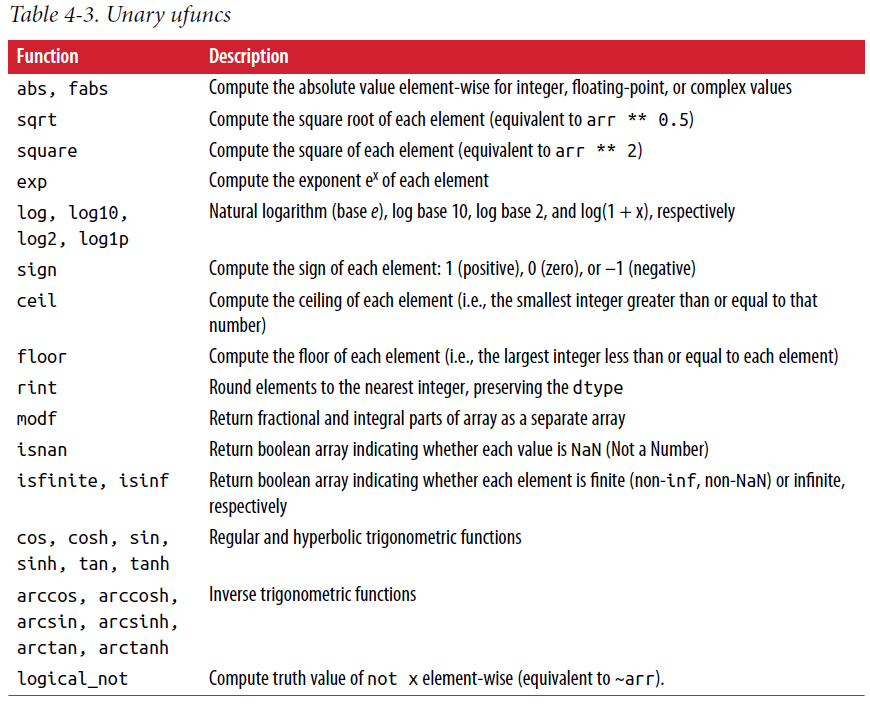
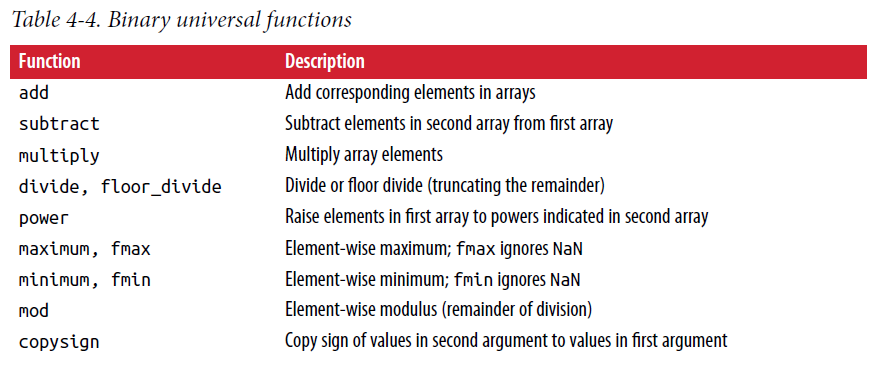
2.3. Universal Functions
a function that performs element-wise operations on data in ndarrays
a = np.arange(10)

b = np.arange(2,12)

# single

a + 1

a*2

np.sqrt(a)

np.exp(a)

np.sin(a)

# binary

a>b                     # return boolean ndarray

np.array_equal(a,b)     # eual?

np.maximum(a, b)        # find max value between each pair values

np.logical_or(a,b)      # Attentions, a and b must be boolean array
2.4. Array-oriented
- Probelm 1
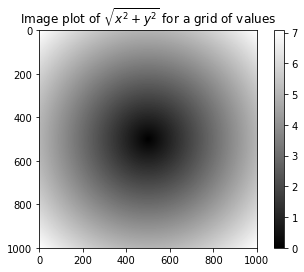
we wished to evaluate the function `sqrt(x^2 + y^2)`` across a regular grid of values.
The np.meshgrid function takes two 1D arrays and produces two 2D matrices corresponding to all pairs of (x, y) in the two arrays:
points = np.arange(-5, 5, 0.01) # 1000 equally spaced points

xs, ys = np.meshgrid(points, points)

z = np.sqrt(xs ** 2 + ys ** 2)

import matplotlib.pyplot as plt

%matplotlib inline

plt.imshow(z, cmap=plt.cm.gray); plt.colorbar()

plt.title("Image plot of $\sqrt{x^2 + y^2}$ for a grid of values")
- Problem 2
we have two array(x,y) and one boolean array, we want select x if boolean=True, while select y if boolean=False->np.where()
xarr = np.array([1.1, 1.2, 1.3, 1.4, 1.5])

yarr = np.array([2.1, 2.2, 2.3, 2.4, 2.5])

cond = np.array([True, False, True, True, False])

result = np.where(cond, xarr, yarr)        # array([1.1, 2.2, 1.3, 1.4, 2.5])
np.where的后面两个参数可以是array,数字. 是数字的话就可以做替换工作,比如我们将随机生成的array中大于0的替换为2,小于0的替换为-2
arr = np.random.randn(4, 4)

np.where(arr > 0, 2, -2)     # 大于0改为2,小于0改为-2

np.where(arr > 0, 2, arr)    # 大于0改为2,小于0不变
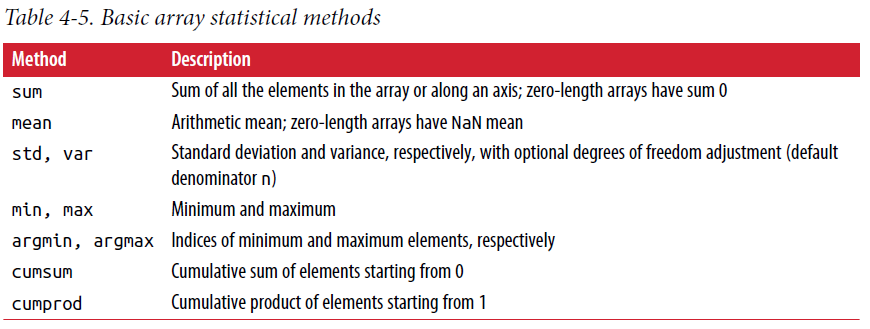
2.5. Mathematical Operations
a = np.random.randn(5, 4)

np.mean(a)

np.mean(a, axis = 1)

np.sum(a)

a.consum()

a.sort()

a.argmax()  # index of maxium

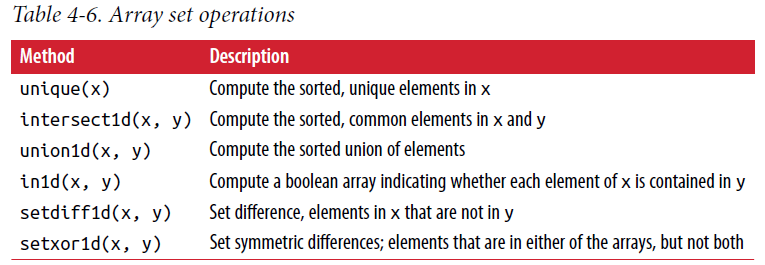
names = np.array(['Bob', 'Joe', 'Will', 'Bob', 'Will', 'Joe', 'Joe'])

np.unique(names)

sorted(set(names))
Python Numpy-基础教程的更多相关文章
- Python Numpy基础教程
Python Numpy基础教程 本文是一个关于Python numpy的基础学习教程,其中,Python版本为Python 3.x 什么是Numpy Numpy = Numerical + Pyth ...
- Python数据分析基础教程
Python数据分析基础教程(第2版)(高清版)PDF 百度网盘 链接:https://pan.baidu.com/s/1_FsReTBCaL_PzKhM0o6l0g 提取码:nkhw 复制这段内容后 ...
- Python机器学习基础教程-第2章-监督学习之决策树集成
前言 本系列教程基本就是摘抄<Python机器学习基础教程>中的例子内容. 为了便于跟踪和学习,本系列教程在Github上提供了jupyter notebook 版本: Github仓库: ...
- Python机器学习基础教程-第2章-监督学习之决策树
前言 本系列教程基本就是摘抄<Python机器学习基础教程>中的例子内容. 为了便于跟踪和学习,本系列教程在Github上提供了jupyter notebook 版本: Github仓库: ...
- Python机器学习基础教程-第2章-监督学习之线性模型
前言 本系列教程基本就是摘抄<Python机器学习基础教程>中的例子内容. 为了便于跟踪和学习,本系列教程在Github上提供了jupyter notebook 版本: Github仓库: ...
- Python机器学习基础教程-第2章-监督学习之K近邻
前言 本系列教程基本就是摘抄<Python机器学习基础教程>中的例子内容. 为了便于跟踪和学习,本系列教程在Github上提供了jupyter notebook 版本: Github仓库: ...
- Python机器学习基础教程-第1章-鸢尾花的例子KNN
前言 本系列教程基本就是摘抄<Python机器学习基础教程>中的例子内容. 为了便于跟踪和学习,本系列教程在Github上提供了jupyter notebook 版本: Github仓库: ...
- 小白必看Python视频基础教程
Python的排名从去年开始就借助人工智能持续上升,现在它已经成为了第一名.Python的火热,也带动了工程师们的就业热.可能你也想通过学习加入这个炙手可热的行业,可以看看Python视频基础教程,小 ...
- Python机器学习基础教程
介绍 本系列教程基本就是搬运<Python机器学习基础教程>里面的实例. Github仓库 使用 jupyternote book 是一个很好的快速构建代码的选择,本系列教程都能在我的Gi ...
- Python 3基础教程1-环境安装和运行环境
本系列开始介绍Python3的基础教程,为什么要选中Python 3呢?之前呢,学Python 2,看过笨方法学Python,学了不到一个礼拜,就开始用Python写Selenium脚本.最近看到一些 ...
随机推荐
- iOS -数据持久化方式-以真实项目讲解
前面已经讲解了SQLite,FMDB以及CoreData的基本操作和代码讲解(CoreData也在不断学习中,上篇博客也会不断更新中).本篇我们将讲述在实际开发中,所使用的iOS数据持久化的方式以及怎 ...
- flex属性
一.flex属性的归纳 flex-direction flex-wrap flex-flow justify-content align-items align-content 1.1 flex-di ...
- SpringBoot简介
Spring Boot,简单讲就是牺牲项目的自由度来减少配置的复杂度(“契约式编程”思想,SpringBoot自动配置方案的指导思想).约定一套规则,把这些框架都自动配置集成好,从而达到“开箱即用”. ...
- Netty 系列五(单元测试).
一.概述和原理 Netty 的单元测试,主要是对业务逻辑的 ChannelHandler 做测试(毕竟对 Bootstrap.EventLoop 这些做测试着实没有多大意义),模拟一次入站数据或者出站 ...
- WPF Modern UI 主题更换原理
WPF Modern UI 主题更换原理 一 . 如何更换主题? 二 . 代码分析 代码路径 : FirstFloor.ModernUI.App / Content / SettingsAppeara ...
- js判断当前内容是否为空
function isValue(o) { return (this.isObject(o) || this.isString(o) || this.isNumber(o) || this.isBoo ...
- 人工智能改进传统云ERP的10种方法
http://blog.itpub.net/31542119/viewspace-2168809/ 随着数字化转型的进程加快,企业开始重新评估ERP的作用.传统ERP经过多年僵硬化定制过于追求生产的一 ...
- 7.Odoo产品分析 (二) – 商业板块(3) –CRM(1)
查看Odoo产品分析系列--目录 CMR:Customer Relationship Management.企业为提高核心竞争力,利用相应的信息技术以及互联网技术协调企业与顾客间在销售.营销和服务上的 ...
- ACL技术总结
1.ACL的全称是访问控制列表,本质上是定义一组策略,以便指导报文在交换机内部的转发行为. 2.要配置策略,首先要明确ACL应用的对象,可以是针对端口,也可以是针对特殊的一条流. 针对端口,就是指端口 ...
- Android为TV端助力 最详细的动画大全,包括如何在代码和在XML中使用
一.动画类型 Android的animation由四种类型组成:alpha.scale.translate.rotate XML配置文件中 alpha 渐变透明度动画效果 scale 渐变尺寸伸缩动画 ...