
Android Studio下HierarchyViewer的使用
什么是HierarchyViewer
Hierarchy Viewer是随AndroidSDK发布的工具,位置在tools文件夹下,名为hierarchyviewer.bat。它是Android自带的非常有用而且使用简单的工具,可以帮助我们更好地检视和设计用户界面(UI),绝对是UI检视的利器,下面来详细介绍如何在Android Studio开发环境下使用Hierarchy Viewer。
如何在Android Studio开发环境下使用HierarchyViewer
1.启动模拟器,通过模拟器运行你的应用
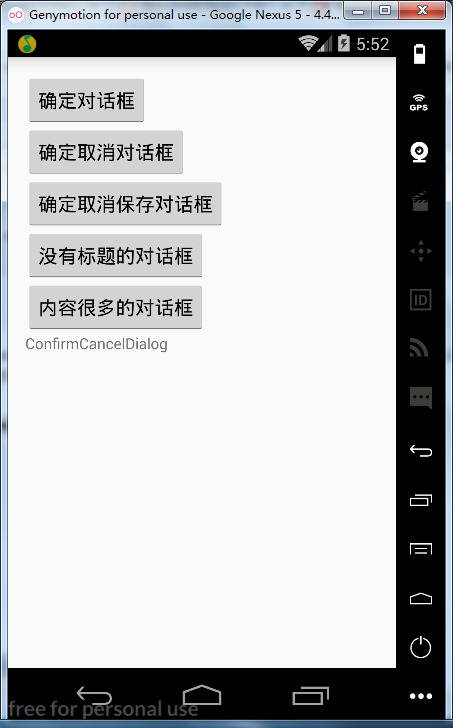
<?xml version="1.0" encoding="utf-8"?>

<LinearLayout

    xmlns:android="http://schemas.android.com/apk/res/android"

    xmlns:tools="http://schemas.android.com/tools"

    android:id="@+id/activity_main"

    android:layout_width="match_parent"

    android:layout_height="match_parent"

    android:paddingBottom="@dimen/activity_vertical_margin"

    android:paddingLeft="@dimen/activity_horizontal_margin"

    android:paddingRight="@dimen/activity_horizontal_margin"

    android:paddingTop="@dimen/activity_vertical_margin"

    android:orientation="vertical"

    tools:context="com.why.project.confirmcanceldialogdemo.MainActivity">

    <Button

        android:id="@+id/btn_confirm"

        android:layout_width="wrap_content"

        android:layout_height="wrap_content"

        android:text="确定对话框"/>

    <Button

        android:id="@+id/btn_confirmcancel"

        android:layout_width="wrap_content"

        android:layout_height="wrap_content"

        android:text="确定取消对话框"/>

    <Button

        android:id="@+id/btn_confirmcancelbetween"

        android:layout_width="wrap_content"

        android:layout_height="wrap_content"

        android:text="确定取消保存对话框"/>

    <Button

        android:id="@+id/btn_notitle"

        android:layout_width="wrap_content"

        android:layout_height="wrap_content"

        android:text="没有标题的对话框"/>

    <Button

        android:id="@+id/btn_message"

        android:layout_width="wrap_content"

        android:layout_height="wrap_content"

        android:text="内容很多的对话框"/>

    <TextView

        android:layout_width="wrap_content"

        android:layout_height="wrap_content"

        android:text="ConfirmCancelDialog" />

</LinearLayout>
2.打开Android Device Monitor
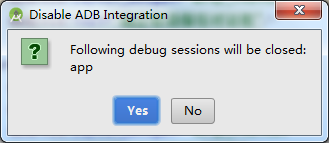
APP先运行起来再使用Android Device Monitor
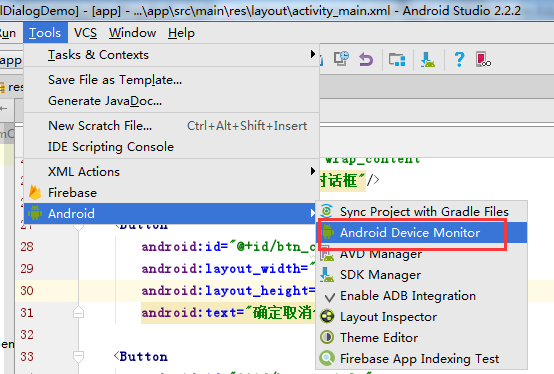
依次点击菜单Tools>Android>Android Device Monitor,如下图:
3.进入Android Device Monitor界面,打开HierarchyViewer
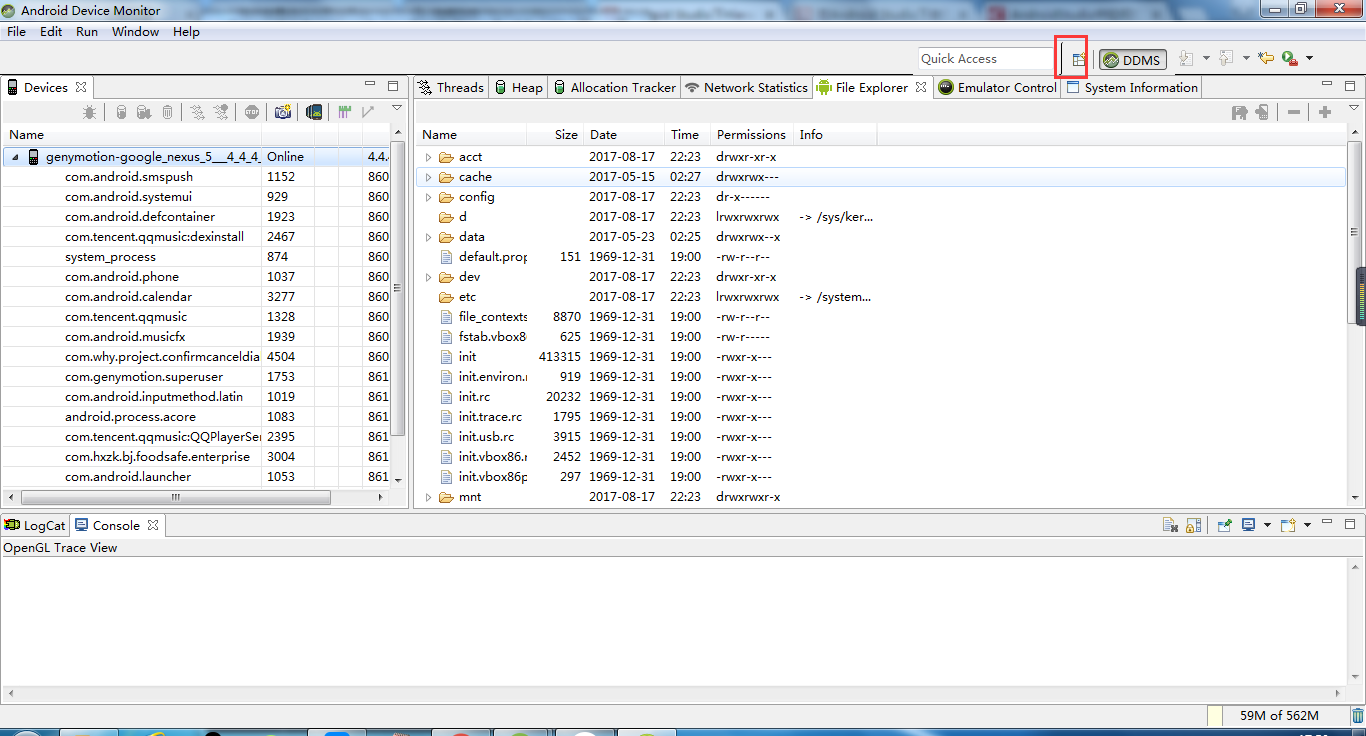
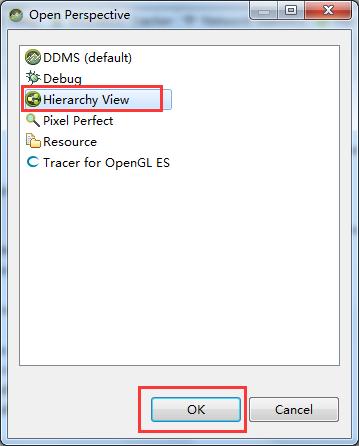
4.加载出当前Activity的节点,可选中进行分析
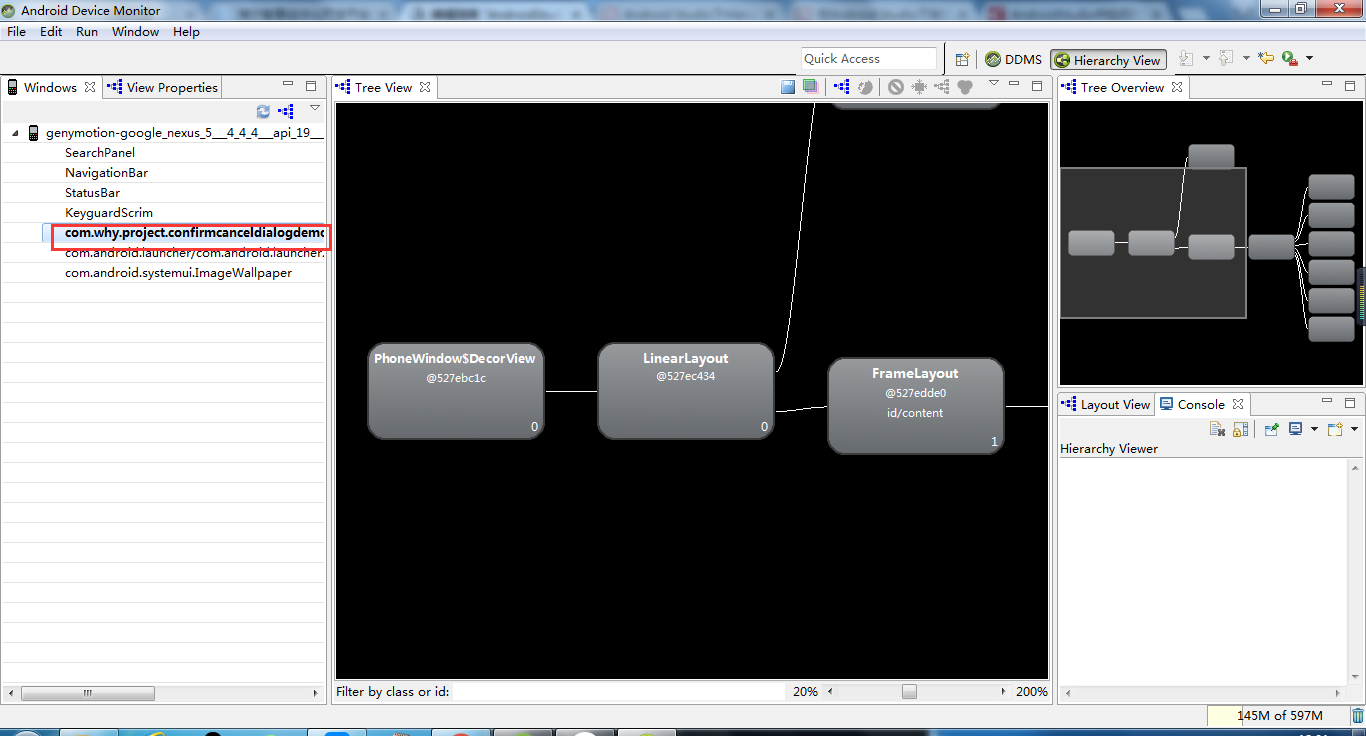
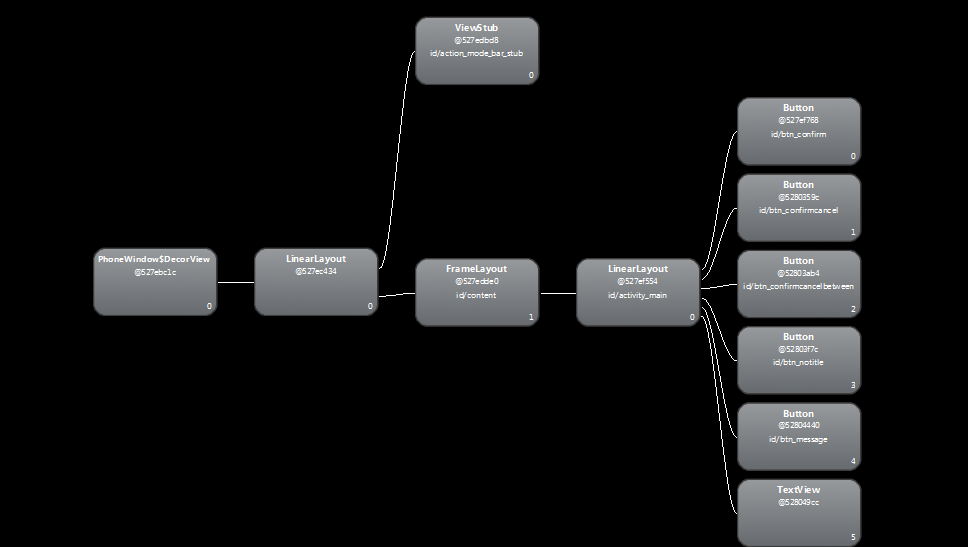
附录1 将Tree View保存成图片
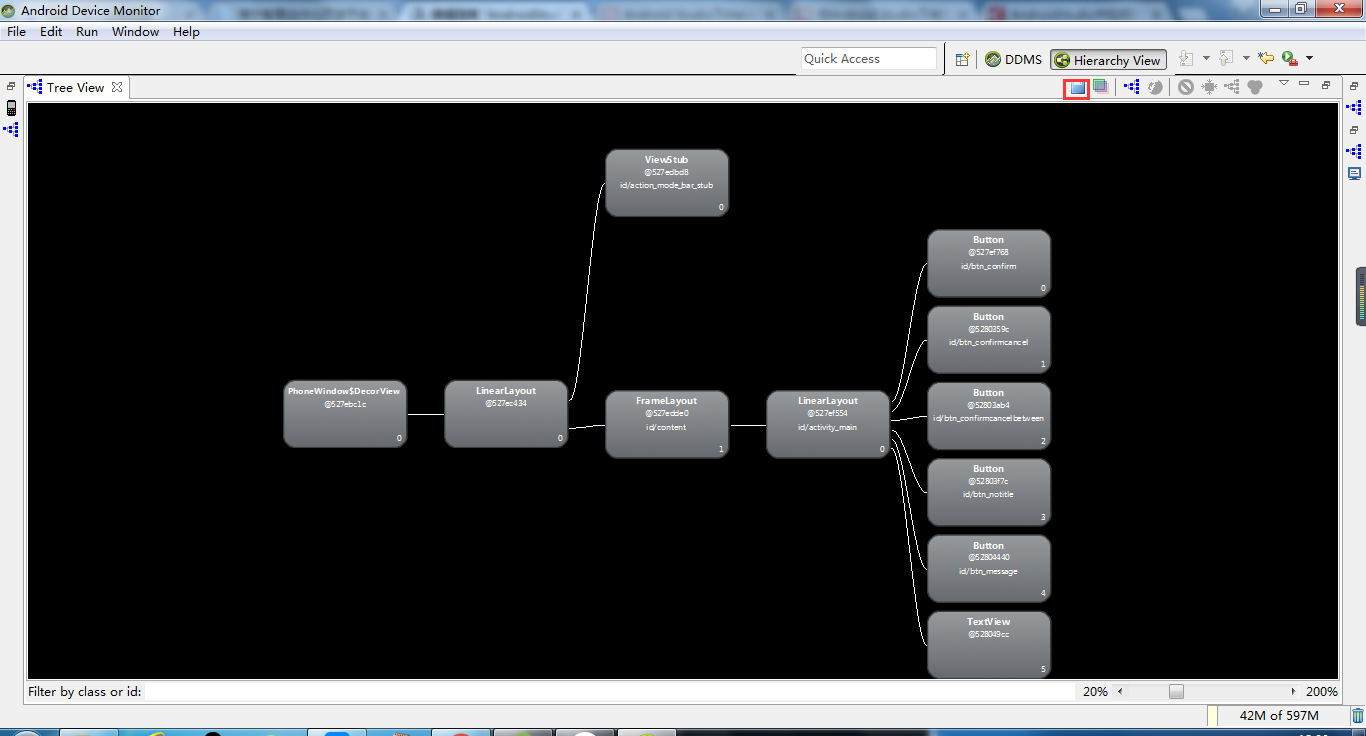
附录2 显示每个View节点的性能指标(颜色点)以及Measure、Layout、Draw的耗时的耗时
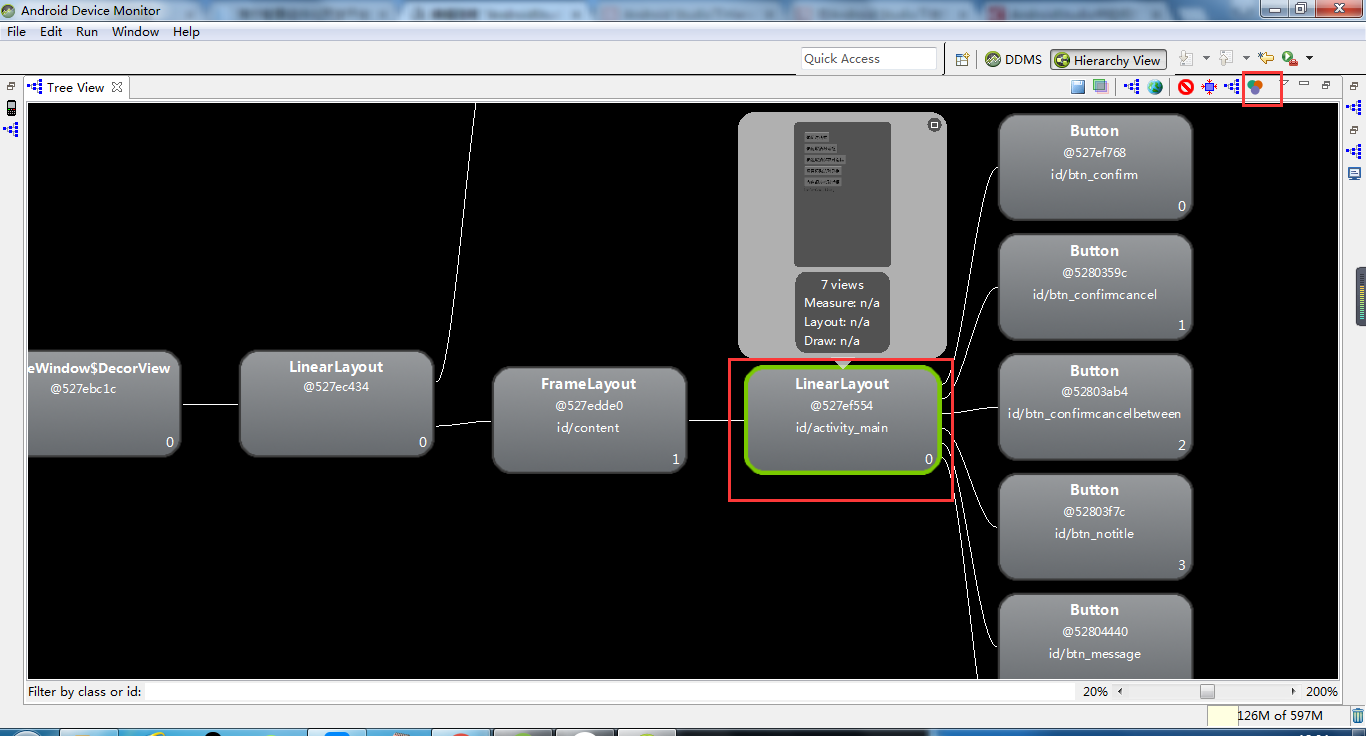

参考资料:
Android Studio下HierarchyViewer的使用
在Android Studio下使用Hierarchy Viewer
AndroidStudio中如何打开hierarchyviewer
Android Studio下HierarchyViewer的使用的更多相关文章
- Android studio下gradle Robolectric单元测试配置
android studio下gradle Robolectric单元测试配置 1.Robolectric Robolectric是一个基于junit之上的单元测试框架.它并不依赖于Android提供 ...
- Android studio 下JNI编程实例并生成so库
Android studio 下JNI编程实例并生成so库 因为公司需要为Android相机做美颜等图像后期处理,需要使用JNI编程,最近学了下JNI,并且在Android Studio下实现了一个小 ...
- Android Studio下打jar包
在我们使用Eclipse时,我们常常使用的第三方类库文件大多都是jar包形式,用起来很方便.但是jar包只能打包class文件,对于Android UI类库而言,我们常常需要打包资源文件,对于界面不多 ...
- Android Studio下导出jar包和aar包
Android Studio下导出jar包和aar包 jar包和aar包的区别 步骤 1. 创建Android工程 创建工程比较简单,不错复述 2. 创建一个Library(Module) 创建了一个 ...
- Android Studio下多渠道打包
Android Studio下实现多渠道打包 直接上步骤 步骤 1. 清单文件添加属性(以友盟统计为例) 在application标签下添加meta-data属性 <application -- ...
- Android Studio下使用NDK的流程
我要重新拿回持之以恒徽章!! 老规矩,先说看能学会什么:ANDROID STUDIO下NDK的使用方法.JNI的基本使用方法,C语言调用JAVA的方法. 首先要下载NDK,如果你没有VPN可以来htt ...
- Android studio 下 JNI 开发实例
在AS中进行 NDK 开发之前,我们先来简单的介绍几个大家都容易搞懵的概念: 到底什么是JNI,什么是NDK? 何为“交叉编译”? 先看什么是 JNI?JNI 的全称就是 Java Native In ...
- Android Studio下添加assets目录
Android Studio下添加assets目录 分类: Android Studio2013-11-06 18:09 10872人阅读 评论(2) 收藏 举报 android studioasse ...
- Android Studio下jni应用
最近在将一个小应用从eclipse开发迁移到android studio,程序中有native代码实现,在eclipse是靠Android.mk这么个mk文件来组织编译的,但到android stud ...
随机推荐
- C++解题报告 : 迭代加深搜索之 ZOJ 1937 Addition Chains
此题不难,主要思路便是IDDFS(迭代加深搜索),关键在于优化. 一个IDDFS的简单介绍,没有了解的同学可以看看: https://www.cnblogs.com/MisakaMKT/article ...
- sqlserver 分割字符串和调用
传入某种规则拼接字符串获得数组(表) /*功能说明:传入字符串跟分割符('''SGHE00000003'',''SGHE00000004'',''SGHE00000005'''),返回一个Table* ...
- java下载Excel模板(工具类)
一次文件下载记录 一次不成熟的文件下载操作记录,希望能对需要的人有所帮助. 1.前端代码 $("#downloadModel").click(function(){ var mod ...
- 探索微信小程序之路
记录一下每日的知识点,时不时温习一下. 视图与渲染对于页面中的数据,以json的方式存放在js文件的data中 判断的使用: <view wx:if='{{true}}'> 为真时显示 & ...
- mybatis-plus 3.X 配置
官网配置参数说明地址:https://mp.baomidou.com/config/#logicdeletevalue 本地配置:yml mybatis-plus: mapper-locations: ...
- 在JAVA中对于类,对象,继承,多态的看法
这是我第一次学高级语言.很抱歉选择了JAVA,目标是开发一款可以上线的APP. 类:是建立对象的一个模板,就是系列产品中的基础款图纸.只是图纸而已.不是产品. 对象:是一个可以操作的对象.新建一个对象 ...
- php 与 memcache 笔记
一:安装 Memcache是什么Memcache是danga.com的一个项目,最早是为 LiveJournal 服务的,目前全世界不少人使用这个缓存项目来构建自己大负载的网站,来分担数据库的压力.它 ...
- mycat 主从切换分析过程
67 68互为主从 66为67从 区分双主写的数据,设置不同的自增id 67: SET @@auto_increment_offset=2;SET @@auto_increment_increment ...
- UNIX笔记 第二天
一.进程的退出: exit(3) _exit(2) atexit(3) onexit(3) 二.进程资源的回收:wait(2) waitpid(2) 三.加载新的可执行程序: exec函数族 exe ...
- spring aop 的代理工厂
参考 https://docs.spring.io/spring/docs/4.3.11.RELEASE/spring-framework-reference/htmlsingle/#aop-unde ...